
n8n MCP server: build, lint, and debug workflows from your AI agent
Nine tools that generate correct n8n JSON, lint for the failure modes that matter, and diagnose silent data loss. Install snippets for Cursor, Claude Code, and six more hosts.
TL;DR: Install @automatelab/n8n-mcp, point your AI agent at it, and get nine tools that generate, lint, and diagnose n8n workflow JSON correctly the first time.
Generic LLMs emit n8n JSON that imports but fails at runtime: AI Agents wired through main connections instead of ai_languageModel, deprecated function nodes, Filter nodes that silently drop every item. This post walks through @automatelab/n8n-mcp - a small, focused Model Context Protocol server that fixes exactly those failure modes from inside Cursor, Claude Code, and any other MCP-compatible host.
What does the n8n MCP server expose?
Other n8n MCP servers (notably czlonkowski/n8n-mcp) compete on breadth - 20+ tools and an indexed corpus of every n8n node. This server is the debugging-and-first-run-correctness MCP for n8n: nine tools, four of them stateless so they work with no n8n instance at all.
Stateless (no n8n required):
n8n_generate_workflow- plain English to workflow JSON, with AI-Agent-aware topology.n8n_scaffold_node- description to a singleINodeTypeTypeScript file for a custom node package.n8n_lint_workflow- workflow JSON to a list of errors and warnings.n8n_explain_execution- failed execution JSON to per-node diagnosis with hints.
Live-instance (require N8N_API_URL and N8N_API_KEY):
n8n_list_workflows,n8n_get_workflow,n8n_create_workflow,n8n_activate_workflow,n8n_list_executions.
How do you install the n8n MCP server?
Requires Node 20 or later.
npm install -g @automatelab/n8n-mcpGet an n8n API key at Settings -> API -> Create API key if you want the live-instance tools. The four stateless tools work without one.
How do you wire it into your AI agent?
The canonical config is the same for Cursor, Claude Desktop, Claude Code, Cline, and Windsurf - drop this block into the host's MCP config file:
{
  "mcpServers": {
    "n8n": {
      "command": "npx",
      "args": ["-y", "@automatelab/n8n-mcp"],
      "env": {
        "N8N_API_URL": "https://your-n8n.example.com",
        "N8N_API_KEY": "n8n_..."
      }
    }
  }
}
The env block is optional. Config-file paths per host:
| Host | Config file |
|---|---|
| Cursor | ~/.cursor/mcp.json (project: .cursor/mcp.json) |
| Claude Desktop | ~/Library/Application Support/Claude/claude_desktop_config.json (macOS), %APPDATA%\Claude\claude_desktop_config.json (Windows) |
| Claude Code | .mcp.json in project root, or ~/.claude.json for user scope |
| Cline (VS Code) | Cline panel -> MCP Servers -> Configure |
| Windsurf | ~/.codeium/windsurf/mcp_config.json |
If you're new to MCP wiring on Windows, the Claude Code MCP setup walk-through covers the npx-resolution gotcha that bites here too.
Three hosts use a different shape:
Continue (~/.continue/config.json):
{
  "experimental": {
    "modelContextProtocolServers": [
      { "transport": { "type": "stdio", "command": "npx", "args": ["-y", "@automatelab/n8n-mcp"] } }
    ]
  }
}
Zed (user settings.json):
{
  "context_servers": {
    "n8n": {
      "source": "custom",
      "command": "npx",
      "args": ["-y", "@automatelab/n8n-mcp"]
    }
  }
}
Goose (~/.config/goose/config.yaml):
extensions:
  n8n:
    type: stdio
    cmd: npx
    args: ["-y", "@automatelab/n8n-mcp"]
Restart your host. The nine n8n_* tools appear in the MCP panel.
How do you generate an n8n workflow from a prompt?
Ask your agent something like:
Use n8n_generate_workflow to build: Stripe webhook -> Slack message + new row in Google Sheets.
The tool returns workflow JSON ready for n8n's Import from File dialog. The interesting case is AI Agents. When the prompt mentions an agent, chat model, or memory, the generator emits the LangChain cluster topology n8n actually expects: sub-nodes connect upward to the agent over typed connections (ai_languageModel, ai_memory, ai_tool), not over main. Generic LLMs almost always get this wrong - the workflow imports but the agent runs without seeing its own model. Imports cleanly on n8n 1.x.
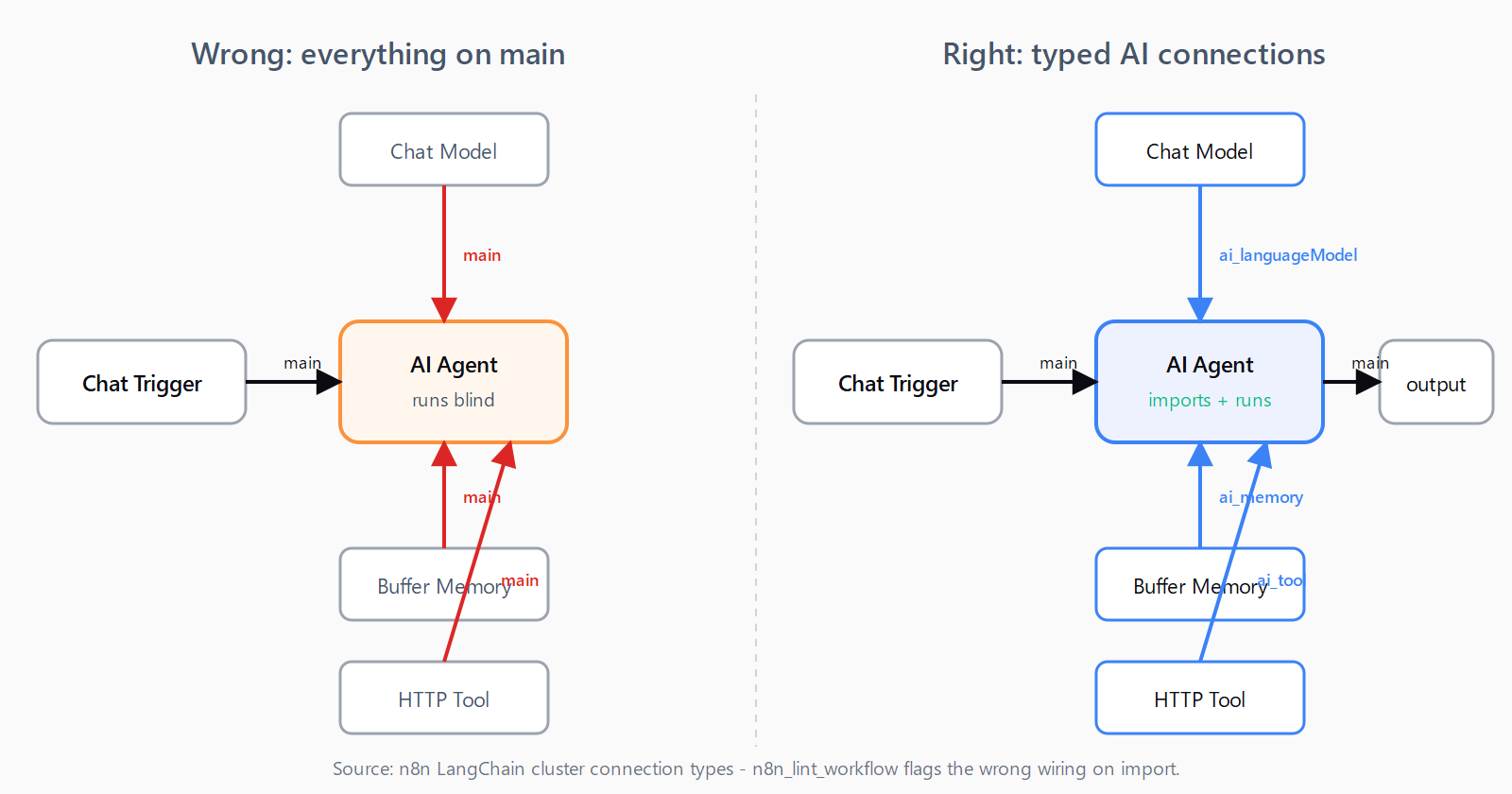
n8n_lint_workflow flags the wrong wiring before import.How do you lint a workflow before importing?
Hand the workflow JSON to n8n_lint_workflow before pasting it into n8n. Sample output for a real failing payload:
ERROR  [AI Agent] AI Agent has no `ai_languageModel` sub-node connected. Attach a chat model (e.g. lmChatOpenAi).
WARNING [Webhook] Webhook node has no `webhookId`. n8n auto-generates one on import, so the production URL will change.
WARNING [LegacyFunction] Node type "n8n-nodes-base.function" is deprecated. Use "n8n-nodes-base.code".
The lint catches a small but high-value set: deprecated node types (function -> code, spreadsheetFile -> convertToFile), AI Agents missing a language model, IF-v1 schema, missing webhookId, broken connections across all connection types - not just main. Most of these import without a parse error and only fail at runtime, which is exactly when you don't want to debug them.
How do you diagnose a failed n8n execution?
Paste the execution JSON (n8n's Copy execution data button) into the chat:
Here's a failed execution from n8n. Why is the Slack node not firing?
You get back per-node findings:
WARNING [Filter] Returned 0 items. Downstream nodes will not execute.
  hint: Common causes: (1) IF/Switch routed to the other branch - check `parameters.conditions`. (2) Filter/Set node dropped everything - inspect its output explicitly.
INFO [Last node executed was "Filter". If the workflow stopped here unexpectedly, check its output items below.]
This is the wedge tool. n8n's UI shows you that the Slack node "wasn't executed" but doesn't volunteer that the Filter two nodes upstream returned zero items - so downstream nodes simply don't fire. The community calls this "silent data loss between nodes" and it's the top-cited n8n debugging pain point. n8n_explain_execution walks the items per node and flags every zero-item handoff with concrete hints.
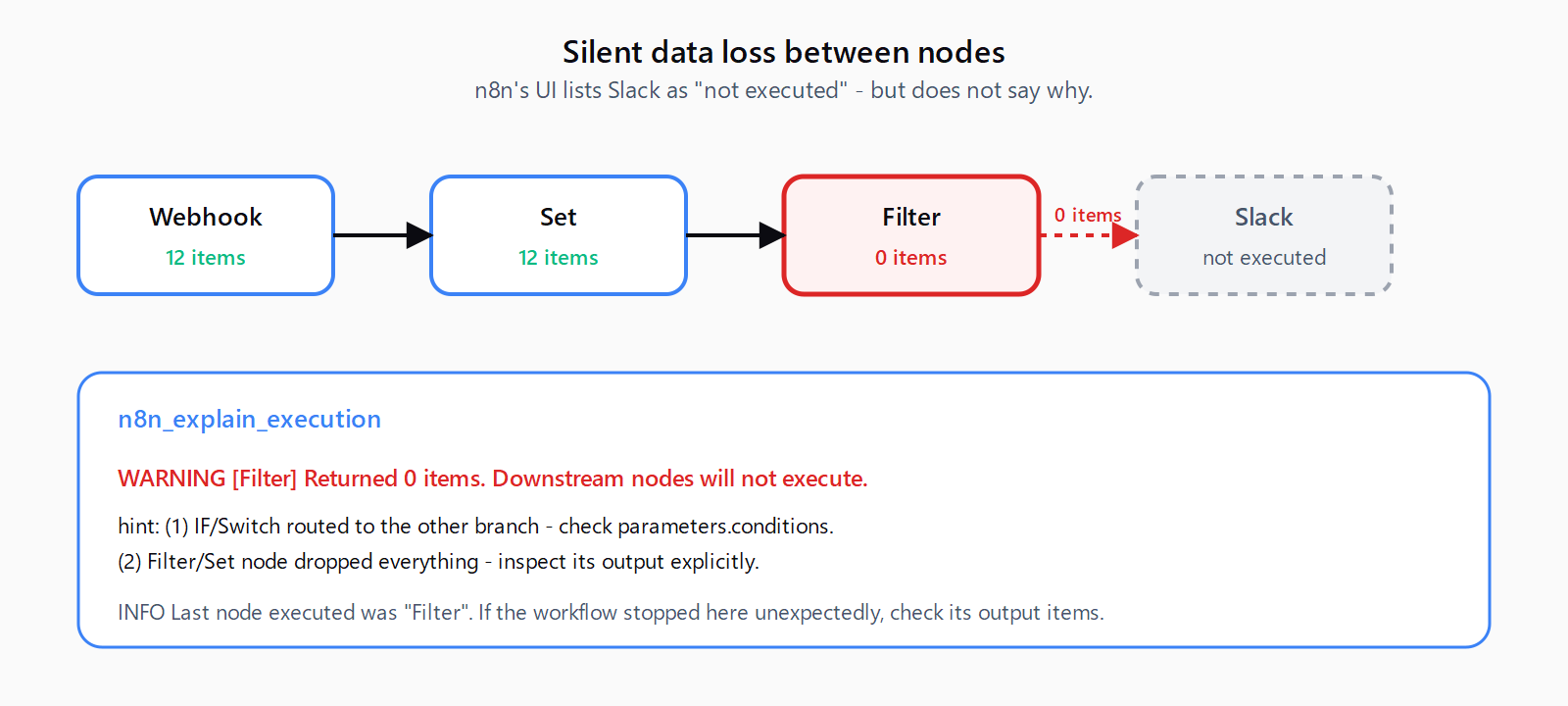
n8n_explain_execution flags the handoff with the most common causes inline.How do you drive a live n8n instance?
With N8N_API_URL and N8N_API_KEY set, the five REST tools let your agent operate against your own self-hosted n8n or n8n Cloud: list and fetch workflows, create new ones (read-only fields stripped), flip active on or off, and pull executions with includeData: true for the full body. The lint and explain tools then run against real workflows and real failures, not just JSON pasted into chat.
How does it differ from other n8n MCP servers?
If you want one MCP server that indexes every n8n node and answers "how does the HTTP Request node work" from chat, install czlonkowski/n8n-mcp. It owns the breadth niche - 20 tools, a hosted dashboard, ongoing node-doc indexing.
If you want first-run correctness and a real diagnosis tool for failed executions, install this one. The two are complementary; nothing stops you running both.
n8n itself shipped MCP support in 2.18.4, which lets workflows be exposed as MCP servers. That solves a different problem: it's the runtime exposing existing workflows to external agents. @automatelab/n8n-mcp sits on the other side - it's a client-side authoring tool that emits and lints the JSON your agent then ships into n8n.
FAQ
What's the difference between this and czlonkowski/n8n-mcp?
Breadth vs. depth. czlonkowski exposes 20 tools and indexes every n8n node, which is great for chat-based discovery. @automatelab/n8n-mcp exposes 9 tools focused on generating correct workflow JSON, linting it for the failure modes that matter, and diagnosing failed executions. Run both if you want.
Do I need a live n8n instance to use it?
No. The four stateless tools (n8n_generate_workflow, n8n_scaffold_node, n8n_lint_workflow, n8n_explain_execution) work with no n8n at all - useful for designing workflows offline or debugging an execution someone shared with you. The five live-instance tools require N8N_API_URL and N8N_API_KEY.
Why does my AI Agent workflow fail to import even though the JSON is valid?
Almost always: sub-nodes connect to the agent over main instead of typed AI connection types. n8n's AI Agent expects its language model on ai_languageModel, memory on ai_memory, and tools on ai_tool. Generic LLMs default to main and the workflow imports cleanly but runs blind. n8n_generate_workflow emits the right topology; n8n_lint_workflow catches it on inputs from elsewhere.
What does "silent data loss" mean and how does the explain tool find it?
An IF, Filter, or Set node returns zero items, downstream nodes do not fire, and n8n's UI lists those nodes as simply not executed - no error, no warning. n8n_explain_execution reads the per-node item counts in the execution payload and flags every zero-item handoff explicitly, with the most common causes listed as hints.
How do I get an n8n API key?
In your n8n instance go to Settings -> API -> Create API key. Set N8N_API_URL to your instance URL (without a trailing slash) and N8N_API_KEY to the value n8n shows you. The key is shown once; rotate it from the same screen.
For a full agent-task management layer on top of n8n, see the agency-os Notion board. You can extend this to content pipelines - for example, automate Ghost publishing with Claude skills using the same MCP foundation.