
agency-os: the Notion board that plans your work, then ships it
We turned Notion into the dashboard of a small AI agency. You drop ideas in. Agents plan the work, sequence it, and ship the output. Here's why we built it and how it works.
TL;DR. agency-os turns Notion into your AI agency dashboard. You drop in an idea. An agent breaks it into a plan, sequences the subtasks, and ships the output back into the board. You stay in the approver's seat. Nothing dispatches without your nod.
Why did we build agency-os?
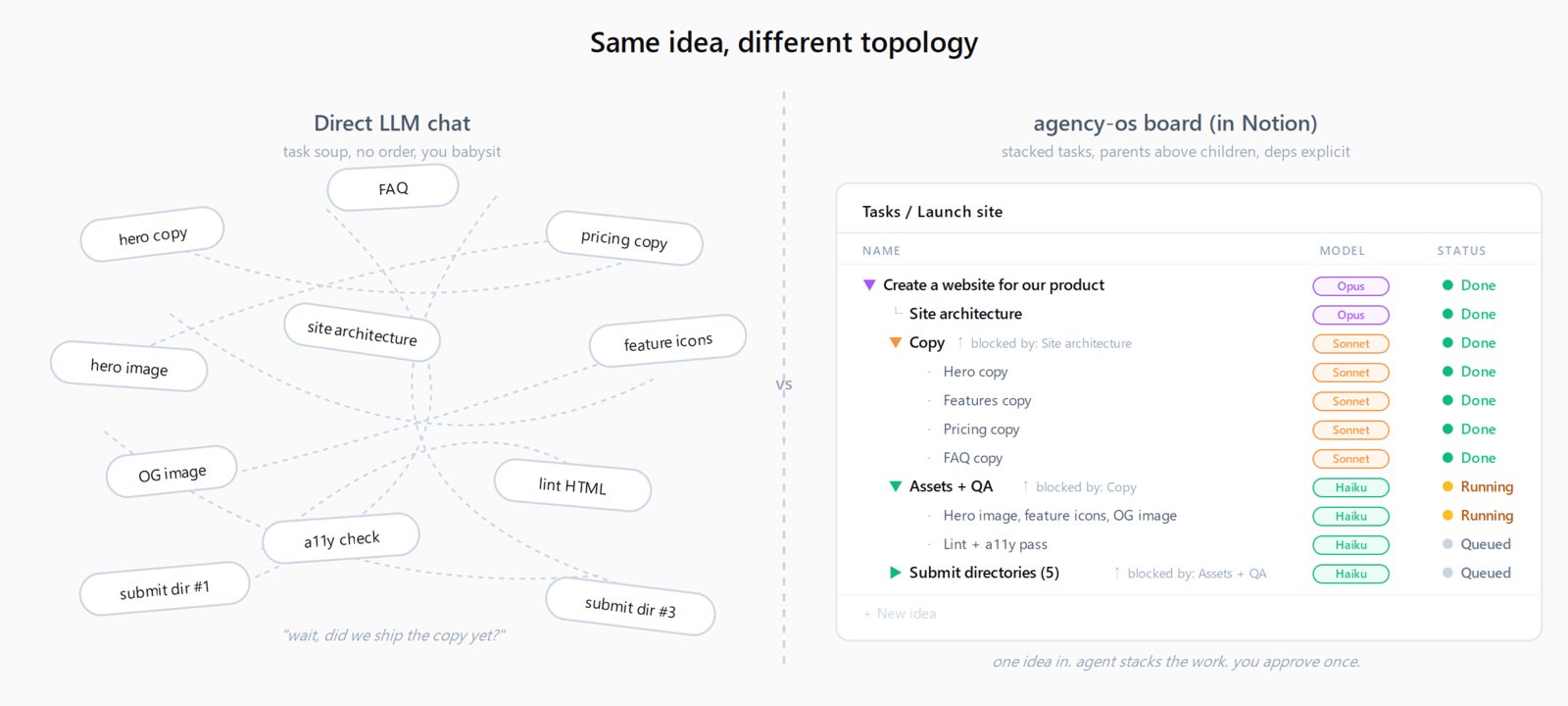
Real work is rarely a single task. It's a tangle. Ten directory submissions that each need a tailored pitch. A launch post that depends on assets, which depend on a draft, which depends on a brief. A weekly report that pulls from four sources and has to land before Monday. The hard part isn't doing any one piece. The hard part is holding the whole thing in your head: what blocks what, what's been done, what's next, where the output went.
We built agency-os to manage that complexity in a simple way. One board. One view. One source of truth. Ideas come in. Plans get drawn. Work gets shipped. Results land back where the task lives.
Most of the AI agency tools out there fall into one of two failure modes:
- "Autonomous agents" that go off and do things, sometimes the wrong things, with no human approval gate.
- "AI assistants" that talk a lot but never actually ship a deliverable.
We wanted a third path. An AI agency where the operator stays in control, but the agent does the heavy lifting on planning and execution. Not just one or the other.
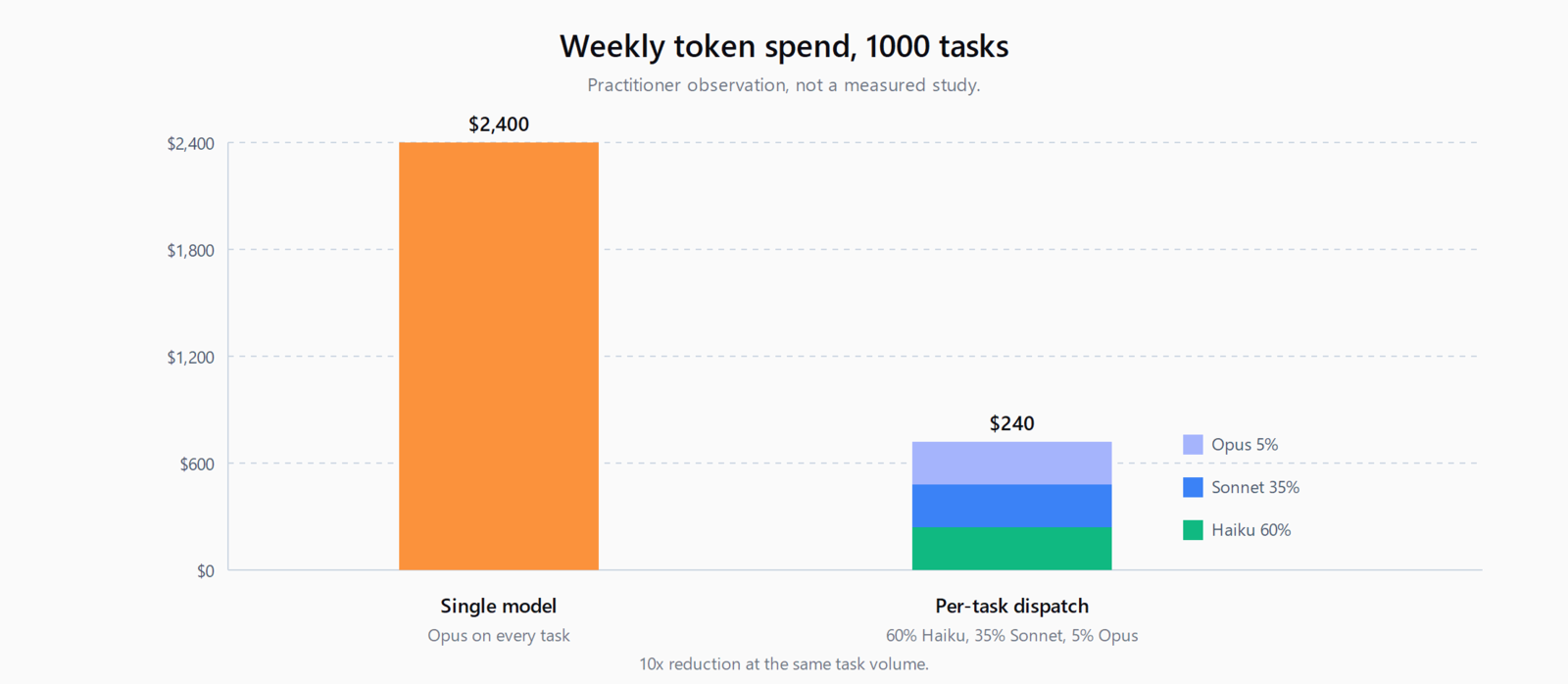
(As a side benefit: when the agent picks the right model for each subtask, you also stop overpaying for clerical work. We'll get to that. It's a bonus, not the point.)
How does agency-os work?
You already think in Notion. So the board is the OS. There's no separate UI to learn, no dashboard to switch into, no agent log to dig through. The board is the source of truth for ideas, plans, queued work, and finished output.
Here's the loop.
1. Suggest
You drop an idea into the inbox. One line is fine. "Create a website for our product." "Draft a launch post for the new feature." "Pull metrics from last month and write the team update."
That's it. You're done thinking.
2. Plan (the agent does this, not you)
This is the part most people get wrong about AI agencies. Operators don't fill in subtasks. The agent plans through the idea. It reads the suggestion, asks clarifying questions in a discussion thread if needed, and then builds the workflow:
- It breaks the idea down into concrete subtasks.
- It cascades the work by figuring out what has to happen before what.
- It sets priorities based on effort and dependency depth.
- It manages the dependency graph so nothing fires before its prerequisites are done.
- It picks the right model for each subtask so light work goes to fast models and heavy reasoning goes to bigger ones.
You don't sit there filling out a project tracker. The agent hands you back a plan. You approve or push back.
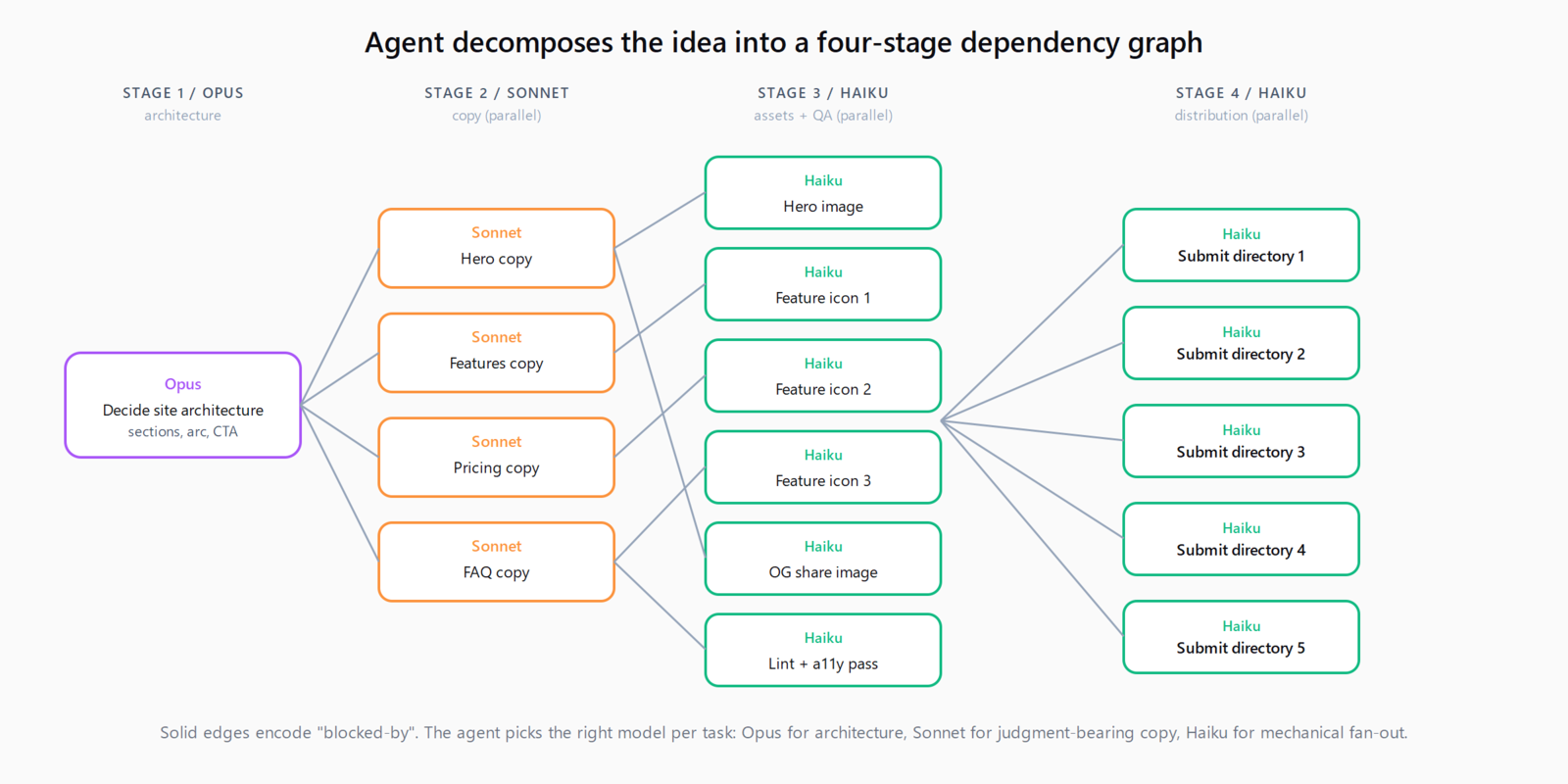
For example, drop "Create a website for our product" in the inbox and the agent expands it into the dependency graph below - one Opus task picks the architecture, four Sonnet tasks draft the copy in parallel, then a row of Haiku tasks generates the assets, runs a lint and accessibility pass, and submits the live site to your target directories.
3. Approve
You're the gate. Nothing runs without your nod. Every queued task is visible, every dependency is honest, every model choice is explicit. If the plan looks wrong, you say so and it gets revised. If it looks right, you flip the switch.
4. Ship
Approved tasks with Exec=Agent get picked up by the queue. Independent tasks run in parallel. Dependent tasks wait their turn. As each one finishes, the result lands back on its row in Notion with a result link: the post draft, the submission confirmation, the report, the directory listing.
You walk away. You come back. The work is done. The board tells you what shipped and where.
What makes agency-os different?
There are a lot of "AI does your work" tools right now. Most of them get one piece right and one piece wrong. Here's where agency-os sits.
The agent is the planner, not just the doer
Most autonomous-agent products dump the planning burden on you. You write the prompt, you specify the steps, you babysit. agency-os flips it: planning is the agent's job, execution is the agent's job, approval is yours.
The operator doesn't fill in tasks. The operator confirms or rejects the plan the agent has drawn up. That's a much smaller cognitive load, and it's the right division of labor. The agent is fast at decomposition. You're fast at judgment.
Dependencies actually work
If task B depends on task A, task B doesn't run until A is done. Period. The queue checks before firing. You don't get a half-published post because the agent shipped the announcement before the assets were ready.
This sounds trivial. It is not trivial. Most automation tools fall down here.
Operator gating is non-negotiable
Nothing runs without your approval. Not ever. The board is honest about what's queued, what's blocked, and why. There is no surprise autonomous action. If a task is sitting in "Approved + Queued," you put it there.
This is the thing most "autonomous agent" products get wrong. We've seen too many demos of an agent confidently doing the wrong thing at 3am. The fix isn't smarter agents. It's a clearer gate.
Right model for the job (the bonus benefit)
A form fill goes to a fast, cheap model. A nuanced post draft goes to a bigger one. A bulk metric extraction goes to whatever's cheapest that can read structured data.
You don't configure this manually. The plan includes the model choice. You can override, but you usually don't need to. The result: you don't burn flagship rates on clerical work. It's a nice side effect of the agent planning out the workflow properly.
Everything lives in Notion
No new dashboard. No new login. No "where did the agent put the output again?" The result link is on the task row. The discussion is in the comments. The status is the status property. If you can use Notion, you can use this.
Who is agency-os for?
We built agency-os for a specific kind of operator:
- Founders who are tired of being the bottleneck on their own roadmap.
- Solo operators who want a junior teammate but don't want to hire one.
- Small teams who already live in Notion and want their AI tools to ship deliverables, not just produce drafts.
- Makers and creators who have a pipeline of content, submissions, and outreach that all needs to go out, not just get planned.
If you've ever finished a planning session and thought "great, now I have to actually do all this stuff", this is for you. agency-os does the doing. You stay in the deciding seat.
What do you get out of the box?
- A scaffold command that wires up your Notion board in under a minute.
- A public template to duplicate, pre-configured with the right properties and views.
- Agent commands for the common patterns: drafting posts, filling submissions, generating reports, running outreach.
- MCP integration so the same workflow runs in Claude Code, Cursor, Cline, or any MCP-capable harness. Your data and commands stay portable.
- Extensible corpora so you can plug in domain knowledge and the agent uses it when planning.
What does an agency-os walkthrough look like?
Say you want to launch a one-page site for a new SaaS product. Here's what happens.
- You drop "Build and launch a one-page site for my SaaS product" in the inbox.
- The agent asks a few clarifying questions in the comments - product name, what it does, who it's for, what's the CTA, what's the launch deadline. You answer in four lines.
- The agent comes back with a plan in four stages:
- Stage 1 (Opus, 1 task): decide the site architecture - which sections to include, the narrative arc, the positioning, the primary CTA.
- Stage 2 (Sonnet, 4 tasks in parallel, blocked on Stage 1): draft the copy for hero, features, pricing, and FAQ.
- Stage 3 (Haiku, 6 tasks in parallel, blocked on Stage 2): generate the hero image, three feature icons, the OG share image, and run a lint + accessibility pass on the assembled HTML.
- Stage 4 (Haiku, 10 tasks in parallel, blocked on Stage 3): submit the live site to ten AI tool directories, one task per directory.
- You approve. One click on the gate.
- The Opus architecture task runs first because everything depends on it. It costs the most per token, but it's one short task and the output anchors the whole plan.
- The four Sonnet copy tasks fan out in parallel as soon as Stage 1 finishes. Sonnet is the right tier here - copy needs judgment, but not deep reasoning.
- Once the copy lands, the six Haiku asset and QA tasks fan out. Image generation, icon generation, lint, a11y - all mechanical, all cheap.
- When the site is built and clean, the ten Haiku directory submissions fan out. Each one is a form fill with a known schema. They finish in parallel, each closing with a result link to the directory listing.
- You wake up. Site is live. Ten directories submitted. The board tells you exactly what shipped and where. Done.
One idea in. Twenty-one subtasks executed across three model tiers, with the right model on each. You approved once.
What is agency-os deliberately not doing?
A few things agency-os explicitly does not do, because they're failure modes we wanted to avoid.
- No autonomous dispatch. If you didn't approve it, it doesn't run.
- No black-box agent runs. Every step is on the board. Every output has a link.
- No "swarm" or "team of agents" theater. One agent, clear plan, clear approval, clear output. The fancy stuff doesn't help if you can't tell what just shipped.
- No lock-in. The skill spec is portable. If you move harnesses, the workflow comes with you.
How do you get started with agency-os?
- Grab it on GitHub
- Install agency-os.
/plugin install https://github.com/ratamaha-git/agency-osin Claude Code, or follow the harness-specific docs for Cursor, Cline, or any MCP agent. - Duplicate the public Notion template into your workspace.
- Create a Notion integration at notion.so/my-integrations and share it with the duplicated page.
- Drop the token in
.env:NOTION_KEY=secret_... - Run
/agency-os scaffold(or the natural-language equivalent in your harness).
That's it. Drop your first idea in the inbox and watch the agent plan it out.
Where is agency-os going next?
This is the first public release. The roadmap, in priority order:
- Richer planning hints. The agent learns from your past approvals what kinds of plans you accept and what you tend to push back on.
- More integrations. Ghost, Beehiiv, Linear, Slack outbound, scheduled posting.
- Team mode. Multiple operators with role-based approval gates.
- Self-pacing loops. Recurring tasks that the agent re-plans automatically when context changes.
If you have a workflow you want agency-os to handle and it doesn't yet, open an issue. The whole point is to let you run your work like an agency without staffing one.
FAQ
What is agency-os?
agency-os is a Claude Code plugin that turns a Notion board into the dashboard of a small AI agency. You drop in an idea, an agent plans the work into subtasks with dependencies, and you approve before anything runs. Approved tasks fan out in parallel, each on the right model for the job.
How is agency-os different from autonomous agent frameworks?
Most autonomous-agent products let the agent dispatch its own work without an approval gate. agency-os flips that: planning is the agent's job, execution is the agent's job, but approval is yours. Nothing fires until you flip the gate, and every queued task is visible on the board.
What does agency-os cost to run?
The plugin itself is MIT-licensed and free. You pay for model usage and Notion. Per-task model dispatch typically cuts model spend by an order of magnitude compared to running every task on a flagship model, because most subtasks are mechanical form-fills and template expansions that route to fast cheap models.
What harnesses does agency-os work with?
It ships as a Claude Code plugin and exposes the same workflow over MCP, so it runs in Cursor, Cline, and any MCP-capable agent. Your Notion board, tokens, and commands stay portable across harnesses - no lock-in.
How do I install agency-os?
Install the plugin with /plugin install https://github.com/ratamaha-git/agency-os, duplicate the public Notion template, create a Notion integration and share it with the duplicate, drop NOTION_KEY=secret_... in your .env, then run /agency-os scaffold to wire the board.