
How to fix MCP Token expired without refresh token in Claude Code
Claude Code's MCP OAuth loop forces a fresh /login every 24 hours. Here is why, and the three steps that actually break the cycle.
TL;DR: Claude Code's "Token expired without refresh token" is bug #25245; delete the stale credential entry, re-authenticate via /mcp, and on macOS grant the Keychain item persistent access.
Claude Code stores an OAuth refresh token for every remote MCP server you authenticate, then on the next start it acts as if the token were not there and asks you to log in again. The bug bites anyone running HTTP-based MCP servers like Notion, Linear, Atlassian, or Circleback. The browser dance gets old fast - especially across multiple terminals.
This guide names the root cause, the workaround that actually holds for more than 24 hours, and how to tell this bug apart from three similar-looking ones.
What does "Token expired without refresh token" actually mean?
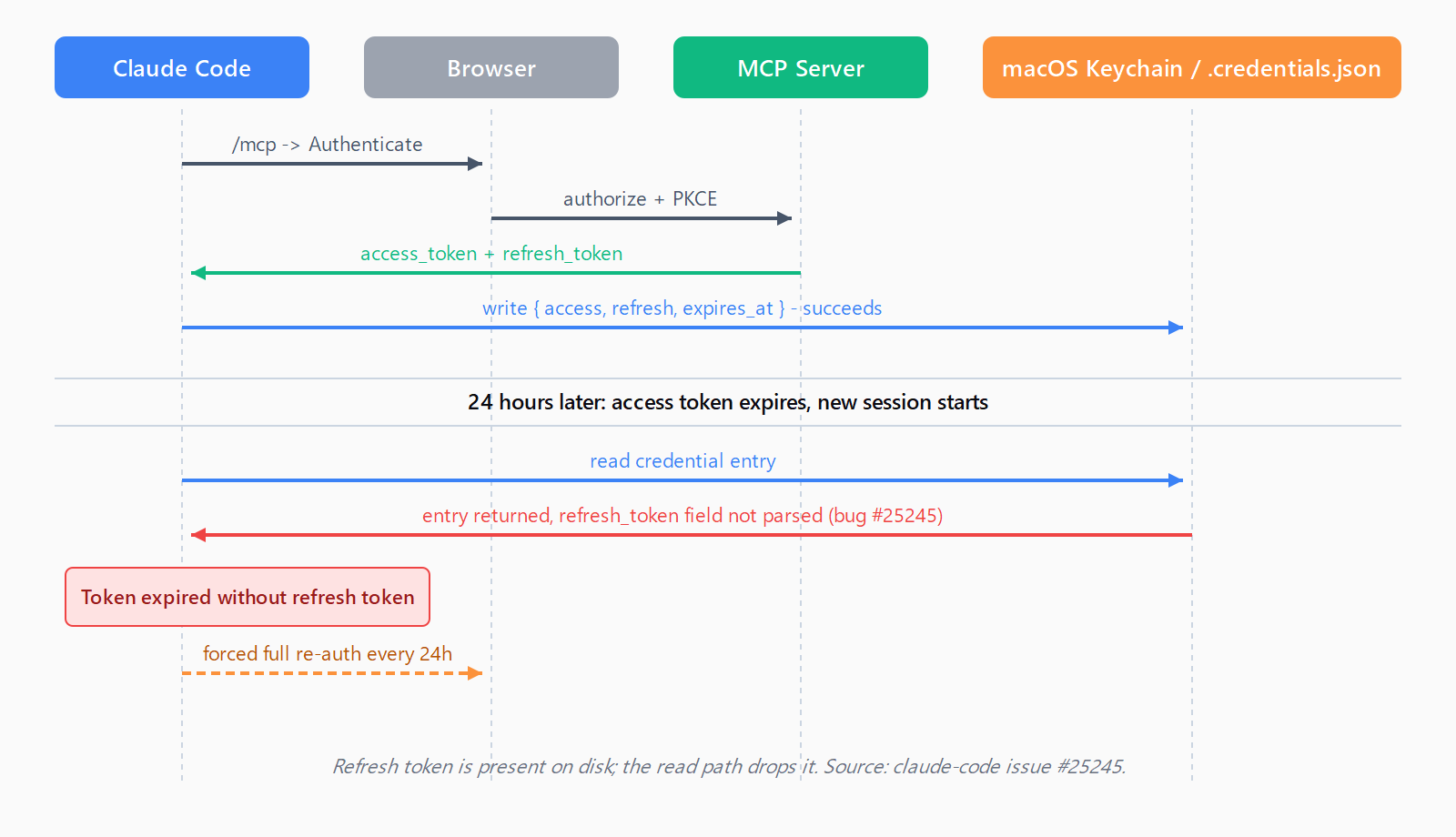
An MCP server using OAuth issues two tokens to Claude Code: a short-lived access token (the Circleback example in issue #25245 shows an 86,400-second / 24-hour lifetime) and a long-lived refresh token used to mint new access tokens silently. The MCP authorization specification follows OAuth 2.1: clients that want refresh tokens MUST keep them confidential and MAY add offline_access to the scope, and for public clients the authorization server MUST rotate refresh tokens (Section 4.3.1).
The relevant log line from a broken session looks like this:
[DEBUG] MCP server "plugin:circleback:circleback": Token expired without refresh token
[ERROR] MCP server "plugin:circleback:circleback" Error: Unauthorized
"Without refresh token" is the misleading part. The refresh token is there. The reporter on issue #25245 ran security find-generic-password -s "Claude Code-credentials" -w on macOS and confirmed hasRefreshToken: True. The bug is on the read path: Claude Code looks up the credential entry at session start, fails to load the refresh token field, and treats the case as "expired and no way to refresh," which forces a full browser re-auth.
Why isn't this an OAuth configuration problem?
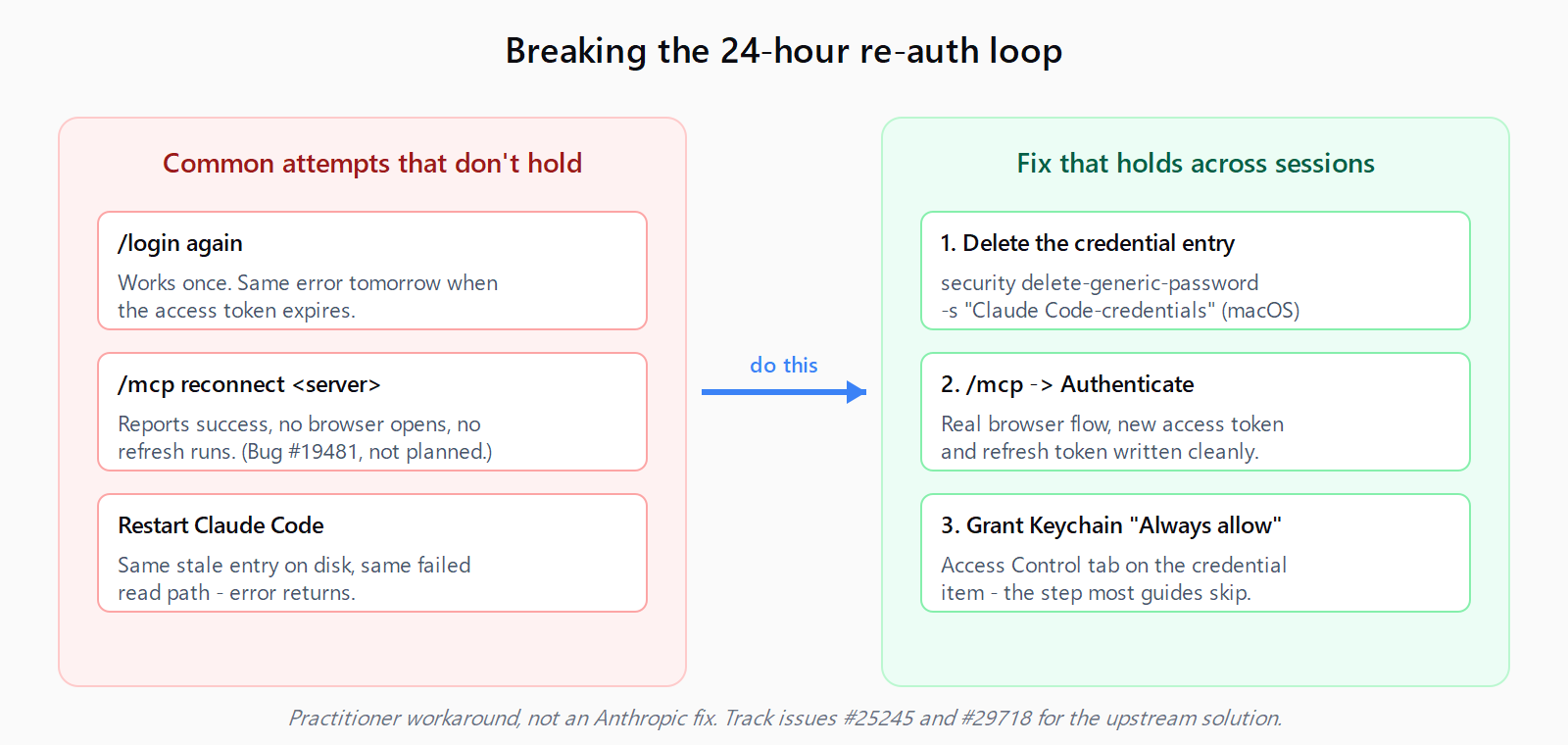
Most "fixes" you will read online tell you to run /login or /mcp reconnect and call it done. That works for the current session, then breaks again the next day. The /mcp reconnect command does not refresh expired access tokens at all - issue #19481 documents that /mcp reconnect reports "Successfully reconnected" while the server keeps returning 401, because no browser flow runs and no new token is obtained. That issue was closed as not planned, which is a useful signal: the read-side bug in #25245 is the one to track for an actual upstream fix.
Issue #29718 is the open feature request to make OAuth tokens auto-refresh the way apiKeyHelper already refreshes the Claude API key on a TTL. Until that ships, the workaround below is the most reliable approach.
How do you fix the auth loop on macOS?
The macOS path is the most-reported variant because Claude Code uses the system Keychain for credential storage. The fix is three steps - do them in order.
Step 1: Remove the stale credential entry
Open Keychain Access, search for Claude Code-credentials, select the entry for the failing MCP server, and delete it. Or from a terminal:
security delete-generic-password -s "Claude Code-credentials"This removes the entire Claude Code credential blob. The next time Claude Code starts, it will treat every OAuth MCP server as unauthenticated and offer the browser flow on first use. If you only want to clear one server, edit ~/.claude/.credentials.json instead and delete just the offending object - but a clean reset is simpler and rarely costs more than a minute.
Step 2: Re-authenticate the MCP server
Start a new Claude Code session, then run:
/mcpPick the affected server and select Authenticate. Your browser opens, you sign in to the MCP server's authorization page, and the OAuth flow returns to a local callback port. Claude Code prints Saving tokens and Has refresh token: true in debug logs if everything wrote correctly.
Step 3: Grant the Keychain item persistent access
This is the step most guides skip and the reason their fix stops working the next day. Re-open Keychain Access, double-click the Claude Code-credentials entry, switch to the Access Control tab, and either add Claude Code to the "Always allow access" list or check Allow all applications to access this item. Save with your login password when prompted.
Without this step, the read on next session start can fail silently behind the macOS authorization prompt and Claude Code falls back to its "no refresh token" branch. With it, the refresh token loads cleanly and stays loaded across reboots.
How do you fix the auth loop on Windows and Linux?
Windows and Linux do not use the Keychain; credentials live at ~/.claude/.credentials.json (or the Windows equivalent under your user profile). The flow is shorter:
- Close all Claude Code sessions.
- Open
~/.claude/.credentials.jsonand delete the object for the failing MCP server, or rename the whole file to force a full reset. - Start one Claude Code session, run
/mcp, and re-authenticate the server.
If you are also dealing with Windows-specific MCP startup quirks, our guide on setting up an MCP server in Claude Code on Windows covers the cmd.exe wrapper that stdio servers need; the OAuth issue here is independent and applies to remote HTTP servers only.
How do you avoid the concurrent-session race?
If you run two or more Claude Code sessions at once - one per terminal, one per worktree, one in an editor integration - hit this fix once per machine and then keep only one session writing credentials during the re-auth step. Issue #24317 describes a race condition where concurrent sessions try to refresh the same token at the same time and overwrite each other's writes, which produces the exact same downstream "expired without refresh token" symptom. After Step 3 above, open the second terminal and let it pick up the cleaned credential.
How do you confirm the fix held?
Wait until past the access token's lifetime (typically 24 hours), open a new Claude Code session, and run a tool call on the MCP server you fixed. If a refresh actually happened, the call succeeds with no browser prompt. In debug logs the relevant line changes from Token expired without refresh token to Refreshing token followed by Has refresh token: true. If you get the original error again, repeat Step 3 - the Keychain access grant did not save, usually because the entry was edited by another tool between Step 2 and Step 3.
Track the upstream fix on issues #25245 (the read-side bug) and #29718 (auto-refresh feature request). When Anthropic ships proper refresh-on-expiry, the workaround above becomes unnecessary - until then it is the reliable answer.
FAQ
Why does Claude Code say "without refresh token" when the token is stored?
The credential write succeeds; the credential read at session start does not load the refresh-token field correctly. The Keychain entry shows hasRefreshToken: True, but Claude Code's loader misses it and falls into the no-refresh code path. Bug tracked as issue #25245.
Does /mcp reconnect refresh OAuth tokens?
No. Despite the name, /mcp reconnect does not run the browser OAuth flow and does not call the token refresh endpoint. It reports success while the server keeps returning 401. Use /mcp then Authenticate instead - that runs a real OAuth flow.
Where does Claude Code store MCP OAuth credentials?
On macOS, the system Keychain under the service name Claude Code-credentials. On Windows and Linux, in ~/.claude/.credentials.json. Both stores hold the access token, the refresh token, and the expiry timestamp.
How long do MCP access tokens last?
It depends on the MCP server. The Circleback example in issue #25245 issues a 24-hour access token. Notion, Linear, and Atlassian servers commonly issue 1-hour access tokens with long-lived refresh tokens. When the refresh-read bug bites, the loop frequency matches the access-token lifetime.
Will this be fixed in a future Claude Code release?
Issue #29718 (auto-refresh on expiry) is open with engagement from the Anthropic team. Issue #25245 (the specific read bug) is open but closed-as-duplicate'd onto related Keychain handling issues. Subscribe to the issues you care about for notification when a fix lands.
Does the same bug affect Cursor and Claude Desktop?
Both Cursor and Claude Desktop use their own MCP host implementations and credential stores - the bug here is specific to Claude Code's loader. If you hit the same symptom in Cursor, check Cursor's MCP logs; it is a separate code path. For background on what an MCP host is and how it differs from a server, see our Model Context Protocol primer. If you also run agent-side MCP clients in Python on Windows, the MultiServerMCPClient NotImplementedError writeup covers a related but distinct failure mode.
Hit a different error? Browse the Automation Error Index for a searchable catalog of Claude Code errors, each with a verified fix.