
How to fix Zapier "Response payload size exceeded maximum allowed payload size (6291556 bytes)" error
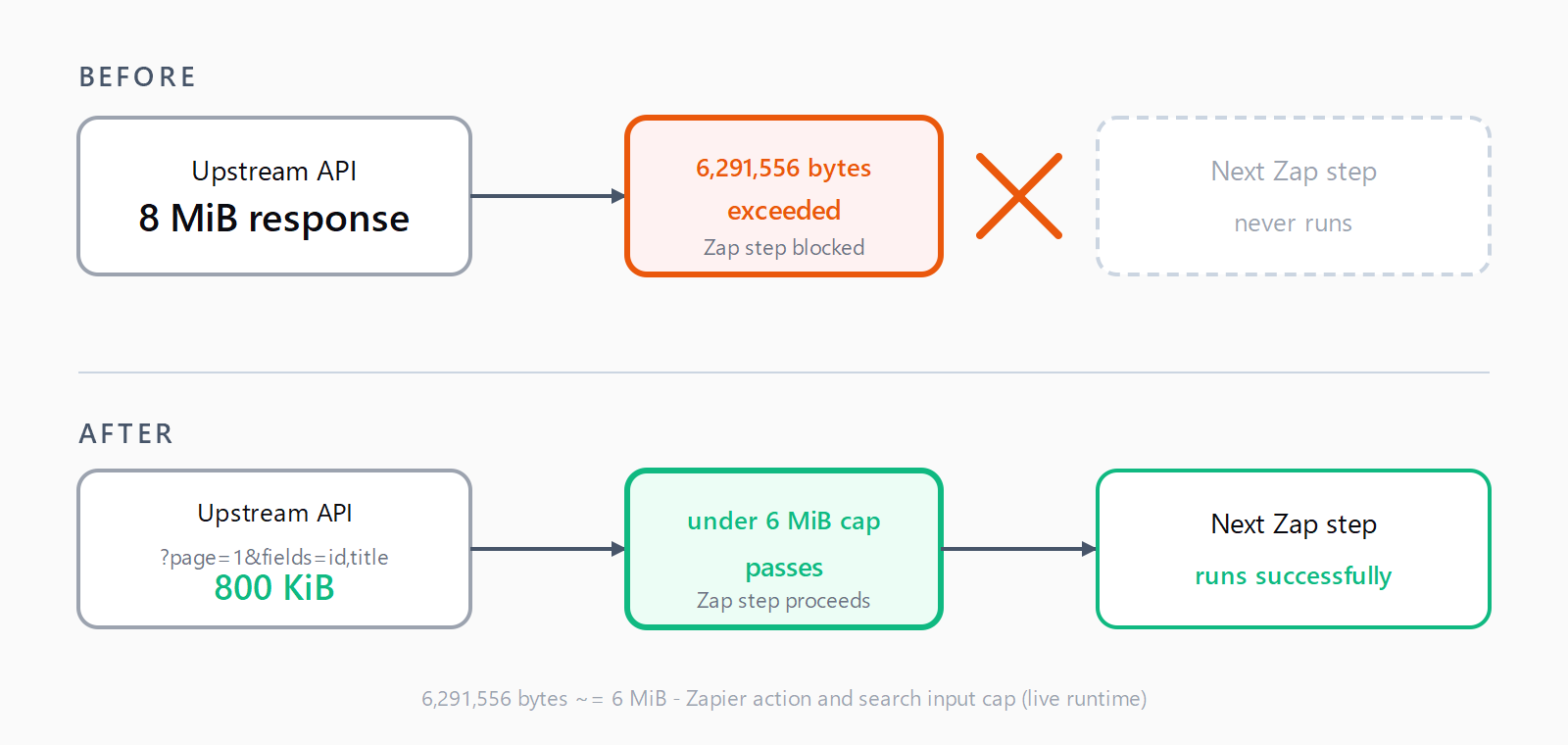
A Zap step throws "Response payload size exceeded maximum allowed payload size (6291556 bytes)" when the upstream returns more than ~6 MiB. Trim it: paginate, project fields, disable file content inlining, or replace the trigger with an inbound webhook.
TL;DR: The error "Response payload size exceeded maximum allowed payload size (6291556 bytes)" fires when a single Zap step receives more than ~6 MiB of data from the connected app or step.
The fix is to shrink that response - paginate, project only the fields you need, switch heavy file triggers off content-inlining, or replace the failing trigger with an inbound webhook. The exact byte ceiling, 6291556 bytes, is Zapier's per-step input cap during a live run, not during a Test in the editor.
Why does the Zapier 6291556-bytes error happen?
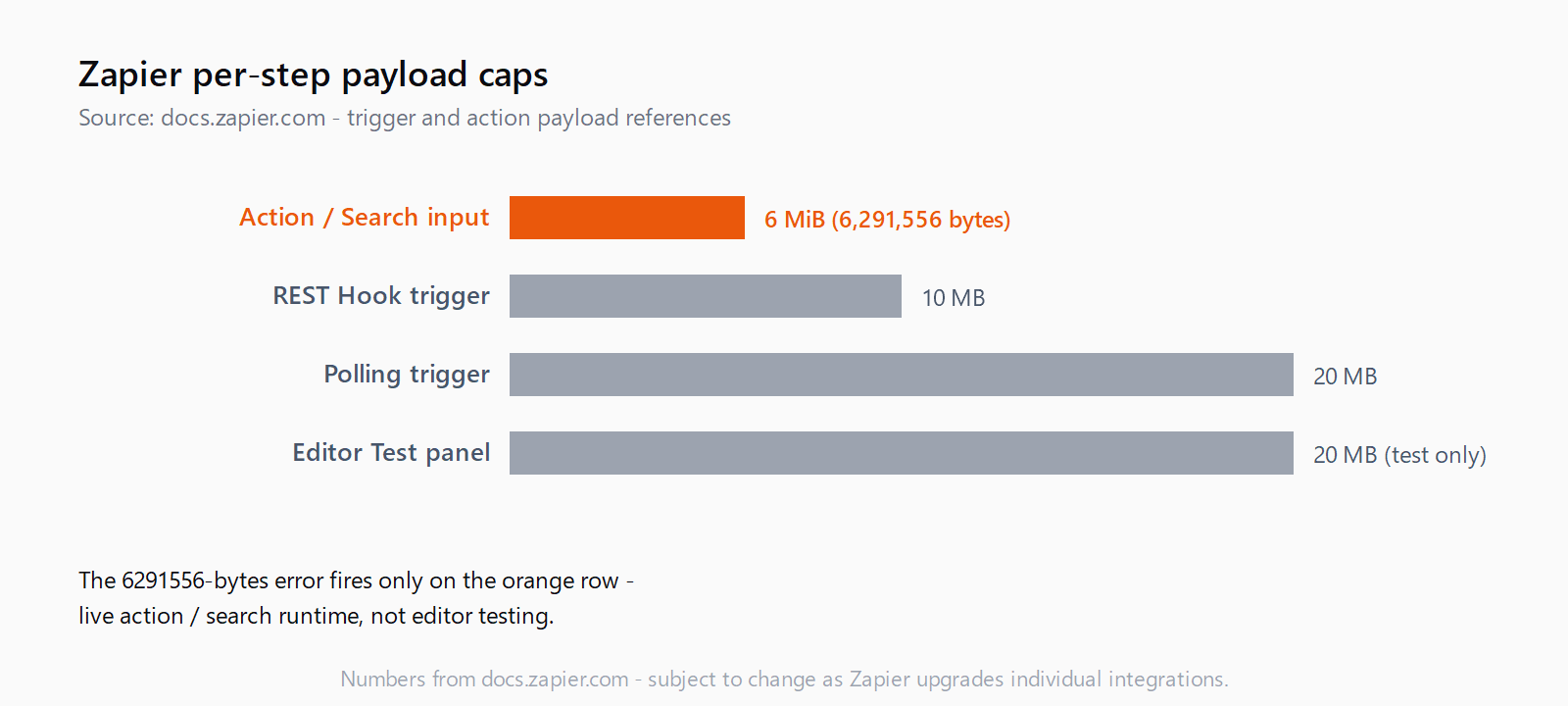
Zapier enforces two different payload ceilings, and most posts conflate them. During a live Zap run, action and search input payloads must stay below 6 MB; polling triggers get up to 20 MB, and REST Hook triggers up to 10 MB per execution, per the official Zapier trigger payload reference. The 6291556-bytes message is the action/search runtime cap. The same Zap can pass Test Trigger (where the editor allows 20 MB) and still throw 6291556 in production.
The symptom appears across Jira Service Management's Updated Request trigger, Dropbox file triggers, Asana, Pipedrive, Quickbase, WordPress, and Scrape-It.Cloud - any time the upstream returns more than the cap allows. Sometimes it's a single oversized record (a Dropbox file with content inlined), sometimes a list response with too many items. The byte number is exact: 6291556 = 6 MiB minus the ~200 bytes Zapier reserves for envelope metadata.
Where do the bytes in the payload come from?
The fix depends on which step throws. Different Zapier step types hit the cap for different reasons.
| Step type | Why it exceeds 6 MiB | The fix |
|---|---|---|
| Webhooks by Zapier (GET) | The upstream returns a full collection with every column. | Add query params for pagination (?page=1&per_page=50) and field projection (?fields=id,title,updated_at) so the response is scoped before it leaves the source API. |
| Code by Zapier (Python / JS) | The script returns the entire fetched payload, including raw HTML or binary blobs. | Filter inside the script. Stream the API response, keep only the fields the next step needs, and return a small dict - not the whole upstream body. |
| Built-in Search (e.g. Find Many Records) | "Many" actions return up to thousands of records with all fields, even when the next step uses two of them. | Set the result limit on the search step itself; if the integration exposes a "Fields to return" toggle, narrow it; otherwise replace the action with a Webhooks GET that you can shape. |
| OAuth-based custom action | The connected app inlines large fields (file content, HTML body, attachments) by default. | Look for a "Include file contents?" or equivalent toggle on the trigger config and set it to No; that single setting fixed the canonical Dropbox-to-S3 case in the community thread on the same error. |
How do you fix the 6291556-bytes error?
- Identify which step throws. Open Zap History, click the failing run, and note the step number on the red error card. Match it to the four cases in the table above.
- Paginate at the source API. If the failing step is Webhooks GET or a custom HTTP call, change the URL or query params so the upstream returns one page at a time. Most APIs accept
?page=,?limit=,?per_page=, or a cursor parameter. A 50-record page rarely breaches 6 MiB unless every record carries embedded HTML. - Project only the fields you need. Salesforce, GitHub, Notion, HubSpot, and most modern APIs accept a
?fields=or?select=query param. Pass exactly the columns the next Zap step references. A response that drops from 80 fields to 6 typically shrinks 90%+. - Disable content inlining on file triggers. Dropbox, Google Drive, Box, OneDrive, and Slack file triggers all expose a "Include file contents?" or equivalent toggle. Turn it off and pass only the file's URL or ID downstream; let the action step fetch the bytes if needed.
- Move heavy work into Code by Zapier. If the upstream API will not paginate or project, fetch with
fetch()in a Code step, slice the response in-script, andreturnonly a compact object. The 6 MiB cap applies to the Code step's output, not the network response it just made - so a 12 MiB API response can become a 200 KiB return value. - Replace the trigger with an inbound webhook. When the failing step is a vendor-built trigger (a known case for Jira Service Management's Updated Request), set up a webhook in the source app that POSTs only the fields you need to a Catch Hook in Webhooks by Zapier. This bypasses the broken trigger entirely. The same workaround surfaced in the Jira Service Management thread on this error.
How do you verify the fix worked?
Re-run the failing step from Zap History. The successful run should show a response under 6,291,556 bytes in the step's "Data Out" panel - Zapier displays the byte count next to the timestamp. If the step now succeeds but downstream steps fail with missing fields, you trimmed too aggressively; restore one field at a time until the whole Zap clears.
What if the fix didn't work?
If you've already paginated and projected and the response still exceeds the cap, three causes are common. First, the integration itself may have a known bug - the Dropbox file trigger needed a vendor-side upgrade in November 2024 to support larger payloads, and only Zapier could ship that fix. Second, you may be hitting the Make's 40-minute scenario hard limit's Zapier sibling: a runtime quota you cannot work around at the user layer. Third, if you maintain the Zapier integration yourself, switch to z.dehydrate per the Zapier action payload reference so heavy fields resolve lazily on the next step that needs them. As a final option, contact Zapier support with the failing run's URL; the bug-tracker route resolved the canonical Jira case after about two years.
FAQ
What does "6291556 bytes" mean exactly?
It's the live-execution input cap for action and search steps - 6 MiB (6,291,456 bytes) minus roughly 200 bytes Zapier reserves for the request envelope. Triggers have higher ceilings: 20 MB on polling triggers, 10 MB on REST Hook triggers, per the official trigger payload docs.
Why did my Zap work in Test but fail when I turned it on?
The Test panel allows 20 MB during editor testing; the live runtime allows 6 MB on actions and searches. A response between 6 and 20 MiB will pass Test and throw 6291556 the moment the Zap goes live. Always test against a record you know is full-size, not the smallest one in the list.
Can I bypass the limit with Code by Zapier?
Partly. Code steps can fetch arbitrarily large responses from the network because the cap applies to the step's return value, not the underlying HTTP response. Slice and project inside the script and return only what the next step needs.
Does Webhooks by Zapier have the same 6 MiB limit?
Webhooks by Zapier follows the same per-step input cap - the inbound POST or GET response must fit. The advantage of moving to Webhooks is control: you set the URL, query params, and headers yourself, so it's the easiest place to add pagination and field projection.
Will splitting one Zap into two fix it?
Only if the split happens before the oversized response. A second Zap can't reduce the first Zap's response size; pagination, projection, or dehydration have to happen at or before the throwing step.
Why does the same Zap that worked last week throw it now?
The upstream record grew. A Pipedrive deal with 12 attached emails, a WordPress post with 30 inline images, or a Jira ticket with 200 comments crosses the 6 MiB line as records accumulate over time. Add pagination or field filtering before the next dataset growth tips it over.
Hit a different error? Browse the Automation Error Index for a searchable catalog of Zapier errors, each with a verified fix.