
How to fix the n8n "ECONNREFUSED" error in HTTP Request nodes
ECONNREFUSED means the target service is not listening on that port, or n8n is in Docker and cannot reach localhost. Replace localhost with host.docker.internal, verify the port, and check firewall rules.
TL;DR: An ECONNREFUSED error from an n8n HTTP Request node means the target host is reachable on the network but is actively refusing the TCP connection on that port.
In self-hosted n8n the cause is almost always Docker networking: localhost and 127.0.0.1 resolve to the n8n container itself, not to your host machine, so the request lands on a port that nothing inside the container is listening on.
The fix in one line: replace localhost in the URL with host.docker.internal on Docker Desktop (Mac/Windows), or with your host's LAN IP on Linux, or with the service name when both n8n and the target run in the same Compose network.
What does ECONNREFUSED actually tell you?
Node.js maps ECONNREFUSED to the OS-level error returned when a TCP connect() call hits a host but no process is bound to the requested port. It is not a DNS failure, not a firewall drop, and not a timeout. The packet got there; the OS sent back a RST.
That distinction matters for triage:
- ECONNREFUSED - host reachable, port closed.
- ETIMEDOUT - host or network silently dropped the packet (firewall, wrong subnet).
- ENOTFOUND / EAI_AGAIN - DNS could not resolve the hostname.
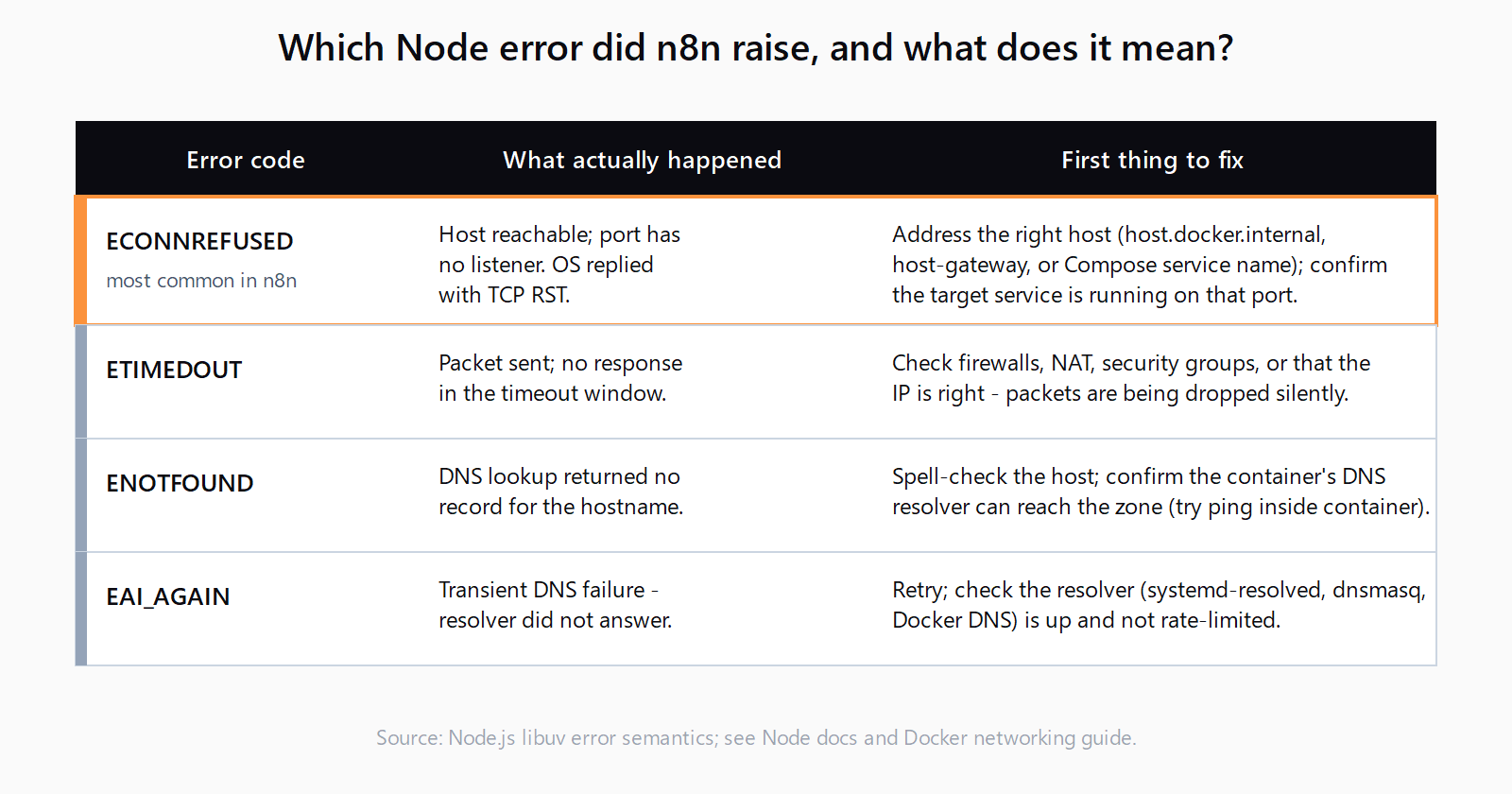
If you see ECONNREFUSED, the URL is correct enough to reach something - you just have the wrong something.
Is Docker localhost the cause? (9 times out of 10, yes)
n8n's official self-hosted image runs in a container. Inside that container, localhost means the container's own loopback interface. If your API runs on the host machine on port 5000, sending an HTTP Request to http://localhost:5000 from inside n8n hits the n8n container's port 5000, which has no listener. ECONNREFUSED, every time.
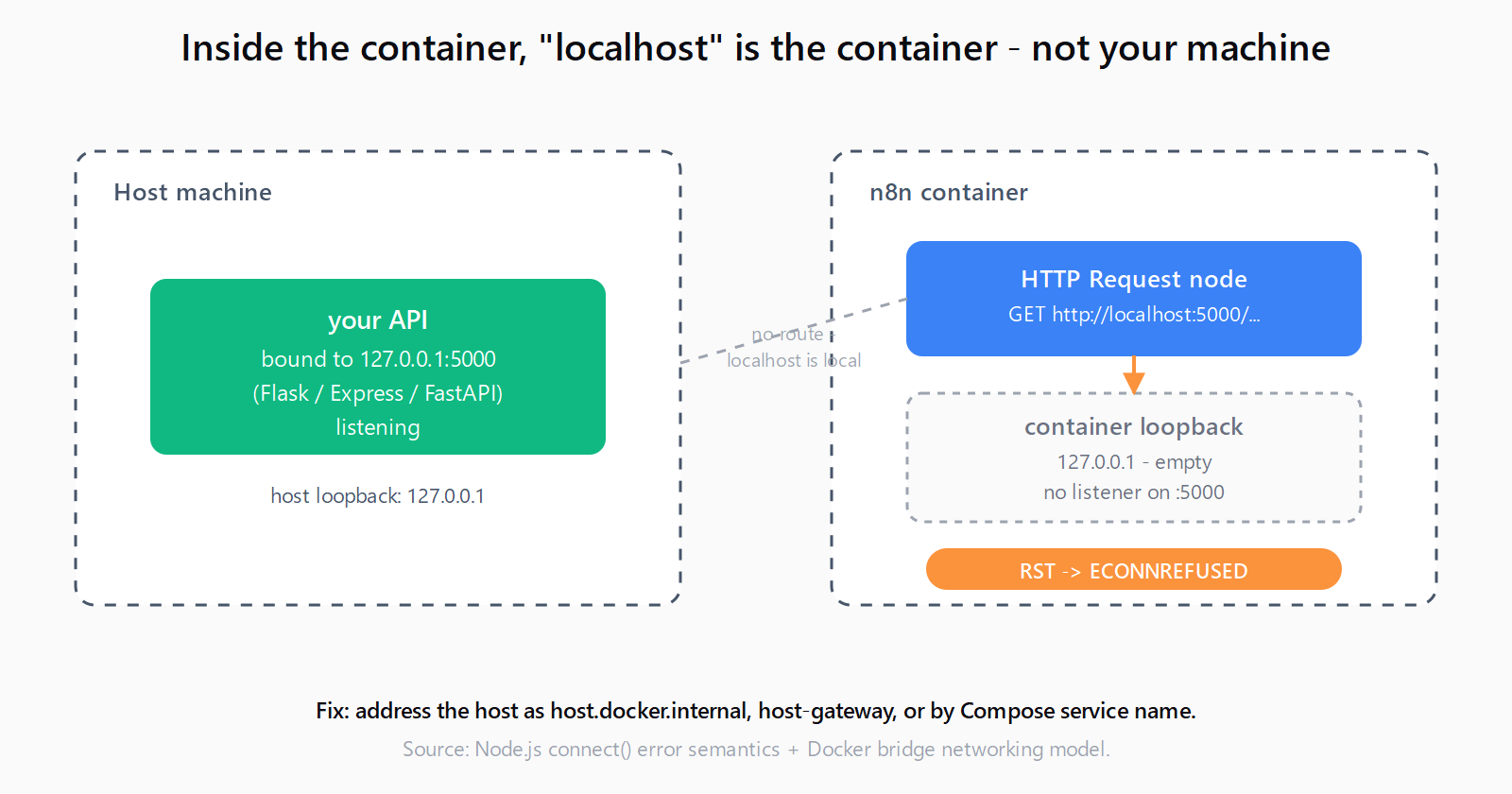
The fix depends on where your target service runs.
Target runs on the host machine
On Docker Desktop for Mac and Windows, swap localhost for host.docker.internal:
http://host.docker.internal:5000/your-endpointDocker Desktop adds this hostname automatically and routes it to the host's gateway interface.
On Linux, host.docker.internal does not resolve by default. You have two options. Either pass --add-host=host.docker.internal:host-gateway when you run the container, or in docker-compose.yml:
services:
  n8n:
    image: docker.n8n.io/n8nio/n8n
    extra_hosts:
      - "host.docker.internal:host-gateway"
The other option is to use the host's LAN IP (192.168.x.x or the bridge IP 172.17.0.1) directly. LAN IP is more portable across machines; the host-gateway alias is more readable.
Target runs in another container
If both n8n and the target service run under the same docker-compose.yml, address the target by its service name, not by localhost:
http://my-api:5000/your-endpointCompose puts both containers on the same user-defined bridge network and resolves service names as DNS entries. The port you reference is the container's internal port - not the published port from the ports: mapping.
Is it an IPv6-vs-IPv4 mismatch?
This one bites users who are not running Docker. Node.js 18 and newer resolve localhost to ::1 (IPv6) before 127.0.0.1. If your API binds only to 127.0.0.1 - which is the default for many dev frameworks like Flask, Express, and FastAPI - the IPv6 connection attempt is refused and Node does not always fall back to IPv4 cleanly inside the HTTP Request node's library.
Two clean fixes:
- In the n8n URL, use
http://127.0.0.1:5000explicitly instead ofhttp://localhost:5000. - In your API, bind to
0.0.0.0so it accepts both IPv4 and IPv6 connections.
What about the other 10%: real connection refusals?
If you have already addressed Docker networking and are still seeing ECONNREFUSED, the target service genuinely is not listening where you think it is. Verify in this order:
- Is the service actually running? A crashed Flask app is the most boring cause and the most common one. Check the process or container.
- Is it bound to the port you think? Run
ss -tlnpornetstat -an | grep LISTENon the host. The port you see is the truth; the port in your config is a hope. - Is it bound to the right interface? A service bound to
127.0.0.1:5000is not reachable from another container even on the same host. Bind to0.0.0.0:5000or to the bridge IP. - Is the n8n container on the same network? A Compose stack with a custom
networks:block can put services on different bridges that cannot talk to each other.
How do you verify the fix without re-running the workflow?
Before retrying the HTTP Request node, exec a shell into the n8n container and try the URL with wget:
docker exec -it n8n wget -qO- http://host.docker.internal:5000/healthIf wget from inside the container succeeds, the HTTP Request node will succeed. If wget also returns "connection refused," the problem is networking or the target service, not n8n. This is the single fastest way to separate "n8n is broken" from "your network setup is broken." See the official n8n Docker hosting guide for the full configuration reference.
Does this apply to n8n Cloud?
n8n Cloud workflows run on n8n's infrastructure, not yours. There is no localhost, no host.docker.internal, and no path to a service running on your laptop. If the target is local-only, expose it through a tunnel (ngrok, Cloudflare Tunnel, Tailscale Funnel) and put the public URL in the HTTP Request node. If your service is already public, ECONNREFUSED on Cloud almost always means a stale port or a service that crashed - check the target, not n8n.
FAQ
Does ECONNREFUSED mean my API is down?
Not necessarily. It means n8n reached a host on the network and got a TCP reset. The API might be running on a different port, bound to the wrong interface, or in a different Docker network than n8n. Down is one possibility among several; check what is actually listening before restarting anything.
Why does the same URL work in my browser but fail in n8n?
Your browser runs on the host. n8n runs in a container. localhost means two different machines in those two contexts. The browser hits the host's port; n8n hits the container's port. Replace localhost with host.docker.internal or the container service name and the asymmetry disappears.
What is the difference between ECONNREFUSED and ETIMEDOUT in n8n?
ECONNREFUSED is an active rejection - the host is reachable but the port has no listener. ETIMEDOUT means the request never got a response within the timeout window, usually a firewall, a wrong IP, or a network route that drops packets silently. Different fixes: ECONNREFUSED is a port or service problem, ETIMEDOUT is a routing or firewall problem.
Can I just disable IPv6 in Node to force IPv4 lookups?
Don't. Bind your target service to 0.0.0.0 or use 127.0.0.1 explicitly in the URL. Disabling IPv6 globally fixes one symptom and creates several others, particularly if any other container or workflow expects standard dual-stack networking.
How do I reach a service on my LAN from n8n in Docker?
Use the LAN IP of the target machine directly: http://192.168.1.42:8080/.... The n8n container's bridge network can route to LAN IPs as long as your Docker host can. host.docker.internal only points to the Docker host itself, not to other machines on your network.
If you're also working in Make.com, the same class of HTTP connectivity problems surfaces as Make HTTP module timeout errors.
If you are processing items inside n8n workflows, see also: n8n Code node: Run Once for All Items vs Each Item.
Hit a different error? Browse the Automation Error Index for a searchable catalog of n8n errors, each with a verified fix.