
n8n webhook returns 404: the most common causes and fixes
n8n 404 on webhooks is usually a wrong URL path, missing production webhook activation, or an n8n_disable_production_main_process flag. Steps to find and fix each cause.
TL;DR: An n8n webhook returns 404 because the URL you're calling isn't registered on the server.
Three causes account for almost every case: the workflow isn't Active, you're hitting the test URL after its short listen window expired, or your self-hosted instance has WEBHOOK_URL misconfigured. Walk through the fixes below in order; one of them resolves the issue 95% of the time.
Why does an n8n webhook return 404?
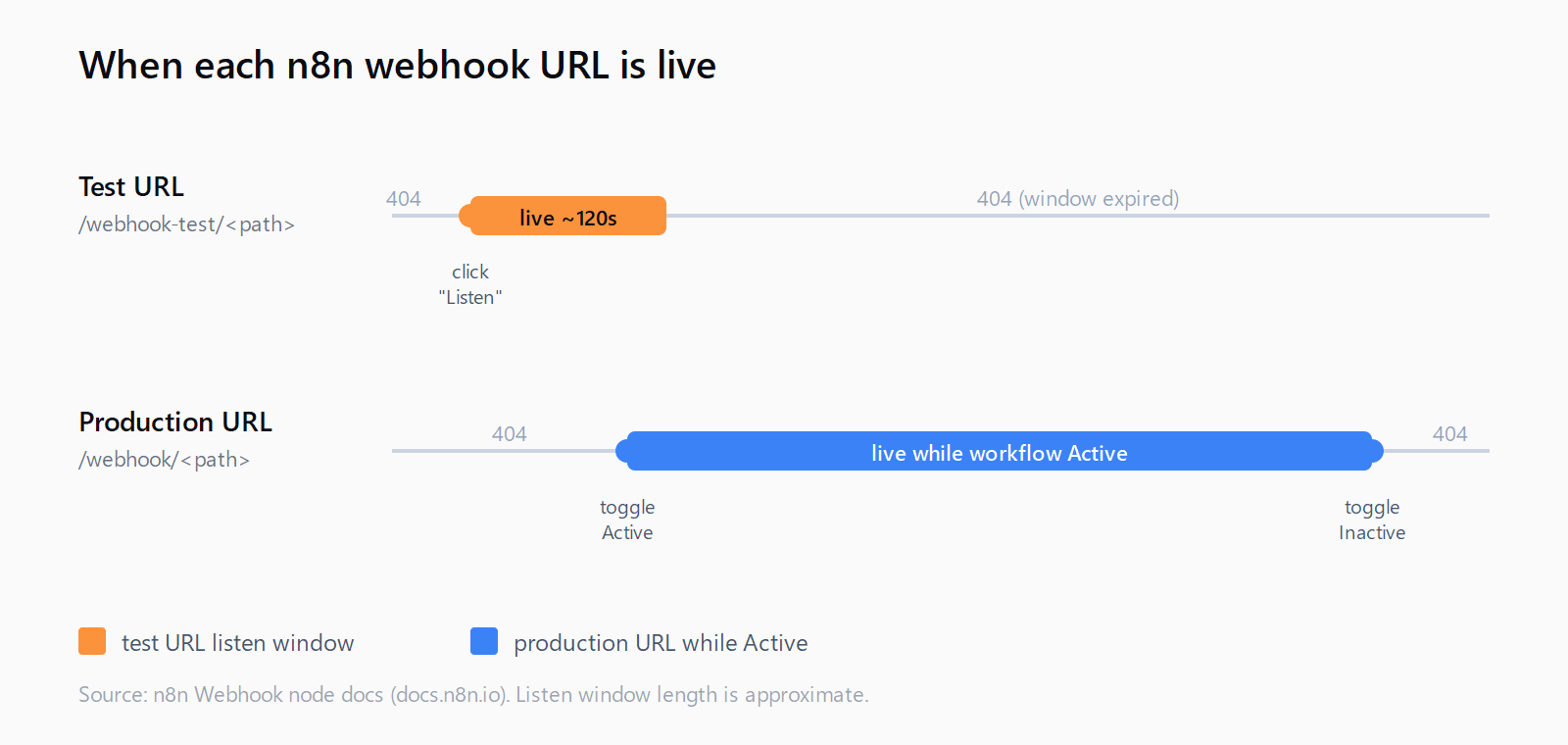
n8n has two distinct webhook URLs per node, and they register at different times. The test URL (/webhook-test/<path>) registers only when you click Listen for test event in the editor and stays live for roughly 120 seconds. The production URL (/webhook/<path>) registers when you toggle the workflow to Active. If you call either URL outside its registration window, n8n responds with 404 Not Found and a body that reads The requested webhook "POST <path>" is not registered. The behavior is documented on the Webhook node reference page.
On self-hosted instances there's a fourth twist: the URL the editor displays is built from the WEBHOOK_URL environment variable. If that variable disagrees with what your reverse proxy actually serves, every call 404s even though the URL looks right when you copy it.
How do you fix the n8n webhook 404?
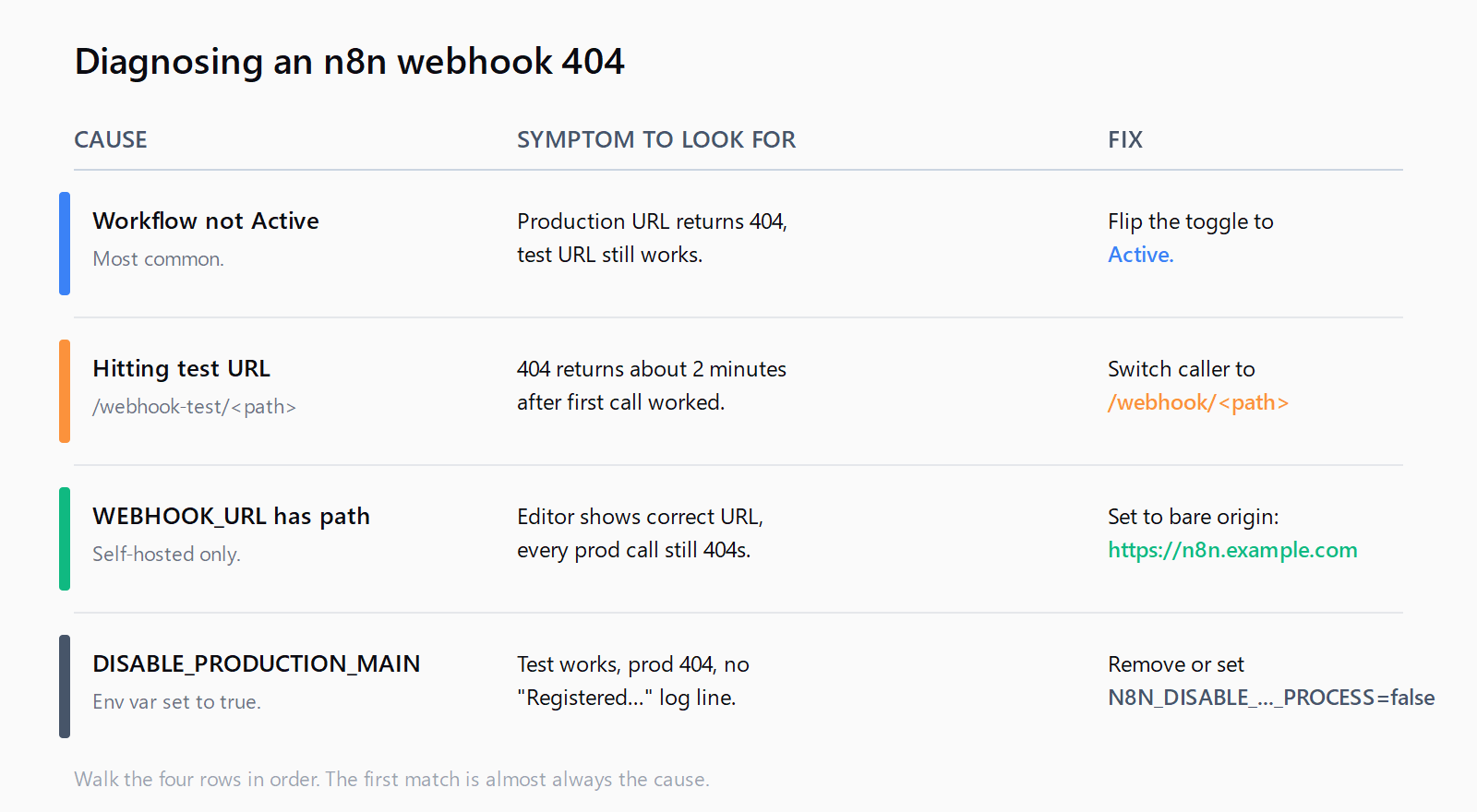
- Confirm the workflow is Active. Open the workflow in the editor and check the toggle in the top-right corner. If it shows Inactive, flip it. The production URL only listens while the toggle is on. A workflow saved but never activated returns 404 on every production call.
- Check which URL you're hitting. Open the Webhook node and look at the Test URL and Production URL fields. The paths differ:
/webhook-test/<id>versus/webhook/<id>. If your client is calling the test URL, switch it to the production one. If you genuinely need the test URL (for example, to capture a one-off payload), click Listen for test event first and send the request within 120 seconds. - Reactivate the workflow. After any config change, toggle the workflow off and back on. The webhook registry is built at activation time; n8n won't pick up the new path until the workflow re-registers. On self-hosted, a full restart (
docker compose restart n8norsystemctl restart n8n) flushes the registry cleanly. - Recreate the trigger if you duplicated a workflow. Duplicating a workflow can leave the original webhook ID in the database while the UI shows a new one, so the registered path and the displayed path disagree. Delete the Webhook node, add a fresh one, save, and reactivate. The path will rotate, so update whatever client is calling it.
Check for N8N_DISABLE_PRODUCTION_MAIN_PROCESS. This variable exists for queue-mode setups where webhooks run on a separate service. If it's set to true on a single-process install, the main process refuses to register production webhooks. Test URLs keep working, which is what makes this one painful to diagnose. Remove the variable or set it to false:
grep N8N_DISABLE_PRODUCTION_MAIN_PROCESS .env docker-compose.ymlThe canonical community thread on this exact 404 traces the root cause to this misconfiguration.
Verify WEBHOOK_URL on self-hosted. The variable should be the bare origin with no trailing path:
WEBHOOK_URL=https://n8n.example.comNot https://n8n.example.com/webhooks/ and not https://n8n.example.com/n8n. A trailing path silently breaks production webhooks even though the editor displays a working-looking URL. The Traefik thread on the n8n community forum documents the exact failure mode.
How do you verify the fix worked?
Send a one-line curl to the production URL and watch for two signals at once:
curl -i -X POST https://n8n.example.com/webhook/my-path \
  -H "Content-Type: application/json" \
  -d '{"test": true}'
You want HTTP/1.1 200 OK in the response and a new entry in the workflow's Executions tab inside n8n. If you see 200 but no execution appears, you're hitting the silent-failure variant tracked in GitHub issue #16339 - the production endpoint accepts requests without firing the workflow on certain n8n versions (1.95.3 in particular). Upgrade past that version: docker compose pull && docker compose up -d on Docker, or npm update -g n8n on a Node install.
What if the fix didn't work?
A few less common causes worth checking, in rough order of probability:
- HTTP method mismatch. The Webhook node has a single configured method (GET, POST, PUT, etc.). Calling it with a different method returns 404 in some n8n versions instead of the more correct 405. Match the caller to the node's setting.
- Reverse proxy stripping the path. An nginx
locationblock with a trailing slash (location /n8n/ { proxy_pass http://n8n:5678/; }) rewrites the request path before n8n sees it. The webhook registers on/webhook/<id>but the proxy forwards/<id>, so n8n returns 404. Drop the trailing slash on either side, or use a subdomain instead of a path prefix. The self-hosting n8n walk-through uses subdomain routing for exactly this reason. - Cloud tenant routing bug. If you're on n8n Cloud and every webhook on the workspace returns 404 despite Active workflows, you're likely hitting the multi-tenant routing issue tracked in GitHub issue #22782. File a support ticket asking n8n staff to re-sync webhook registrations for your workspace; there's no self-serve fix.
- Workflow saved but credentials missing. A Webhook node with broken downstream credentials sometimes activates partially - the registry entry never gets written, but the editor shows the workflow as Active. Open each node, re-test the credentials, save, and reactivate.
FAQ
Why does my n8n test webhook work but the production URL returns 404?
The test URL registers when you click Listen for test event. The production URL registers only when the workflow is Active. If the workflow is Inactive, the production URL is never written to the webhook registry, so every call 404s. Activate the workflow and the production URL starts responding.
How long does the n8n test webhook URL stay active?
About 120 seconds from when you click Listen for test event. After that the listener is torn down and the URL returns 404 until you click the button again. The window is short by design - test URLs aren't meant for ongoing traffic.
What is WEBHOOK_URL and when do I need it?
It's the origin n8n uses when it builds the URLs shown in the editor. You need to set it on any self-hosted instance where the public URL differs from http://localhost:5678. Set it to the bare origin (https://n8n.example.com) without a trailing path. If it's wrong, the URL the UI displays won't match what the server actually serves.
Does activating a workflow always register its webhook?
Almost always, but not on n8n 1.95.3 specifically, where a known bug lets activation succeed without writing the production webhook to the registry. The endpoint then returns 200 OK to incoming requests without firing the workflow. Upgrade to a newer version if you're on 1.95.x and seeing this pattern.
Why do I see 404 only after upgrading n8n?
Some upgrades reset the webhook registry. The fix is to edit the webhook path in the Webhook node, save, then revert it back to the original path and save again. That re-registers the path under the new version. Same fix works after restoring an n8n instance from a backup.
Can I chain n8n workflows with webhooks?
Yes, that's a routine pattern. Activate the destination workflow, then POST to its production URL from an HTTP Request node in the source workflow. The same idea works across tools: in Make.com you chain scenarios with a webhook to keep each run under the 40-minute scenario cap.
What if I'm getting other n8n errors instead of 404?
For ECONNREFUSED errors specifically (downstream HTTP requests, not the webhook itself), see the guide on n8n ECONNREFUSED in HTTP Request nodes. For generic 5xx responses, check the n8n container logs first - docker logs n8n --tail 200 usually surfaces the exception.
For RPA users hitting compile errors on deploy, see the fix for UiPath Studio CS0246 publish errors.
Hit a different error? Browse the Automation Error Index for a searchable catalog of n8n errors, each with a verified fix.