
Fix Claude Code MCP "Failed to Connect" (Bun Runtime Bug)
curl reaches your HTTP MCP server fine, but Claude Code's CLI still says 'Failed to connect' -- here's why the Bun runtime is the actual point of failure, and three ways around it.

TL;DR: If curl reaches your HTTP MCP server but Claude Code reports "Failed to connect," the CLI's Bun runtime is failing to open the socket - switch to a stdio or SSE transport, or run the server through the VS Code extension instead.
An HTTP-type MCP MCP config file entry can be entirely correct and still fail inside Claude Code's CLI: claude mcp list reports "Failed to connect" for a server that curl, from the same machine, reaches successfully. This isn't a misconfigured URL or a firewall - it's a gap between the runtime Claude Code's CLI is compiled with and the one its VS Code extension uses.
What does the Claude Code HTTP MCP connection error look like?
Two variants show up depending on whether the config uses a hostname or an IP address. With a hostname:
MCP server "muninn": HTTP Connection failed after 8ms: Unable to connect. Is the computer able to access the url? (code: ConnectionRefused, errno: none)With a direct IP address:
MCP server "muninn": HTTP Connection failed after 6ms: Was there a typo in the url or port? (code: FailedToOpenSocket, errno: none)Both fail in single-digit milliseconds - too fast for a real network timeout. Checking the target server's own access logs confirms why: no TCP connection attempt ever arrives. The failure happens before Claude Code even reaches the wire.
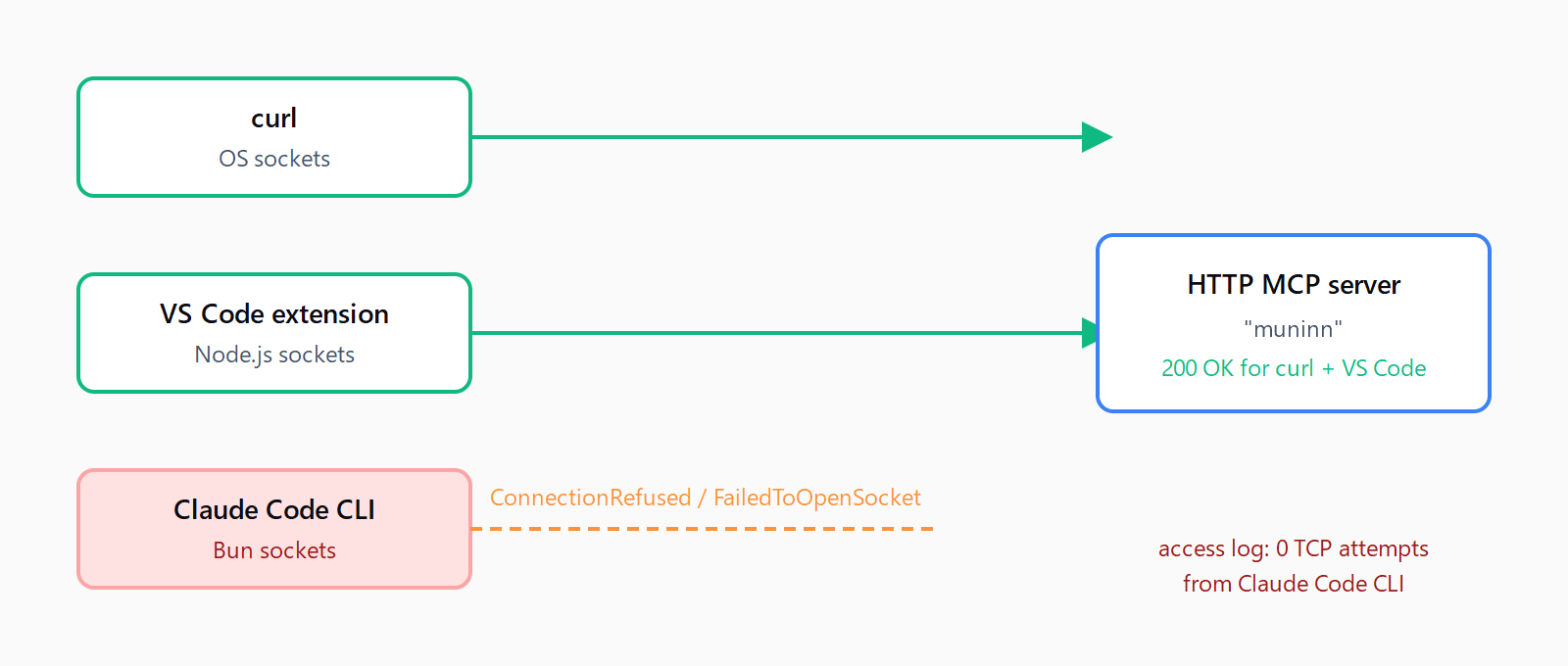
Why does the same config work in VS Code but not the Claude Code CLI?
Per a detailed GitHub issue with a full repro, "the CLI binary is compiled with Bun, which bundles its own HTTP/socket implementation separate from Node.js. Bun's networking stack produces FailedToOpenSocket / ConnectionRefused at the TCP level for endpoints that are fully reachable via system curl and Node.js fetch." The VS Code extension runs on Node.js, so it opens the same connection through Node's networking stack without issue - identical MCP config, identical target server, two different socket implementations underneath.
Two other issues (#17541 and #11633) report the same "Failed to connect despite successful manual testing" symptom independently, which rules out a one-off local network quirk. As of this writing the issue carries the area:mcp and bug labels with a confirmed repro, but no shipped fix.
How do you work around the Claude Code HTTP MCP connection failure?
Since the break is in the CLI's runtime rather than your config, no amount of URL, header, or firewall tweaking fixes it. Three practical options:
- Switch the server's transport to stdio if the server supports it. Claude Code's MCP documentation lists stdio, SSE, and HTTP as supported transport types; stdio-transport servers spawn as a local subprocess and never touch the CLI's HTTP client, so they sidestep this failure entirely.
- Run the same MCP config through the VS Code extension instead of the terminal CLI. Same server, same JSON config, Node.js runtime underneath - it connects because the extension never inherits the CLI's Bun HTTP stack.
- If the server only speaks HTTP and you're tied to the CLI, proxy it through a local stdio-to-HTTP bridge (a small local script that forwards stdin/stdout MCP messages to the HTTP endpoint) so Claude Code talks stdio locally while the bridge process - running under Node or any other runtime - handles the actual HTTP call.
None of these are the vendor's own fix - they're workarounds for a networking bug that sits below the MCP protocol layer. Check the Automation Error Index for updates once a patched CLI ships.
Is this the same bug as the MCP spawn ENOENT error?
No - they're unrelated failures in different transport types. The spawn npx ENOENT error hits stdio-transport servers on Windows, where Node's child_process.spawn can't resolve a bare npx or uv command without a shell wrapper. The Bun socket failure described here only affects HTTP-transport servers and has been reported on macOS. If your server uses stdio and you're seeing a spawn failure, that's the ENOENT issue, not this one; if it's an HTTP-type server failing at the socket level, it's the Bun runtime issue. A separate, unrelated remote tool call timeout can also surface on HTTP servers after the connection succeeds - worth ruling out once the connection itself is confirmed working.
FAQ
Does this affect stdio-transport MCP servers too?
No. The reported failure is specific to HTTP-transport servers, where Claude Code's CLI opens its own outbound socket via Bun. Stdio-transport servers spawn as a local subprocess and don't go through this networking path.
Does the VS Code extension have the same bug?
No - the VS Code extension runs on Node.js and connects to the same HTTP MCP server without issue. The failure is specific to the terminal CLI's Bun-compiled binary.
Which Claude Code versions are affected?
The primary report is on version 2.1.76, with the last confirmed working version around 2.1.70. Two independent issues describe the same symptom, suggesting it isn't tied to one specific patch release.
Does using an IP address instead of a hostname fix it?
No - it changes the error code from ConnectionRefused to FailedToOpenSocket, but the connection still fails at the same socket-opening step regardless of whether you use a hostname or a raw IP.
Is there a config setting that forces Claude Code to use Node instead of Bun?
Not as a documented option. The CLI binary itself is compiled with Bun; there's no published flag to swap its networking runtime, which is why the practical workarounds route around the HTTP client entirely (stdio transport, VS Code extension, or a local bridge process).