
LangChain "Agent stopped due to iteration limit" error: how to fix
Why the "Agent stopped due to iteration limit or time limit" error fires - and the five-step fix that beats just raising max_iterations.
TL;DR: The error Agent stopped due to iteration limit or time limit means a LangChain agent ran out of steps before the model emitted a final answer.
Fix it by raising the step budget (max_iterations on the legacy AgentExecutor, recursion_limit on the v1 create_agent), switching early_stopping_method from "force" to "generate" so the runner forces a final pass, and turning on parser-error retries so a single bad LLM output doesn't burn three iterations. Full diagnosis and steps below.
Why does "Agent stopped due to iteration limit" happen?
An AgentExecutor loops: model picks a tool, tool returns an observation, model decides whether it has the answer or needs another tool. Each pass through that loop is one iteration. When the loop hits max_iterations (default 15) or max_execution_time seconds without the model emitting a finishing action, the runner gives up. The literal string Agent stopped due to iteration limit or time limit. is what early_stopping_method="force" returns in that case - the runner does not call the LLM one more time to compose a real answer; it returns a constant.
The root cause is almost never "15 iterations isn't enough." It is one of three things: the model is stuck in a parser-error loop, a tool keeps returning observations the model can't act on, or the prompt does not give the model a clear stopping condition. Bumping the cap to 30 just delays the same error. The canonical issue thread on this is langchain-ai/langchain issue #8493, where the original reporter raised the cap to 15 and still hit it - because the underlying loop was the problem, not the cap. The same shape applies to any other platform-imposed limit - Make.com's 40-minute scenario timeout cannot be raised either; the only fix is structural.
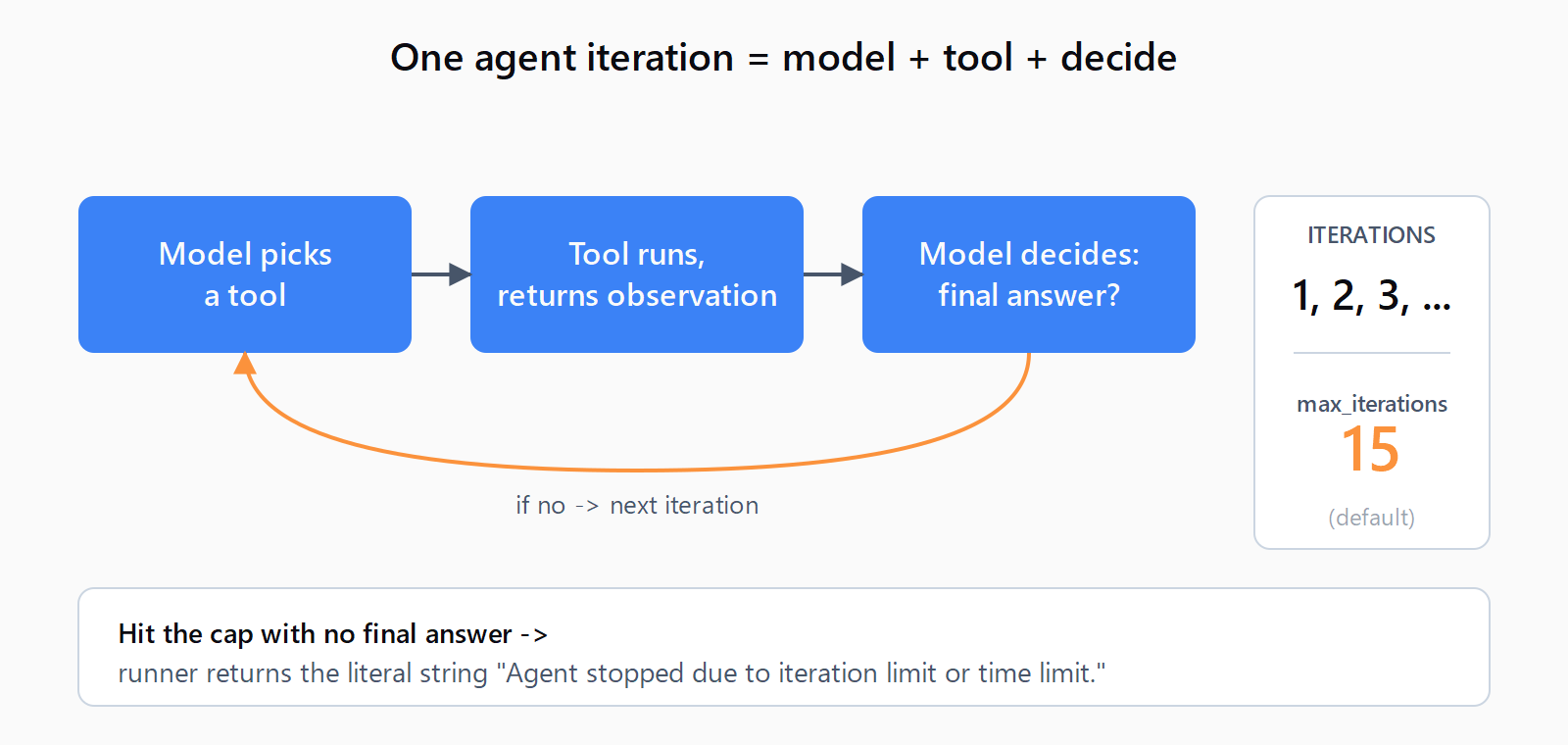
max_iterations defaults to 15 and the canned error string fires the moment the counter hits the cap.How do you fix it on legacy AgentExecutor?
- Switch
early_stopping_methodto"generate". The default"force"returns the canned error string. The"generate"mode does one final pass through the LLM with the accumulated scratchpad and asks it to produce a best-effort answer. The user sees a real response instead of the literal error. If you are pinned to LangChain 0.1.0 withlangchain-openai0.0.2.post1, this raisesGot unsupported early_stopping_method generate- upgrade past those pins (the bug is tracked in issue #16263) or stay on"force"and rely on the other fixes. - Tighten the prompt and the tool descriptions. Most loops are caused by the model not knowing when to stop. Add an explicit stop instruction to the system prompt ("If you have the answer after one tool call, return it - do not call additional tools to verify"), and rewrite each tool's
description=so it says exactly what the tool returns and when to use it. Vague tool docstrings cause the agent to call three tools where one would do. - Set a wall-clock fallback. Pass
max_execution_time(seconds) alongsidemax_iterations. Iteration counts vary per query; a 60-second cap is a saner upper bound for a chat UI than trying to predict step counts. - Then, and only then, raise
max_iterations. If the prompt and tools are clean and the agent legitimately needs more steps for a multi-hop task, raise the cap to 25 or 30. Raising it without doing steps 1-3 first hides the real bug.
Turn on parser-error retries. Pass handle_parsing_errors=True when building the executor. A single malformed LLM output (missing Action: block, stray markdown) otherwise burns one iteration with a hard exception; with the flag set, the parser error is fed back to the model as an observation and the next pass usually recovers.
from langchain.agents import AgentExecutor

executor = AgentExecutor(
    agent=agent,
    tools=tools,
    max_iterations=15,
    max_execution_time=60,
    handle_parsing_errors=True,
    early_stopping_method="generate",
    verbose=True,
)
How do you fix it on LangChain v1 / create_agent?
LangChain v1 (released in 2025) deprecates AgentExecutor in favour of create_agent, which is built on LangGraph. The same error surfaces with different wording and a different parameter. The agent now hits a recursion limit instead of an iteration limit. The default is 25 graph steps; each LLM call and each tool call counts as one step, so the practical iteration budget is roughly half the recursion limit.
Set the limit by chaining .with_config() on the agent, as documented on the LangChain forum thread for create_agent v1:
from langchain.agents import create_agent

agent = create_agent(
    model=model,
    tools=tools,
    prompt=system_prompt,
).with_config({"recursion_limit": 50})
You can also pass recursion_limit per-invocation: agent.invoke({"messages": [...]}, {"recursion_limit": 50}). When the limit is hit, LangGraph raises GraphRecursionError rather than returning a string - catch it and decide whether to retry with a higher limit or surface a friendlier message. The error doc lists the canonical guidance: if the graph is genuinely cyclic, fix the cycle; only raise the limit if the graph legitimately needs more steps. See the GRAPH_RECURSION_LIMIT reference.
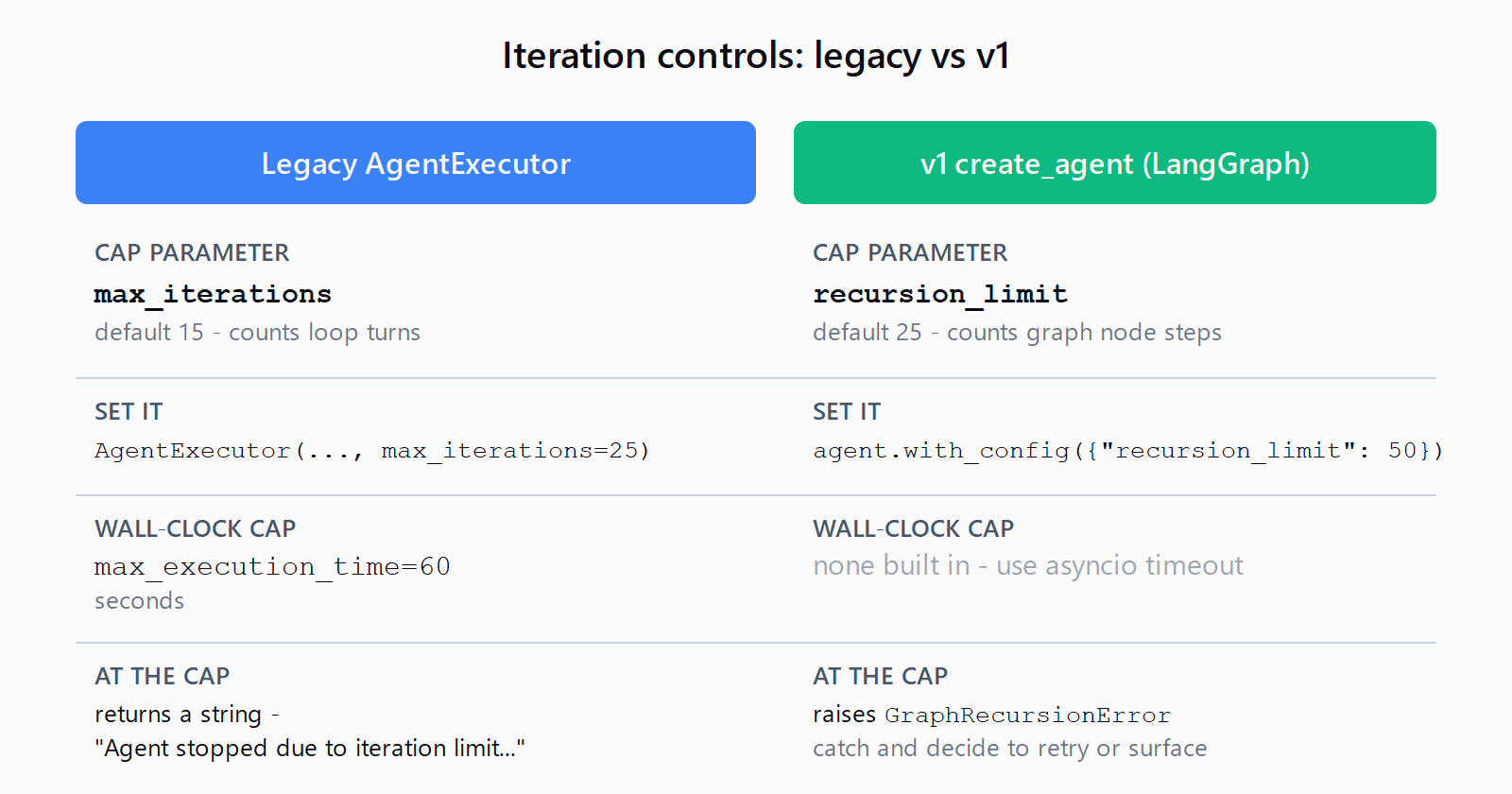
max_iterations=15 roughly translates to a v1 recursion_limit=30.How do you verify the fix worked?
Run the failing query again with verbose=True on the executor (or LangSmith tracing on create_agent) and watch the iteration log. Three signals say it is fixed:
- The run ends with a
Final Answer:line (legacy) or a finalAIMessagewith notool_calls(v1) - not the canned iteration-limit string. - The iteration count is well under the cap. If you raised
max_iterationsto 30 and the agent still uses 28 of them, the prompt or tools are still wrong. - No parser-error log lines appear between iterations. If they do,
handle_parsing_errors=Trueis masking a flaky output format - look at the raw LLM output and adjust the prompt's example block.
What if the fix didn't work?
Three less-common causes worth checking. First, a tool is hanging - the iteration cap fires because max_execution_time is also set and the tool is the bottleneck; add timeouts inside the tool itself. Second, the model genuinely cannot solve the task with the tools given - watch the verbose log for repeated calls to the same tool with the same arguments and consider whether a missing tool is the real fix. Third, on the streaming path, an upstream client (Streamlit, FastAPI) is dropping the connection before the agent finishes; confirm by running the same prompt in a plain Python script.
FAQ
What is the default max_iterations value in LangChain's AgentExecutor?
max_iterations defaults to 15. The default for max_execution_time is None, so without setting it the agent will only stop on iterations or on a finishing action.
Is early_stopping_method="generate" safe in production?
Yes, with one caveat. It costs one extra LLM call per agent run that hits the limit, and the generated answer is best-effort - it may admit it could not finish the task. That is still better UX than the canned error string. If you are on LangChain 0.1.0 with langchain-openai 0.0.2.post1 it raises Got unsupported early_stopping_method generate; upgrade past those pins.
Why does my agent hit the iteration limit on the first query?
Almost always a parser-error loop. The model returns output the ReAct or OpenAI tools parser cannot read, the executor catches it as an exception, and (without handle_parsing_errors=True) bails or burns iterations on retries. Turn that flag on first, then look at the raw LLM output in the verbose log.
How is max_iterations different from recursion_limit in LangGraph?
max_iterations counts agent loop turns (model + tool = 1 iteration). recursion_limit counts graph node executions (model = 1 step, each tool = 1 step). A recursion limit of 25 is roughly equivalent to 12-13 iterations in legacy terms, which is why agents migrating from AgentExecutor sometimes hit the new limit unexpectedly.
Does handle_parsing_errors=True reduce iterations?
Often yes. Without it, a single malformed LLM output raises OutputParserException and either crashes the run or counts as a wasted iteration. With it, the parser error is sent back to the model as an observation and the next pass usually produces clean output - one iteration spent recovering instead of two or three lost to retry logic.
Hit a different error? Browse the Automation Error Index for a searchable catalog of LangChain errors, each with a verified fix.