
n8n Code node: Run Once for All Items vs Each Item
Run Once for All Items uses $input.all() and returns an array; Run Once for Each Item uses $json and returns { json: ... }. Three traps to watch.
TL;DR: The n8n Code node has two execution modes - Run Once for All Items and Run Once for Each Item - and the choice changes which variables are available, how many times the code runs, and what return shape n8n accepts.
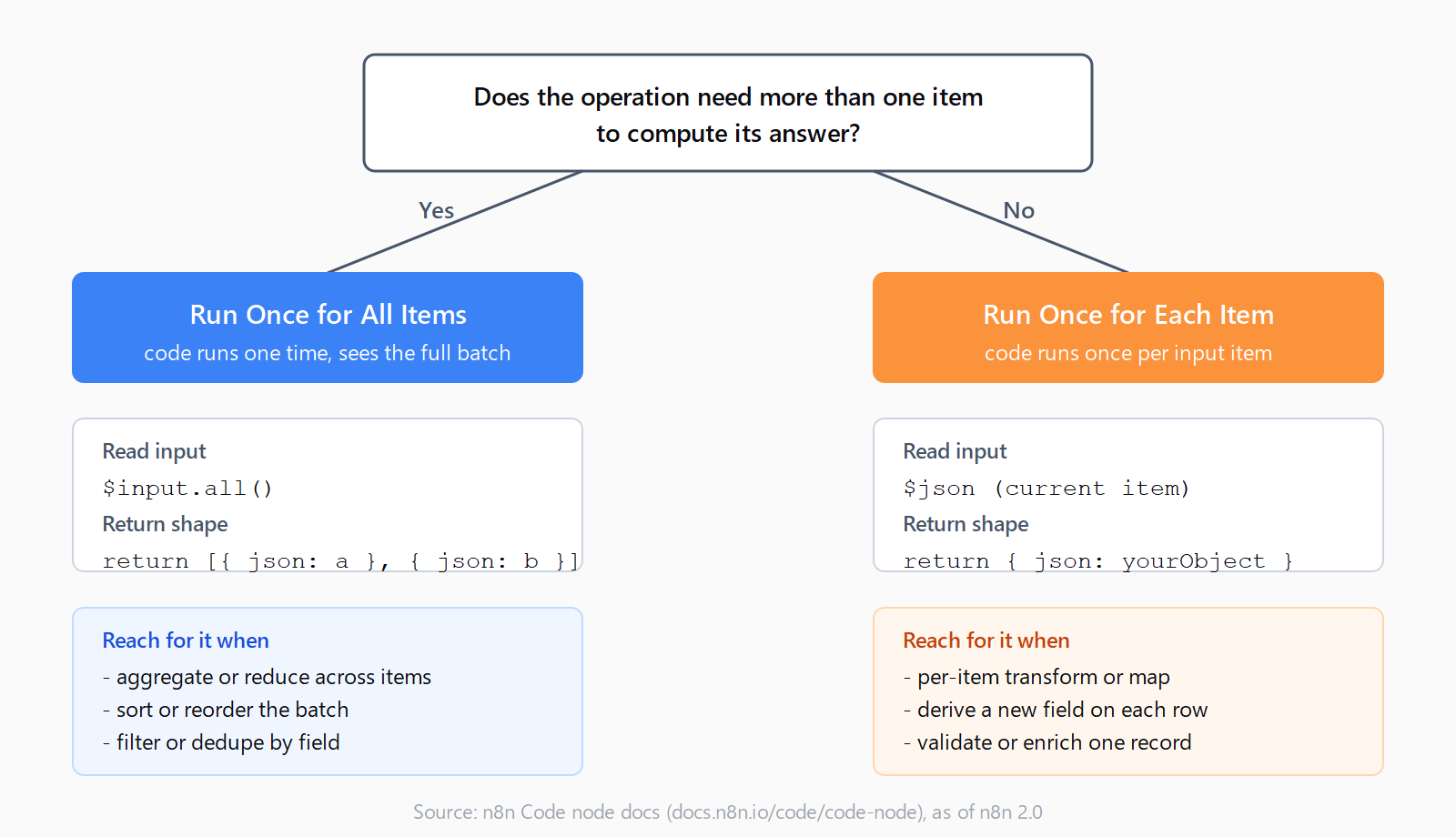
Pick Run Once for All Items when the code aggregates, filters, or reorders the whole batch (you read the input through $input.all() and return an array). Pick Run Once for Each Item when each item should be transformed independently (you read the current item through $json and return { json: yourObject }).
That single decision drives the rest of the configuration. Get it wrong and you hit one of three predictable failures: the "Unknown top-level item key" error, a code path that only returns the first row, or a toggle that visibly saves but iterates anyway. The traps are listed near the bottom; the rule itself is the table that follows.
What's the difference between the two Code node modes?
| Aspect | Run Once for All Items | Run Once for Each Item |
|---|---|---|
| How often the code runs | Once, regardless of input count | Once per input item |
| Read input | $input.all() (array of all items) | $json (current item only) |
| Required return shape | Array of objects, e.g. return [{ json: a }, { json: b }] | Single object: return { json: yourObject } |
| Best for | Aggregation, sorting, filtering, deduping | Per-item transforms, enrichment, validation |
| Item count out | Whatever the array contains | Same as input (one per call) |
When should you pick Run Once for All Items?
This is the default. The code runs one time, sees the full batch, and returns whatever you build out of it. Reach for it any time the operation needs the collection: a sum across items, a sort by timestamp, a dedupe by id, a filter that rejects rows missing a field. Before it, that kind of work usually meant chaining a Loop Over Items node and a Merge node; the Code node compresses both into a few lines of JavaScript or Python.
A typical aggregation looks like this:
const items = $input.all();
const total = items.reduce((sum, i) => sum + (i.json.amount || 0), 0);
return [{ json: { total, count: items.length } }];
The return value is an array of items, where each item is an object with a json key. n8n accepts a bare object too (it wraps it for you), but writing { json: ... } explicitly avoids confusion later when you switch modes on a similar block of code. If a downstream HTTP Request node is going to fan out per item, return as many array entries as you want it to fire.
When should you pick Run Once for Each Item?
This mode treats the Code node as a per-row function. n8n calls your code once for every item in the input - if a Set or an HTTP Request hands it 50 rows, the code runs 50 times. The current row is exposed as $json (and the legacy $input.item still works), and the return value must be a single object, not an array.
// Run Once for Each Item
const fullName = `${$json.first_name} ${$json.last_name}`;
return { json: { ...$json, fullName } };
Reach for it when the work is genuinely per item: building a derived field, calling a helper library on each row, validating one record at a time. The mode is also the right choice when you want n8n to handle an error per item rather than failing the whole node - if the third row throws, the first two and the rest still flow downstream, depending on the node's error settings.
Which three traps catch most n8n Code node users?
"Unknown top-level item key" in Run Once for Each Item
The most common surprise. Returning a bare object - return { test: "value" } - throws an error like Unknown top-level item key: test [item 0]. The fix is the wrapper: return { json: { test: "value" } }. n8n requires the json key (and optionally binary and pairedItem) at the top level so it knows which part of the object is data versus metadata. The n8n community thread for this error has a clean reproducer if you want to see it firsthand.
![Side-by-side comparison of return shapes for the two n8n Code node modes. Left panel for Run Once for All Items shows return type as an array of objects with example code that totals an amount with reduce and returns [{ json: { total } }]. Right panel for Run Once for Each Item shows return type as a single object wrapped in a json key with example code that builds a fullName from first_name and last_name and returns { json: { ...$json, fullName } }. A red footer warns that returning a bare object in Run Once for Each Item throws Unknown top-level item key.](https://automatelab.tech/content/images/2026/05/n8n-code-node-run-once-all-items-vs-each-item-2-return-shapes.png)
Run Once for All Items returning only the first item
The mode does not auto-iterate. If the Code node receives 10 items and you write return $json, you get one row out - the first one - because $json in this mode only resolves the first item. To return everything you have to read the array explicitly:
// Run Once for All Items - returning everything
return $input.all();
// or, if you need to transform first:
return $input.all().map(i => ({ json: { ...i.json, processed: true } }));
If the goal is "transform every item the same way," that's a sign the mode should be Each Item, not All Items. Use All Items when the code shape is reduce, filter, sort, or any operation where the answer depends on more than one row.
The n8n 1.91.3 toggle regression
One reported edge case: in issue #15330, a user on n8n 1.91.3 enabled "Execute Once" on a Function/Code node and the node still ran once per input item. The issue was closed as not planned, so it is not on the official fix list. If the symptom shows up - the toggle visibly saves but the node iterates anyway - the workaround is to toggle the setting off, save, toggle it back on, and save again. The behavior is unrelated to the per-item return shape; it is a configuration-persistence issue. Worth knowing about if you are running an older self-hosted instance and the modes feel like they are doing the opposite of what they should.
How do you switch between the two modes?
Open the Code node, expand Mode, and pick either option. The switch changes the in-editor variable hints (autocomplete will offer $input.all() in one mode and $json in the other) and changes the linter's expectations for the return shape. Code that compiled in one mode often will not run in the other without a small edit - the most common change is wrapping or unwrapping the { json: ... } envelope.
If you self-host on a recent build, the mode lives in the same panel for both JavaScript and Python; the Python option was removed from the browser-based Code node in n8n 2.0, so on a v2 install the language picker only shows JavaScript. The execution-mode toggle itself is unchanged across versions and works the same on n8n cloud and on a self-hosted n8n instance.
FAQ
When should I use Run Once for All Items vs Run Once for Each Item in n8n?
Run Once for All Items is for operations that need the full batch - aggregation, sorting, filtering, deduping. Run Once for Each Item is for per-item transforms - building a derived field, calling a helper, validating one record. If the operation can be expressed as map, prefer Each Item; if it needs reduce, filter, or sort, prefer All Items.
Why does my Run Once for Each Item Code node throw "Unknown top-level item key"?
You returned a bare object instead of one wrapped in { json: ... }. In Run Once for Each Item mode, n8n requires the top-level json key. Change return { foo: "bar" } to return { json: { foo: "bar" } }.
How do I return all input items from a Run Once for Each Item Code node?
You can't directly - that mode runs once per item and is shaped to return one item per call. If you need to emit several items per input row, return one row from each call and use a Split Out node downstream, or switch the Code node to Run Once for All Items and build the full array there.
Why is $input.all() not receiving all items in Run Once for All Items?
Two common causes. First, the upstream n8n webhook or trigger may only be emitting one item - check its output panel. Second, you may actually be in Run Once for Each Item mode (the toggle is easy to miss), where $input.all() resolves only the current item plus any siblings n8n exposes for that call. Open the Code node panel and confirm the Mode field.
What variables can I use in each mode?
In Run Once for All Items: $input.all() for the array, $input.first() and $input.last() as conveniences, plus $input.item for the current row and $input.params for node parameters. In Run Once for Each Item: $json for the current item and $input.item as the legacy alias for the same value. Both modes also expose $node, $workflow, and $execution for the surrounding context.