
Best managed browsers for authenticated AI agents in 2027
Compare Browserbase, Browserless, and Hyperbrowser for saved logins, session isolation, concurrency, replay, pricing, and authenticated AI agent workflows.
TL;DR: Choose Browserbase for persistent contexts and its agent stack, Browserless for reusable authentication profiles and session lifecycle control, or Hyperbrowser for saved profiles with optional managed agents.
For authenticated work, the important question is whether tomorrow's run resumes the correct account and stops cleanly when the site demands a fresh login. A concurrency allowance leaves those recovery questions open. Compare persistence behavior, debugging evidence, and the total bill for your actual portal workflow.
Which managed browser platform fits authenticated agents?
The buying recommendations below are architectural judgments based on vendor documentation checked on 26 October 2026. They are not results from production benchmarks. All three support browser automation, but a hosted browser and an autonomous task executor have different responsibilities and costs.
| Platform | Login persistence | Paid entry and capacity | Choose when |
|---|---|---|---|
| Browserbase | Named Context; save changes with persist: true. | Developer $20/month; 25 concurrent browsers and 100 browser hours. | You want cloud browsers alongside the Stagehand and agent platform. |
| Browserless | Authenticated profiles plus Session API persists profile data until configured TTL. | Prototyping $25/month billed annually; 10 concurrent browsers and 20,000 units. | You need explicit persistence lifetimes or licensed self-hosting. |
| Hyperbrowser | Profiles; persistChanges saves updated state. | Startup $30/month; 25 concurrent sessions and 30,000 credits. | You want profiles and an optional managed agent layer. |
When should you choose Browserbase?
Browserbase Contexts retain cookies and application data between sessions. Create a Context, start a session with its ID and persist: true, log in, and end the session. Wait a few seconds before reusing it so saved changes can synchronize.
Contexts persist until deleted or invalidated, but the destination website can revoke its own tokens. Browserbase recommends one Context per site and login and warns against simultaneous sessions using the same Context. Plan account-level locking even when the browser plan permits many concurrent workers.
The Developer plan includes 100 browser hours, followed by $0.12 per browser hour, and 1 GB of proxy traffic, followed by $12/GB. Models are metered separately. The platform also includes agent capabilities, so check which runtime and model features your implementation actually consumes.
When should you choose Browserless?
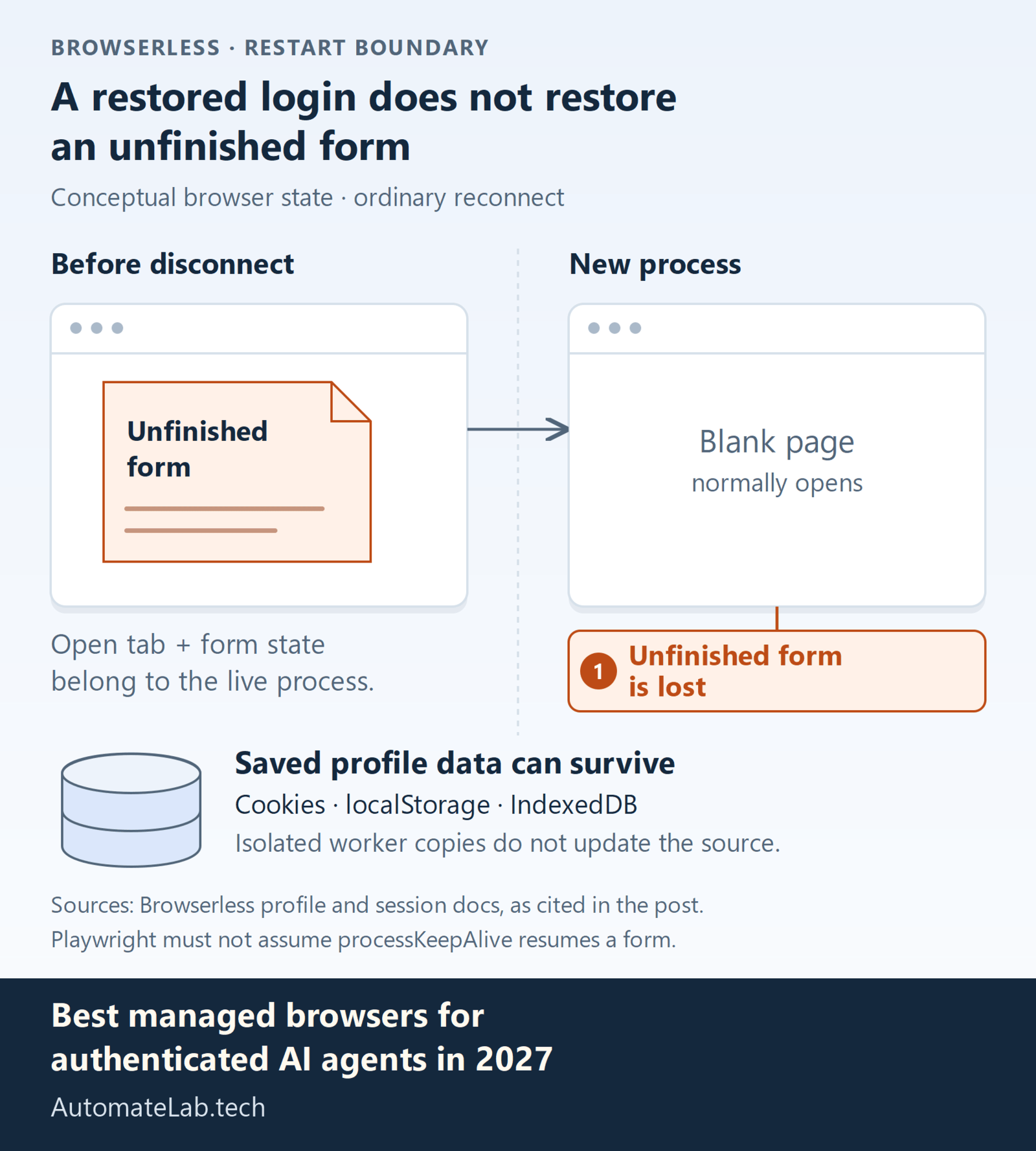
Browserless Authenticated Profiles snapshot cookies, localStorage, and IndexedDB. Each new worker receives an isolated copy; its changes do not update the saved profile. This supports parallel workers without sharing one live browser. Website account rules still apply. With a Playwright profile endpoint, reuse browser.contexts()[0] so the script uses the restored authentication state.
The Browserless Session API persists cookies, localStorage, and cache in an isolated profile directory. Set ttl explicitly. On Prototyping, persisted data can live for up to seven days; this is separate from the maximum duration of an active browser session.
When connections close, a later connection normally starts a new browser process on a blank page with saved profile data. The processKeepAlive option preserves the live process briefly, but its documented disconnect behavior is Puppeteer-only. A Playwright implementation should not assume it can resume an unfinished form merely because cookies survived.
Browserless pricing meters units of up to 30 seconds per connection, with reconnects starting another unit. Proxy traffic and successful CAPTCHA solves consume additional units. Enterprise lists private deployments and licensed self-hosting; those need their own commercial agreement.
When should you choose Hyperbrowser?
Hyperbrowser browser sessions support saved profiles, Live View, and session recordings. Attach a profile to reuse login state. Enable persistChanges and stop the session when finished to save updates; otherwise the stored profile stays unchanged.
Live View lets a user take control for a verification code before automation continues. That suits portals with occasional human authentication. Recordings help investigate where an export or form submission stopped. Keep profile identifiers scoped to the customer account in your application.
The Startup subscription includes $30 of usage monthly. Browser time costs 100 credits an hour, or $0.10, while proxy data costs $10/GB. Managed HyperAgent and Browser Use steps add $0.02 per step to browser and proxy charges. Compare those charges with running your own deterministic script.
What does a persistent login fail to preserve?
Saved authentication and live application state have different lifetimes. A profile can restore cookies while losing the open tab or an unfinished form. A site can also reject a still-stored token. Treat a resumed browser as an account that must be checked before any action.
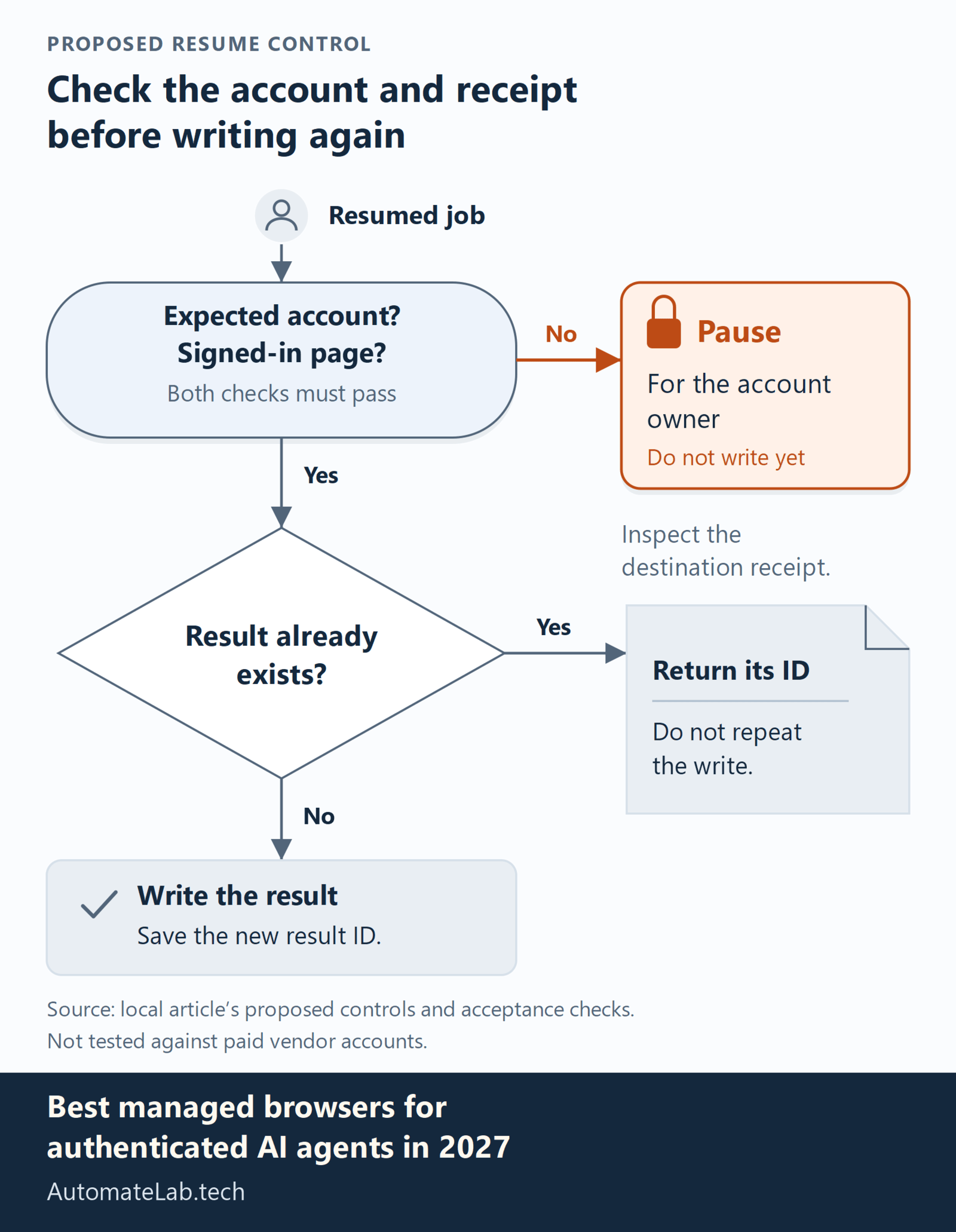
Start every job with an account identity assertion and a signed-in page check. If either fails, pause for the account owner. Give each customer a separate profile and avoid concurrent writers to the same saved state. Browserless isolated profile copies avoid that particular storage race, but concurrent writes to a website record still require application controls. Protect replay access because the recording can contain private page contents even when your application logs omit them.
Related guides cover How to Deploy an AI Agent to Production with Express and Docker and How we made automatelab.tech agent-ready with WebMCP.
How do you test authenticated browser workflows?
- Log in to a test account, persist the profile, end the session, and verify a fresh session opens the correct account.
- Repeat with a second account and prove its documents and session state stay separate.
- Revoke the first account's session at the website and require the next run to pause for authentication.
Then resume a partially completed form and check for duplicate submission using the destination's record. Repeat a normal export as the neighboring valid case. Set your own time and cost limits before comparing platforms. This proposed acceptance test has not been run against paid vendor accounts.
FAQ
Can a saved profile bypass MFA?
No persistence feature guarantees that. When the website requests fresh verification, provide an authorized human authentication path.
Does higher concurrency mean the same login can run in parallel?
Capacity alone does not prove safe parallel use. Browserless profiles can seed isolated workers, but website account limits and duplicate writes still need testing.
Which option supports private deployment?
Browserless explicitly lists enterprise private deployment and licensed self-hosting. Confirm the required hosting and support terms before purchasing.