
Add AI to your Zapier workflows: a practical 2026 guide
Two built-in ways to add AI steps to any Zap -- AI by Zapier (no API key needed) and the ChatGPT integration -- with task cost breakdown, action types, and four practical workflow patterns.
TL;DR: Add AI to Zapier with "AI by Zapier" -- a built-in action using GPT-4o mini/Claude/Google, no API key needed -- or via the ChatGPT integration; each AI step costs 2 Zapier tasks, so account for that in your plan.
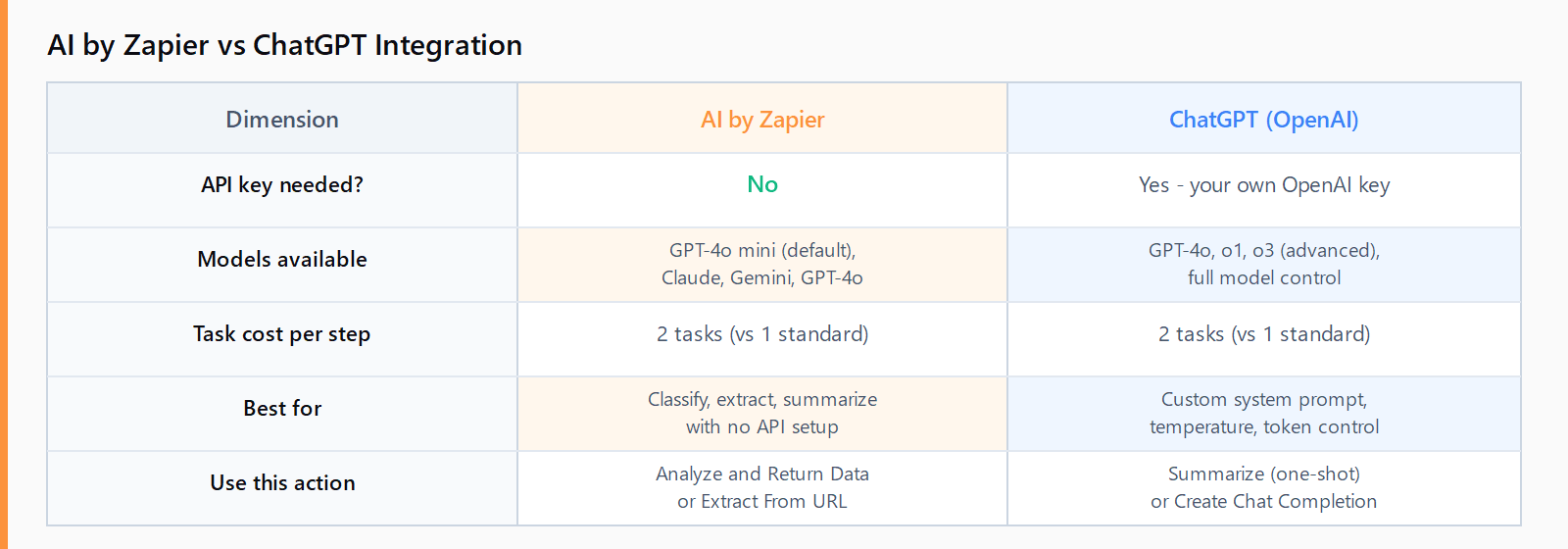
Zapier has two built-in AI routes in 2026 and the choice matters for task billing. The AI by Zapier action requires no external account and handles summarization, classification, extraction, and generation from a single step. The ChatGPT (OpenAI) integration gives you direct model control and supports custom system prompts, but calls the OpenAI API via your own key. Both bill at 2 Zapier tasks per AI step -- a fact most setup guides omit.
How do you add "AI by Zapier" to a Zap?
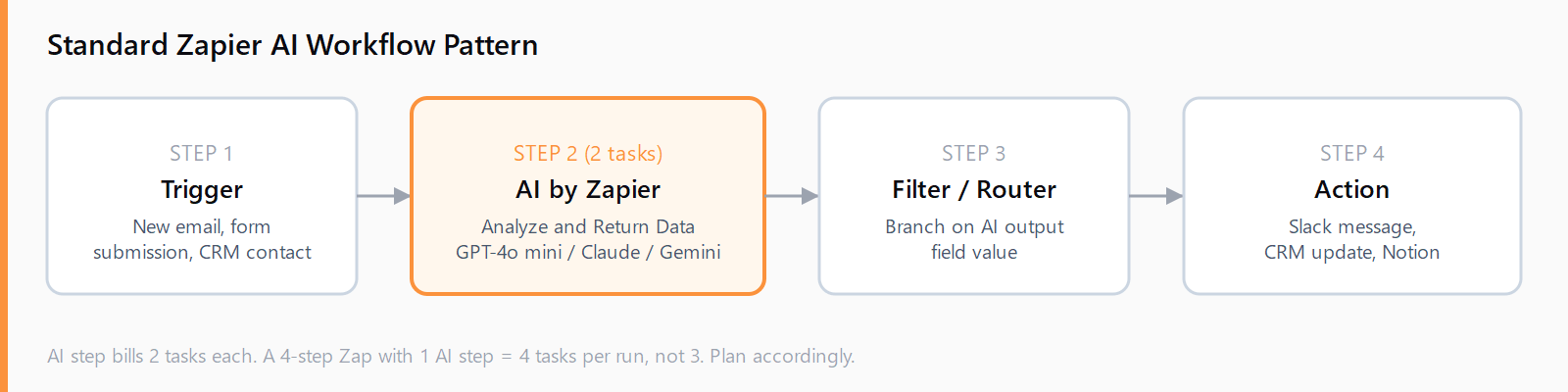
AI by Zapier went to general availability in 2025 and is available on all paid Zapier plans. It ships GPT-4o mini as the default model, with OpenAI GPT-4o, Anthropic Claude, and Google Gemini selectable per step -- meaning you can switch models without rebuilding the workflow.
- In the Zap editor, click + to add a step and search for "AI by Zapier."
- Select Analyze and Return Data as the action.
- In the Instructions field, write your prompt. Map prior-step fields as variables using curly braces. For example: "Classify the following support ticket as Billing, Technical, or General: {{ticket_body}}".
- Choose the model. For most classification and extraction tasks, GPT-4o mini keeps cost per step minimal.
- Under Output Fields, define what the step should return (e.g.,
category,summary). Zapier maps these fields to subsequent steps. - Test the step and verify the output fields populate correctly before activating.
Additional specialized actions include Extract Content From URL (scrapes a page or video transcript) and Search Content Across URLs (queries multiple sources simultaneously). Both suit enrichment Zaps -- for example, a lead enrichment workflow that extracts a prospect's company description from their website and sends it to HubSpot. See the guide to connecting HubSpot to Zapier for the broader setup.
How do you connect ChatGPT to Zapier with a custom prompt?
The ChatGPT (OpenAI) integration uses your own OpenAI API key. It exposes more model options (GPT-4o, o1, o3) and gives you full system-prompt control.
The most important distinction is action type:
- Send a Message: attaches to a conversation thread. Each call continues the same session. Use only when you need stateful, multi-turn dialogue -- rare in automation.
- Summarize: one-shot call with no thread state. The right choice for 90% of automation tasks: summarize email, classify ticket, extract JSON from text.
- Create Chat Completion (Advanced): full control -- set system prompt, temperature, max tokens. Use when the standard actions don't expose the parameter you need.
For a Zap that routes Slack notifications by sentiment, connect a Slack "New Message" trigger, add a ChatGPT "Summarize" step with a prompt like "Return either 'urgent' or 'normal' based on this message: {{message_text}}", then add a Zapier Filter to split routing. The Slack-to-Zapier connection guide covers the trigger setup.
What are the most practical Zapier AI use cases?
The four patterns that deliver the most value with minimal Zap complexity:
- Support ticket triage. Trigger on new email or form submission. Use AI to classify as billing/technical/general and route to the correct Slack channel or Notion board.
- Lead qualification. On new CRM contact, use AI to score or classify intent (e.g., "hot/warm/cold") based on job title + company size fields, then update the contact record. Pairs with the Slack notification Zap to alert the sales team.
- Email summarization. Trigger on new Gmail/Outlook message. Summarize the body into a one-sentence subject and post to a Slack digest channel. Reduces inbox-check time without a custom app.
- Content extraction. Trigger on new Google Sheet row containing a URL. Use "Extract Content From URL" to pull the page body, pass it to "Analyze and Return Data" to generate a 50-word summary, write back to the sheet.
How do you build these three Zapier AI workflows in 15 minutes?
- Choose your trigger: form submission, new email, new CRM contact, or Google Sheet row.
- Add an "AI by Zapier - Analyze and Return Data" step. Write a precise classification or extraction prompt mapping the relevant trigger fields.
- Define one or two output fields (e.g.,
classification,summary) to keep mapping simple. - Add a Filter or Router step that branches on the AI output field value.
- Add the destination action (Slack message, CRM update, Notion record). Test each branch before activating.
FAQ
Does AI by Zapier require an API key?
No. AI by Zapier includes GPT-4o mini without an external account. You can also select Anthropic Claude or Google Gemini models from the same step -- those also run through Zapier's built-in integration, no separate key required. You only need your own API key if you use the separate ChatGPT (OpenAI) app integration.
How much does Zapier AI cost per task?
Each "AI by Zapier" step and each ChatGPT integration step counts as 2 Zapier tasks instead of the standard 1. A Zap with a trigger + 2 AI steps + an action step bills 5 tasks per run (1 + 2 + 2), not 4. Account for this when estimating your monthly task count against your plan limit.
What is the difference between Send a Message and Summarize in the Zapier ChatGPT integration?
"Send a Message" maintains a conversation thread -- each new call adds to the same session. "Summarize" is a stateless one-shot call. For automation workflows (classification, extraction, routing) always use "Summarize" or "Create Chat Completion (Advanced)" unless you explicitly need multi-turn memory.
Can I use Claude or Google Gemini in Zapier?
Yes. The "AI by Zapier" action lets you switch the model per step from a dropdown: GPT-4o mini (default), GPT-4o, Anthropic Claude models, and Google Gemini models. You can run different models on different steps in the same Zap.
What is Zapier AI Actions vs AI by Zapier?
They are different products. "AI by Zapier" is an action you add inside a Zap to process data with AI. "Zapier AI Actions" (or "Zapier Actions") is an external API that lets ChatGPT GPTs and other AI assistants call your Zaps from outside Zapier. This guide covers AI by Zapier -- the in-Zap AI step.