
Send automated emails with n8n: SMTP, Gmail, and templates
Set up Gmail SMTP credentials, build HTML templates with dynamic data, and wire the Send Email node into any n8n workflow.
TL;DR: For Gmail SMTP in n8n, enable 2-Step Verification, generate an App Password, then add a Send Email credential with host smtp.gmail.com, port 465, and use {{ $json.field }} expressions to personalise the HTML body.
Email is still the most reliable channel for automation alerts, scheduled digests, and transactional confirmations. n8n gives you two routes: the Send Email node (SMTP, works with any provider) and the Gmail node (OAuth, Gmail-only but zero credential setup). This guide covers both, shows how to build reusable HTML templates with dynamic data, and documents the errors you will hit before the first successful send.
Which n8n email node should you use?
| Send Email (SMTP) | Gmail node | |
|---|---|---|
| Works with | Any SMTP provider | Gmail only |
| Auth | App Password / SMTP creds | OAuth 2.0 |
| HTML support | Yes | Yes |
| Attachments | Yes | Yes |
| Best for | Self-hosted, multi-provider, bulk sends | Personal Gmail, fastest setup |
Use Send Email if you run self-hosted n8n and want a single credential type that covers Gmail, Outlook, and transactional relays like SendGrid. Use the Gmail node if you want to be running in two minutes and never need to leave Gmail.
How do you set up Gmail SMTP credentials in n8n?
Gmail's SMTP gateway requires an App Password — a 16-character token for third-party apps. Your normal Google password will not work; Gmail rejects it with an authentication error.
Step 1 — Enable 2-Step Verification
Go to myaccount.google.com/security and confirm 2-Step Verification is on. The App Passwords option only appears in Google's UI when it is active.
Step 2 — Generate an App Password
In the same Security panel, search for "App passwords". Select Mail as the app and Other as the device; name it n8n. Copy the 16-character password Google displays — it is shown only once.
Step 3 — Add the credential in n8n
- Go to Credentials > New credential > Send Email (SMTP).
- Fill in:
- Host:
smtp.gmail.com - Port:
465(SSL) or587(STARTTLS) - User: your full Gmail address
- Password: the 16-character App Password
- Host:
- Leave SSL on for port 465; switch to TLS for port 587.
- Click Test — a green success banner confirms the credential works.
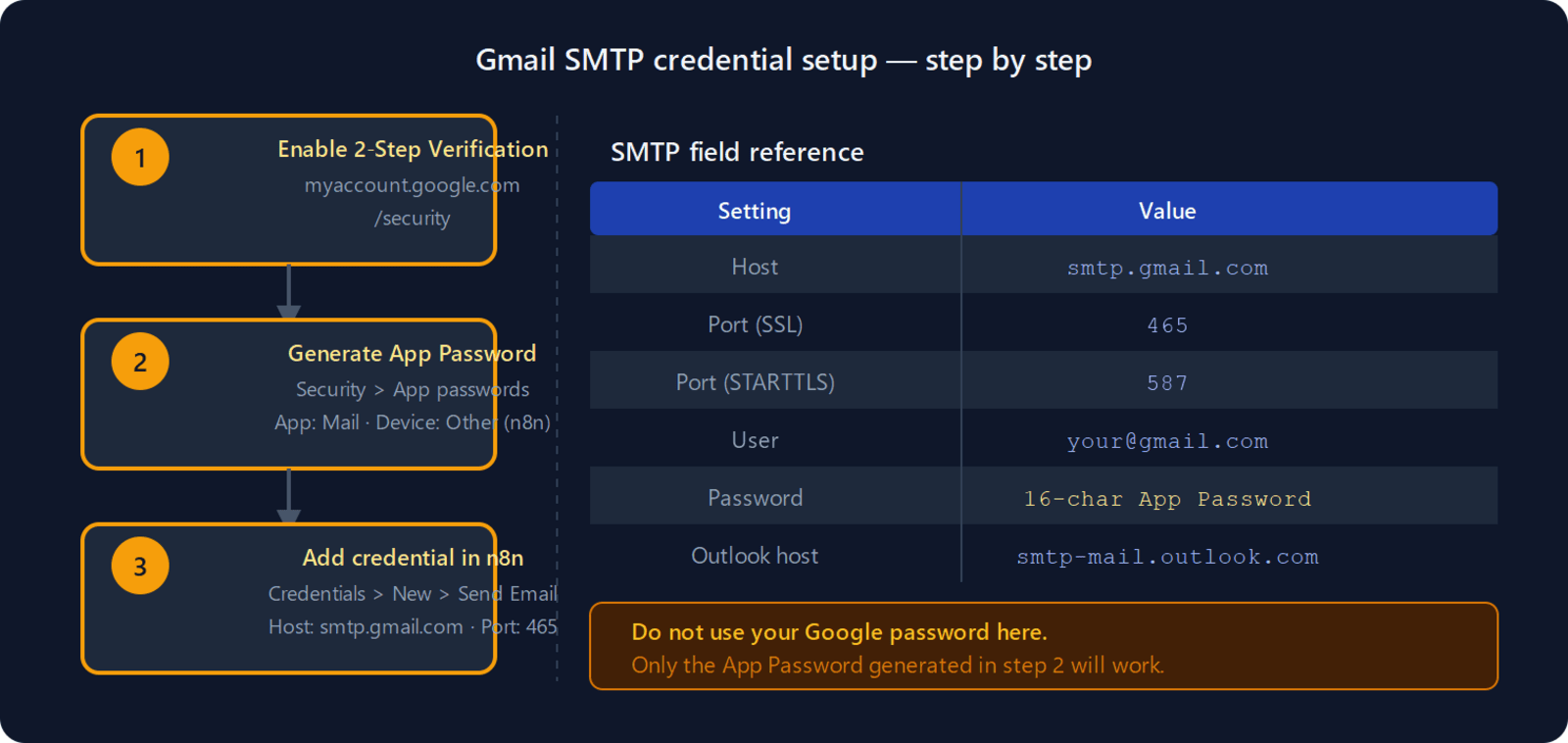
For Outlook: host is smtp-mail.outlook.com, port 587, TLS. Generate an App Password in your Microsoft account security settings if two-factor authentication is enabled.
How do you set up the n8n Gmail node with OAuth?
The Gmail node calls the Gmail API directly and skips SMTP entirely.
- Add a Gmail node to your workflow.
- Under Credential, click Create New and follow the OAuth flow to connect your Google account.
- Set the operation to Message > Send.
The Gmail node has richer options (labels, reply-to thread, send-as alias) but it is Gmail-only. If you later need to support a second provider, you will need to rewire to the Send Email node. For multi-provider setups, start with SMTP.
If the OAuth flow fails with a redirect URI error, see how to fix n8n OAuth callback URL returning 401 — the most common cause is a mismatched redirect URI in the Google Cloud Console OAuth app.
How do you build an n8n email automation workflow?
The simplest useful pattern is a daily digest: schedule a trigger, fetch data, send email.
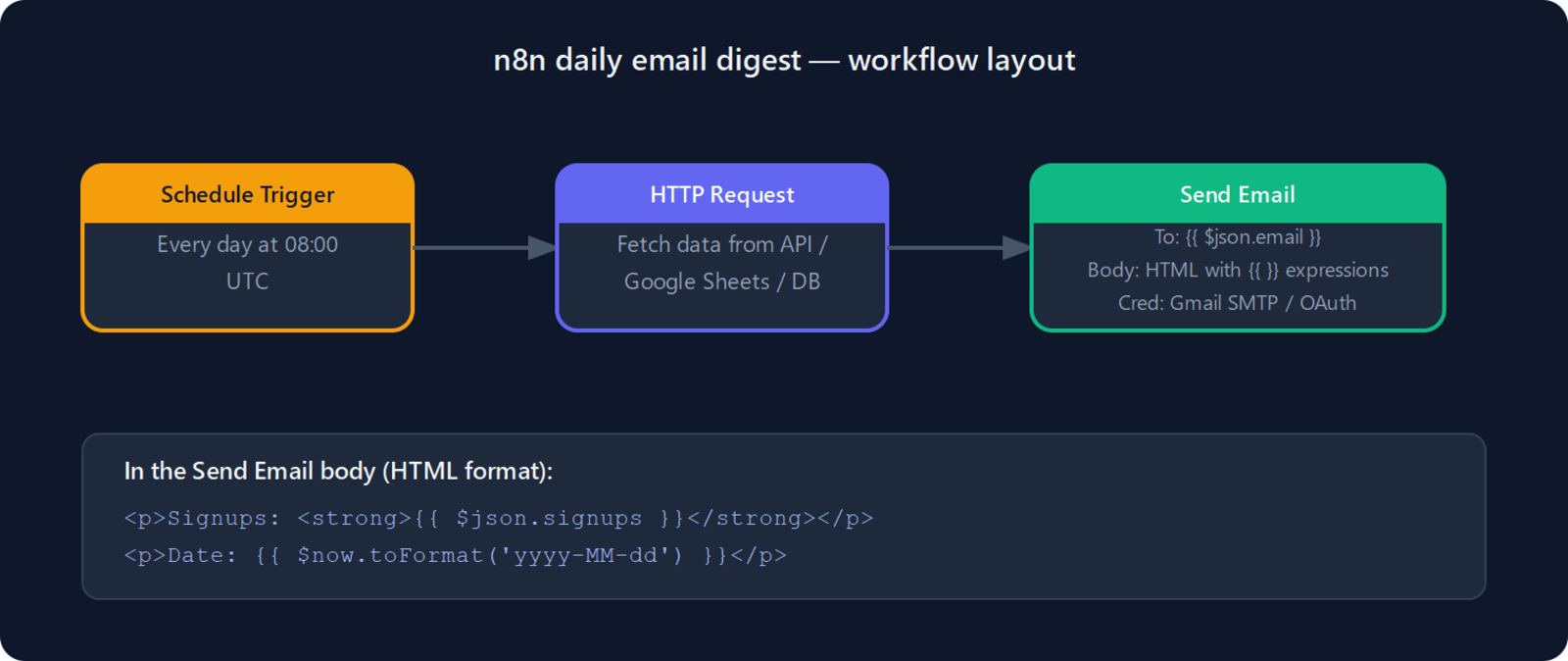
- Schedule Trigger — set to daily at 08:00 UTC.
- HTTP Request — fetch the data you want in the email (a Google Sheet, an internal API, a database query via a Code node).
- Send Email — in the Message field, switch Email Format to HTML and write the body using n8n expressions.
A minimal HTML body using upstream data looks like this:
<h2>Daily summary — {{ $now.toFormat('yyyy-MM-dd') }}</h2>
<p>Signups today: <strong>{{ $json.signups }}</strong></p>
<p>Revenue: <strong>${{ $json.revenue }}</strong></p>
Every {{ }} expression is evaluated at runtime from the upstream node's output. If the HTTP Request returns { "signups": 14, "revenue": 320 }, the rendered email shows those values inline.
How do you build reusable HTML email templates in n8n?
For longer messages — onboarding emails, order confirmations, weekly reports — build the HTML in a Code node and pass the rendered string to the Send Email node. This keeps the template editable without touching the email node.
// Code node (JavaScript)
const name = $input.first().json.name;
const plan = $input.first().json.plan;

return [{
  json: {
    subject: `Welcome, ${name}`,
    body: `
      <html>
        <body style="font-family:sans-serif;max-width:600px;margin:auto">
          <h1>Hi ${name}</h1>
          <p>You are now on the <strong>${plan}</strong> plan.</p>
          <p>Visit your <a href="https://app.example.com">dashboard</a> to get started.</p>
        </body>
      </html>
    `
  }
}];
In the Send Email node, set Subject to {{ $json.subject }} and HTML to {{ $json.body }}. The Code node renders the full template; the Send Email node just delivers it.
What are the most common n8n email automation patterns?
Error alerting — set the Error Workflow in your workflow's settings to a second workflow containing only a Send Email node. Every runtime exception triggers an email with the failed workflow name and error message.
Scheduled digest — Schedule Trigger, then an aggregate step (HTTP Request, Google Sheets node, or Code node), then Send Email. Works for daily revenue summaries, weekly task reports, or log digests.
Form confirmation — n8n Form Trigger (or a webhook from Tally, Typeform, or HubSpot) into a Send Email node. Use {{ $json.email }} in the To Email field for personalised delivery. Watch the n8n webhook not firing guide if your trigger doesn't receive submissions.
Conditional routing — add an If node before Send Email to branch on a field value. Send a trial-plan welcome template to one group, a paid-plan template to another.
How do you fix common n8n email send failures?
"Authentication failed" on Gmail SMTP — you used your Google account password instead of the App Password, or 2-Step Verification was never enabled. Generate a new App Password from myaccount.google.com/security and update the credential.
"Connection refused" on port 465 or 587 — your VPS or hosting provider blocks outbound SMTP. Port 587 STARTTLS is blocked less often than 465. If both ports are blocked, switch to a transactional relay (SendGrid, Mailgun, Postmark) that accepts outbound HTTPS calls on port 443 instead.
Emails land in spam — the SMTP relay is a free Gmail account sending to a strict corporate domain, or SPF/DKIM records are missing on your sending domain. For any volume above a few dozen per day, use a dedicated relay with your verified domain.
OAuth flow fails on the Gmail node — the redirect URI in your Google Cloud Console OAuth app doesn't match what n8n generates. See the n8n OAuth 401 fix.
Debugging a workflow that never sends — add a Stop and Error node downstream and use the per-node execution debugging workflow to inspect exactly what data reaches the Send Email node before it fires.
FAQ
Can you send attachments with the n8n Send Email node?
Yes. In the Send Email node, enable Attachments and point it to a binary property from an upstream node — for example, a file downloaded via HTTP Request, exported from Google Drive, or generated by a Code node. The binary property name must match what the upstream node outputs (default: data).
Can you send to multiple recipients?
Put a comma-separated list in the To Email field: alice@example.com, bob@example.com. The node also exposes CC Email and BCC Email fields under Options for carbon copies.
Is there a daily send limit on Gmail SMTP?
Gmail limits free accounts to 500 emails per day and Google Workspace accounts to 2,000 per day. For higher volume, switch to a transactional relay (SendGrid free tier: 100/day; Mailgun free tier: 1,000/month) and update only the host, port, and password in the Send Email credential — the workflow stays the same.
Can n8n schedule an email to send later?
Not natively inside the Send Email node. Schedule the entire workflow instead: use a Schedule Trigger to fire at the desired time, or insert a Wait node upstream of the Send Email node to delay execution by a fixed duration.
What n8n version added HTML email support?
HTML has been supported in the Send Email node since the early stable releases. The current n8n 1.x docs confirm HTML and plain-text format options. No upgrade is required to use HTML bodies.