
Best AI Workflow Tools for Agency Onboarding in 2027
Compare Make, Zapier, and n8n for agency client onboarding, with client connection boundaries, current plan limits, AI approvals, and practical retry tests.
TL;DR: Choose Make for visual onboarding branches, Zapier for straightforward app handoffs, or n8n for workflows that need technical ownership and custom integration logic.
Agency onboarding usually has a predictable middle: create the project, set up folders, and notify the delivery team. The variable part is interpreting the client's intake. Keep those responsibilities separate when choosing an AI workflow tool.
Which automation tool fits agency client onboarding?
Make, Zapier, and n8n can support the workflow. The better choice depends on who maintains it and whose accounts it uses. This comparison uses vendor documentation checked on October 26, 2026, rather than a speed benchmark.
| Tool | Best fit | Plan or operating boundary | Agency boundary to check |
|---|---|---|---|
| Make | Visual branching and repeatable scenarios | Teams for multiple teams and role management | Connections and scenarios belong to a team; lower plans allow one team |
| Zapier | Direct handoffs across the client's existing apps | Team for shared collaboration; verify connection access | Shared app connections need deliberate ownership and access rules |
| n8n Cloud | Custom logic maintained by a technical operator | Cloud Pro: three shared projects, 10,000 executions | Project capacity must fit client separation; model costs need a separate budget |
These allowances are not equivalent. A task, a Make credit, and an n8n workflow execution describe different units of work. Price a representative onboarding run, including branches and AI calls, before multiplying it by the expected number of clients.
When should an agency choose Make, Zapier, or n8n?
When is Make the best fit?
Choose Make when an operator wants to inspect different service-package branches on a visual canvas. Its scenario templates support reuse and guided setup, so a standard onboarding process can become a starting point for each account.
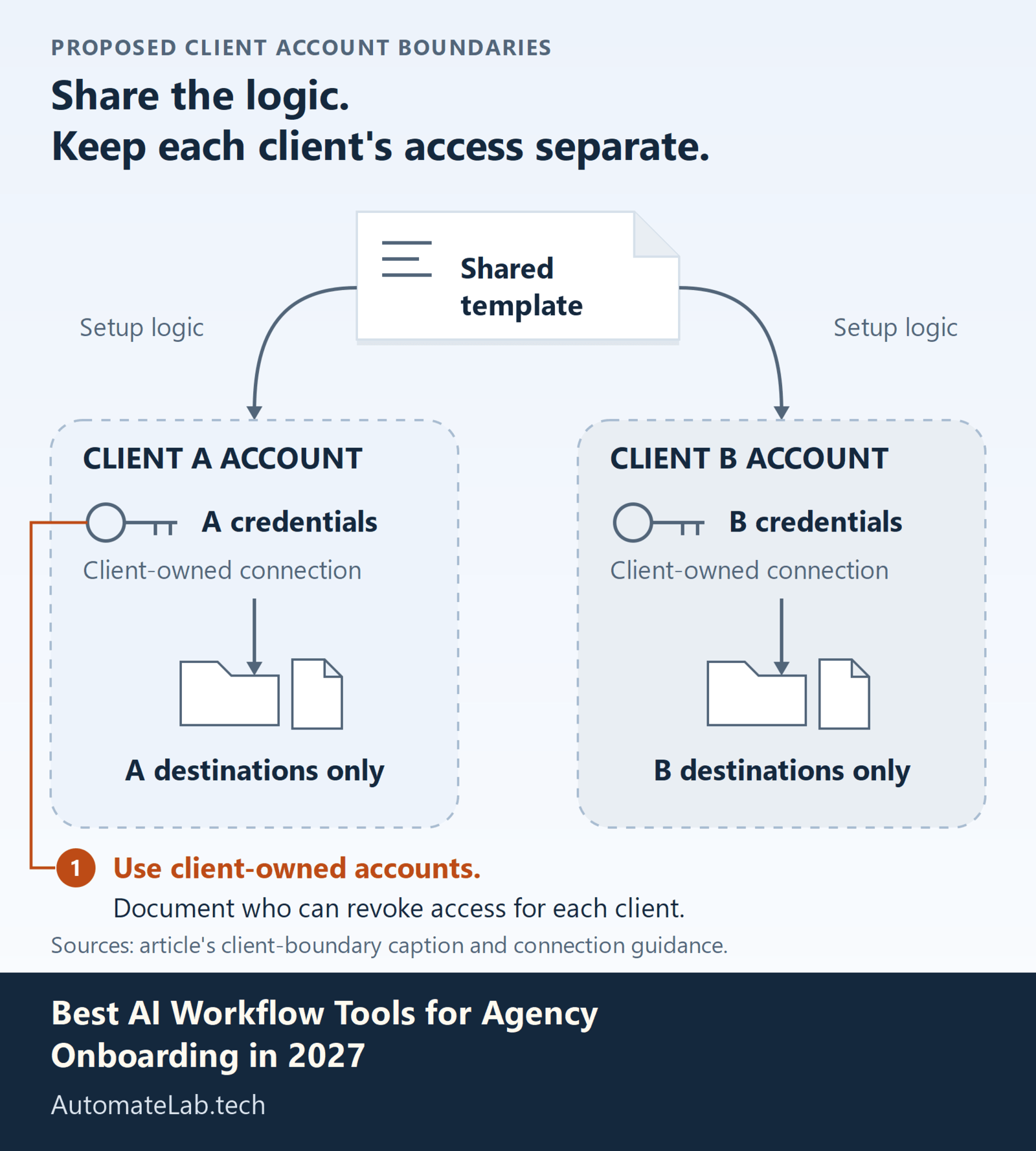
The access boundary deserves as much attention as the template. Make's team documentation says connections, webhooks, scenarios, and data stores belong to one team. Plans below Teams permit one team and do not allow role management within it.
Skip a single shared team when clients require separate access. Confirm the selected plan's team and role permissions before buying. A copied template still needs a review of every connection and destination; a successful test in the agency account says nothing about the client's access after handover.
When is Zapier the best fit?
Choose Zapier when the agency's work is mainly app-to-app handoffs that several operators must understand. Its Team plan adds shared folders, shared connections, and roles. Choose the tier for its collaboration permissions before comparing usage allowances.
For new workflows, evaluate AI by Zapier in the Zap editor. Zapier is migrating standalone Agents into that product. A migrated agent keeps its tools inside one step; migration does not turn those tool calls into individual actions.
Skip an all-purpose agent for fixed setup steps. Move folder creation and project creation into explicit actions, then use AI for intake classification or a draft brief. Enable per-tool approval for sensitive AI actions, and turn off the original agent after validating the migrated Zap to prevent duplicate runs.
When is n8n the best fit?
Choose n8n when a technical operator will maintain API calls and custom workflow behavior. n8n Cloud pricing counts workflow executions with unlimited steps: Starter is EUR20/month billed annually for 2,500 executions and one shared project; Pro raises those limits.
n8n's current pricing comparison includes workflow sharing across its Cloud plans and on Business and Enterprise self-hosted plans. Its separate sharing guide lists older availability, so confirm the entitlement for your chosen offer. A free self-hosted installation should not be assumed to include paid collaboration features. Check who can edit workflows that use a client's credentials.
Skip n8n if nobody owns failures after handover. For AI-connected tools, its human review feature pauses selected tool calls for approval or denial. Use that for client-facing messages while a deterministic path handles approved setup data.
How should you test an onboarding workflow?
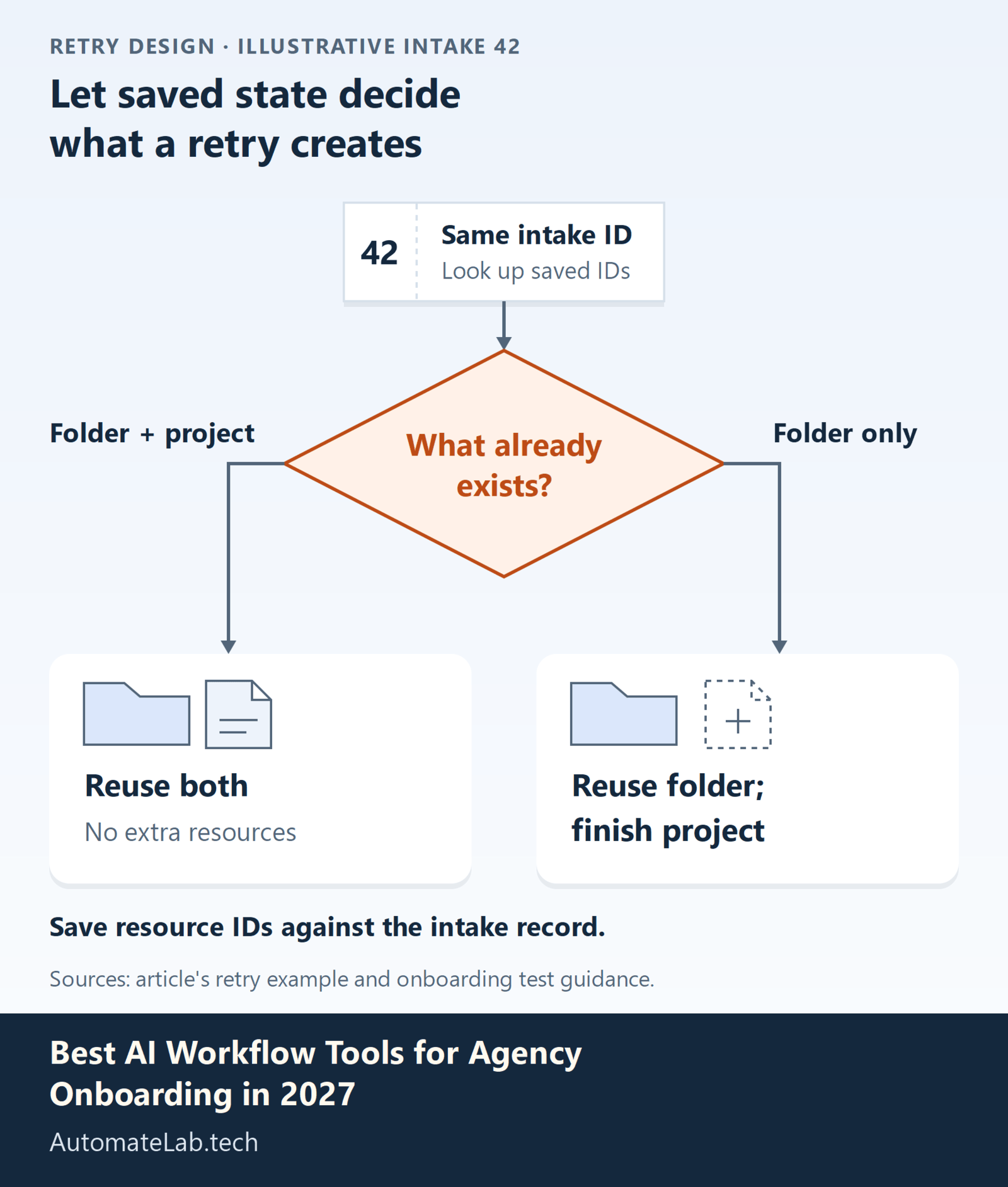
Use a stable intake ID as the workflow's duplicate-check identifier. Store the created folder, project, and channel IDs against that record. On a retry, look up existing resources before creating more; rerunning a workflow is not proof that its actions are safe to repeat.
Run a normal intake, the same intake twice, and an intake missing a required field. The first should produce one complete setup, the duplicate should produce no extra resources, and the incomplete form should stop before client-facing actions. Inspect actual destination accounts as well as execution logs.
Then revoke one test connection midway through a run. Confirm that the operator receives a useful failure and can resume without recreating completed resources. Finally, swap the service package and confirm the workflow selects the correct template and client-owned connections.
Related guides cover Make vs Zapier TCO at scale: 12-month cost model across 6 workload sizes and How to connect Slack to Zapier (triggers, actions, and tips).
How do you check the three options before handover?
- Copy a Make scenario into the intended team and verify every connection and destination.
- Inspect Zapier's AI tool approvals and disable any replaced legacy Agent trigger.
- Confirm n8n project access and rehearse a failed execution with the person who will maintain it.
FAQ
Should AI create every onboarding resource?
Use explicit actions for known folders, tasks, and channels. AI is useful for variable intake interpretation when its output is validated before those actions.
Who should own client connections?
For a workflow handed over to a client, use client-owned accounts and document who can revoke access. An agency employee's personal connection creates a dependency on that employee.
Is n8n cheaper than Make or Zapier?
Compare the same completed onboarding process, including retries, AI usage, and maintenance. The vendors count usage differently, so subscription prices alone do not establish the cheapest option.