
Make scenario won't trigger: 7-step webhook diagnosis
Seven sequential checks to diagnose a Make scenario that won't run: covers webhooks, polling triggers, incomplete executions queue, scheduling, and timezone issues.
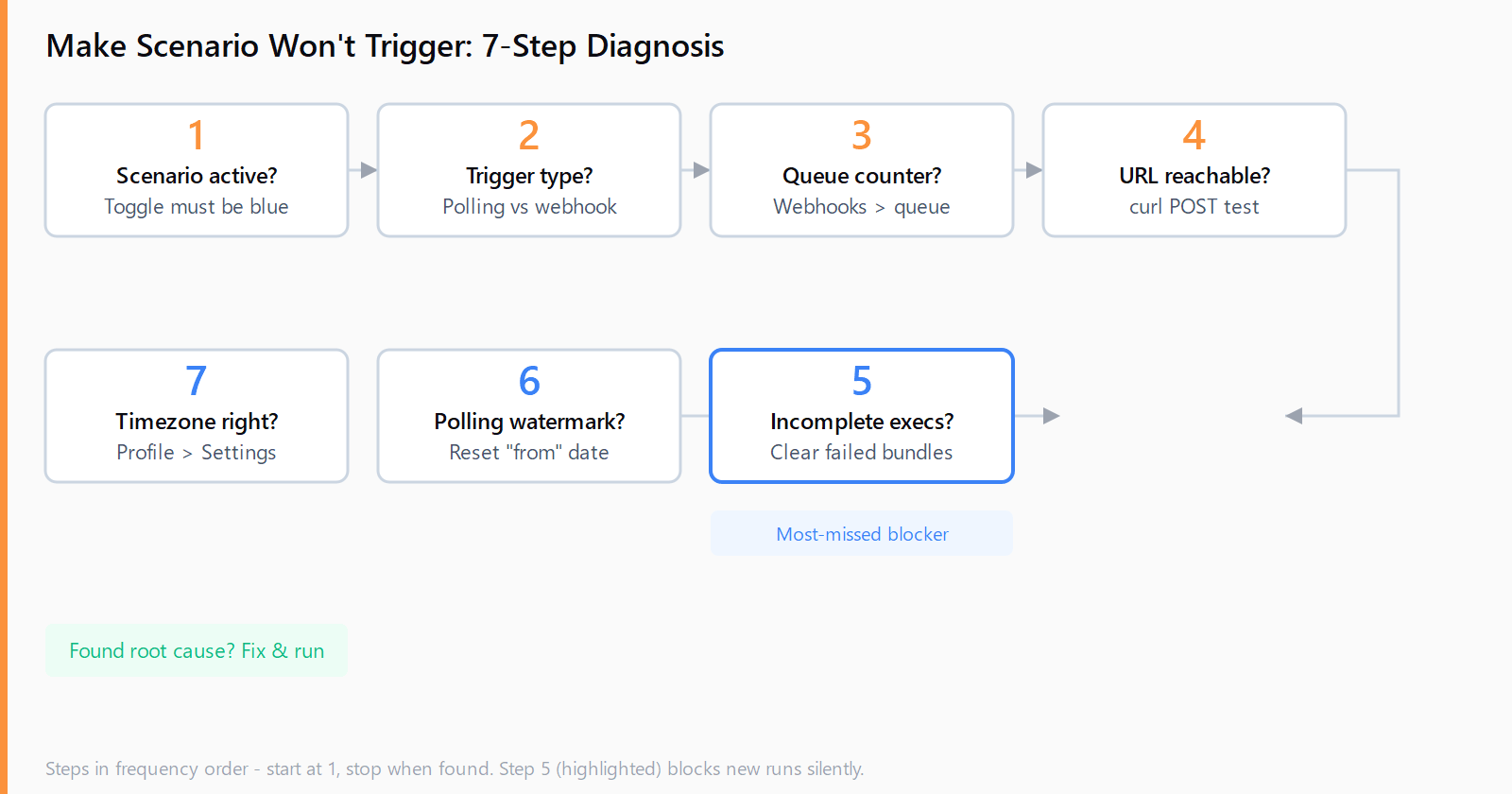
TL;DR: When a Make scenario won't trigger, run seven checks in order: scenario active, trigger type understood, webhook queue counter non-zero, URL reachable, incomplete executions cleared, polling reset, schedule timezone correct.
Make scenarios stop firing for at least seven distinct reasons, and almost none of them produce an obvious error message. The scenario sits idle, the executions counter stays at zero, and the only clue is that nothing happened. Each cause maps to a concrete check; work through them in order and you'll find the blocker in under five minutes. Consult the Automation Error Index for a full catalog of Make errors and confirmed fixes.
How do you diagnose a Make scenario that won't run?
The seven-step sequence below covers the causes in frequency order, starting with the two that account for roughly 60% of cases. Each step takes under a minute.
Step 1: Is the scenario active?
Open the scenario. The toggle in the bottom-left corner must show blue (active). A gray toggle means the scenario is a draft and will never run. Click the toggle to activate; Make will prompt you to confirm scheduling. Symptom: zero executions, no error. Fix: activate the toggle.
Step 2: Which trigger type are you using?
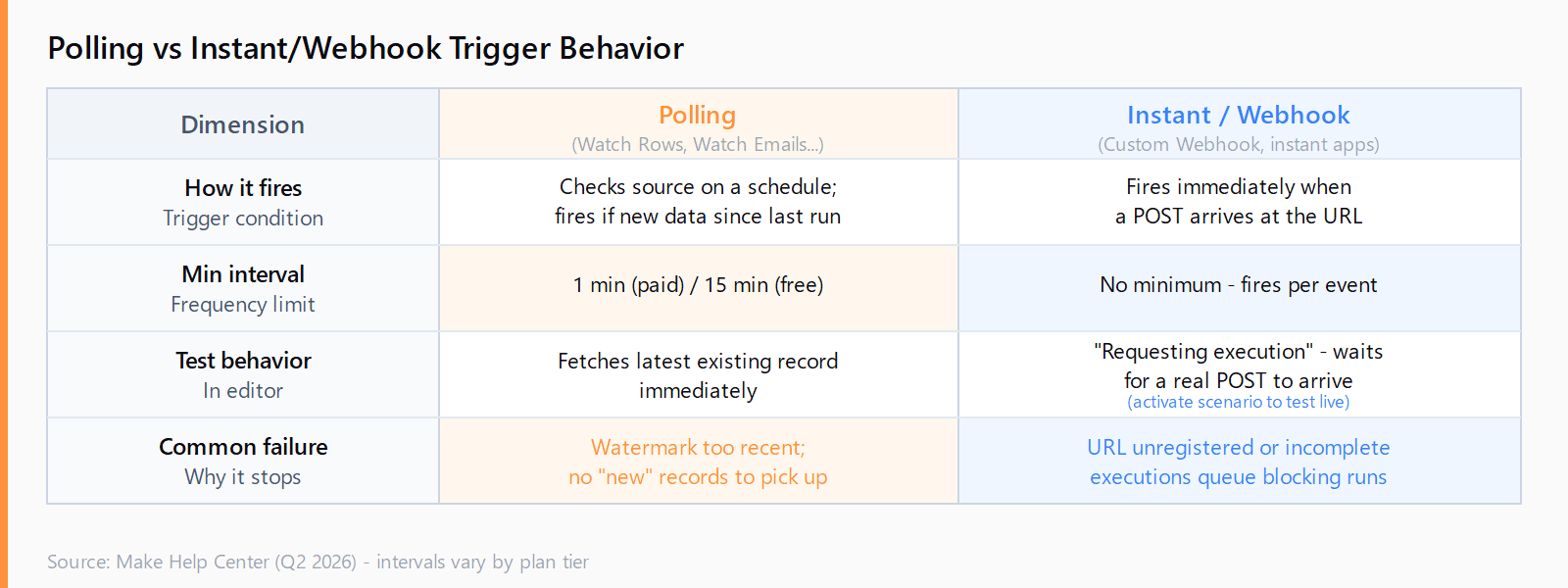
Make has two trigger families with different behavior. Polling triggers (Google Sheets Watch Rows, Gmail Watch Emails, etc.) check for new data on a schedule and only fire when the source has records newer than the "last run" watermark. Instant triggers and custom webhooks fire immediately when a POST arrives. If you confuse the two, you will diagnose the wrong path.
Step 3 (webhook only): Did the request arrive at the queue?
In Make, open Webhooks in the left sidebar. Find the webhook tied to your scenario. The Queue column shows how many payloads are waiting. If the counter is zero, the external service never called the URL -- the problem is on the sender's side, not Make's. Check the sender's delivery logs first. If the counter is non-zero but the scenario hasn't processed them, move to Step 5.
Step 4 (webhook only): Is the webhook URL registered correctly?
Re-open the webhook module in your scenario, copy the URL, and test it directly:
curl -X POST "https://hook.eu1.make.com/YOUR_WEBHOOK_ID" \
  -H "Content-Type: application/json" \
  -d '{"test":"ping"}'
A successful registration returns a brief acknowledgement. If you get a 404 or 400, the webhook was deleted or the scenario was cloned from a template and the URL was not regenerated. Delete the webhook module, add a new custom webhook, and re-register the URL with the sender. This matches the pattern in webhook 404 diagnosis -- registration gaps affect all no-code platforms, not just n8n.
Step 5: Is the incomplete executions queue blocking new runs?
This is the cause most documentation skips. When Make encounters a module error it pauses the execution and, if Allow storing of incomplete executions is enabled, puts the failed bundle into a queue. While that queue holds unresolved bundles, Make will not start a new execution on the same scenario -- the trigger fires but the run never starts. Check via Scenarios > History > Incomplete executions. If bundles are listed, resolve or delete them. The guide to Make incomplete executions covers how to clear the queue without losing data.
Step 6 (polling only): Is the "from" boundary set correctly?
Polling triggers remember the last record they processed via a watermark. If you set up the scenario and chose From now during the initial run, Make ignores all records created before that moment. If your data already existed before you activated the scenario, the trigger has nothing to pick up. Fix: click the small clock icon on the trigger module, select Choose where to start, and either reset to a specific date or clear the watermark entirely to reprocess from the beginning.
Step 7: Is the scheduled time in the right timezone?
Make displays schedule times in your profile timezone, not UTC. If your account is set to UTC+0 but you intended 9 AM in New York (UTC-4), the scenario fires at 1 PM New York time. Go to Profile > Settings, verify the timezone, then re-check your scenario's schedule. The Make 40-minute execution limit guide covers a related problem: scenarios scheduled to run within seconds of each other can also queue behind the execution limit.
How do you test a Make instant webhook trigger without activating the scenario?
You cannot fully test an instant (webhook) trigger in sandbox mode. When you click Run once inside the scenario editor, Make enters "requesting execution" state and waits for a real POST. If no POST arrives, it stays waiting indefinitely. This is not a bug -- it is the expected behavior for instant triggers.
To test, either: (a) activate the scenario, send a real payload, then deactivate; or (b) use the Run this module only option on the webhook module after manually pasting a sample payload. Option (a) is faster and gives you a real execution history to inspect.
How do you check the Make webhook queue counter?
In the Make UI, go to Webhooks in the left sidebar (not inside the scenario editor -- this is a top-level menu item). Each webhook shows its URL, the scenario it belongs to, and a Queue count. Clicking a webhook opens the queue detail with each payload's timestamp, size, and status. If payloads are pending but not processing, the scenario is likely paused by an incomplete executions queue (Step 5).
FAQ
Why does my Make scenario only trigger sometimes?
Intermittent triggering on a polling scenario usually means the source is sporadically providing new data that meets the filter. On webhook scenarios, it usually means the sender is sending on some events but not others. Check the Webhooks queue for delivered payloads and compare against the executions list to find the gap.
What does "requesting execution" mean in Make?
"Requesting execution" is Make's editor state for instant trigger scenarios waiting for an incoming webhook payload to arrive during a manual test run. The scenario is not broken -- it is waiting. Send a real POST to the webhook URL to trigger it, or activate the scenario to let it run automatically.
Does a Make polling trigger reprocess old records when I reset it?
Yes. Clearing the watermark (the "from" boundary on the trigger module) tells Make to treat all existing records as new on the next run. This can generate a large burst of executions if the source has many records. Set a narrow date range when resetting to avoid processing thousands of old items.
Why is my Make scheduled scenario not running at the correct time?
Make schedules display in your profile's timezone. If your profile timezone does not match where you are, every scheduled run will appear to fire at the wrong time. Check Profile > Settings > Timezone and correct it, then update the scenario schedule to match your intended local time.
Can incomplete executions prevent new Make runs?
Yes. If Allow storing of incomplete executions is on and the queue has unresolved bundles, Make holds back new executions on that scenario. Resolve the failed bundles via Scenarios > History > Incomplete executions to unblock it.