
n8n Code node: how to install and use external npm packages
Allowlist and install external npm packages for the n8n Code node - including the n8n 2.x task-runner gotcha most guides skip.
TL;DR: Allow external npm packages in the n8n Code node with NODE_FUNCTION_ALLOW_EXTERNAL, install the package inside the task runner image (not globally on the main n8n container), and require() it in your script.
Most guides stop at setting an environment variable. On n8n 2.x with task runners enabled, the Code node executes inside an isolated runner process. A global npm install -g on the main n8nio/n8n container will not make the module visible to require(). The fix is installing dependencies into the runner environment and allowlisting them in the runner config.
Why does the Code node block npm imports by default?
n8n disables require() for security. Without an explicit allowlist, user JavaScript cannot load built-in Node modules or third-party packages. Two environment variables control what slips through:
NODE_FUNCTION_ALLOW_BUILTIN- built-in modules such ascryptoorfs.NODE_FUNCTION_ALLOW_EXTERNAL- packages installed in the runner'snode_modulestree.
The official modules-in-Code-node guide documents both variables. External support stays off until you set at least one of them.
What changed in n8n 2.x with task runners?
From n8n 1.111.0 onward, JavaScript in the Code node runs through task runners - separate processes that pick up execution jobs from a broker. In internal mode, the main n8n container spawns the runner as a child process. In external mode, a sidecar n8nio/runners container handles execution.
That isolation is the gotcha. Community threads from early 2026 report errors like Cannot find module 'vcards-js' with stack traces pointing at @n8n/task-runner, even after a working pre-2.x Dockerfile that ran npm install -g. The package was installed in the wrong filesystem. It must live where the runner resolves modules - typically /opt/runners/task-runner-javascript/node_modules after you extend the runners image.
If you are self-hosting n8n on a VPS with Docker Compose, treat the runners service as a first-class deployment unit, not an afterthought on the main service.
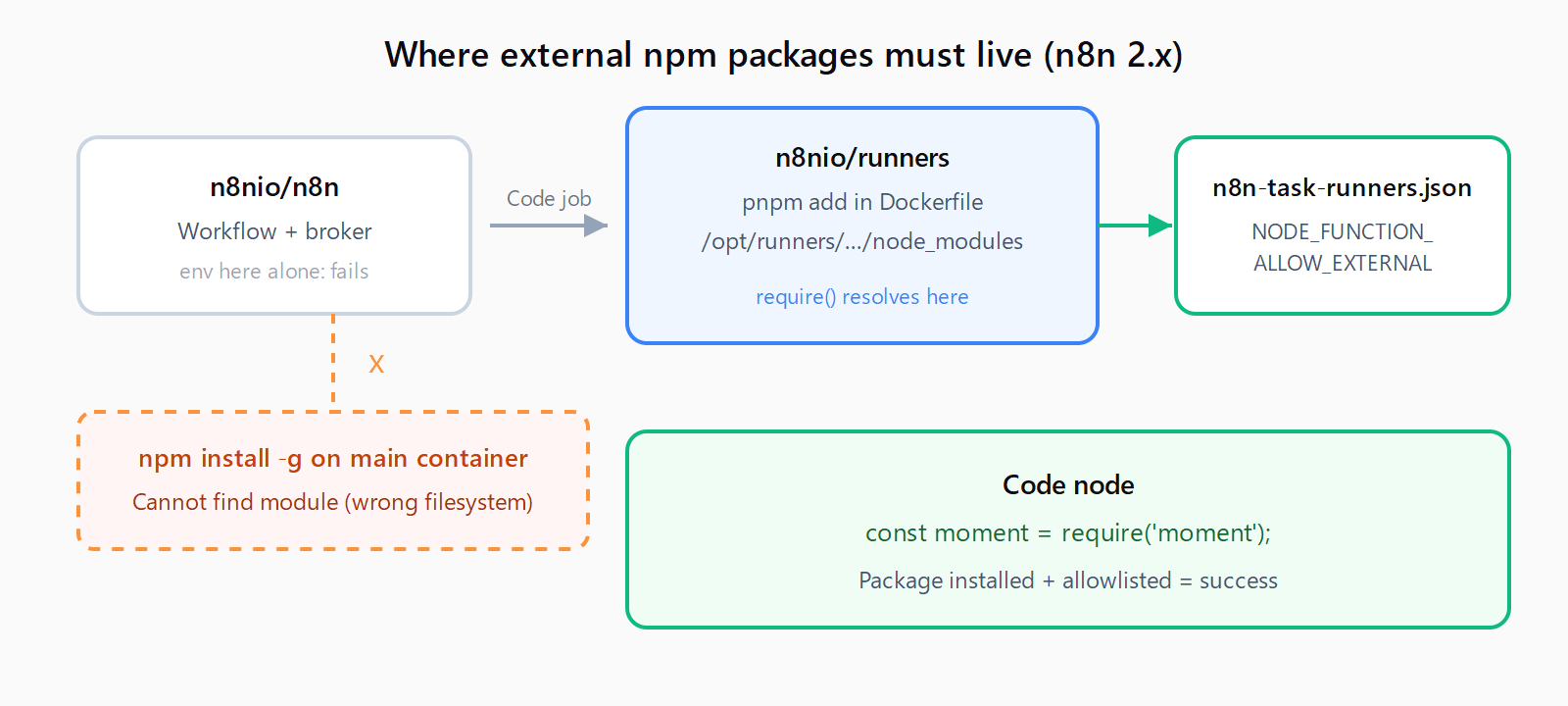
require() resolves inside the task runner sandbox, so dependencies belong in the runners image.How do you allowlist packages for the Code node?
Pick a comma-separated list of package names, or use * to allow everything (convenient on a private instance, risky on multi-tenant hosting).
# Allow only moment and lodash
NODE_FUNCTION_ALLOW_EXTERNAL=moment,lodash

# Allow all external packages the runner has installed
NODE_FUNCTION_ALLOW_EXTERNAL=*

# Allow built-in crypto and fs
NODE_FUNCTION_ALLOW_BUILTIN=crypto,fs
Where you set these variables depends on runner mode. The docs state that when task runners are enabled, the variables belong on the runners, not only on the main n8n service. In external mode, the launcher reads /etc/n8n-task-runners.json and applies env-overrides to the JavaScript runner - setting NODE_FUNCTION_ALLOW_EXTERNAL only on the main n8n container leaves the sandbox without the allowlist.
How do you install external npm packages for internal-mode Docker?
Internal mode is fine for local testing. n8n's own docs warn against internal mode in production because the runner shares the n8n process identity.
- Extend the n8n image. Build a Dockerfile from
n8nio/n8nand install packages into the path n8n documents for external modules, or follow the runners-image path below if you already enabled external runners. - Set allowlist env vars on the n8n service. In docker-compose, add
NODE_FUNCTION_ALLOW_EXTERNAL=moment,lodash(or your package list) under then8nserviceenvironmentkey. Also setN8N_RUNNERS_ENABLED=trueif runners are on. - Restart the container. Environment changes do not apply to a running runner child until restart.
Packages that ship inside the default n8nio/n8n image (community reports mention moment and lodash) work once allowlisted. Anything else needs a custom image build.
How do you install packages for external-mode task runners?
Production setups should use external mode. The supported path from n8n 1.121.0+ is extending n8nio/runners:
FROM n8nio/runners:1.121.0
USER root
RUN cd /opt/runners/task-runner-javascript && pnpm add moment uuid
COPY n8n-task-runners.json /etc/n8n-task-runners.json
USER runner
Match the runners image tag to your n8nio/n8n version. Mismatched tags are a common source of broker connection failures.
Create n8n-task-runners.json beside the Dockerfile:
{
  "task-runners": [
    {
      "runner-type": "javascript",
      "env-overrides": {
        "NODE_FUNCTION_ALLOW_BUILTIN": "crypto",
        "NODE_FUNCTION_ALLOW_EXTERNAL": "moment,uuid"
      }
    }
  ]
}
Mount that file in compose if you customize an existing image instead of baking it in:
task-runners:
  image: your-registry/n8n-runners-custom:1.121.0
  environment:
    - N8N_RUNNERS_TASK_BROKER_URI=http://n8n:5679
    - N8N_RUNNERS_AUTH_TOKEN=your-shared-secret
  volumes:
    - ./n8n-task-runners.json:/etc/n8n-task-runners.json
Rebuild, redeploy both n8n and task-runners, then test. If a package still fails with Module 'x' is disallowed despite a correct allowlist, check GitHub issues for your n8n minor version - some 2.14.x builds had regressions where external runners ignored NODE_FUNCTION_ALLOW_EXTERNAL; switching to internal mode temporarily confirmed the package install was correct.
How do you use an allowed package inside the Code node?
Add a Code node set to Run Once for All Items or Run Once for Each Item depending on whether you need per-item logic. Use CommonJS require():
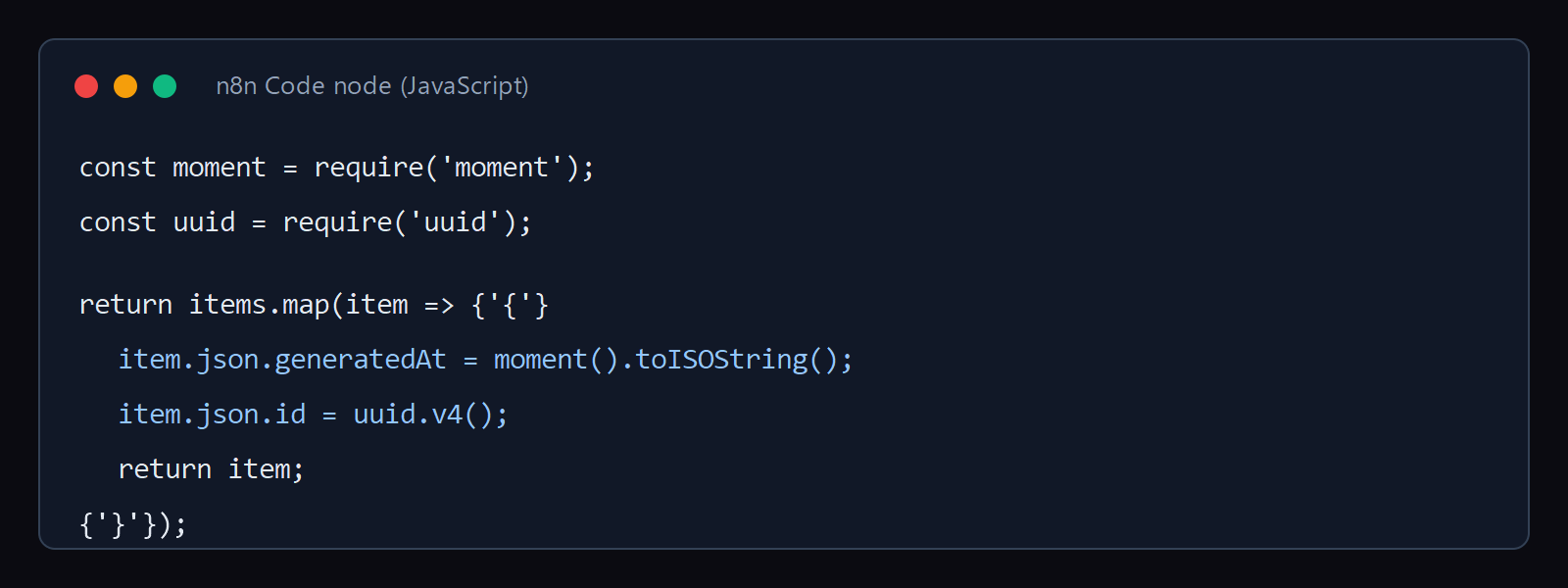
require('moment') and require('uuid') work like standard Node.js imports inside the Code node.const moment = require('moment');
const uuid = require('uuid');
return items.map(item => {
item.json.generatedAt = moment().toISOString();
item.json.id = uuid.v4();
return item;
});Return an array of items in the shape n8n expects. Heavy transformation logic belongs here; for workflow portability, consider exporting and importing n8n workflows as JSON after you validate the Code node output.
What should you do when npm dependencies are too heavy for the Code node?
n8n staff have pointed operators toward three alternatives when arbitrary npm installs fight the sandbox:
- Community nodes - if functionality exists as a community package, install it through n8n's community-node mechanism instead of
require()in Code. - External microservice - run the library in a small API container and call it with an HTTP Request node. This pattern also works for long-running jobs that should not block a runner slot.
- Built-in nodes first - date parsing, JSON transforms, and regex rarely need lodash. Reach for packages only when the standard library falls short.
For AI-heavy flows, pairing a slim Code node with streaming OpenAI responses from n8n keeps runner memory predictable.
How do you verify the package loaded correctly?
- Run a one-line Code node:
return [{ json: { ok: typeof require('moment') === 'function' } }]; - Confirm the output item shows
ok: true. - If you get
Cannot find module, the install path is wrong - rebuild the runners image. - If you get
Module 'moment' is disallowed, the allowlist is missing fromn8n-task-runners.jsonor the runner container was not recreated after the change.
FAQ
Does n8n Cloud let you install custom npm packages in the Code node?
No. n8n Cloud does not expose NODE_FUNCTION_ALLOW_EXTERNAL or custom Docker images. You can use built-in allowlisted modules where n8n permits them, but arbitrary npm installs are a self-hosted feature.
Can you use ES module import syntax instead of require()?
The Code node expects CommonJS require() for external packages in current n8n releases. Stick to const pkg = require('pkg') unless n8n's release notes for your version document ESM support.
Why does npm install inside the running container not stick?
Ephemeral installs disappear on container recreate, and task-runner isolation means installs on the main n8n filesystem never reach the runner sandbox. Bake dependencies into a custom image and version-pin the tag in compose.
Do Python packages follow the same pattern?
Yes, with different variables. Python runners use N8N_RUNNERS_STDLIB_ALLOW and N8N_RUNNERS_EXTERNAL_ALLOW in the same n8n-task-runners.json file, with packages installed via uv pip install in the runners Dockerfile.
Is wildcard allowlisting safe?
NODE_FUNCTION_ALLOW_EXTERNAL=* is acceptable on a single-tenant instance you control. On shared infrastructure, enumerate packages explicitly so a compromised workflow cannot pull in unexpected modules.