
LangChain vs LangGraph: when to use each for AI agents
LangChain is for linear pipelines. LangGraph is for agents that loop, checkpoint state, and wait for human approval. Here is the exact decision criteria.
TL;DR: Use LangChain for linear pipelines (RAG, single-turn Q&A, prototyping) and LangGraph when your agent needs loops, persistent state, human approval gates, or multi-agent coordination -- most production teams run both layers together.
LangChain and LangGraph come from the same company -- LangChain Inc -- and are designed to be used together, not chosen between. The confusion comes from the name overlap. Understanding what each layer actually does makes the decision obvious.
What is the difference between LangChain and LangGraph?
LangChain is a component library and pipeline orchestrator. It gives you model connectors (OpenAI, Anthropic, local models), document loaders, vector store integrations, and LangChain Expression Language (LCEL) for wiring them into linear chains. Data flows in one direction: input enters, gets processed at each step, and output emerges. The underlying execution model is a directed acyclic graph (DAG) -- no loops, no branching back.
LangGraph is a low-level runtime for stateful, long-running agents. It models workflows as a cyclic graph: nodes are Python functions, edges define routing logic, and the graph can loop back on itself. Every run carries an explicit state object (a TypedDict) that each node reads and updates. That state can be checkpointed to a database, paused mid-execution for a human review, and resumed from the exact stopping point -- even across server restarts.
| Feature | LangChain (LCEL) | LangGraph (StateGraph) |
|---|---|---|
| Execution model | Linear DAG | Cyclic state machine |
| Loop support | Limited | Native |
| State management | Implicit (passed between steps) | Explicit TypedDict, checkpointed |
| Human-in-the-loop | Manual workaround | Built-in interrupt/resume |
| Multi-agent support | Possible but awkward | Native (shared state, handoffs) |
| Debugging tool | LangSmith traces | LangGraph Studio (visual replay) |
| Best for | RAG, data pipelines, prototyping | Production agents, long-running tasks |
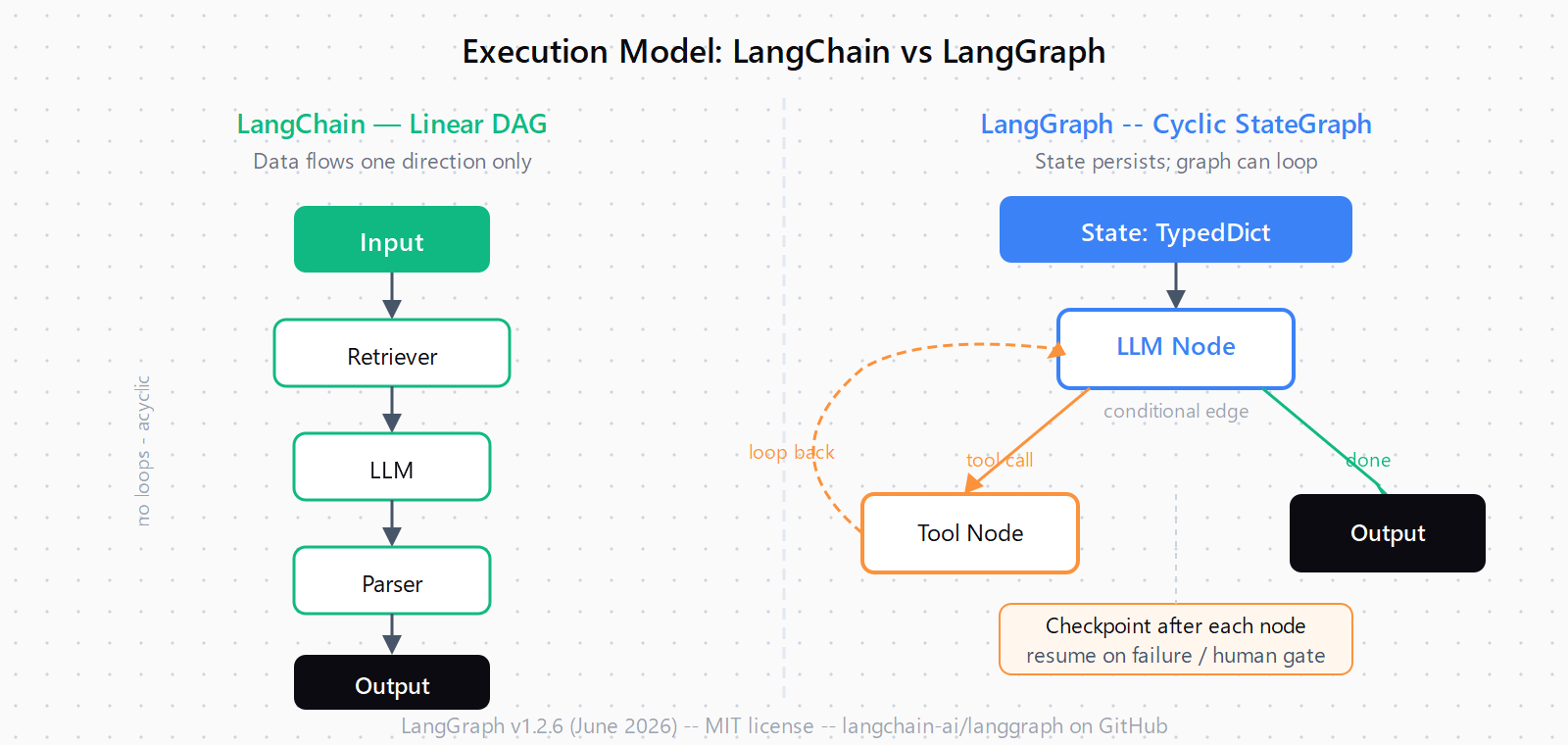
One important note: since October 2025, LangChain's own create_react_agent runs on LangGraph's execution engine under the hood. If you use LangChain's agent helpers today, you are already using LangGraph. The question is whether you need to drop to the explicit StateGraph API for fine-grained control.
When is LangChain enough for your agent?
LangChain handles the job well when the workflow is fixed and linear. Concrete cases where you do not need LangGraph:
- RAG pipeline. Embed documents, retrieve relevant chunks, pass to an LLM, return a grounded answer. No loops, no branching. LCEL chains handle this cleanly in fewer lines than a full StateGraph would take.
- Single-turn structured extraction. Parse an invoice, extract named entities, run a classification. Each request is independent with no cross-run memory needed.
- Rapid prototype. LangChain's abstractions get a working demo on screen faster. LCEL's declarative syntax is easy to read and debug when the pipeline does not branch.
- Linear NLP pipelines. Summarise a document, then answer a question about the summary. The step sequence is predetermined; no node needs to re-run based on output.
When does your agent need LangGraph?
There are five conditions that force the move to explicit StateGraph control. Hit any one of them and the LCEL layer starts fighting you:
- Loops and retries. The agent calls a tool, gets a bad result, and needs to try again with a different approach. LangGraph models this as an edge that routes back to the same node. LCEL has no native cycle.
- Persistent state across turns. A customer support agent that needs to remember the ticket history across a multi-day conversation. LangGraph checkpoints state to a database (SQLite, Postgres, Redis); LangChain's memory components do not durably resume from a checkpoint after a process restart.
- Human approval gates. Place
interrupt_beforeon a dangerous node -- a database write, a live API call, a code execution step -- and the graph pauses, emits the current state, and waits for a humanresume(). This is a first-class feature of LangGraph, not a workaround. - Multi-agent handoffs. One agent researches, another drafts, a third reviews. LangGraph routes between them through shared state and conditional edges. Coordinating this in plain LangChain requires custom orchestration code that duplicates what LangGraph ships out of the box.
- Time-travel debugging. LangGraph Studio, the visual debugger, lets you inspect graph state at any node, replay a failed run from any checkpoint, and branch off a new execution from the problem point. For debugging complex multi-turn agent failures at the multi-tool AI agent level, this cuts hours off diagnosis.
How do LangChain and LangGraph fit together in production?
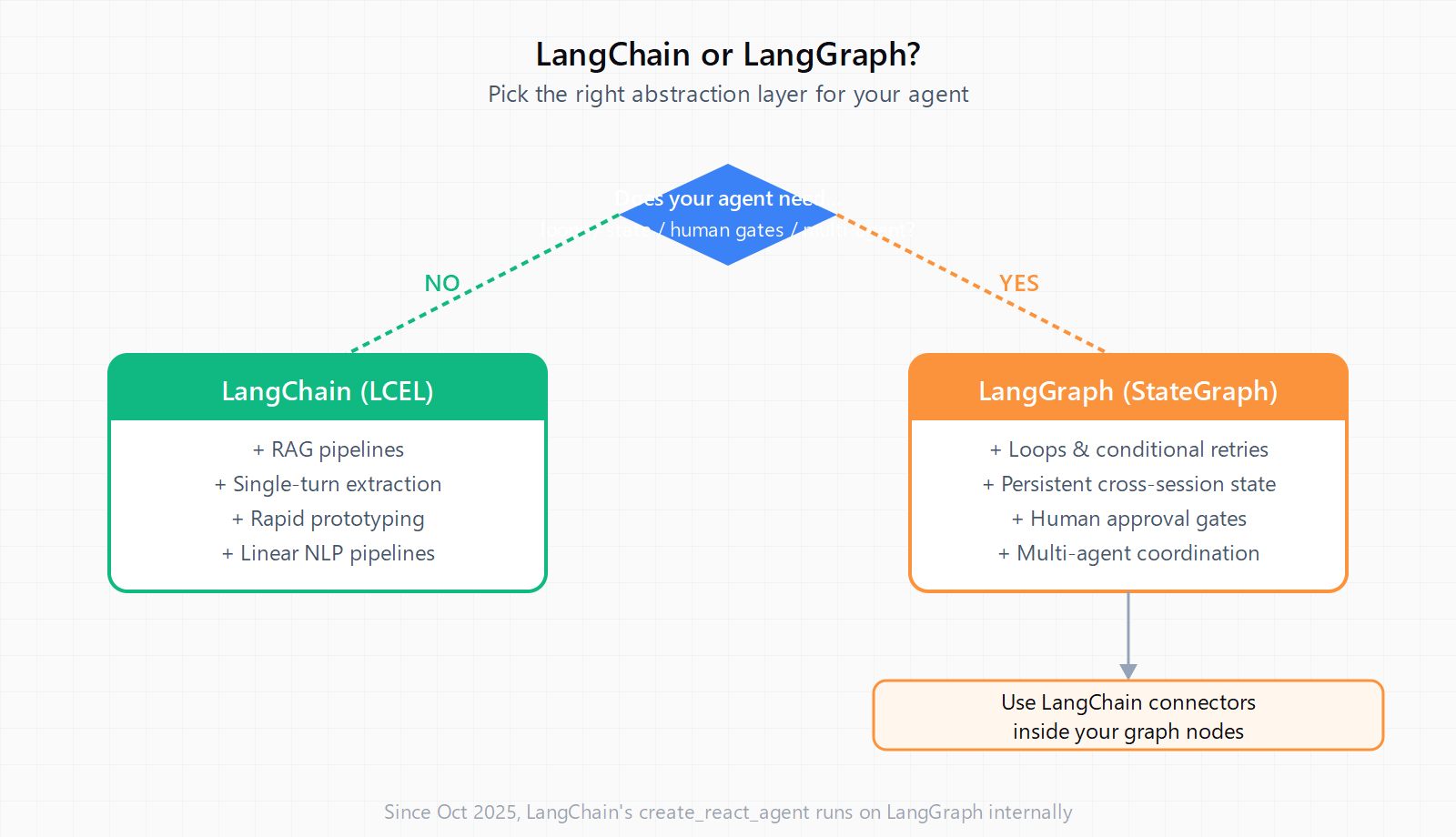
The production pattern is to use both. LangChain supplies the integrations -- ChatOpenAI, TavilySearch, vector store connectors, document loaders. LangGraph runs the agent execution loop on top of those components. A typical setup:
- LangChain retriever fetches relevant context from a vector store.
- LangGraph StateGraph runs the reasoning loop: call LLM node, route to a tool node if needed, check result, loop back or terminate.
- LangSmith traces both layers for observability in production.
This is the same architecture companies like Klarna (85 million users, 80% faster resolution time) and Uber (automated code migrations via networks of agents) have published. Neither replaced LangChain with LangGraph -- they layered LangGraph on top of LangChain components to get stateful orchestration without rewriting their integration code.
If you are building an agentic workflow that replaces a deterministic process, check first whether LangGraph's added complexity is justified -- some tasks that feel like "agent territory" are simpler and cheaper when handled by a linear LCEL chain or even a no-code tool. The no-code AI agent builders category now covers many use cases that previously required a Python framework.
Where do you start in 2026?
Start with LangChain if you are new to these frameworks or building a prototype. Its documentation, tutorials, and component library lower the initial barrier, and create_react_agent gives you a working agent in a few lines. When you hit the first loop, the first "wait for human approval" requirement, or the first "why did it loop forever" production incident, that is the signal to move to explicit StateGraph control. Install both from the start (pip install -U langchain langgraph) since they are designed to run together, and none of your LangChain integration code needs rewriting when you add the graph layer.
LangGraph's latest release is v1.2.6, published June 18, 2026 on GitHub (35.4k stars). It ships as an MIT-licensed library with no vendor lock-in, and a JavaScript/TypeScript equivalent (LangGraph.js) covers the same feature set for Node.js stacks.
FAQ
Does LangGraph replace LangChain?
No. LangGraph is a separate orchestration layer built by the same team. It runs on top of LangChain and uses LangChain's components for integrations. Since October 2025, LangChain's agent helpers call LangGraph internally, so the two are tightly coupled, not competing.
Can I use LangChain and LangGraph in the same project?
Yes -- that is the intended pattern. Use LangChain's connectors, document loaders, and LCEL chains for linear steps. Wrap the parts that need loops, state, or human gates in a LangGraph StateGraph. Both install with a single pip command and share the same Python environment.
When should I switch from LangChain to LangGraph?
When your agent needs to loop, retry conditionally, persist state across sessions, wait for human approval, or coordinate multiple sub-agents. If none of those apply, LCEL is simpler and sufficient.
What is LangGraph Studio?
LangGraph Studio is the visual debugger that ships with the LangGraph platform. It shows the graph structure, lets you inspect state at any node during or after a run, replay execution from any checkpoint, and branch off new paths from any point. It is the primary tool for diagnosing complex multi-turn agent failures.
Is LangGraph production-ready in 2026?
Yes. LangGraph v1.2.6 is the current release (June 2026). Klarna runs it at 85 million users, Uber uses it for automated code migration pipelines, and Elastic runs it for AI-assisted threat detection. It ships with checkpointing, streaming, human-in-the-loop primitives, and LangSmith integration for observability.
What is the difference between LCEL and StateGraph?
LCEL (LangChain Expression Language) is a declarative way to compose linear chains using the pipe operator (prompt | model | parser). StateGraph is LangGraph's cyclic graph runtime with explicit state, conditional edges, and checkpointing. LCEL is simpler; StateGraph is more powerful for anything that branches or loops.