
How to fix n8n webhook not firing (test URL vs production URL gotcha)
n8n has two webhook URLs: test (/webhook-test/) and production (/webhook/). Using the wrong one for your mode causes silent failures. Here is how to check which URL your integration is calling and how to fix it.
TL;DR: n8n has two webhook URLs - test (/webhook-test/) and production (/webhook/) - and the wrong one for your mode causes the webhook to silently not fire; copy the production URL, activate the workflow toggle, and update your external service.
You build a workflow, paste the webhook URL into Zapier or a third-party API, and nothing arrives. No errors, no logs, no response - the webhook just does not trigger. Nine times out of ten, you have either used the test URL in production, or the production URL without activating the workflow. Here is exactly how to diagnose and fix both variants.
Why does n8n have two webhook URLs?
Every n8n Webhook node shows two URLs in the editor panel:
- Test URL:
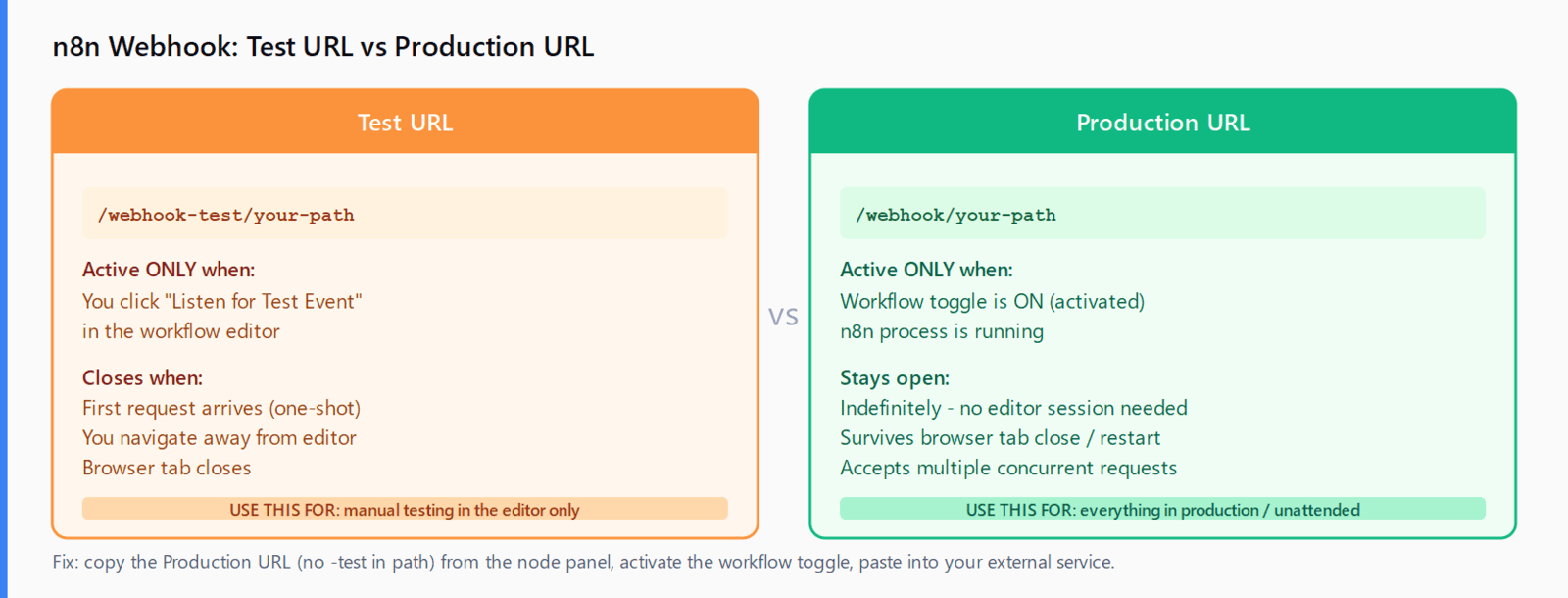
https://your-n8n.example.com/webhook-test/your-path- only active while you are actively listening in the workflow editor. Click "Listen for Test Event" to open it; it closes when the request arrives or when you navigate away. - Production URL:
https://your-n8n.example.com/webhook/your-path- only active when the workflow is published and activated. No editor session required.
The path segment after /webhook-test/ or /webhook/ is the same - only the prefix differs. That single character difference (-test) is the source of most "webhook not firing" reports.
How do you tell which URL your external service is calling?
Check the URL you pasted into your external service or configured in your integration. The easiest way:
# Does your integration URL contain -test?
echo "https://your-n8n.example.com/webhook-test/abc123"
#                                           ^^^^^ this = test URL, expires with editor session

echo "https://your-n8n.example.com/webhook/abc123"
#                                         no -test = production URL, needs workflow activated
If your URL contains /webhook-test/, your external service is calling the test endpoint. That endpoint is only open while you have the n8n editor open and have clicked "Listen for Test Event." The moment you close the browser tab or the first test request comes in, the listener closes. Subsequent calls from your integration get nothing.
How do you fix a test URL configured as production?
- Open the workflow in the n8n editor.
- Click the Webhook node to open its panel.
- Copy the Production URL (the one without
-testin the path). - Go to your external service and replace the old URL with the production URL.
- Activate the workflow using the toggle in the top-right of the editor. The toggle must be ON for the production webhook to accept requests.
Once the workflow is active, the production endpoint stays open permanently - it does not require an editor session and survives server restarts (as long as n8n is running). For other common n8n webhook failure patterns including 404 responses, see the n8n webhook 404 fix guide and the Automation Error Index for a full catalog of n8n HTTP errors.
What if you are using the production URL but the webhook still does not fire?
Three secondary causes after confirming the URL prefix is correct:
Workflow not activated. The production URL requires the workflow to be in the active state - the toggle at the top of the editor must be ON. Workflows default to inactive. Check: navigate to the n8n workflows list and confirm the toggle next to the workflow shows active (green). If it is grey, activate it there.
WEBHOOK_URL environment variable is wrong or missing. If n8n is self-hosted, the WEBHOOK_URL environment variable must match the public URL your external service uses to reach n8n. If WEBHOOK_URL is set to http://localhost:5678 (the default in many Docker Compose examples), n8n will generate webhook URLs with that base - and your external service will call localhost, which resolves to its own machine, not yours. Fix: set WEBHOOK_URL=https://your-public-domain.example.com in your environment and restart n8n.
Path mismatch from a workflow duplicate or rename. When you duplicate a workflow, n8n may assign the Webhook node a new path to avoid collisions. The path shown in the node panel is the canonical one. If you renamed the workflow or duplicated it, open the node, note the current path, and update the URL in your external service to match.
How do you verify the webhook is receiving requests?
# Send a test POST to the production URL while the workflow is active
curl -X POST https://your-n8n.example.com/webhook/your-path \
  -H "Content-Type: application/json" \
  -d '{"test": "payload"}'

# Expected for an active production webhook: HTTP 200 or 404 (if path is wrong)
# Expected for an inactive workflow: no response or connection refused
Check n8n's executions panel after the curl command. If the execution appears there, the webhook is firing correctly - the problem is upstream in your external service. If no execution appears and curl returns a 404, the workflow is not active or the path does not match.
FAQ
Why does the test URL stop working after one request?
The test listener closes after the first payload arrives - it is a one-shot capture designed for debugging in the editor. For persistent listening, use the production URL with the workflow activated.
Can I use the test URL in a production integration?
Technically yes, but only while you are manually clicking "Listen for Test Event" in the editor. This is impractical for unattended integrations. Always use the production URL for anything that runs without a human present.
Does activating the workflow affect other nodes or credentials?
No. Activation only enables the webhook listener. Credentials, node configurations, and workflow logic are not changed. The workflow resumes executing from the trigger point when a request arrives.
What is the difference between the test and production URL paths?
The test URL uses /webhook-test/ as the path prefix; the production URL uses /webhook/. The path segment after the prefix (your custom path or the auto-generated UUID) is the same for both.
Why is my self-hosted n8n webhook URL showing localhost?
The WEBHOOK_URL environment variable defaults to http://localhost:5678 in many Docker Compose setups. Set it to your public-facing URL and restart n8n. The webhook URLs shown in the editor are derived from this variable.
My webhook fires in the editor but not from my integration - what is wrong?
Your integration is almost certainly calling the test URL. The editor test listener and the production endpoint are separate. Copy the production URL from the node panel (no -test in the path), activate the workflow, and update your integration.