
Fix the Zapier Tables Cannot Create ULID 400 Error
The 400 'Cannot create ULID from string' error is a field-mapping mistake, not a broken table - here is how to feed Zapier Tables a valid Record ID.
TL;DR: Zapier Tables' "Cannot create ULID from string" error means the action's Record ID field got an external app's ID instead of the 26-character ID Zapier Tables generates - map the Tables Record ID, or add a Find Record step first.
This 400 hits Zapier Tables Update Record, Increment Value, and AI Actions called from a custom GPT. The full message reads like Error code 400: Error found at request.body.payload.record_id: Cannot create ULID from string of length 8 (general:validation_error). The number changes (2, 4, 8) but the cause never does: the Record ID field received a value that is not a Zapier Tables record identifier. It is a field-mapping mistake, not a bug in your table.
What does "Cannot create ULID from string of length N" mean in Zapier Tables?
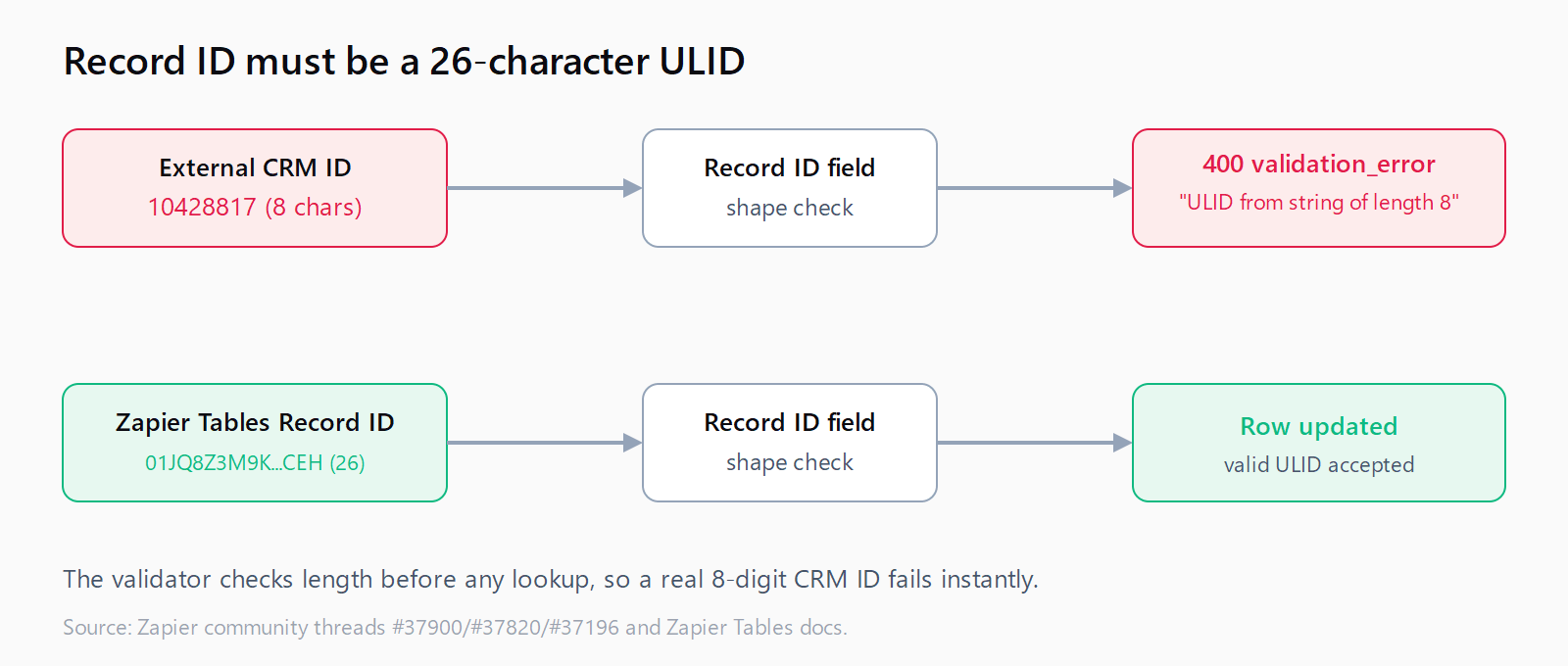
Every row in a Zapier Table has an internal identifier called a ULID - a Universally Unique Lexicographically Sortable Identifier. A ULID is always 26 characters (Crockford base32), for example 01JQ8Z3M9K7F2VYB4T6R0XWCEH. When an action needs to know which row to update, it validates that the Record ID you gave it can be parsed as a ULID.
"length 8" (or 2, or 4) is the tell. You passed an 8-character string - almost always an ID from another app, a spreadsheet row number, or a name - and Zapier rejected it before touching the table because 8 characters cannot be a 26-character ULID. The validator never even looks the record up; the string fails the shape check first.
Why is the Record ID field getting the wrong value?
The mistake is upstream in the Zap. The Record ID field was mapped to an ID that belongs to a different system:
- An external app's record ID. A Copper, Salesforce, or HubSpot object ID (often 6-10 digits) is not a Zapier Tables ULID. Mapping a CRM record straight into the Record ID field is the single most common trigger.
- A table cell value. Mapping a column like "Order ID" or "Email" into Record ID feeds a business value, not the row's internal ULID.
- An AI Actions guess. When a custom GPT calls a Zapier AI Action, it sometimes invents a short
record_idor reuses one from earlier context. That short string fails the same ULID check.
In every case the fix is to feed the Record ID field the value Zapier Tables itself produced for that row, not an identifier borrowed from anywhere else. This is the same class of error as mapping a CRM record field into the wrong slot - the data looks like an ID, so it is easy to grab the wrong one.
How do you fix the ULID error when you already have the record?
If the step that created or found the row is earlier in the same Zap, Zapier exposes its ULID as an output field named Record ID (sometimes id). Map that field into your Update Record or Increment Value action:
- Open the failing action and find the Record ID input.
- Delete whatever is mapped there now (the external ID).
- Insert the Record ID output from the Zapier Tables step that created or matched the row - it will be the 26-character value.
- Re-test the step; the 400 disappears once the field holds a valid ULID.
If you are chaining actions, the "Create Record" step's own Record ID output is the correct thing to pass to a later "Update Record" - never the source app's ID.
How do you fix it when you do not have the ULID upstream?
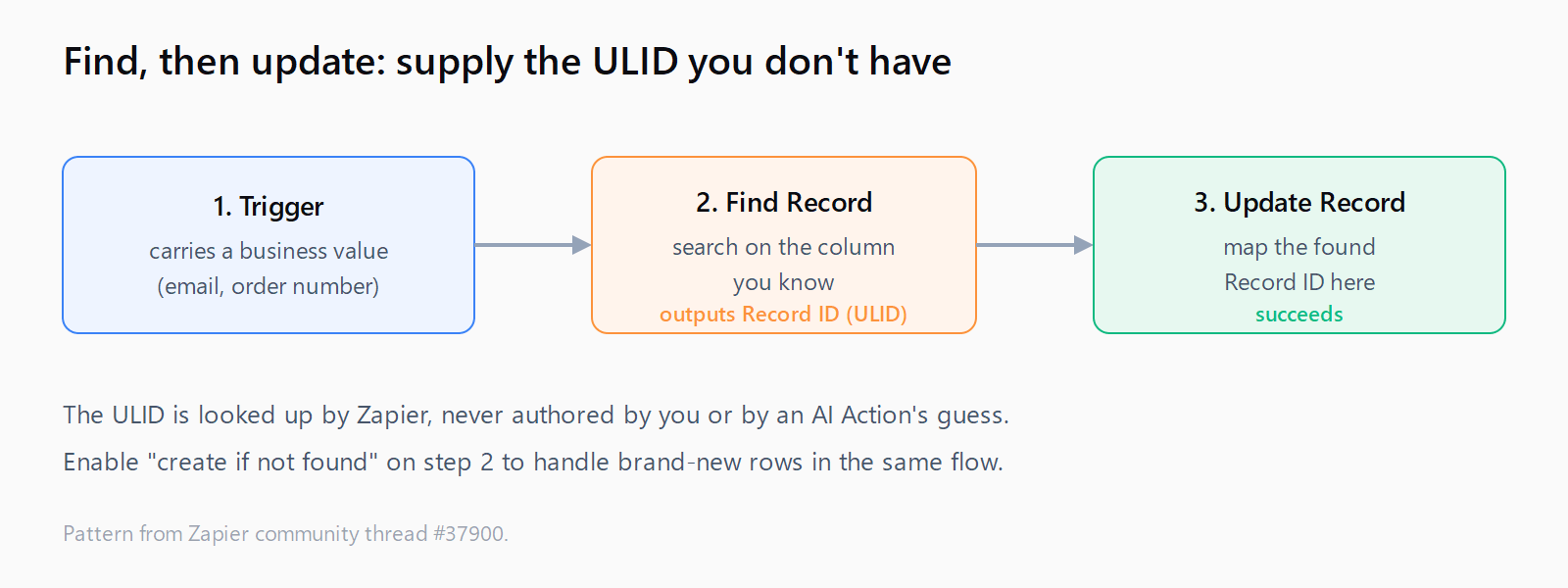
Often you only know a business value - an email, an order number - and need to update the matching row. You cannot invent the ULID, so retrieve it first with a search action:
- Add a Zapier Tables - Find Record action before the update.
- Search on the column you do know (e.g. Email equals the trigger's email).
- Map the Find Record step's Record ID output into the Update Record action's Record ID field.
- Optionally enable "create if not found" on the search so new rows are handled too.
This two-step "find, then update" pattern is the durable fix: it works even when the trigger carries no Zapier identifier at all, which is the usual situation when the data originates in a Zapier AI workflow or an external CRM. For AI Actions specifically, add the Find Record step inside the action chain so the GPT never has to supply a record_id it does not actually know.
How do you stop AI Actions from sending an invalid record_id?
Custom GPTs calling Zapier AI Actions are the trickiest source because the model fills in parameters. Two guardrails help:
- Do not expose a raw "Update Record by ID" action to the GPT. Expose a search-then-update flow so the ULID is looked up by Zapier, not authored by the model.
- Constrain the action's field hints. In the AI Action config, mark Record ID as "have AI guess" only if a prior step supplies it; otherwise set it explicitly, so the model cannot hallucinate an 8-character string.
Zapier's own Zapier Tables documentation confirms the Record ID is generated by Tables, which is why any externally sourced value fails the check. If you hit related platform limits while building the search branch, our roundup of Zapier and Make errors lists the sibling validation failures worth knowing.
FAQ
What is the correct length of a Zapier Tables Record ID?
26 characters. A ULID is a fixed 26-character Crockford base32 string. Any value shorter or longer than 26 characters fails the "Cannot create ULID from string" validation.
Why does the error say "length 2" or "length 4" instead of 8?
The number is just the length of whatever you mapped in. "length 2" means a two-character value reached the Record ID field; "length 4", four characters. All of them fail because none is a 26-character ULID.
Can I convert my external app's ID into a ULID?
No. The ULID is assigned by Zapier Tables when the row is created and has no relationship to any external ID. You must look up the Zapier Tables Record ID with a Find Record step rather than transform an outside identifier.
The value looks like a valid ID - why is it still rejected?
Zapier validates the shape before the lookup. A CRM ID of "10428817" is a legitimate ID in that CRM but is only 8 characters, so it fails the ULID parse instantly regardless of whether a matching row exists.
Does this error mean my table or data is corrupted?
No. Your table is fine. The error is raised at request validation, before any row is read or written, so nothing in the table changed. Fix the field mapping and re-run the step.