
Fix n8n MCP AI Agent OAuth2 Silent Tool Failure
The AI Agent says it used no tools and the run shows success - the real cause is an OAuth2 token n8n never refreshes in an MCP context.
TL;DR: n8n doesn't refresh OAuth2 tokens for HTTP tool nodes called from an MCP AI Agent, so ~an hour in the tool fails silently and the Agent reports "None of your tools were used" - upgrade past n8n 2.10-2.11.
This bites a specific pattern: an n8n MCP server workflow whose AI Agent calls HTTP Request tool nodes that authenticate with OAuth2. It works right after you publish, then stops roughly 60 minutes later with no error surfaced anywhere obvious. The execution is marked successful, so alerting never fires, and the only hint is the Agent's own note that it used no tools. The root defect - n8n refreshing tokens for manual runs but not for tool calls made from the MCP context - was tracked in n8n issue #22893.
What does "None of your tools were used in this run" mean here?
The AI Agent tried to call a tool, the tool call failed at the credential layer, and the Agent fell back to answering from the model alone. Because the tool node returned nothing usable rather than throwing, n8n recorded the run as a success and the Agent honestly reported that no tool contributed. It is not a prompt problem and not a model refusing to use tools - the tool was reachable but its OAuth2 request was rejected.
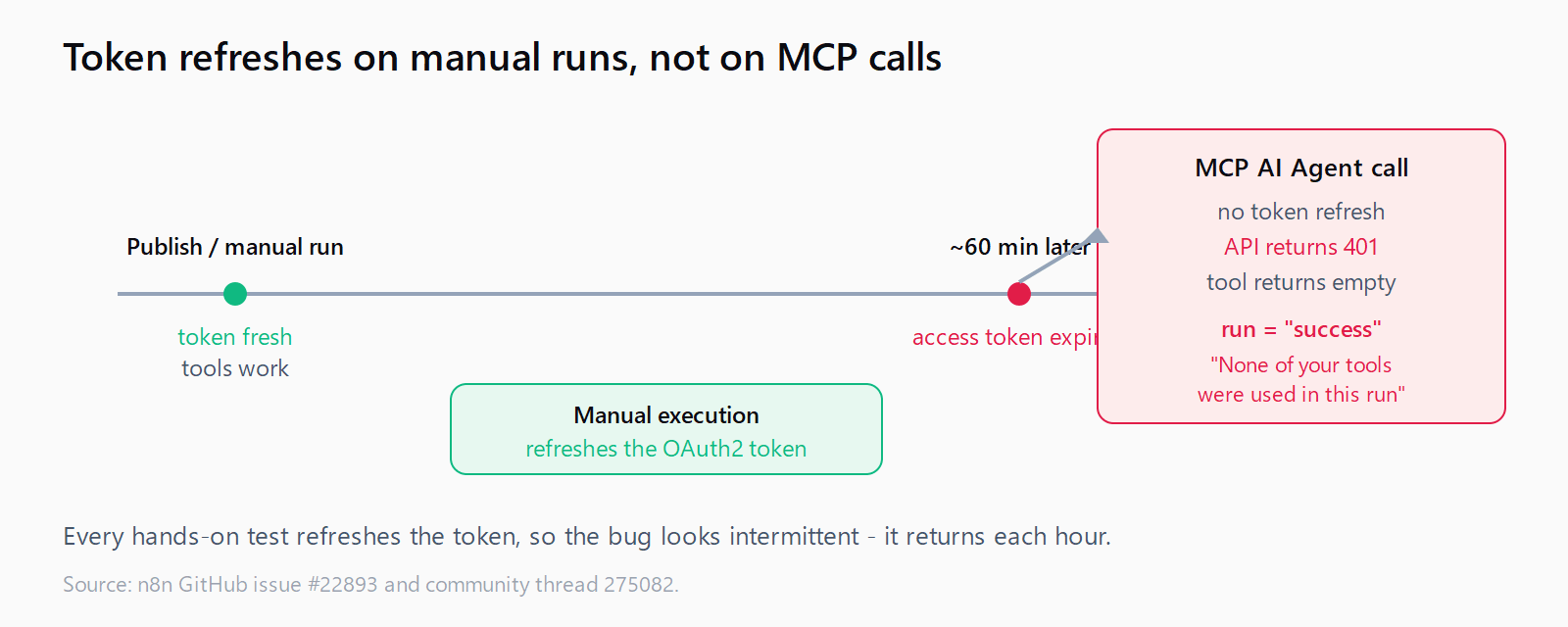
The giveaway is timing. Immediately after you publish or manually execute the workflow, tools work. An hour later - the typical OAuth2 access-token lifetime - the same run produces the "no tools" message. Nothing in the workflow changed; the token behind the HTTP Request tool simply expired.
Why do the OAuth2 tool calls fail after about an hour?
n8n stores an OAuth2 credential as a short-lived access token plus a long-lived refresh token. When the access token expires, n8n is supposed to use the refresh token to mint a new one before the request goes out. That refresh happens correctly for a manual execution of the HTTP Request node - but not when the same node is invoked as a tool from inside an MCP-served AI Agent run.
So the credential's stored token goes stale, the MCP-context call sends the expired access token, the API returns 401, and the tool node swallows it as an empty result. Manually opening and running the node refreshes the token again, which is exactly why the bug looks intermittent: every hands-on test "fixes" it for another hour. This is a different failure from n8n's OAuth callback 401 error, which happens at connect time; here the initial auth succeeded and only the mid-session refresh is broken.
How do you fix the n8n MCP OAuth2 token refresh for good?
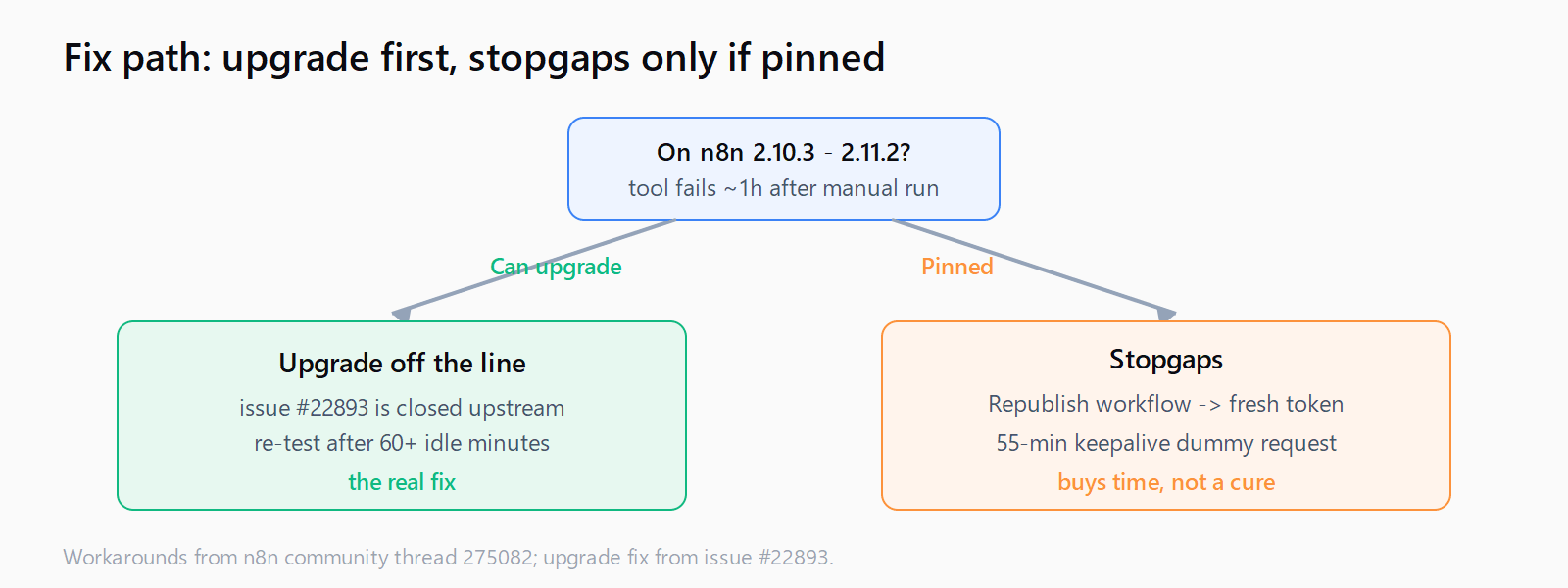
The durable fix is to move off the affected release. The token-refresh defect in issue #22893 is closed upstream, and the fix ships in current n8n. If you are on the range where this reproduces - reported on 2.10.3 and still present through 2.11.2 - upgrade to the latest 2.x and re-test:
docker compose pull
docker compose up -d
docker compose exec n8n n8n --version   # move off the 2.10-2.11 line
After upgrading, leave the workflow idle for over an hour and then trigger it through the MCP client, not by opening the node. If the tool call still returns data after the token would have expired, the refresh path is fixed. Upgrading the runtime is also the fix that pairs cleanly with the queue-mode n8n MCP webhook memory leak, another MCP-context bug resolved by staying current.
How do you keep a pinned 2.10-2.11 install working?
If you cannot upgrade immediately, two community workarounds keep the token warm. Treat them as stopgaps, not fixes:
- Republish the MCP workflow. Unpublishing and republishing forces n8n to re-initialise the credential and mint a fresh token. It buys another token lifetime but has to be repeated, so it only suits low-frequency workflows.
- Schedule a 55-minute keepalive. Add a separate scheduled workflow that fires a dummy HTTP Request on the same OAuth2 credential every 55 minutes. Because a manual/scheduled execution does refresh the token, this keeps the access token fresh so the MCP-context call never meets an expired one.
The keepalive is the more reliable of the two because it removes the human step. Point it at a cheap, side-effect-free endpoint (a GET on the provider's "me" or "ping" route) so you are not mutating data every hour just to refresh a token. Both stopgaps only buy time until you can upgrade, and the pattern sits alongside sibling n8n failures in the Automation Error Index.
How do you confirm the token is the cause and not the Agent?
- Run the workflow manually - if tools work right after a manual run, the Agent and prompt are fine.
- Wait 60+ minutes without touching the node, then trigger via the MCP client.
- If it now reports "None of your tools were used," open the credential and check its
updatedAt- a stale timestamp means the token never refreshed. - Manually execute the HTTP tool node once; the timestamp updates and tools work again, confirming the refresh path is the fault.
FAQ
Why is the execution marked successful if the tool failed?
The HTTP Request tool returns an empty result to the Agent instead of throwing, so n8n sees no error and records success. The only signal is the Agent's "None of your tools were used in this run" message, which is not an error status.
Does raising the OAuth2 token lifetime fix it?
Only partially. A longer access-token lifetime delays the failure but does not repair the missing refresh, so the tool still breaks once the longer token eventually expires. Fix the refresh path by upgrading instead.
Why does manually running the node make it work again?
A manual execution follows the code path that does refresh the OAuth2 token, so it mints a fresh access token. That is why every hands-on test appears to fix the problem for roughly another hour.
Is this the same as the n8n OAuth callback 401?
No. The callback 401 happens when connecting the credential (a redirect-URL or state mismatch). This bug happens after a working connection, when the mid-session token refresh silently fails inside an MCP-served Agent run.
Which n8n versions are affected?
It was reported on 2.10.3 and persisted through 2.11.2. The underlying defect is tracked in issue #22893 and is closed upstream, so moving to a current n8n release is the fix.