
How to fix Claude Code creating a 'nul' file on Windows
Claude Code on Windows under Git Bash writes an undeletable file named nul into the project root. Delete it with the Win32 \?\ prefix, then update additionalDirectories so the CLI stops re-creating it.
TL;DR: If Claude Code keeps dropping a file named nul in your Windows project and Explorer or del nul refuses to remove it, the fix is two commands.
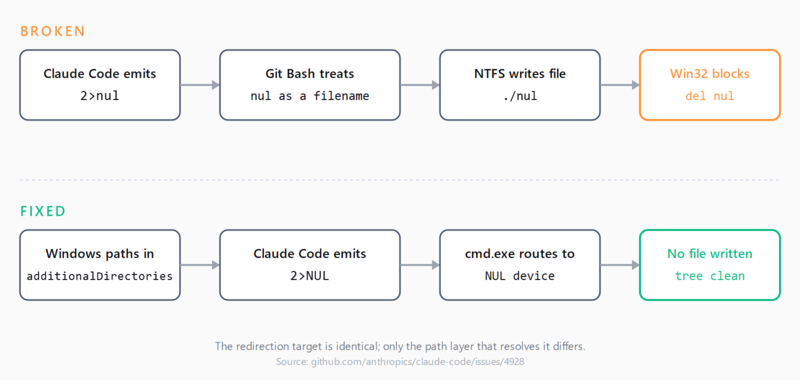
First, delete the file with the Win32 extended-length prefix from cmd.exe: del \\?\C:\full\path\to\project\nul. Then stop Claude Code from re-creating it by replacing any Unix-style entries under additionalDirectories in .claude/settings.local.json with Windows paths, so the CLI stops emitting > /dev/null redirections that Git Bash writes as a literal file.
:: cmd.exe - run from any directory, full path required
del \\?\C:\Users\you\projects\your-repo\nul
That clears the immediate breakage. The rest of this post explains why the file is undeletable through normal commands, why Claude Code creates it in the first place, and the configuration change that stops the loop on Claude Code 1.0.62 through 2.0.22 - the range where the bug is still confirmed in issue #4928.
Why Windows refuses to delete a file named nul
NUL is one of the names the Win32 layer reserves as a device, alongside CON, PRN, AUX, COM1-9, and LPT1-9. Any path resolving to one of these names is intercepted before it reaches NTFS, which is why del nul, File Explorer, and git rm nul all fail.
The escape hatch is the \\?\ namespace prefix, documented in Microsoft's file-naming docs. The prefix tells the kernel to skip path parsing and pass the literal string to the filesystem driver. NTFS has no reserved-name concept, so it deletes the entry. The prefix only works with absolute paths.
How Claude Code ends up writing the file
Claude Code runs shell commands by spawning a shell process. On Windows, the default shell varies: Git Bash, WSL, PowerShell, or cmd.exe. When the model emits 2>nul by analogy with cmd.exe's null device but the script runs under Git Bash, Git Bash treats nul as a relative filename and writes an empty file in the project root. Issue #4928 traces this to a cross-platform redirection path that does not branch on the actual shell. Anthropic closed the issue via PR #13949, but the artefact still surfaces on 2.0.x releases when generated commands take a Unix shape.
Delete the file from the project
Use one of these depending on the shell you are in. All three need the project's full absolute path - the \\?\ prefix only works with absolute paths.
| Shell | Command |
|---|---|
| cmd.exe | del \\?\C:\Users\you\projects\repo\nul |
| PowerShell | Remove-Item -LiteralPath '\\?\C:\Users\you\projects\repo\nul' |
| Git Bash / WSL | rm "./nul" from inside the project directory |
The Git Bash form works because it bypasses the Win32 path parser entirely - the POSIX layer reads the directory entry and unlinks it through the same syscall that NTFS exposes via \\?\. If the file is in a OneDrive- or SharePoint-synced folder, sync stops working until the file is gone; issue #16604 reports collaborators getting "Access Denied" on the parent folder until the nul artefact is removed.
Stop Claude Code from re-creating the file
The cleanest mitigation is configuration-side. Open .claude/settings.local.json and check additionalDirectories. If any entry uses Unix-style paths (/c/Users/you/... or /mnt/c/...) while the project itself lives on a Windows path, the mismatch nudges the model toward Unix-style redirections. Replace the entries with Windows absolute paths so every directory resolves through the same path layer.
{
  "additionalDirectories": [
    "C:\\Users\\you\\projects\\repo",
    "C:\\Users\\you\\notes"
  ]
}
If the file still appears intermittently after the config change, add a PostToolUse hook that runs the PowerShell delete after every tool call. Treat the hook as a stop-gap; keep it until your Claude Code release stops emitting cross-shell redirections.
When to add nul to .gitignore
If a git commit already failed with "fatal: cannot create file 'nul': Invalid argument" and you cannot wait to clean the working tree, add nul on its own line to .gitignore. The entry only stops the file from being staged in future commits; it does not delete the existing file or remove it from past commits. Treat the gitignore entry as belt-and-braces alongside the cleanup command, not as a substitute. Do the same in any Cursor rules silently failing to load investigation that points at the same project root, since the artefact can corrupt rule discovery there too.
If you are also running Claude Code on Windows with MCP servers configured, the nul-file fix and the MCP setup are independent - both can fail at the same time, but neither change affects the other.
FAQ
Why is nul a reserved name on Windows in 2026?
Backwards compatibility. Reserved device names date to MS-DOS and are still honoured by the Win32 path parser so legacy scripts keep working. NTFS does not enforce the rule; Microsoft has no plan to remove it.
Why does del nul fail but del with the question-mark prefix work?
del nul is parsed by Win32, which intercepts the reserved name. del \\?\C:\path\to\nul skips path parsing and passes the absolute path to NTFS, which has no reserved-name list and deletes the directory entry.
Will adding nul to .gitignore prevent corrupting commits?
It stops future commits from staging the file, which is enough to keep git commit working. It does not delete the file or remove it from past commits, and OneDrive and SharePoint sync still fail until the artefact is gone. Pair the entry with the cleanup command.
Does this happen on macOS or Linux?
No. Both treat nul as an ordinary filename and /dev/null as the actual device, so the redirection always reaches the right target. The bug only fires on Windows hosts where the executing shell is Git Bash or a wrapper that does not translate the redirection target.
Is the bug fixed in newer Claude Code releases?
Issue #4928 was closed via PR #13949, but reports recurred on 2.0.x through 2.0.22, including in issue #16604 on 2.0.76. The additionalDirectories mitigation is the de facto fix today.
Can OneDrive or SharePoint sync break if the project has a nul file?
Yes. Sync clients call into the Win32 path layer when staging files; the reserved-name interception causes sync to fail with an Access Denied error on the parent folder, and collaborators lose access to the entire directory until the artefact is removed.