
How to fix Power Automate flow 401 / 403 Unauthorized errors
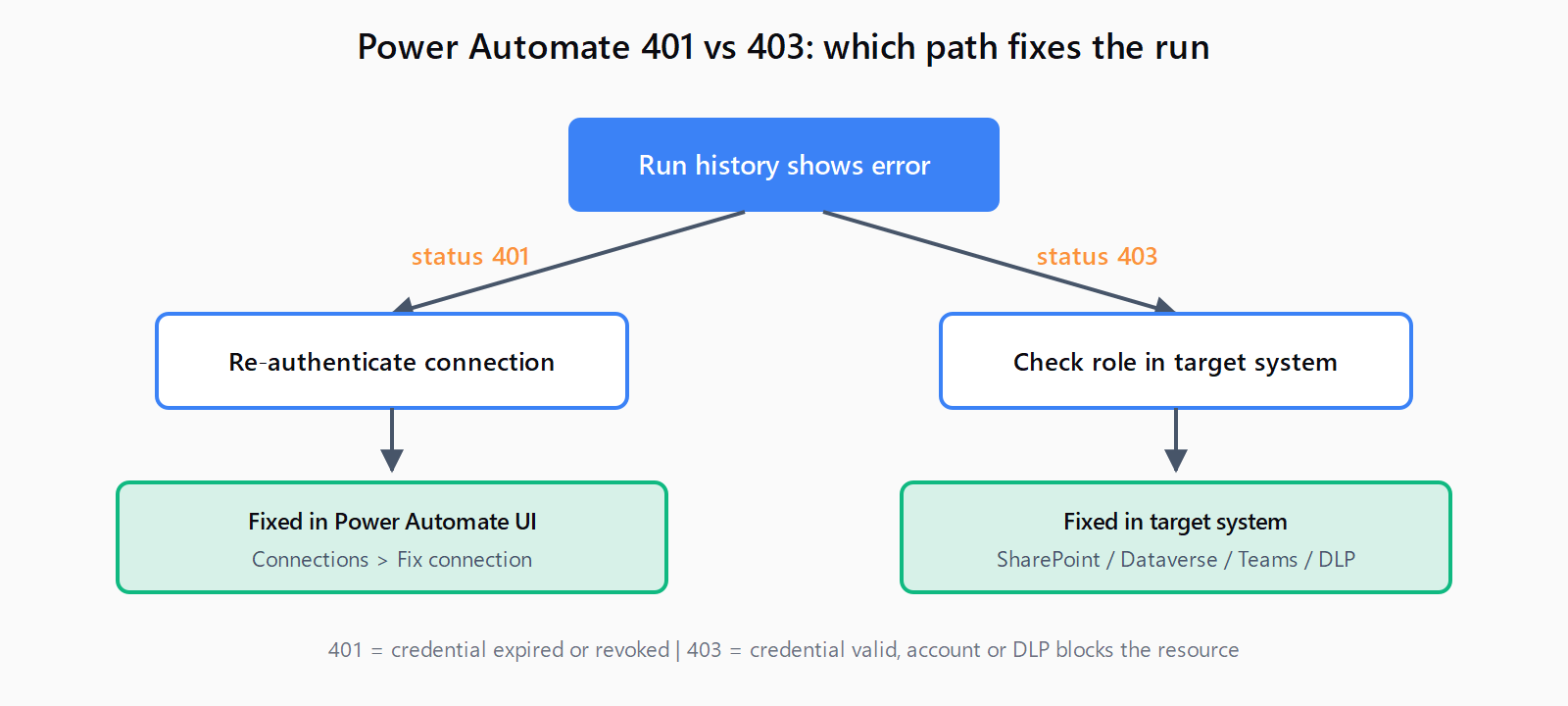
401 = expired connection (fix in Power Automate). 403 = missing permission in target system (fix in SharePoint, Dataverse, Teams, or DLP policy).
TL;DR: A Power Automate cloud flow that returns 401 Unauthorized almost always has an expired connection.
Reconnect: open the flow, go to Connections in the left nav, find the broken connection, and select Fix connection. A 403 Forbidden is a different problem - the credential is valid but the account does not have permission for the target resource, so reconnecting will not help. The fix lives in the target system, not in Power Automate.
The two error codes look similar in run history, but they need different fixes. Treating them as the same problem is the most common reason a "fix" does not stick.
How do you tell 401 and 403 apart in Power Automate?
Open the failed run in Power Automate, expand the red action, and read the status code in the response body. Then map it to the right fix:
| Code | What it means | Where the fix lives |
|---|---|---|
401 Unauthorized | Credentials are missing, expired, or revoked | Power Automate → Connections → Fix connection |
403 Forbidden | Credentials are valid; the account lacks permission, or a DLP policy is blocking the connector | Target system (SharePoint, Dataverse, Teams) or tenant admin |
The Microsoft Learn cloud flow troubleshooting reference spells this out: 401 is "authentication failed, re-authenticate the connection," and 403 is "permission denied - you lost access to the resource, or a DLP policy is blocking the connector."
Fix 401: How do you re-authenticate the connection?
The connection-expiry path takes about 30 seconds in the UI:
- Go to make.powerautomate.com and sign in.
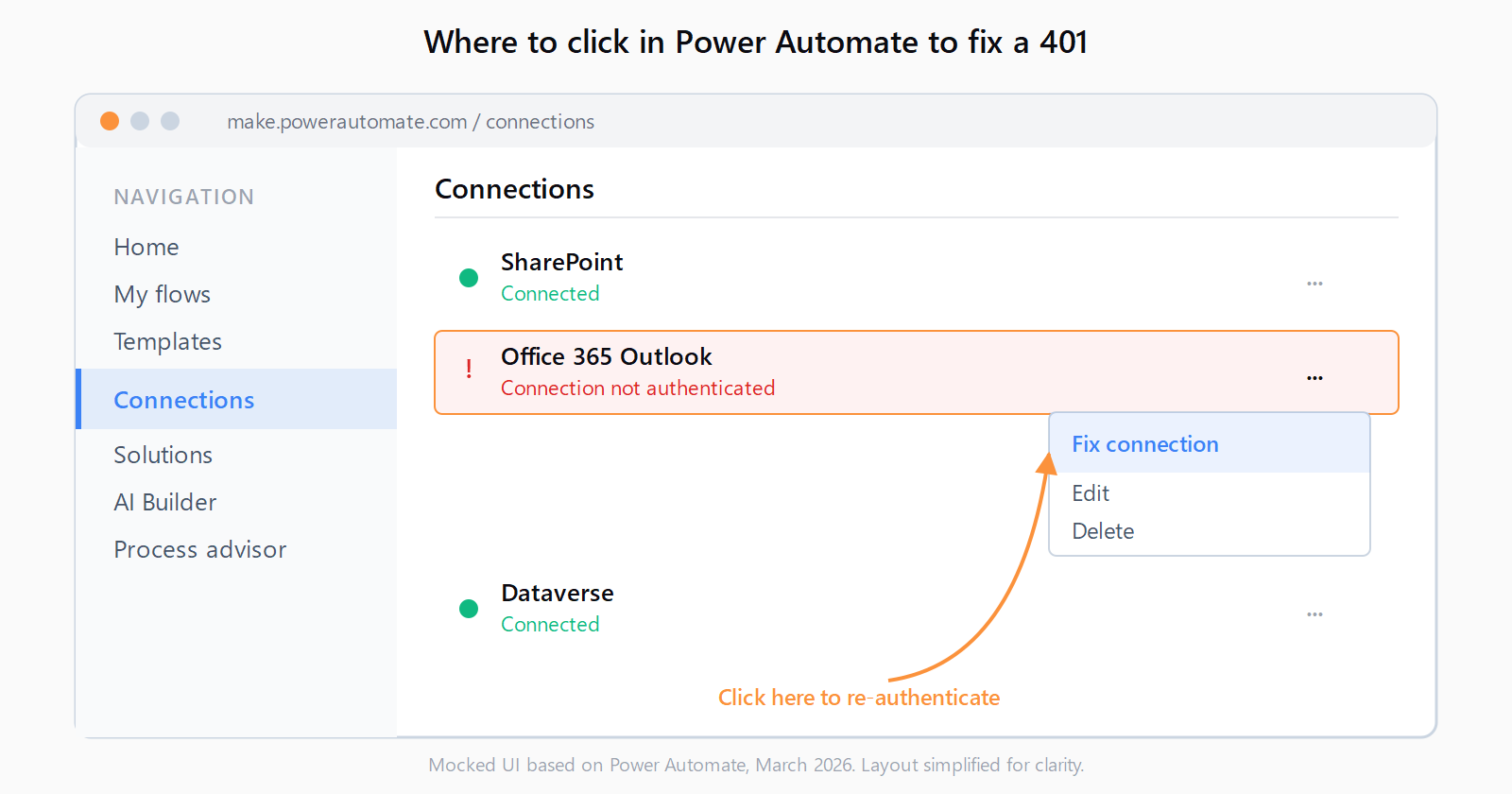
- In the left nav, select Connections. Broken connections show a red exclamation icon and the status Connection not authenticated.
- Click the three-dot menu next to the broken connection and select Fix connection.
- Re-enter credentials in the popup. For most Microsoft connectors this is a single SSO redirect; for third-party connectors (Google, Dropbox, Salesforce) you re-grant the OAuth scopes.
- Open the flow, click Edit, then Save to bind the refreshed connection.
- Resubmit a failed run from Run history using Resubmit, or trigger a new test run.
If the same connection breaks again within hours, the cause is not expiry - it is one of three things: the user's password was rotated, an admin revoked consent for the app in Microsoft Entra ID, or a Conditional Access policy now requires MFA that the connection cannot satisfy. Talk to the tenant admin; reconnecting on a loop will not help.
Fix 403: Why is it a permissions problem, not an auth problem?
403 Forbidden means the connector authenticated successfully and then the target system said no. Reconnecting authenticates the same identity again, so the answer changes nothing. Find the connector that failed and fix permissions in that system.
| Connector | What "403" usually means | Where to fix it |
|---|---|---|
| SharePoint | The user lacks at least Contribute on the site or list | Site → Settings → Site permissions → add the user or group |
| Dataverse | Security role missing read/write on the table, or row-level security blocks the row | Power Platform admin center → Environment → Users + permissions → Security roles |
| Microsoft Teams | Account is not a member or owner of the team or channel | Teams → team settings → Manage team → Members |
| Outlook 365 | Mailbox delegation removed, or shared mailbox access revoked | Microsoft 365 admin center → mailbox → delegation |
| Any connector | A tenant DLP policy classifies the connector as blocked | Power Platform admin center → Policies → Data policies |
If a flow worked yesterday and gets 403 today on the same row or file, the most common cause is an ownership change: someone removed the flow owner from the SharePoint site, the Dataverse row was reassigned to a different business unit, or the user lost a security group. The flow does not show this - only the run history does, in the response body.
How do you fix HTTP action 401 errors?
The HTTP action does not use Power Automate connections. It uses the Authorization header you pass in the action body, so a 401 there means the header is wrong, not that a connection expired. Fix connection does not apply.
Three things to check, in order:
- Header format. Bearer tokens require
Bearer <token>with a single space. Basic auth requiresBasic <base64-of-user:pass>. Anything else returns 401 from most APIs. - Token lifetime. Bearer tokens issued by Microsoft Entra ID typically expire after 60 to 90 minutes. If the flow stores the token as a static value, every run after expiry returns 401. Switch the action to HTTP with Microsoft Entra ID (or a child flow that calls a token endpoint and passes the result on) so the token is fetched fresh.
- Tenant or audience mismatch. A token issued for one resource (for example, Microsoft Graph) returns 401 when sent to a different resource (SharePoint REST). The audience claim has to match the API.
If the same request works in Postman but the HTTP action returns 401, the difference is almost always how the Authorization header is being constructed in the action's body - Power Automate's expression engine sometimes wraps strings in quotes that the API rejects. Compare the raw outgoing request in Run history (under Show raw inputs) with the Postman request side by side. The patterns that cause connection failures elsewhere - like auth errors in n8n HTTP Request nodes - are wired differently, but the diagnostic move is the same: read the raw outgoing request.
How do you fix recurring 401 errors with a service principal?
If Fix connection works for a few hours and then breaks again, the connection is not the problem. The three loop-causing patterns:
- Password rotation policy. Tenants that force password changes every 60 to 90 days break every connection that uses that user account on rotation day. The fix is a service account with a managed password, or a service principal connection.
- Conditional Access requiring MFA. Some Conditional Access policies require MFA on every API call. User-account connections cannot satisfy that. The connection 401s every run. The tenant admin has to either exempt the Power Automate service or move the flow to a service principal connection.
- Owner change on the flow. When a flow is reassigned to a new owner and the new owner does not own the connection, every run uses an invalid identity. Reassign ownership of both the flow and its connections together.
For unattended production flows, a service principal beats a user account on every dimension: no password rotation, no MFA challenges, no human leaving the company and breaking the flow on their last day. Microsoft documents the setup at create a service principal connection.
Other low-code platforms have their own version of this same gotcha - an n8n webhook returning 404 or a platform-imposed error in Make.com can look like a flow problem when it is really an environment problem. Reading the response body, not the action error, is the move.
FAQ
What is the difference between 401 and 403 in Power Automate?
401 means the credential is missing, expired, or revoked - fix it by reconnecting. 403 means the credential is valid but the account lacks permission, or a DLP policy blocks the connector - fix it in the target system or with the tenant admin. Reconnecting on a 403 will not change anything.
Why does my Power Automate flow keep getting 401 even after I reconnect?
The connection is fine for a few hours and then breaks because something is invalidating it on a schedule. Common causes: a password rotation policy on the user account, a Conditional Access policy that requires MFA on every call, or a flow ownership change that orphaned the connection. Move to a service principal connection for unattended flows.
How do I update the connection used by a Power Automate flow?
Open the flow, click Edit, expand the action that uses the connection, and click the connection name at the bottom of the action. Pick a different existing connection from the list, or click + Add new connection. Save the flow to bind the change.
Why does the HTTP action return 401 when my Postman request works?
The HTTP action does not share state with Postman. The most likely causes are an Authorization header that Power Automate's expression engine has wrapped in extra quotes, a stored bearer token that has since expired, or a wrong audience or scope. Compare the raw outgoing request in run history with Postman's raw request to spot the difference.
How do I fix "User does not have access" in the SharePoint connector?
That is a 403. The flow's connection identity does not have at least Contribute on the SharePoint site or list. Go to the site, Settings → Site permissions, add the user or the security group the user is in, and re-run. Reconnecting the SharePoint connection authenticates the same user, so it will not change a 403.
When should I use a service principal instead of a user account?
For any flow that runs unattended and needs to keep running after the original creator leaves, rotates a password, or hits an MFA Conditional Access policy. Service principal connections use an app registration in Microsoft Entra ID with a client secret or certificate, so they are not tied to a human user.
Hit a different error? Browse the Automation Error Index for a searchable catalog of Power Automate errors, each with a verified fix.