
How to fix n8n Google Sheets "Quota exceeded" rate-limit errors
Google Sheets API allows around 100 reads per 100 seconds per user. In n8n: add a 1-second delay between items, enable batching on the node, or switch to a service account with its own quota.
TL;DR: n8n's Google Sheets node returns 429 Quota exceeded once a workflow exceeds 60 reads or 60 writes per minute per Google user; batch the writes, throttle with the Wait node, and stop sharing the n8n Cloud OAuth client.
The fix in 90% of cases is to stop looping the node per row and use its array input to batch writes; on n8n Cloud, also attach your own Google Cloud OAuth credential so you stop sharing the bundled quota with other tenants.
This post covers exactly which Google quota you are hitting, the four mistakes that pin a workflow to that ceiling, and the n8n-specific patterns (batched array input, SplitInBatches with Wait, your own GCP project) that get you past it. Tested against n8n 1.100.x, where issue #16750 regressed Sheets call frequency, as of May 2026.
Which Google Sheets quota are you hitting?
Per Google's published Sheets API limits:
| Quota metric | Limit | Refill | Who it counts |
|---|---|---|---|
| Read requests per minute per user | 60 | every 60 seconds | one Google account, across every project it touches |
| Write requests per minute per user | 60 | every 60 seconds | one Google account, across every project it touches |
| Read requests per minute per project | 300 | every 60 seconds | one GCP project, across every user that authorised it |
| Daily request cap | none | n/a | no daily ceiling if per-minute holds |
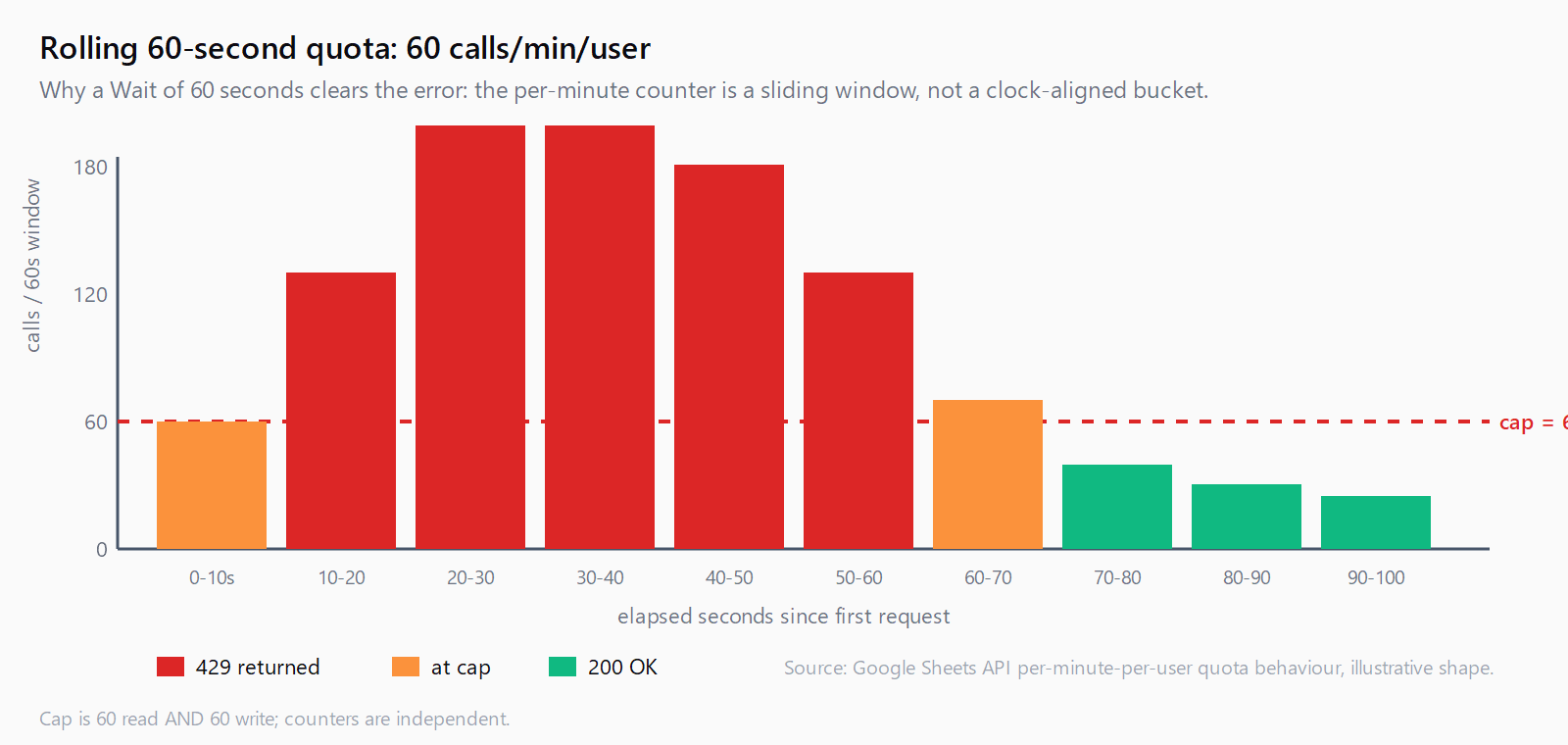
The two numbers that bite n8n users are 60 reads/min/user and 60 writes/min/user. They are independent counters and reset on a rolling 60-second window. The cap is per Google user, not per Sheet, and on n8n Cloud the bundled "Google Sheets account" credential authorises against a GCP project that all tenants share, so the 300/min/project ceiling is contested.
Fix 1: How do you batch writes with the node's array input?
The Google Sheets node's Append or Update Row(s) operation already accepts an array. One call writes hundreds of rows in one API request. The most common cause of the quota error in n8n is feeding that operation through a SplitInBatches set to 1, which flips one batched write into one call per row.
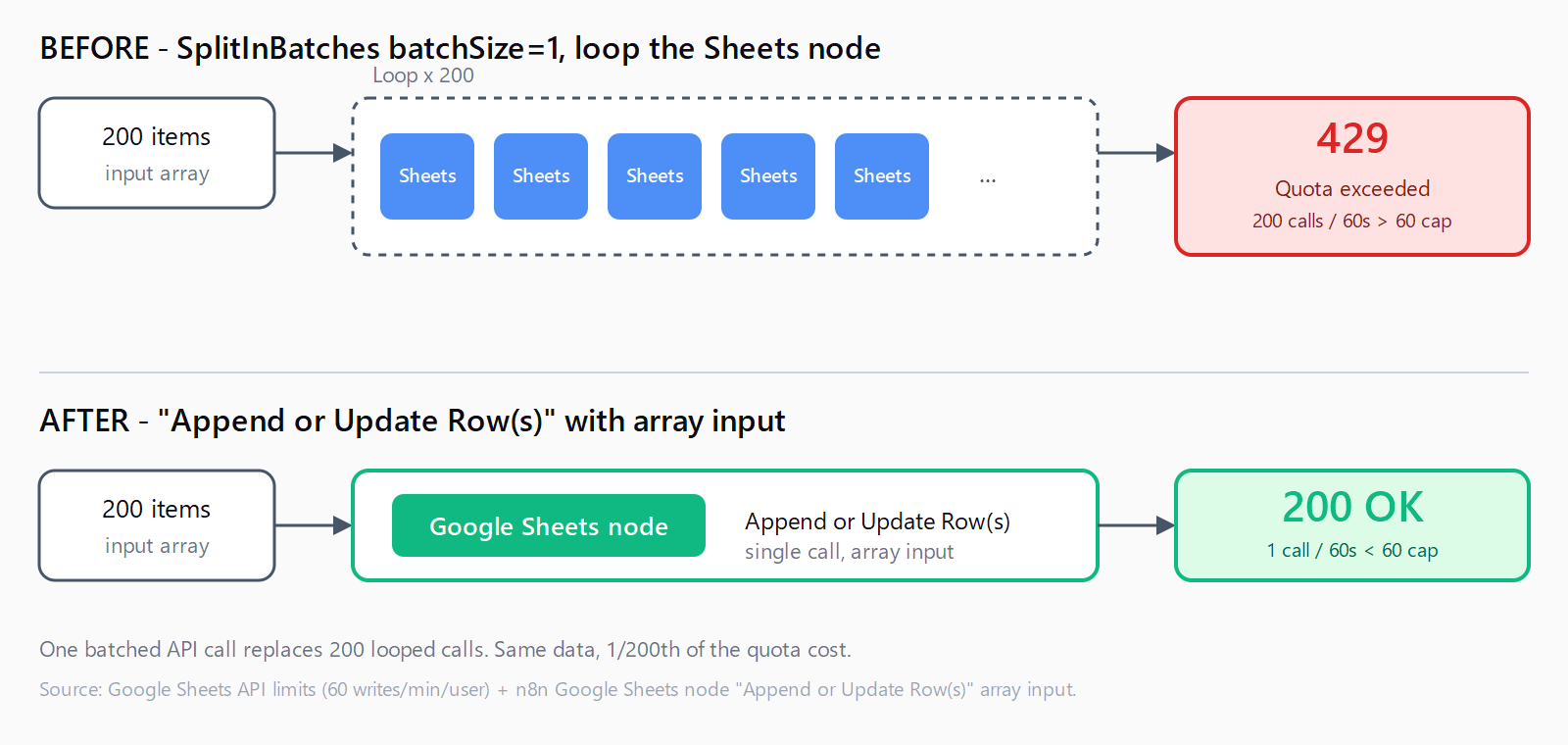
Wrong: 200 items in, SplitInBatches batchSize 1, Sheets node "Append Row" inside the loop. Result: 200 API calls in roughly 30 seconds, which trips the 60/minute write cap on the second minute and pegs the rest of the run.
Right: no SplitInBatches, Sheets node "Append or Update Row(s)" with the input set to {{ $json }}. Result: 1 API call. The node maps the array internally to a single spreadsheets.values.batchUpdate request.
Fix 2: How do you throttle with SplitInBatches plus Wait?
If the workflow genuinely needs per-row processing - each row triggers a downstream HTTP call that depends on the previous response - keep SplitInBatches but slow it down. Set batchSize to 50, add a Wait node set to 60 seconds after the Sheets node, then the loop end. The official "Preventing Google Sheets Quota Errors during Batch Processing" template on n8n's workflow library codifies this pattern.
Fix 3: How do you enable the built-in retry with exponential back-off?
Open the Google Sheets node, click the gear icon, switch on Retry On Fail, set Max Tries to 5, and set Wait Between Tries (ms) to 2000. n8n will retry a 429 response with the configured delay; combined with the 60-second window refilling on each retry, this rescues bursts that just barely overshoot.
Retry alone does not solve a workflow that exceeds quota by 5x - it only smooths workflows that exceed by 1.1x. Use it as a safety net, not the main fix.
Fix 4: Why should you stop sharing the n8n Cloud OAuth client?
This one is n8n Cloud specific. The bundled "Google Sheets account" credential authorises against a GCP project that n8n provisions and all n8n Cloud users share. The 300 reads/min/project ceiling is competed for, so a quiet workflow can still hit 429 if other tenants are noisy. n8n staff have acknowledged the shared-quota problem in the community forum.
The fix is to create your own GCP project, enable the Sheets API, generate an OAuth 2.0 client ID, and add it to n8n as a "Google Sheets OAuth2 API" credential pointing at your client ID and secret. Now the per-project 300/min counter is yours alone, and the per-user 60/min counter is the only ceiling left. The same setup is also the prerequisite for self-hosted n8n; if you followed our self-hosted n8n setup walkthrough, you already have the credential pattern in place and only need the Sheets API enabled in your GCP project.
Fix 5: Should you raise the Google quota or move off Sheets?
If 300/min/project is genuinely too tight after Fixes 1-4, the Google Cloud console at APIs & Services -> Sheets API -> Quotas has an "Edit quota" button. Per-user limits are not raisable, per-project is, and approval takes 1-3 business days. For high-write workflows (more than a few hundred rows per minute, sustained), Google Sheets is the wrong store - move the hot path to Postgres or Airtable and run a once-an-hour batch export to Sheets.
How do you confirm the fix landed?
Open Google Cloud console -> APIs & Services -> Sheets API -> Quotas. The "Read requests per minute per user" graph shows your last 60 minutes. Re-run the workflow and watch the curve. If it stays under the 60-line, you are done. If it spikes over 60, there is a node still issuing per-row reads - usually a forgotten "Get Row" inside a loop. The same forensic discipline applies to other n8n HTTP Request errors: read the error string, find the metric it names, and fix the call rate at its source.
FAQ
Why does this only happen on n8n Cloud?
Self-hosted n8n uses your own OAuth client by default, so quota is yours alone. n8n Cloud's bundled credential shares one GCP project across all tenants, so the per-project 300/min counter is contested. Self-hosted hits the error too if a workflow legitimately exceeds 60 calls/min, but cloud users hit it on lighter workflows.
Does adding a Wait node always fix it?
Only if the Wait sits inside the loop and the batch size keeps under 60 calls per 60-second window. A Wait at the start of the workflow does nothing because the calls still burst inside the loop. The combination is SplitInBatches with batchSize less than 60, then the Sheets node, then Wait set to 60 seconds, then the loop end.
Will paying Google fix the quota error?
Partially. Sheets API itself is free of charge as of 2026, but Google plans to introduce paid quota tiers later in 2026. Per-user limits remain at 60/min regardless of payment; only per-project caps move. For most n8n workflows, batching plus your own GCP project is enough.
Service account or OAuth credential - which is better for n8n?
Service accounts have separate per-project quotas and are not subject to per-user limits, which makes them a strong fit for headless n8n workflows. The trade-off: the service account must be added as an editor on each Sheet you want to touch. If you write to a fixed list of Sheets, prefer a service account; if users keep adding new Sheets, OAuth with your own GCP project is more convenient.
Are the 60/minute limits per Sheet or per Google user?
Per user, across all Sheets that user touches in any GCP project. Splitting one workflow across two spreadsheets does not double your budget if both use the same Google account.
Does Retry On Fail actually help?
For workflows overshooting by 10-20%, yes - the retry waits long enough for the per-minute counter to refill. For workflows overshooting by 5x, retry just chains 429s and burns runtime. Use retry alongside batching, not instead of it.
Hit a different error? Browse the Automation Error Index for a searchable catalog of n8n errors, each with a verified fix.