
The n8n Nodes Catalog: a complete, machine-readable reference
A free, structured dataset of every n8n node, parsed from source and refreshed monthly. Built for LLM training, AI agent grounding, and developer reference.
TL;DR: The n8n Nodes Catalog is a free, machine-readable dataset of every n8n node (524 in n8n@2.20.6, across 16 categories), updated monthly and published on Hugging Face for LLM training, AI agent grounding, and developer reference.
If you build with n8n, "what nodes does n8n have, and what can each one do?" is a question you hit constantly. The in-app picker is great for one node at a time, the docs are great for reading prose, but neither is queryable. The n8n Nodes Catalog is the structured answer: one row per node, every category, credential, and operation parsed out of the n8n source code, refreshed monthly.
What does the n8n Nodes Catalog contain?
The catalog is extracted directly from the n8n GitHub repository at a pinned release tag. The current build covers 524 nodes sourced from n8n@2.20.6: 431 from packages/nodes-base and 93 from packages/@n8n/nodes-langchain. Every record carries the node's internal name, display name, categories, execution group, supported operations, required credentials, top-level property schema, and a GitHub permalink anchored to the extraction tag.
Two files ship side by side: nodes.json as a canonical UTF-8 array, and nodes.parquet as a Snappy-compressed columnar version that loads into the Hugging Face dataset viewer, pandas, DuckDB, or Polars without conversion.
Who is the n8n Nodes Catalog for?
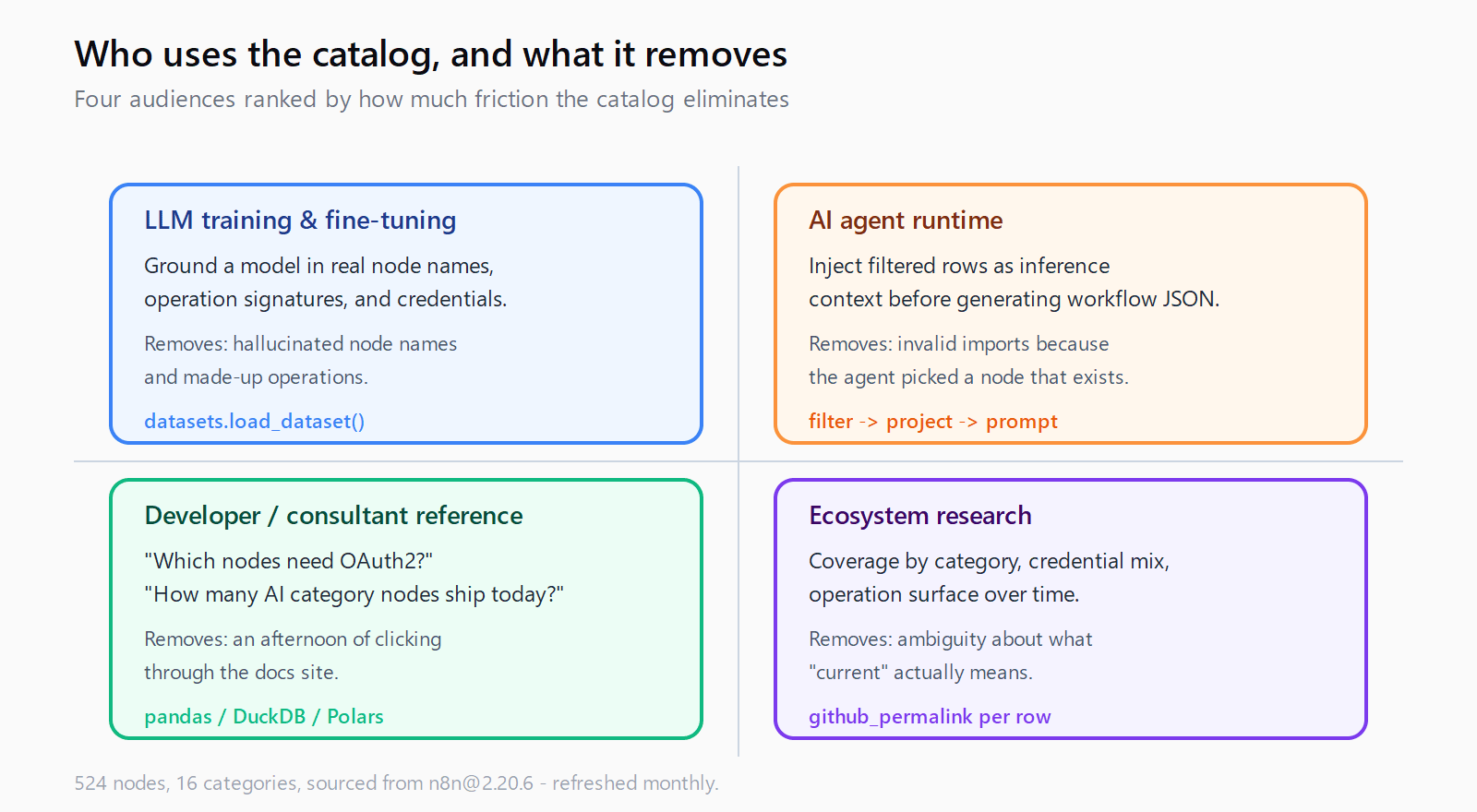
Four audiences, in order of how much pain the catalog removes:
- People training or fine-tuning LLMs on n8n. A model grounded in this catalog stops inventing node names and operation signatures. Existing n8n datasets on Hugging Face are workflow collections; this one fills the layer underneath: what each node is.
- Engineers building AI agents that generate n8n workflows. Load the catalog as inference-time context. The agent can pick a real node, confirm the operation exists, check the credential type, and emit a workflow JSON that imports cleanly instead of one that breaks on the first run.
- Developers and consultants writing about n8n. "Which nodes need OAuth2?" or "How many nodes are in the AI category?" goes from a docs-browsing afternoon to a one-line query.
- Researchers measuring the n8n ecosystem. Coverage by category, credential distribution, operation surface area over time. The
github_permalinkon every row pins each record to its extraction tag, so older snapshots stay reproducible.
Why pull the catalog instead of scraping the n8n docs?
Three reasons that matter once you try to ship something on top of it:
- Source of truth. The data comes from
INodeTypeDescriptionin the n8n TypeScript source, not from a rendered docs page. If a node added an operation last week, the next monthly run picks it up. - Queryable shape. Categories, operations, and credentials are real list fields (JSON-encoded inside Parquet for list columns), not free text. You can filter and group without regex.
- Version anchored. Every row carries the exact GitHub permalink at the extraction tag. Older snapshots remain reproducible even after upstream renames a file.
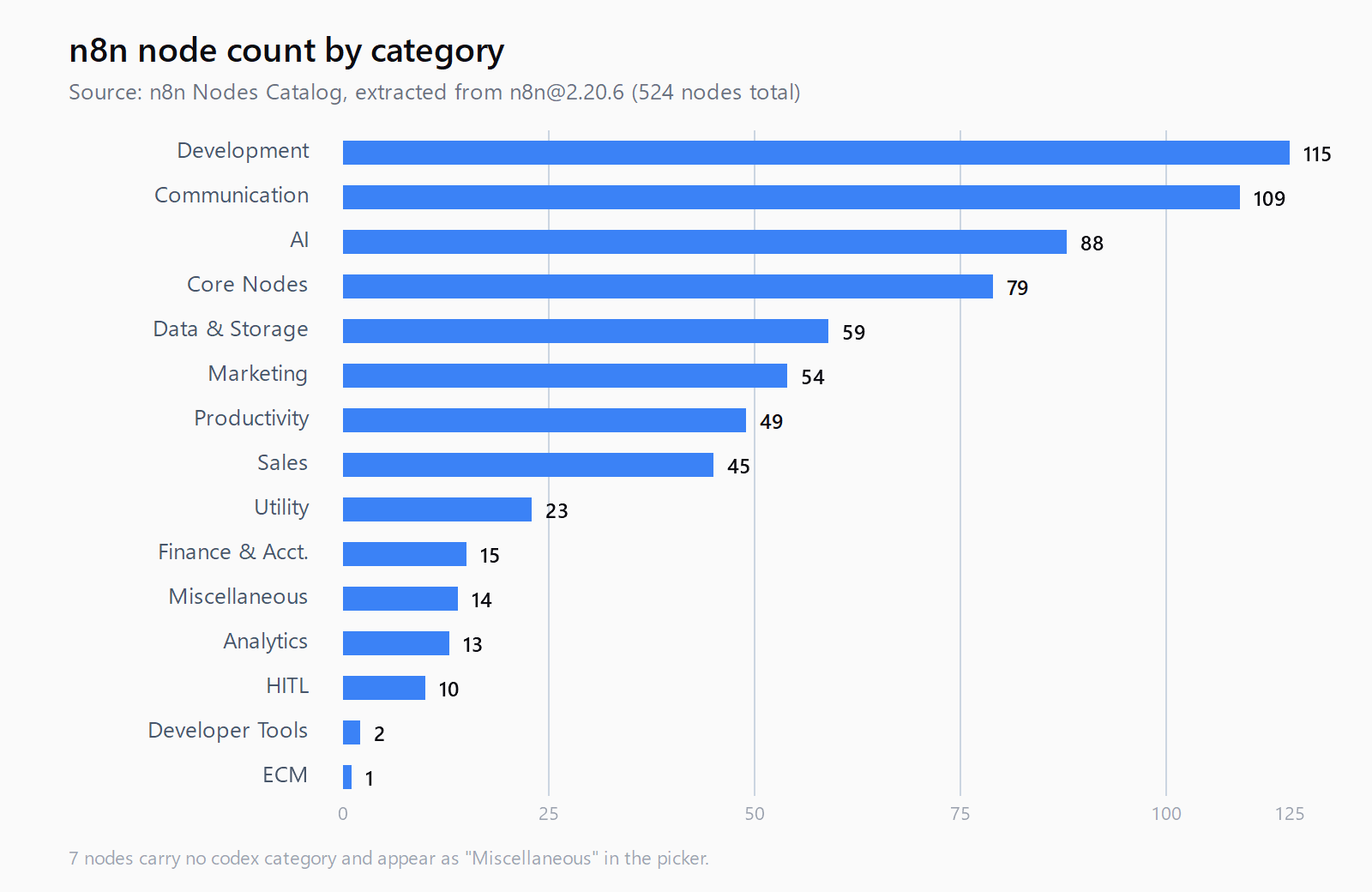
How are n8n nodes distributed by category?
The current snapshot from n8n@2.20.6:
| Category | Node count |
|---|---|
| Development | 115 |
| Communication | 109 |
| AI | 88 |
| Core Nodes | 79 |
| Data & Storage | 59 |
| Marketing | 54 |
| Productivity | 49 |
| Sales | 45 |
| Utility | 23 |
| Finance & Accounting | 15 |
| Miscellaneous | 14 |
| Analytics | 13 |
| HITL (Human in the Loop) | 10 |
| Developer Tools | 2 |
| ECM | 1 |
By execution group: 207 transform nodes, 110 triggers, 106 inputs, 103 outputs, and a long tail of schedule and organization nodes. Seven nodes carry no codex category and surface under "Miscellaneous" in the picker.
Which 10 nodes are most useful for AI automation?
An editorial pick, opinionated. These are the nodes that show up in almost every production AI workflow we build, and the catalog row for each one is worth bookmarking.
- AI Agent - the LangChain agent runner. Generates an action plan and executes it against attached tools. The hub of any agentic n8n workflow.
- HTTP Request - the universal escape hatch. When no native integration exists, this node calls the API directly and keeps the workflow in n8n.
- Webhook - exposes an HTTPS endpoint that triggers the workflow. The standard way to plug an agent into a chat platform, a form, or another service.
- Schedule Trigger - cron-based runs. The starting point for monitors, daily digests, and batch enrichment.
- Code - run custom JavaScript or Python. Use sparingly, but invaluable when expressions are not enough.
- Set - reshape items into the schema the next node expects. The most-used transform node for a reason.
- If and Switch - branching. Switch is the cleaner pick when you have three or more paths.
- Merge - combine items from two branches. Essential for any workflow that fans out and rejoins.
- OpenAI - message a model, analyze images, generate audio. Even when an AI Agent node orchestrates the run, the raw OpenAI node is often where the actual call lands.
- Execute Sub-workflow - call another n8n workflow as a function. The cleanest pattern for reusable agent tools and for keeping a top-level workflow readable.
Slack, Google Sheets, Airtable, Postgres, Gmail, Notion, and Telegram are the other names that show up in roughly every other build. Use the catalog to find their exact operation lists before you wire them in.
How do you use the catalog?
Three patterns cover almost every use case.
Load it as a Hugging Face dataset
from datasets import load_dataset
import json

ds = load_dataset("automatelab/n8n-nodes-catalog", split="train")
oauth_nodes = [r["display_name"] for r in ds
               if "oAuth2Api" in json.loads(r["credentials_required"])]
print(oauth_nodes)
This is the path for LLM training pipelines and for any agent runtime that already speaks the datasets library.
Query the Parquet file with pandas or DuckDB
import pandas as pd, json

df = pd.read_parquet("nodes.parquet")
df["ops"] = df["operations_supported"].apply(json.loads)
slack = df[df["node_name"].str.contains("slack", case=False)]
print(slack[["display_name", "ops"]])
List columns (categories, operations_supported, credentials_required, group, subcategories) are JSON strings inside Parquet. Decode with json.loads once and the rest is normal dataframe work.
For SQL-shaped questions, DuckDB reads the Parquet directly:
SELECT category, COUNT(*) AS node_count
FROM read_parquet('nodes.parquet'),
     UNNEST(json_extract_string(categories, '$[*]')) AS t(category)
GROUP BY category
ORDER BY node_count DESC;
Drop it into an agent's context window
The full catalog is small enough to fit alongside a long-context prompt. The pattern that works: filter to nodes the agent might plausibly need for the task, project down to display_name, description, operations_supported, and credentials_required, and include the trimmed list as a system message. The agent picks real nodes and stops inventing operation names.
If you are wiring n8n into an agent over n8n's MCP server, the catalog complements the live MCP introspection: MCP tells the agent what is callable right now in a specific instance; the catalog tells it what could be installed and what each node generally supports.
How does the catalog stay current?
The catalog rebuilds monthly via an automated pipeline. The extraction script (extract.py, open source on GitHub) downloads the n8n release tarball at the target tag, walks packages/nodes-base/nodes/ and packages/@n8n/nodes-langchain/nodes/, parses each top-level .node.ts file for its INodeTypeDescription, and reads the sibling .node.json codex for category metadata. Versioned implementation directories (V1/, V2/, actions/) are skipped because they are not standalone nodes.
The script is idempotent: re-running it against the same tag produces byte-identical output. Pin a specific build with --tag n8n@2.20.6, or let the default pick up the latest release. The dataset card always carries the most recent extraction date at the top.
Where do you go next?
Grab the catalog from huggingface.co/datasets/automatelab/n8n-nodes-catalog. The extraction script and the monthly update pipeline are open source at github.com/ratamaha-git/n8n-nodes-catalog - fork it, audit it, or open an issue if a field is missing. If you are deciding whether to run n8n yourself, the n8n cost calculator compares Cloud against self-hosted setups, and the VPS self-host walkthrough covers the full Hetzner/DigitalOcean install.
Need help wiring n8n into your stack? Talk to us.