
n8n vs Make in 2026: pricing, execution limits, and when to pick which
Current n8n and Make prices, credit-versus-execution examples, cloud limits and a self-hosting budget that includes maintenance.
TL;DR: Pick n8n for workflows that process many records or need self-hosting; pick Make for managed visual automation, after comparing actual credit usage, regional prices and maintenance costs.
A daily batch of hundreds of records and a webhook that updates one contact need different allowances. Add hosting and paid features to the comparison before committing to either subscription.
How do n8n and Make prices compare in 2026?
Checked 5 November 2026. The tables show starting allowances and monthly equivalents of annual subscriptions, before tax. The n8n pricing table quotes euros; Make's UK-region public pricing response quotes US dollars, converted approximately below.
n8n Cloud
| Option | Monthly equivalent | Included executions | Best for |
|---|---|---|---|
| Starter, hosted | €20 | 2,500/month | Small workloads without server maintenance. |
| Pro, hosted | €50 | 10,000/month | Production workflows needing more capacity and collaboration. |
| Business, self-hosted only | €667 plus infrastructure | 40,000/month | Paid governance and deployment features on your infrastructure. |
| Enterprise, hosted or self-hosted | Quote | Contract allowance | Contracted security, scale and support requirements. |
| Community, self-hosted | €0 software; illustrative €52 total below | No paid-plan execution quota | Eligible internal use with an operator responsible for hosting. |
Business is a paid self-hosted plan, not a cloud upgrade that becomes free when installed on a VPS. Community is a different edition with fewer collaboration and governance features.
Make
| Option, UK quote | Approximate euros/month | Starting allowance | Best for |
|---|---|---|---|
| Free | €0 | 1,000 credits/month | Small automations that fit its limits. |
| Core, annual | €9.76 | 10,000 credits/month | Managed automation with a monthly credit budget. |
| Pro, annual | €17.75 | 120,000 credits/year | Advanced features and an annual credit pool. |
| Teams, annual | €31.95 | 120,000 credits/year | Team roles and shared scenario work. |
| Enterprise | Quote | Contract allowance | Organisation-specific requirements. |
The Make pricing page loads country-specific rates. Its UK annual quotes were 132, 240 and 432 US dollars respectively. Core's US annual quote was 144 dollars, approximately €10.65/month. Conversion uses the 4 November ECB rate of 1.1267 dollars per euro. These conversions are not euro checkout quotes; confirm country, tax, term and allowance before purchase.
Make sells higher credit tiers as well as the starting allowances shown here. An annual Pro or Teams pool also differs from Core's monthly reset. Compare the actual billing period before deciding whether a burst fits.
How do n8n and Make count executions differently?
n8n counts production workflow executions on paid plans; ordinary steps inside one run do not each consume an execution. Make generally charges one credit per standard non-AI operation. Its operation rules distinguish a trigger check from downstream work on each returned bundle.
Consider the original daily sync example: one fetch returns 200 records, then seven standard paid operations run for each record. With no extra checks, retries, pagination or AI, Make uses 1 + 200 x 7 = 1,401 credits per run, or 42,030 over 30 days. n8n uses 30 top-level scheduled executions. The calculation models usage; it does not measure cost or speed in production.
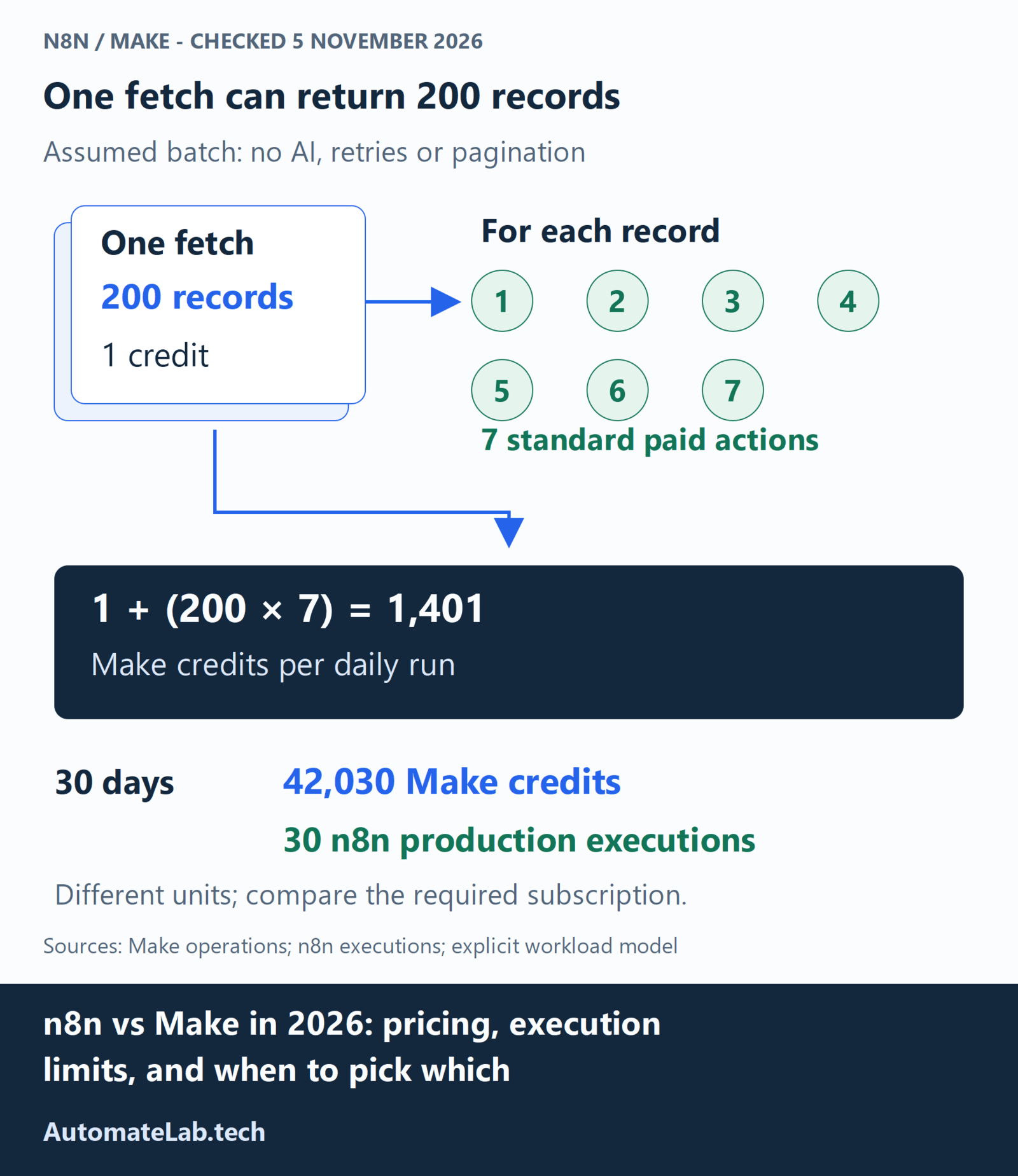
| Assumed monthly workload | n8n production executions | Make credits |
|---|---|---|
| 30 batches, each fetching 200 records then seven operations per record | 30 | 42,030 |
| 5,000 runs, each one check returning one record plus one standard action | 5,000 | 10,000 |
The first case fits n8n Starter's execution allowance, subject to runtime and resource limits. The second needs more than Starter's 2,500 executions but fits Make Core's starting monthly credits. Price both workloads at the tier they require.
n8n's quota rules exclude manual runs, called sub-workflows, error workflows and empty polling results. A Schedule Trigger counts whenever it fires, even with no useful output. Make polling checks consume an operation even when empty; routers and listed error-handler controls are exempt from credits. Count actual operations rather than multiplying every visible module by every record.
How do n8n and Make differ on self-hosting and licensing?
n8n Community is source available under the Sustainable Use License, rather than an unrestricted open-source licence. It permits eligible internal business and personal use. Selling hosted access or exposing a workflow builder needs a separate licence review; do not assume a normal Enterprise subscription covers every resale arrangement.
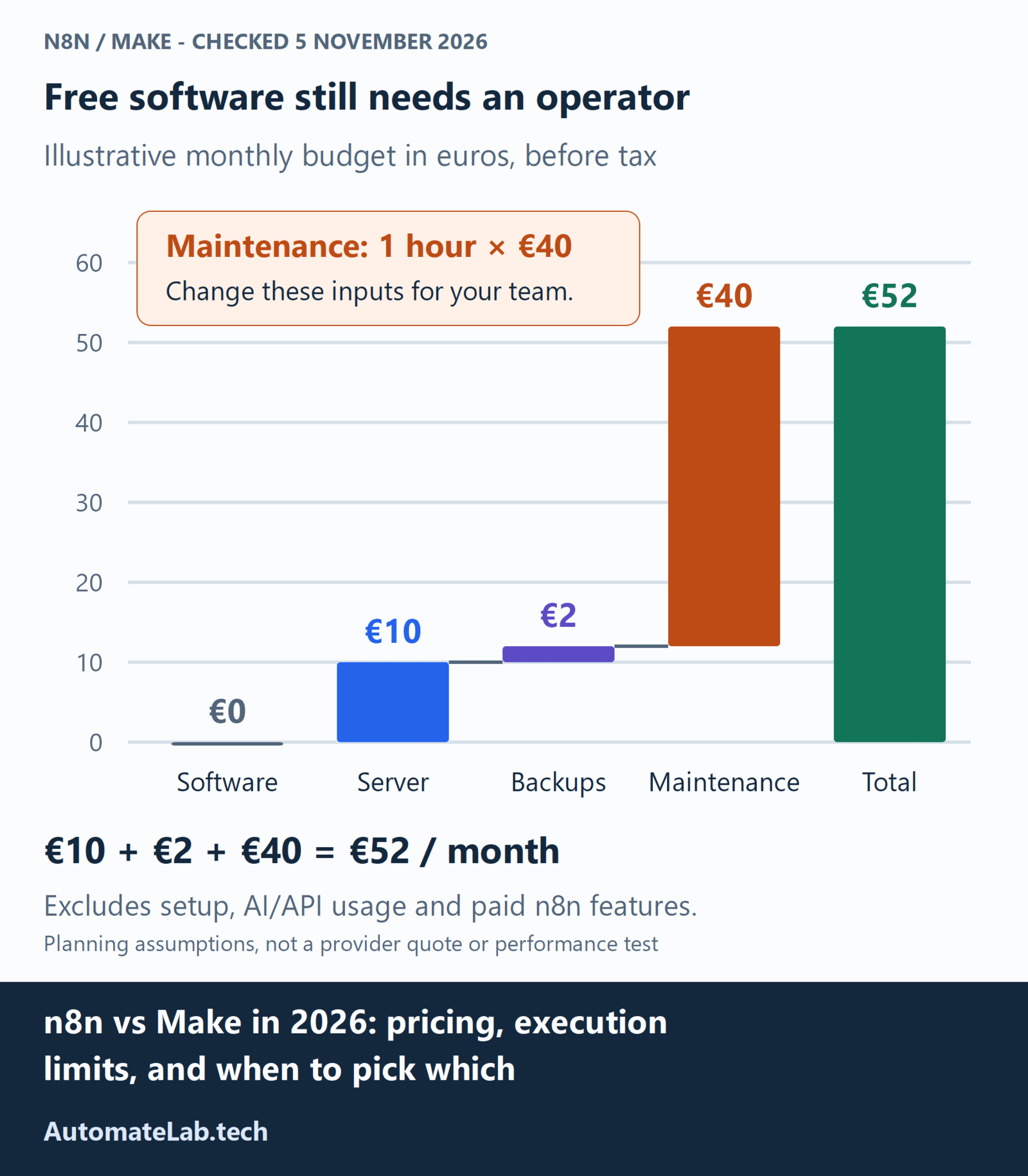
An operator must maintain the server even when the software licence is free. For an illustrative small installation, assume €10/month for the server, €2 for backups and one maintenance hour valued at €40: total €52/month. These are planning inputs, not a provider quote, sizing guarantee or measured maintenance average. Zero maintenance hours gives €12; two gives €92.
Add setup, recovery work, storage growth and AI/API charges where applicable. The edition comparison excludes features such as SSO, projects and Git version control from Community. If those are required, include the appropriate paid licence alongside hosting. Use the n8n Docker Compose deployment guide to assess the operating work before switching.
Make offers a managed platform rather than a self-hosted scenario engine. Its free tier can serve a small real workload if the allowance and scheduling restrictions fit; calling it only a sandbox dismisses that use.
What execution limits does each platform impose?
n8n's current cloud table lists maximum execution durations of five minutes on Starter and 40 minutes on Pro and Enterprise. Starter has five concurrent executions; Pro lists 20 or 50 depending on plan size. Excess production executions queue. Workflow history and execution-log retention are different fields, so choose the retention you need.
Self-hosted n8n has configurable execution timeouts: the default EXECUTIONS_TIMEOUT=-1 disables the instance default. Per-workflow settings, task runners, external APIs and available memory can still stop work. Free Community capacity is finite even without a metered execution quota.
Make's published plan comparison lists five-minute executions on Free and 40 minutes on paid plans, with minimum scheduled intervals of 15 and one minute respectively. A schedule interval is not a concurrency limit. Its scenario settings support sequential processing; webhooks otherwise run in parallel by default. Check the specific module's timeout separately instead of assuming a universal 40-second HTTP limit.
When should you pick n8n vs Make?
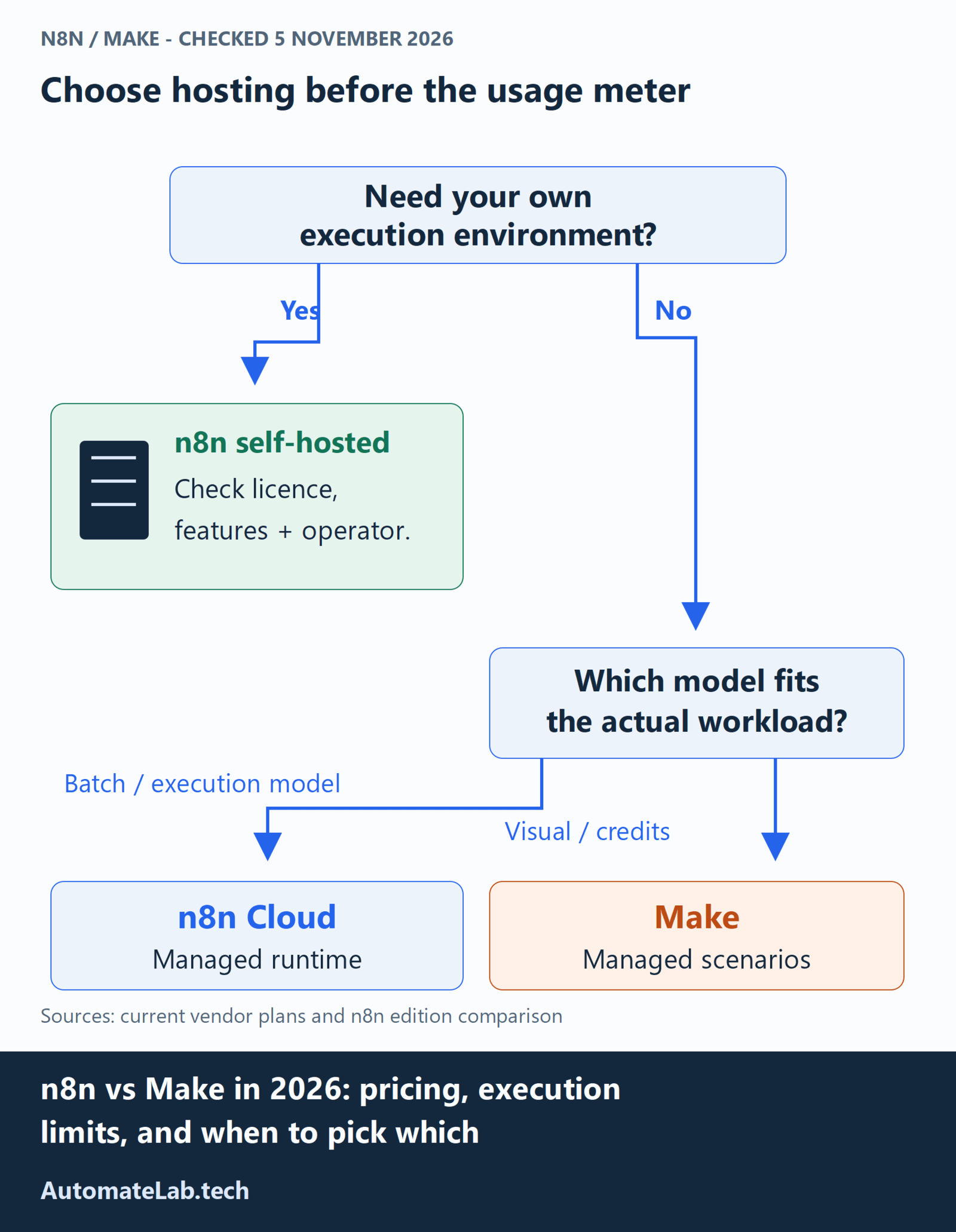
Pick n8n when batching many records or keeping the execution environment under your control justifies its operating work. Hosted n8n fits teams that want its workflow model without maintaining servers. Make suits teams whose required actions fit its integrations and visual scenario builder within an affordable credit tier.
For AI workflows, compare model usage separately. n8n Gateway credits pay for supported workflow services and are separate from Assistant credits. Make's AI credit rules can include operations and tokens; custom provider connections split platform operations from the provider's token bill. Budget for inference separately from access to the agent builder.
Before migrating, replay representative records against safe destinations and compare field mappings, duplicates and recovery behaviour. Check total operating cost using the same assumptions on both platforms. If Zapier is also shortlisted, the refreshed Make versus Zapier comparison covers its different task meter.
FAQ
Is n8n really free if I self-host?
Community software is free for eligible uses under its licence. Hosting, backups, maintenance and external services still cost money, and some governance features require a paid edition.
Why is Make so much more expensive at the same plan price?
It may be cheaper or more expensive depending on the workflow. Compare actual bundle operations, credit exceptions and AI usage against n8n production executions, then price the allowance each needs.
Can I migrate from Make to n8n or vice versa?
Plan a rebuild of mappings, credentials and failure handling rather than assuming exports are interchangeable. Validate one workflow and its side effects before moving production traffic.
Which one has the bigger integration catalog?
Check your required trigger and action in each live catalog. Published app and node counts use different definitions; an HTTP fallback or community node also needs an authentication and maintenance check.
Which one does AutomateLab recommend in 2026?
Make suits teams wanting managed visual automation within a credit budget. n8n suits batching and control requirements; choose Community only when its licence, features and operating responsibilities fit.