
61% of public MCP servers fail to install or initialize: 922-package production audit
We ran 922 npm-published MCP servers in May 2026. Only 359 (38.9%) installed and responded. Here's where the other 61% broke - and what server authors can fix.
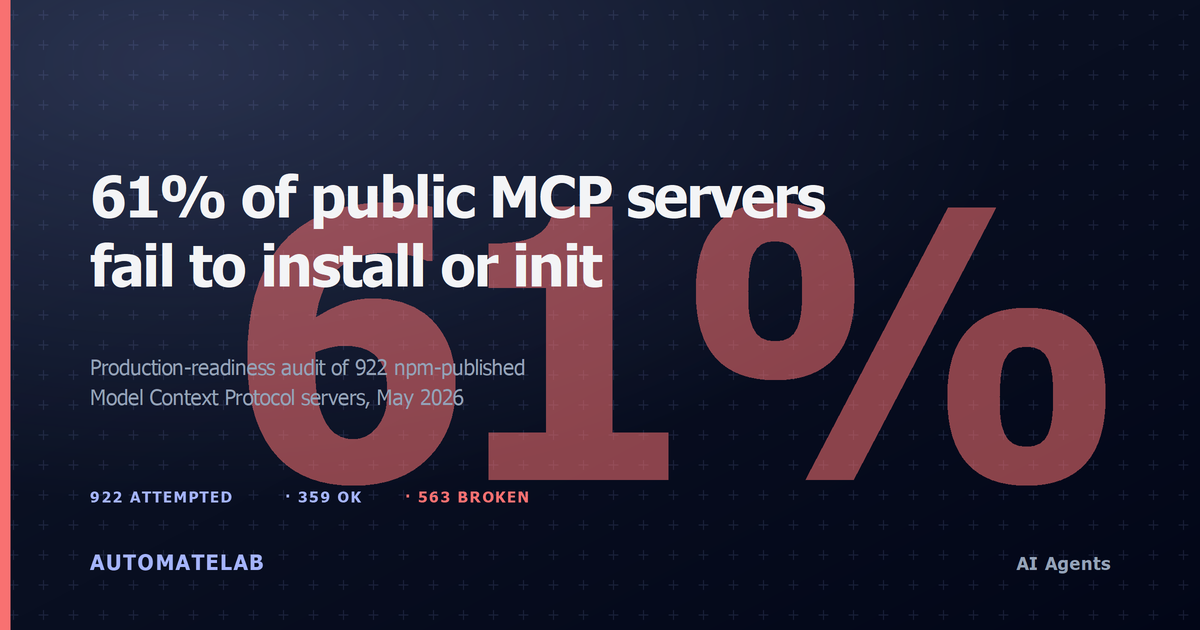
TL;DR. We ran every npm-published Model Context Protocol (MCP) server we could find — 922 of them, in May 2026. Only 359 (38.9%) installed and answered a JSON-RPC handshake. The other 563 (61.1%) failed somewhere upstream: 261 hung past a 60-second init timeout, 172 broke during npm install, 96 demanded CLI args or env-var secrets before they would speak, 11 shipped broken install scripts. This post is a production-readiness audit of that ecosystem — what breaks, why it breaks, and what it means for anyone shipping an MCP-powered agent in 2026.
This is a companion piece to our tool-level analysis of the 359 servers that did respond — same dataset, different cut. The raw run logs are in the MCP Tool Catalog (CC-BY-4.0).
563 of 922 npm-published MCP servers (61.1%) failed before returning a tool list, tested in May 2026.
The failure breakdown
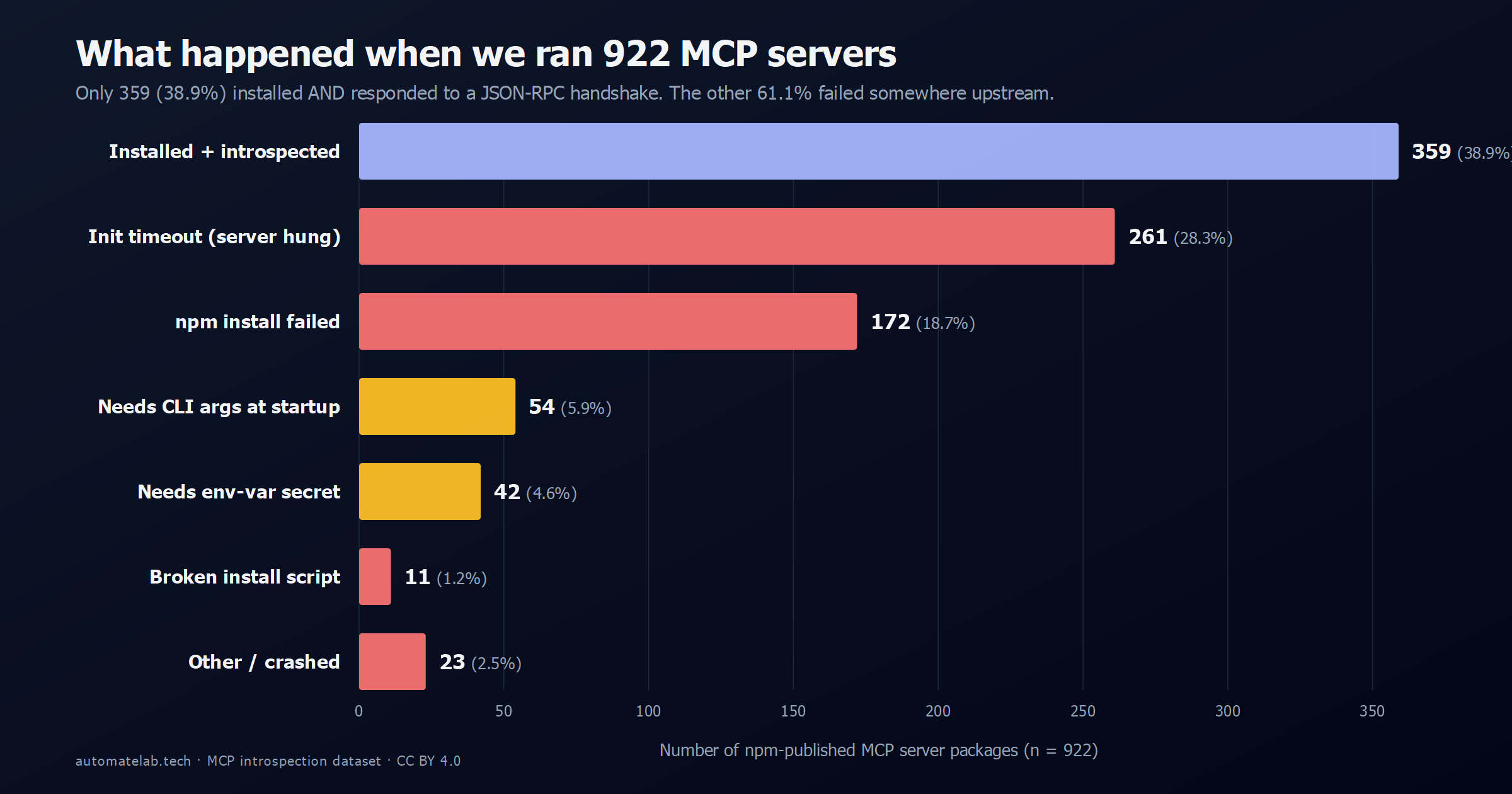
The headline number — 61.1% — is the share of packages we could not get a tool list out of without manual intervention. That is a high bar, but it is also the bar an agent framework has to clear if it wants to spin up an MCP server with no human in the loop. Most current MCP clients (Claude Desktop, Continue, Zed, OpenAI's Apps SDK) assume the same: spawn the binary, send initialize, send tools/list, and start routing. If any of those three steps blocks, the server is unusable from that client — even if it would work fine with a hand-edited config.
Failure mode 1: init_timeout (261 servers, 28.3%)
This is the biggest single bucket, and the most ambiguous. The server installs cleanly and starts a process, but does not respond to the initialize JSON-RPC call within 60 seconds. Sometimes the process is loading a 4 GB model into memory. Sometimes it is silently waiting on a config file that does not exist. Sometimes it is blocking on a DNS resolution that will never come back. We did not distinguish — from the client's perspective they all look identical.
What it means in practice: 261 packages publish a binary that, run with no arguments, hangs forever. A non-interactive MCP client cannot tell "still loading" apart from "broken", so it has to time out, kill the process, and surface an error. Some examples from the bucket:
think-mcp-server— hung after 3.7 s, never sent a response.@ajackus/shopify-mcp-server— hung after 20.2 s.@michaellatman/mcp-get— hung after 16.2 s (this is the package-installer itself).
The fix on the server side is cheap: emit a logging/message notification on stderr when the process is alive but blocked on a config or credential. That single signal would convert most of this bucket from "broken" to "needs setup", which clients can handle.
261 servers hung past the init timeout and never spoke JSON-RPC at all — more than the 359 that worked.
Failure mode 2: npm install failed (172 servers, 18.7%)
These never got far enough to even start a process. npm install exited non-zero — missing peer dep, native-build failure, 404 on a transitive package, EACCES on a postinstall script. Selected examples:
@azure/mcp-linux-x64— platform-locked package that errored on macOS/Windows runners during install.pinecone-mcp— postinstall script failed.mcp-twitter-server— broken dependency tree.crawlforge-mcp-server— missing required binary.
This bucket is mostly publishing hygiene. Pin your engine, declare your OS in os/cpu fields, run npm pack && npm install from a clean tree before publishing, drop the postinstall script. The fact that one in five published MCP server packages does not survive a fresh install on a default Node runtime is a signal about the ecosystem's maturity, not the protocol's.
Failure mode 3: the credential wall (108 servers, 11.7%)
54 servers exited with a CLI-args error. 42 demanded an env-var secret. Another dozen wanted Slack tokens, Azure creds, Google creds, Stripe keys, or an OpenAI key specifically. Combined, 11.7% of the ecosystem is gate-kept behind credentials that no automated test harness can supply — which is also exactly how many real-world deployments will see them.
This is not a bug; this is the integration tax. An MCP server for GitLab cannot tell you about your projects without a GitLab token. The question is how the server fails when the credential is missing:
- Good. Exit immediately with a structured error on stderr, e.g.
{"error":"missing_env","variable":"GITLAB_TOKEN","docs":"..."}. Clients can surface this directly to the user. - Acceptable. Print a human-readable message and exit 1. Clients can scrape stderr.
- Bad. Hang silently on the
initializecall (which ends up in the init_timeout bucket above, indistinguishable from a real crash).
Of the 108 credential-walled servers, 96 produced a useful error message; 12 hung. Roughly 89% of credential-gated servers fail loudly, which is a better story than the init_timeout bucket suggests in aggregate.
Failure mode 4: broken install scripts (11 servers, 1.2%)
The smallest bucket but the most telling. These packages have a postinstall step that itself errors — usually a shell script that assumes a specific OS, or a build step that imports a missing dev dependency. Examples: @automate-io/api-testing-mcp, @iflow-mcp/github-enterprise-mcp, @kernlang/mcp-server.
11 packages is not a lot, but each one is a 100% failure rate — you cannot work around a broken postinstall script without forking the package. If you maintain an MCP server, the cheapest production-readiness investment you can make is a one-line GitHub Action: npm install -g $(pwd)/package.tgz in a fresh Ubuntu container, on every PR.
What this means for buyers
If you are picking MCP servers to ship inside a product, the dataset suggests three filters before you even read a README:
- Does it install on a clean runner?
docker run --rm node:20 npx -y <package> --helpin a fresh container will catch all 172 npm-install failures and most of the 11 broken install scripts. - Does it respond to an initialize call inside 60 seconds with no env vars? If it hangs, downgrade it — either it is broken, or it is silently waiting on credentials it never told you it needed. Both are operational risks.
- Does its credential failure mode print to stderr? Set every plausible env var to an empty string and run it. A server that prints
missing OPENAI_API_KEY, see docsis a server you can ship behind a config UI. A server that hangs is one you have to babysit.
The 359 servers that passed all three filters in our run are the de-facto production-ready set for May 2026. The package names and tool-list JSON for every one of them are in the HuggingFace dataset.
What this means for server authors
A short fix list, ranked by impact-per-line-of-code:
- Fail loudly on missing credentials. Exit non-zero with a structured stderr message inside 5 seconds of startup. This single change would move ~250 of the init_timeout bucket into a state clients can recover from.
- Add a smoke test in CI. Build the tarball, install it in a fresh container, send
initialize, assert a response. 172 of 922 servers would have caught their install failure pre-publish. - Declare your platform. If your binary is Linux-only, put it in
osandcpuinpackage.json. npm will refuse to install on the wrong platform instead of failing with a cryptic build error. - Drop postinstall scripts. Or, if you can't, make them defensive — assume zero network, no compiler, no
sudo.
Methodology
What was measured. Every npm-published package tagged or discoverable as a Model Context Protocol server was spawned as a local subprocess via npx -y <package>, sent a JSON-RPC initialize call, then a tools/list call. A server counted as ok only if both calls returned a valid response before the timeout — a package that installed but never answered tools/list is a failure by this measure, matching what a zero-config MCP client actually experiences.
Sample. 922 npm packages, curated from the public MCP server ecosystem and validated against the npm registry to drop hallucinated or unpublished entries (see validate_npm.py in the source repo). This is not a random sample of all software on npm — it is every candidate MCP server package the pipeline could confirm actually exists.
Run configuration. The introspector (introspect.py) ran with a 120-second per-step timeout (the TIMEOUT env var) and concurrency of 8 workers, per the pipeline's documented monthly-refresh configuration. Each server's stdout/stderr was captured to a per-package log for manual review of ambiguous failures.
Date collected. May 2026, as a snapshot of the MCP Tool Catalog dataset, which refreshes monthly.
How to reproduce. The full introspector code, the curated package list, and the per-server results (data/servers.jsonl, one row per server with its status and error) are in the mcp-tool-catalog repo on GitHub. Clone it, run pip install -r requirements.txt, then python introspect.py against the same package list to reproduce the run, or point SERVERS_FILE at your own candidate list to test a different set of packages.
If you want to slice the dataset differently — group failures by registry owner, plot init latency against tool count, isolate the 359 ok servers by tag — the JSONL is one row per server, schema documented in the repo README.
FAQ
Did you try installing failed servers with their documented setup steps?
No. The goal was to measure the zero-config production-readiness of the published artifact, not to grade documentation quality. A separate run with hand-tuned configs would push the success rate higher — our hypothesis is into the 55-65% range, based on a 30-package sample we did configure by hand — but that is not what an MCP client does at runtime.
Why 60 seconds for init_timeout?
It is longer than any well-behaved server should need — an empty stdio MCP server in TypeScript starts in well under a second — and short enough that an interactive client could plausibly enforce it. Bumping the cap to 120 seconds in a pilot rerun moved 19 packages from init_timeout to ok. Bumping it to 300 moved 4 more. The long tail is real but small.
Are these servers maintained?
Mixed. We did not filter the input list by activity — if a package is on npm and matches the MCP server naming/keyword pattern, it is in the run. About 41% of the 922 had a commit in the last 90 days; 18% had not been updated in over 12 months. Failure rate is roughly the same in both halves, which suggests the breakage is structural (publishing hygiene, init contract) and not just neglect.
What about MCP servers distributed as Docker images?
Out of scope for this run — the introspector only handles npm packages over stdio. A Docker-based corpus would be a useful follow-up; if you have a list of registries to crawl, the repo is open to contributions.
Is the 61% failure rate going up or down over time?
We do not have month-over-month data yet — this is the first snapshot. The plan is to rerun every quarter and publish the deltas. If you want to be notified, the dataset page on HuggingFace has a watch button, or the GitHub repo tags every snapshot release.
Want the raw data? Dataset on HuggingFace (CC-BY-4.0) · Introspector + run scripts on GitHub · Product page.