
Notion Custom Agents vs Claude Code: when to use each in 2026
Notion launched Custom Agents in February and the Developer Platform on May 13, 2026. Here is when to use Custom Agents, when to use Claude Code, and why most teams should use both.
Short answer: Notion Custom Agents are best when the work lives entirely inside Notion - databases, pages, comments, recurring routines - and you want zero-config dispatch from Notion's own UI. Claude Code is best when the work spans Notion plus a codebase, a terminal, or a filesystem, and you want to drive it from your editor with operator-gated execution. They are not direct substitutes. Pick by where the work lives and who's pushing the button.
Notion launched Custom Agents on February 24 2026 and followed up on May 13 2026 with the Notion Developer Platform, which adds a Workers cloud sandbox and names Claude Code, Cursor, and Codex as external agent partners. That second announcement matters: Notion isn't trying to replace coding agents. It's drawing a line between in-Notion work (handle that with Custom Agents) and technical work that needs files, repos, or shell access (route that through an external agent over MCP). The two products are designed to coexist.
What's the architectural difference between Notion Custom Agents and Claude Code?
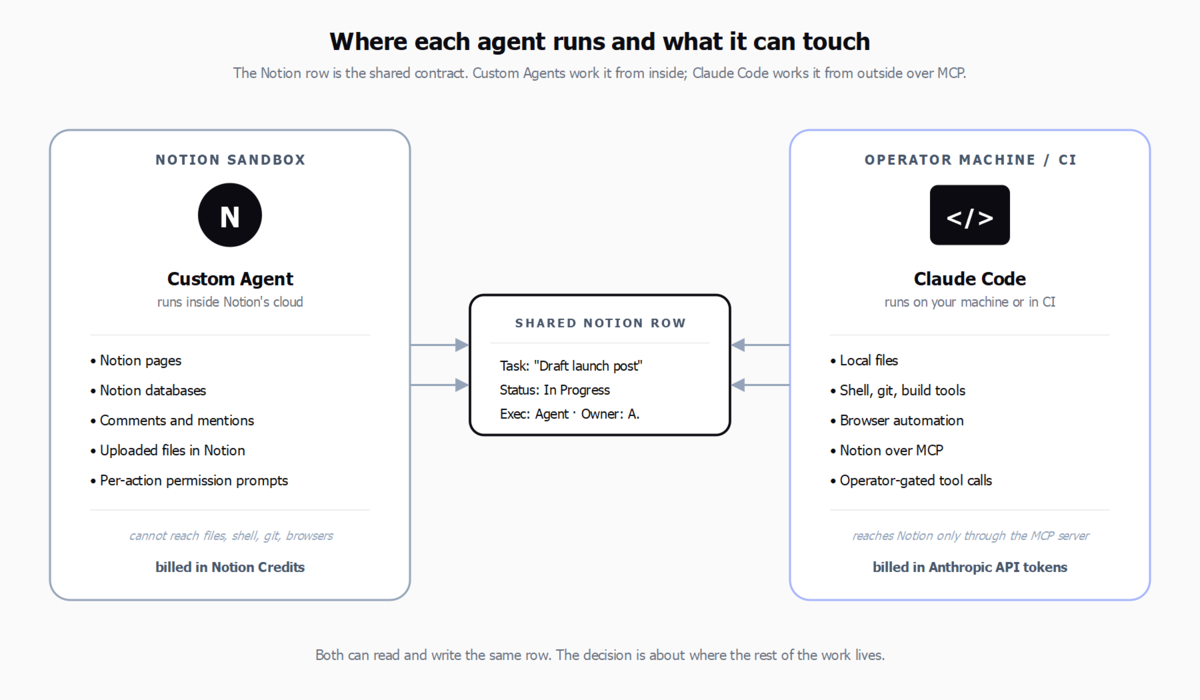
A Notion Custom Agent runs inside Notion. It reads and writes database rows from Notion's UI, uses Notion Credits for billing, and cannot reach your filesystem or run a shell command. A Claude Code session runs on your machine or in CI. It reads and writes files, runs commands, and talks to Notion through an MCP server when it needs to. You pay per token at Anthropic's published rates. Most comparison posts on this topic miss this distinction and treat the question as "which chatbot is smarter." The smarter question is: where does the work happen?
How do Notion Custom Agents and Claude Code compare side by side?
| Dimension | Notion Custom Agents | Claude Code |
|---|---|---|
| Where it runs | Inside Notion (web, desktop, mobile) | On your machine, or in CI |
| What it can touch | Notion pages, databases, comments, files attached to Notion | Local files, shell commands, git, browsers, plus Notion via MCP |
| Trigger | Notion UI, scheduled, or row-level @mentions | CLI prompt, IDE plugin, or scripted invocation |
| Approval model | Per-action permission prompts in Notion | Operator-gated by default; tool use can be auto-approved per project |
| Pricing | Notion Credits (bundled with Business and Enterprise plans) | Anthropic API tokens - Haiku 4.5 $1/$5, Sonnet 4.6 $3/$15, Opus 4.7 $5/$25 per MTok |
| Multi-step planning | Yes, scoped to Notion entities | Yes, scoped to the project root and any connected MCP servers |
| Code execution | No | Yes, native |
| Best fit | Ops, knowledge work, recurring Notion routines | Engineering, content pipelines, anything that touches a repo |
When should you use Notion Custom Agents?
Reach for Custom Agents when the agent's work product is a Notion artefact. Examples that fit cleanly:
- Summarising a long meeting note and writing the recap back to a project page.
- Triaging an inbox database - reading new rows, setting priority, assigning owners.
- Drafting a brief from a research database and posting it as a comment on a project page.
- Recurring weekly digests pulled from a status database.
The wins here are operational. Everyone on the team already lives in Notion. The agent's actions are visible in page history. Billing is bundled. You don't need to ship an MCP server or hand out API keys.
The limit shows up the moment the work leaves Notion. Custom Agents can't open a pull request, can't run a script, can't fill a form on an external site. They can't even open a URL the way a browser-using agent can. If the workflow ends with "and then upload this to the vendor portal," Notion Custom Agents stop short of the goal.
When should you use Claude Code?
Reach for Claude Code when the agent has to touch something outside Notion. Examples:
- Reading a Notion task row, writing the code, opening the pull request, and posting the PR link back to the row.
- Drafting a blog post from a research brief, generating images, and publishing through a CMS Admin API.
- Running a release: tagging, building, generating release notes, posting to a Notion log.
- Any workflow that needs git, shell, or filesystem access.
Claude Code reaches Notion through the Model Context Protocol. You install the Notion MCP server, share an integration token, and the agent can now read and write Notion the same way a Custom Agent would, while still doing everything a coding agent does. Setup is a one-time exercise - on Windows it takes a few minutes; on macOS and Linux less.
Do you actually have to pick just one?
The Developer Platform launch on May 13 2026 made this explicit. Notion's own announcement frames external agents (Claude Code, Cursor, Codex, Decagon) as first-class partners. Notion's product head Ivan Zhao described the platform as a way to "bring agents to where the work lives." That's not a wall between Custom Agents and Claude Code. It's a routing rule:
- Work happens in Notion? Use a Custom Agent. No external infrastructure, no token costs to worry about.
- Work touches a repo or filesystem? Route it to Claude Code over MCP. The Notion row stays the source of truth; the agent reports back when it's done.
Many teams will end up running both. The Custom Agent handles the operational layer; Claude Code (or Cursor, or Codex) handles the technical layer. The Notion row is the contract between them.
What does each cost in practice?
This question comes up early, so address it directly. Notion Credits are bundled into Business and Enterprise plans and are denominated as agent actions, not tokens. For ops work that means most teams won't hit a hard cap. Claude Code is pay-per-token. A typical short Claude Code task (read a Notion row, edit two files, open a PR) runs through a few thousand tokens of Haiku 4.5 plus a few hundred of Sonnet 4.6 - cents, not dollars. Long planning sessions on Opus 4.7 are where bills accumulate, which is why most teams route mechanical work to Haiku and reserve Opus for the parts that genuinely need it.
Comparing the two on price alone is the wrong frame. The right frame is: how much would it cost not to ship the work? An hour of operator time is more expensive than either option.
How can you use both with a Notion board as the dispatch layer?
The pattern we've found cleanest is to keep one Notion board as the source of truth for all work - ideas, tasks, decisions, completed - and let agents read from it. Custom Agents handle the Notion-shaped rows. Claude Code (or another coding agent) picks up rows marked for technical execution and posts results back. We wrote up this pattern as agency-os: a visual Notion workflow for AI work, with operator-gated dispatch and dependency ordering. It works because the board, not the agent, is the system of record.
The bigger point is the pattern, not the tool: keep your agents pointed at one structured surface, keep humans in the loop on what ships, and let the agent type follow the work shape. Custom Agents inside Notion, Claude Code outside.
How do you decide which to use for your team?
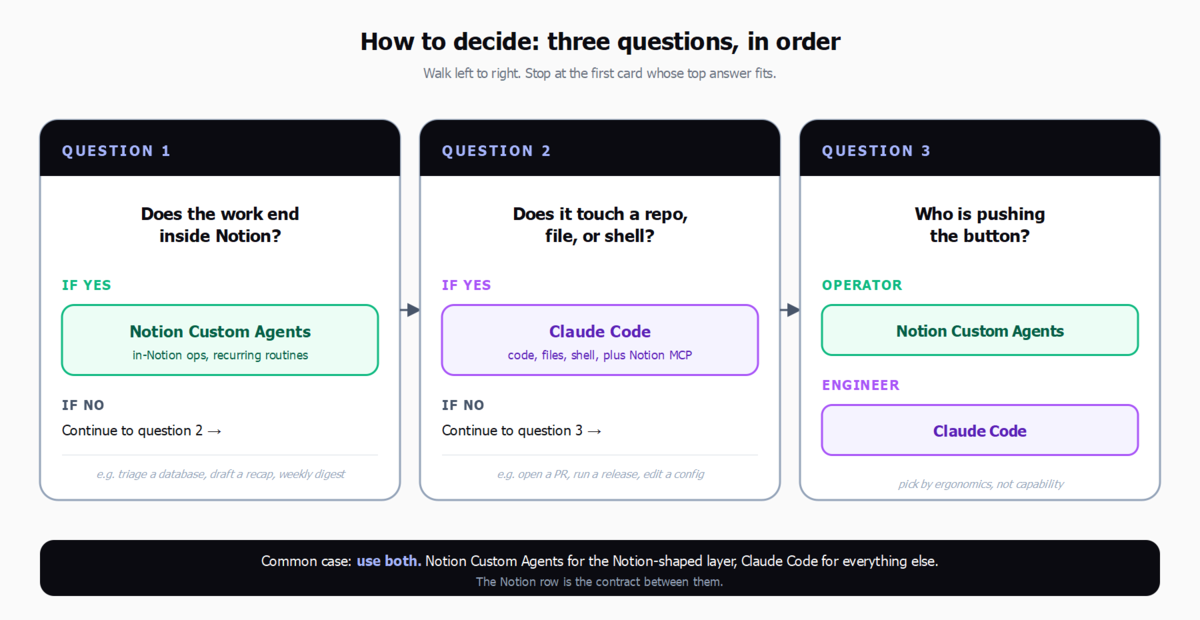
Three short questions, in order:
- Does the work end inside Notion? If yes, start with Custom Agents. You'll know within a week whether they cover the routines you care about.
- Does the work touch a repo, a file, or a shell? If yes, you need Claude Code (or Cursor / Codex) in the loop. Use Custom Agents for the Notion-shaped parts and route the rest.
- Who is pushing the button? If it's an operator working in Notion, Custom Agents win on ergonomics. If it's an engineer working in an editor, Claude Code wins on the same grounds.
You almost never need both for the same workflow. You will usually want both across your organisation.
FAQ
Can Notion Custom Agents edit files outside Notion?
No. They can read and write Notion pages, databases, comments, and uploaded files. They can't reach your local filesystem, open a terminal, or run a script. Anything outside Notion needs an external agent.
Does Claude Code work with Notion databases?
Yes, through the Notion MCP server. Once installed and authenticated with an integration token, Claude Code can read, query, and update Notion databases the same way a Custom Agent does.
Which is cheaper - Notion Credits or Claude API tokens?
For Notion-shaped work, Credits are usually cheaper because they're bundled into Business and Enterprise plans. For technical work, Claude Code on Haiku 4.5 is inexpensive and Sonnet 4.6 is mid-range; Opus 4.7 is where costs climb. The comparison is apples-to-oranges - they're billing for different work.
Can I use Claude Code as the agent behind a Notion Custom Agent?
Not directly today. The Developer Platform's external agent partnerships suggest tighter handoffs are coming, but as of May 2026 the practical pattern is: a Custom Agent flags work for a human or external agent, and Claude Code picks it up over MCP from its end.
What about Cursor and Codex?
Same architecture as Claude Code: external agents that reach Notion through MCP. The choice between them is about your editor and team preference, not about Notion compatibility.
How do I run both without chaos?
Pick one Notion board as the source of truth. Define which rows go to Custom Agents and which go to external agents (a single status field is enough). Keep humans in the loop on approval. The pattern is described in more detail in our agency-os post.
Bottom line
Notion Custom Agents and Claude Code are not competing for the same job. Custom Agents are for in-Notion ops work, dispatched from Notion's UI, paid in Credits. Claude Code is for work that touches code, files, or shells, dispatched from an editor, paid in tokens. The Notion Developer Platform makes the coexistence explicit. Pick by where the work lives. Most serious teams will end up using both.
If you want to compare Claude Code to Notion Custom Agents in your own workspace, the fastest path is to install the Notion MCP server in Claude Code, point it at a small test database, and watch the same task run from both sides.