
How to run n8n in queue mode with Redis and worker containers on Docker
A working docker-compose.yml for n8n queue mode: Redis broker, Postgres, main process, and worker replicas, plus how to verify workers actually pick up jobs.
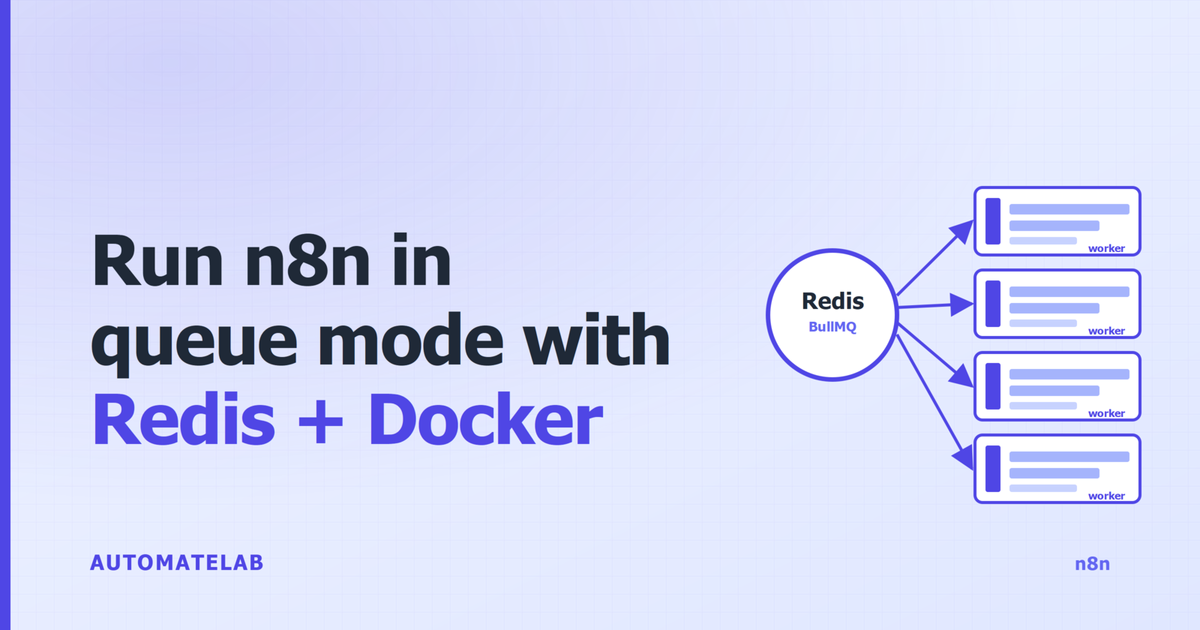
TL;DR: Run n8n in queue mode on Docker by setting EXECUTIONS_MODE=queue on the main process and every worker, running Redis as the broker, switching to Postgres, and adding a worker service that pulls jobs from Redis.
Scale workers with docker compose up -d --scale n8n-worker=N.
Queue mode is the official horizontal-scaling pattern in n8n. The single-container setup runs every workflow inside one Node.js event loop, so concurrent webhooks, long AI nodes, and scheduled triggers contend for the same process. Splitting into main + Redis + workers removes that contention and lets you scale by adding worker replicas. Once a self-host starts choking on concurrent webhooks or long-running AI workflows, queue mode is the fix - the same step covered in passing in the self-hosting n8n on a VPS walkthrough.
Prerequisites
- Docker Engine 24+ and Docker Compose v2 on the host.
- At least 2 vCPU and 4 GB RAM for main + Redis + Postgres + one worker. Add ~1 GB per extra worker.
- A Postgres database. SQLite is not supported in queue mode - n8n requires a shared database all containers can connect to.
- A 32-character random string for
N8N_ENCRYPTION_KEY. The exact same value must be set on the main process and every worker, or workers silently fail to decrypt credentials.
How do main, Redis, and worker containers connect?
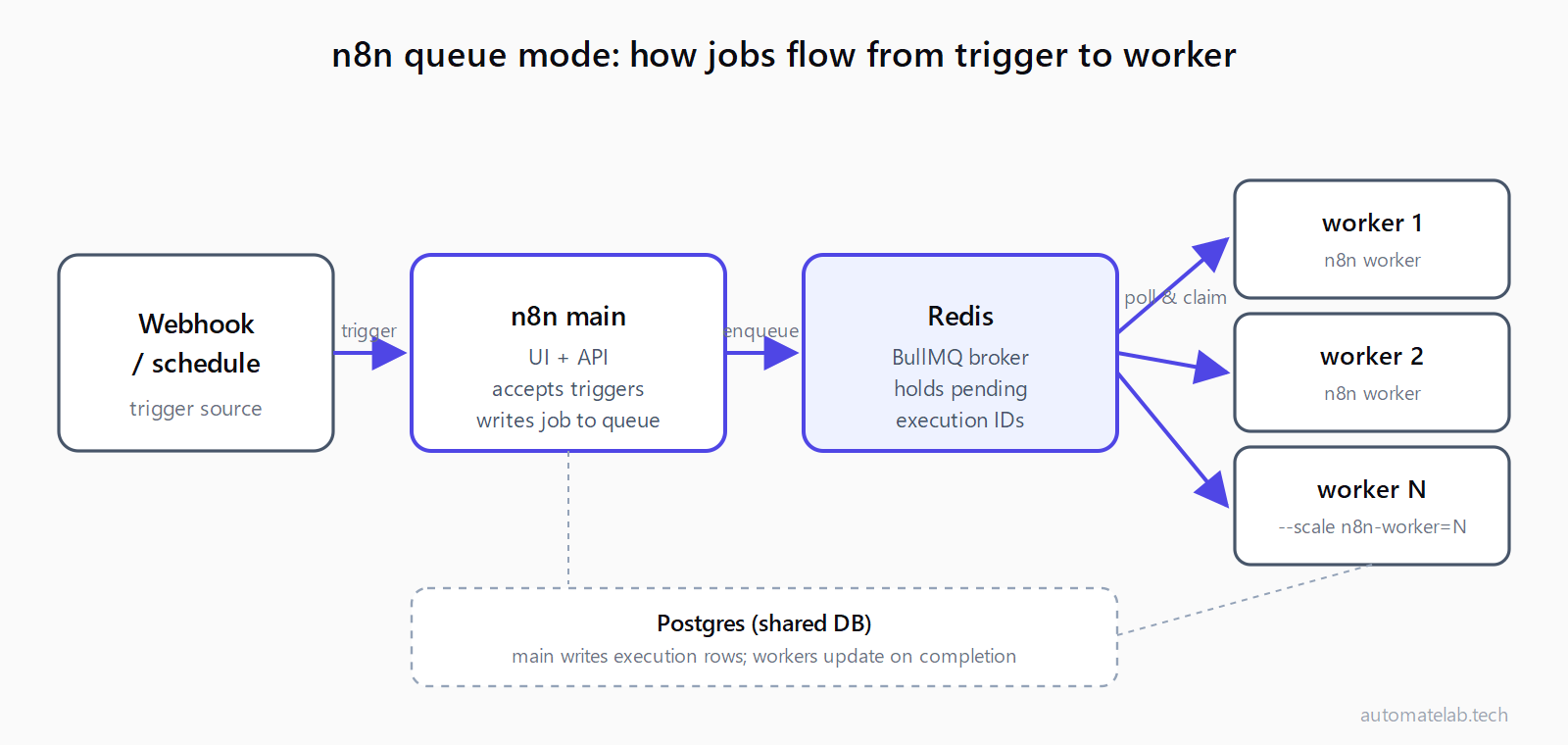
The main n8n process owns the UI, the API, the schedule trigger, and webhook reception. When a workflow needs to run, main writes an execution record to Postgres and pushes the execution ID into a Redis list managed by BullMQ. Each worker container runs n8n worker, which is a long-lived process that polls Redis, claims a job, runs the workflow, and writes the result back to Postgres. Multiple workers pull from the same queue, so jobs spread across them automatically.
What does the docker-compose.yml look like?
This file is the entire stack: Redis broker, Postgres database, n8n main, and a single n8n worker service that you scale with --scale. Save it as docker-compose.yml:
services:
  redis:
    image: redis:7-alpine
    command: ["redis-server", "--appendonly", "yes"]
    volumes:
      - redis_data:/data
    healthcheck:
      test: ["CMD", "redis-cli", "ping"]
      interval: 10s
      retries: 5

  postgres:
    image: postgres:16-alpine
    environment:
      POSTGRES_DB: n8n
      POSTGRES_USER: n8n
      POSTGRES_PASSWORD: ${POSTGRES_PASSWORD}
    volumes:
      - postgres_data:/var/lib/postgresql/data
    healthcheck:
      test: ["CMD-SHELL", "pg_isready -U n8n -d n8n"]
      interval: 10s
      retries: 5

  n8n-main:
    image: n8nio/n8n:latest
    depends_on:
      redis: { condition: service_healthy }
      postgres: { condition: service_healthy }
    env_file: .env
    ports:
      - "5678:5678"
    volumes:
      - n8n_data:/home/node/.n8n

  n8n-worker:
    image: n8nio/n8n:latest
    depends_on:
      redis: { condition: service_healthy }
      postgres: { condition: service_healthy }
    env_file: .env
    command: worker
    volumes:
      - n8n_data:/home/node/.n8n

volumes:
  redis_data:
  postgres_data:
  n8n_data:
Two things to notice. First, both n8n-main and n8n-worker use the same image and the same .env file - the only difference is command: worker on the worker service, which switches the entrypoint to the worker binary. Second, both services mount the same n8n_data volume, which holds the encryption key file written on first boot.
What goes in the .env file?
Create .env next to the compose file. These are the variables n8n reads when it starts:
EXECUTIONS_MODE=queue
N8N_ENCRYPTION_KEY=replace-with-32-random-bytes-base64
QUEUE_BULL_REDIS_HOST=redis
QUEUE_BULL_REDIS_PORT=6379
QUEUE_HEALTH_CHECK_ACTIVE=true
QUEUE_WORKER_CONCURRENCY=5
DB_TYPE=postgresdb
DB_POSTGRESDB_HOST=postgres
DB_POSTGRESDB_PORT=5432
DB_POSTGRESDB_DATABASE=n8n
DB_POSTGRESDB_USER=n8n
DB_POSTGRESDB_PASSWORD=${POSTGRES_PASSWORD}
POSTGRES_PASSWORD=replace-with-strong-password
N8N_HOST=localhost
WEBHOOK_URL=http://localhost:5678/
GENERIC_TIMEZONE=UTC
Generate the encryption key once and reuse it: openssl rand -base64 32. If you ever swap it on the main process without updating the workers (or vice versa), workers boot but cannot decrypt stored credentials, so jobs sit in the queue marked as failed. Set QUEUE_WORKER_CONCURRENCY=5 as a starting point; bump to 10+ for I/O-bound workflows that mostly wait on HTTP calls, drop to 1-2 if a worker is CPU-bound on heavy AI nodes. Add QUEUE_BULL_REDIS_PASSWORD if your Redis is exposed beyond the compose network.
How do you bring the stack up?
From the directory containing both files:
docker compose up -d
docker compose ps
You should see four services: redis, postgres, n8n-main, and n8n-worker, all in state running with healthy on Redis and Postgres. Open http://localhost:5678 and finish the onboarding to create the owner account. Build a quick test workflow - a Manual Trigger followed by a Set node is enough.
How do you verify workers are picking up jobs?
Trigger the workflow once from the UI, then tail the worker logs:
docker compose logs -f n8n-worker
Look for a line like Worker started execution followed by an execution ID. If main runs the workflow itself instead, the worker is misconfigured - the most common cause is EXECUTIONS_MODE not making it into the worker container's environment, or a mismatched N8N_ENCRYPTION_KEY. The next-most-common cause is the worker not reaching Redis at all, which surfaces as the same ECONNREFUSED error in HTTP Request nodes pattern - check that QUEUE_BULL_REDIS_HOST matches the compose service name (redis, not localhost).
How do you tune worker count for your load?
Start with one worker and scale based on observed queue depth. Add workers on the fly:
docker compose up -d --scale n8n-worker=4
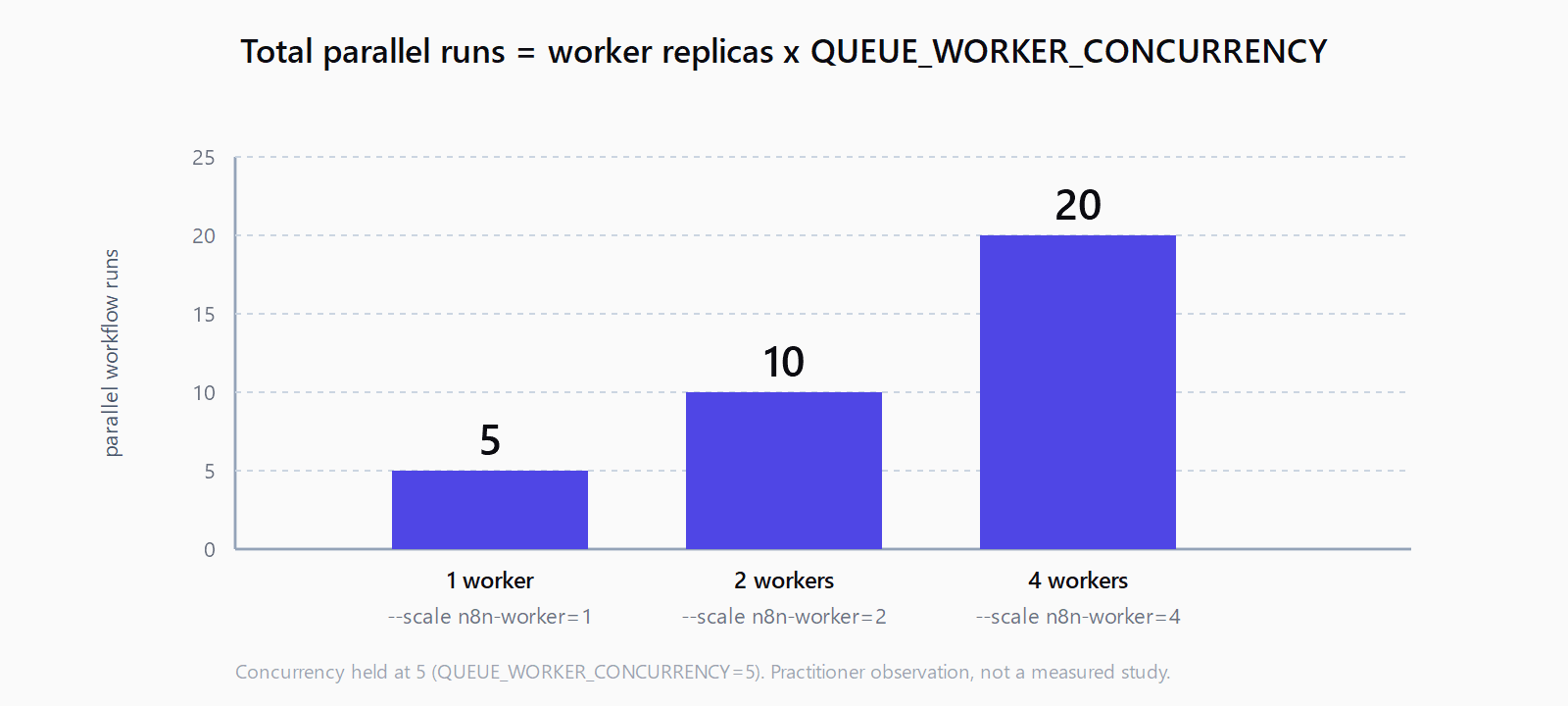
The new replicas connect to Redis and start pulling immediately. Total parallel executions = n8n-worker replicas x QUEUE_WORKER_CONCURRENCY. Four workers at concurrency 5 gives 20 simultaneous workflow runs. Watch docker stats while load climbs; if individual worker CPU stays under 70%, raise concurrency before adding replicas, since each replica adds memory overhead. To scale down, repeat the command with a smaller number - Docker stops excess workers gracefully and they finish in-flight jobs first.
When should you add a separate webhook process?
Webhooks are received on the main process by default. If you push hundreds of webhooks per minute, that traffic competes with the UI and scheduler for the same event loop, which can cause UI lag and the kind of dropped requests that show up as a n8n webhook returns 404 in the logs. Offload webhooks to a dedicated process by adding a fifth service:
  n8n-webhook:
    image: n8nio/n8n:latest
    depends_on:
      redis: { condition: service_healthy }
      postgres: { condition: service_healthy }
    env_file: .env
    command: webhook
    ports:
      - "5679:5678"
Point your reverse proxy at n8n-webhook:5678 for incoming webhooks and at n8n-main:5678 for the UI. Update WEBHOOK_URL in .env to the public URL the webhook process is reachable on, otherwise registered webhook URLs in workflows still point at main.
FAQ
Do I need Postgres, or can I keep SQLite?
You need Postgres. Queue mode requires a shared database that main and every worker can connect to simultaneously. SQLite stores its file on a single host process and does not handle concurrent writers from multiple containers, so n8n refuses to start workers when DB_TYPE=sqlite is paired with EXECUTIONS_MODE=queue.
How many workers should I run?
Start with one and add replicas as queue depth grows. Total parallel runs equal worker replicas multiplied by QUEUE_WORKER_CONCURRENCY. For most self-hosted setups, two workers at concurrency 5 (10 parallel runs) handle a healthy load. Monitor docker stats and Redis queue length before scaling further.
Why are my workers idle even though jobs exist?
Three usual suspects, in order of frequency: N8N_ENCRYPTION_KEY differs between main and workers (workers boot but cannot decrypt credentials); workers cannot reach Redis (check QUEUE_BULL_REDIS_HOST matches the compose service name); or EXECUTIONS_MODE=queue is set on main but missing on workers, so workers default to a non-queue mode and never poll.
Can main and workers run on the same host?
Yes. The compose file above does exactly that - all four services share one Docker host. Multi-host deployments are an option for very large setups, but a single host with several worker replicas covers most workloads up to several hundred executions per minute.
Do webhooks need a separate container?
Only at high webhook volume. A few hundred webhooks per minute can stay on the main process. Past that, add the n8n webhook service shown above and route incoming webhook traffic to it via your reverse proxy. The benchmark improvement is well documented - the n8n team measured roughly 7x throughput in queue mode (around 162 req/s versus 23 req/s in default mode).