
Best no-code AI agent builders for 2026
Compare ten no-code AI agent builders by billing unit, integrations, enterprise controls and use case, with prices checked in October 2026.

TL;DR: Choose n8n for workflows you can self-host, Make for visual orchestration, Lindy for a shared assistant, Dify for knowledge applications, and Copilot Studio for Microsoft governance.
Checked 21 October 2026. This comparison covers ten no-code AI agent builders, including three additions: Gumloop, Dify and Microsoft Copilot Studio. Recommendations reflect documented capabilities and current billing terms, without claiming a hands-on performance benchmark.
What should you look for in a no-code AI agent builder?
Start with one business task and the exact actions it needs. A large connector catalogue is less useful than an authorised action that reads the right record, requests approval and writes back safely. Check authentication, supported fields and failure handling before comparing app counts.
Separate workflow steps with fixed rules from decisions that need a model. Keep calculations, payment rules and permission checks deterministic. For a concrete selection exercise, map the tools in an AI sales agent workflow onto each candidate's actual integrations.
Prices checked October 2026. Euro equivalents below use the ECB's 20 October reference rate, 1 euro to 1.1215 US dollars; vendors may bill in dollars. Annual prices are monthly equivalents with an annual commitment. Taxes, model usage, overages and additional seats can change the bill.
| Builder / example plan | Entry price or basis | Included allowance / caveat |
|---|---|---|
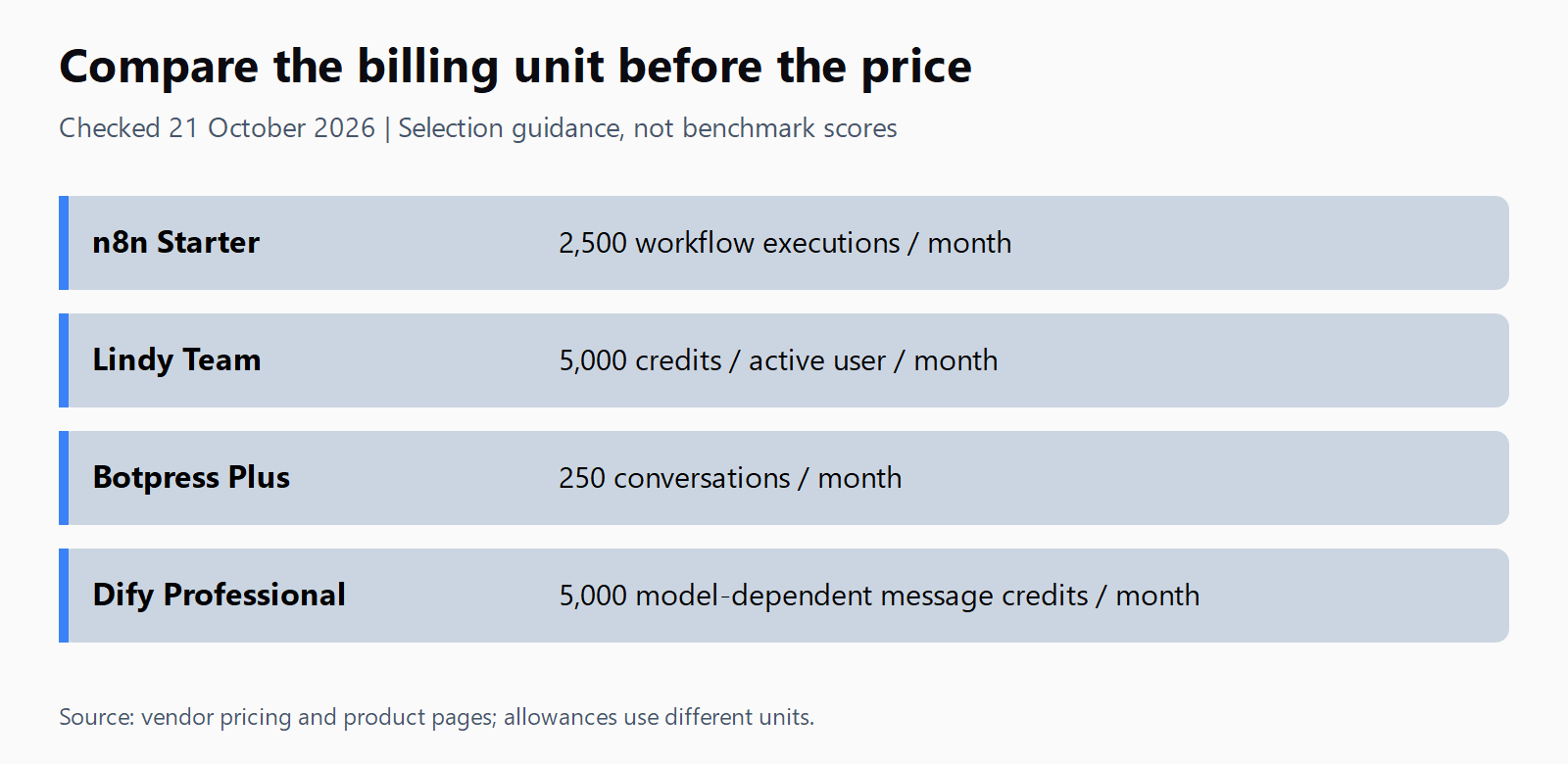
| n8n Starter | €20/month, annual | 2,500 workflow executions/month; unlimited steps |
| Relevance AI | Enterprise quote | Custom Actions and Vendor Credits |
| Lindy Team | About €44.57/active user/month | 5,000 credits/user/month, pooled; free trial credits expire after 7 days |
| Zapier / AI by Zapier | Task-based platform pricing | AI step and tool-call consumption depends on model; legacy Agents activities are separate |
| Botpress Plus | About €133.75/month, annual | 250 conversations/month; Free has 100 conversations without top-ups |
| Voiceflow | Request pricing / usage-based | Agency trial; business terms require a quote |
| Make Core | About €8.02/month, annual | 10,000 credits/month; advanced AI can consume more per action |
| Gumloop Pro | About €32.99/month | 20,000 credits; 8% orchestration fee |
| Dify Cloud Professional | About €43.84/month, annual | 5,000 message credits/month; 3 members; model-dependent consumption |
| Copilot Studio standalone | Pre-purchased credits or pay-as-you-go | Azure subscription required; distinct from Microsoft 365 Copilot licensing |
These units are not interchangeable. One completed workflow can contain several tool calls, and one customer conversation can contain several messages. Compare the cost of completing your task, including failed attempts, against a monthly headline price.
Which no-code AI agent builder is best for each use case?
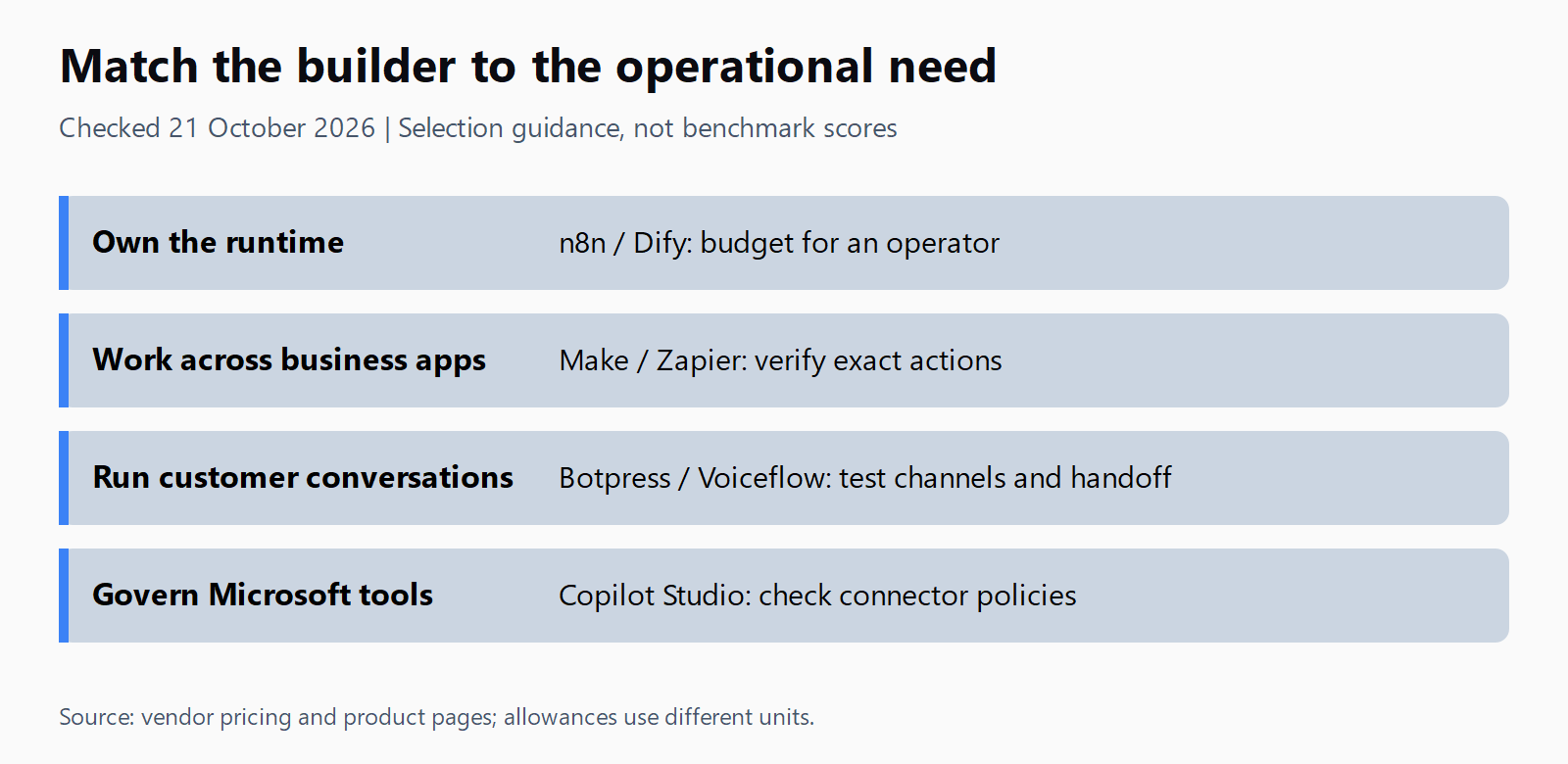
The verdicts below are starting points for a shortlist. The governance column identifies a relevant tier or deployment option; it does not imply every feature comes with the cheapest plan. Confirm contractual requirements with the vendor.
| Builder | Integration approach | Enterprise option / check | Best for |
|---|---|---|---|
| n8n | Workflow nodes, AI and MCP nodes | Business SSO/LDAP; Enterprise secrets and log streaming | Technical workflow owners |
| Relevance AI | Tools, triggers and workforces | SSO, RBAC and audit logs on quoted offering | Governed multi-agent work |
| Lindy | Slack, inbox/calendar, integrations and MCP | Enterprise SSO/SCIM, audit logs and BAA terms | Shared office assistant |
| Zapier | Zap triggers and AI tool calls | Enterprise admin control of tool calling | Existing Zapier workflows |
| Botpress | Webchat, support channels and tools | Team RBAC; Enterprise security review and SLA | Customer conversations |
| Voiceflow | Voice/chat channels and integrations | Business roles, permissions and environments | Conversation design / agencies |
| Make | Visual scenarios and app actions | Request current Enterprise governance terms | Branching operational workflows |
| Gumloop | Connectors and MCP | Enterprise connector policies; optional VPC | AI operations with MCP tools |
| Dify | Visual workflows, knowledge pipelines, plugins | Private Enterprise deployment available | Knowledge-based applications |
| Copilot Studio | Power Platform connectors and tools | Tenant/environment data policies | Microsoft-governed deployments |
n8n: best for technical workflow owners
n8n combines a visual editor with self-hosting and optional code. Its pricing page separates hosted Starter from self-hosted Business and quoted Enterprise features. Community is source-available under the vendor's Sustainable Use License. Infrastructure, model calls, backups and maintenance still cost money; self-hosting alone does not settle data residency.
Relevance AI: best for governed multi-agent work
Choose Relevance AI when the design calls for several agents with shared tools and administrative controls. The canonical pricing page now presents a quoted Enterprise offering with custom usage. Old public Pro prices should not be treated as a current purchasing offer. Ask for an allowance tied to your expected actions.
Lindy: best for a shared office assistant
Lindy's current plans describes a Slack-native teammate with routines, inbox work and meeting support. Team billing applies to every active user, with pooled credits. Its free credits last seven days, so they support a trial rather than a recurring free production budget. Test a routine with the people who will actually use it.
Zapier: best for existing Zapier workflows
Zapier is migrating Agents from standalone Agents into AI by Zapier inside the Zap editor; no shutdown date is set yet. New evaluations should follow that path. Existing Agents accounts use activity allowances, which are different from Zap tasks. After converting an agent, test the new Zap before disabling the old trigger to prevent duplicate work.
Botpress: best for customer conversations
Botpress fits a support agent that needs a chat channel and handoff arrangements. Its pricing page now measures conversations, with 100 on Free and 250 monthly on Plus. A conversation allowance is not a message allowance. Budget for extra conversation packs and AI usage before making a support-volume forecast.
Voiceflow: best for conversation design and agencies
Voiceflow's current offer distinguishes agency/client delivery from business deployments. It lists multi-client workspaces, handoff and white-labelling for agencies, and roles plus separate environments for businesses. The current page does not support the old fixed Pro price. Request usage assumptions and channel costs alongside the quote.
Make: best for branching operational workflows
Make suits teams already mapping branches and app actions on a visual canvas. Its current agent page says agents are available on all plans; an older vendor roundup describes paid tiers, so the current product page takes precedence. Make pricing explains credit consumption. Check the Make AI agent MCP tools setup separately when remote tools are required.
Gumloop: best for AI operations with MCP tools
Gumloop's pricing page lists Pro credits, unlimited agents and an orchestration fee. Its MCP options make it a candidate when tool connectivity matters more than a traditional chatbot designer. Include the fee and actual credit consumption in a pilot budget; the starting credit balance is not a count of completed business tasks.
Dify: best for knowledge-based applications
Dify combines visual workflows with knowledge pipelines and a plugin marketplace. Its pricing page offers managed Cloud, self-deployed Community and private Enterprise options. Cloud Professional includes three members and model-dependent message credits. Test document retrieval quality and update handling before choosing a deployment; self-deployment still needs an operator.
Copilot Studio: best for Microsoft governance
Copilot Studio suits organisations that need Microsoft-administered tools and publishing controls. Microsoft pricing distinguishes standalone usage billing from Microsoft 365 Copilot entitlements. Data policies can block connectors, HTTP requests and publishing channels. Confirm the intended channel and connector are permitted before treating a working authoring demo as deployable.
How do you choose between n8n and a hosted platform?
Choose self-hosting when an operator can own upgrades, credentials and recovery, and the deployment requirement justifies that work. Choose a hosted builder when its supported actions and governance fit the task and its measured running cost is acceptable. Neither option removes the need to test model mistakes.
How do you test your shortlist?
- Confirm n8n's deployment and licence fit the delivery model.
- Request Relevance AI's action and credit quote.
- Count Lindy's active users and measure credit use.
- Check Zapier's migration path and prevent duplicate triggers.
- Price Botpress against conversations and AI usage.
- Obtain Voiceflow's channel and workspace terms.
- Measure Make credits across a complete scenario.
- Include Gumloop's orchestration fee in the budget.
- Test Dify retrieval against representative documents.
- Check Copilot Studio connector and channel policies.
FAQ
What is the best free no-code AI agent builder?
Botpress Free offers 100 conversations for a small support pilot; Make offers a free allowance for workflow experiments. Self-hosted Community editions can suit technical owners, but hosting and model costs remain. Lindy's seven-day free credits are a trial.
Can I build an AI agent without any code at all?
Yes, when the builder exposes the required trigger, knowledge source and actions. Unsupported authentication or API behaviour can still require technical work. Prove the exact task before buying a plan.
Which no-code agent platform supports MCP?
n8n, Lindy and Gumloop list MCP capabilities on their current pricing pages. Confirm whether you need to call an MCP server or expose tools through one; these are different roles. The Model Context Protocol explanation covers that distinction.
How much does it cost to run a no-code AI agent in production?
There is no reliable single monthly figure across these builders. Add the platform commitment, active seats, tool usage and model charges, then measure cost per completed task on representative inputs.
Is n8n's AI Agent node production-ready in 2026?
Its availability does not establish readiness for your workflow. Validate permitted actions, approval points, retry behaviour and recovery, then choose the deployment and support tier the workload needs.