
Best AI customer support agents for SaaS ticket actions in 2027
Choose a SaaS support agent by the account actions it can execute, its customer identity checks, and what it bills as an outcome.

TL;DR: Shortlist Intercom Fin for authenticated backend actions, Zendesk AI agents for Zendesk workflows, and Chatbase for a separate support agent with configured integrations.
A SaaS customer asking to change an account needs more than a help-center answer. The agent must identify the customer, call the correct system, confirm the change, and preserve the conversation if a person takes over.
Which AI support agents belong on a SaaS shortlist in 2027?
These three products address different purchasing situations. The recommendations use official documentation and pricing pages checked on 14 October 2026. No hands-on benchmark was conducted. Each option has a route to configured actions or helpdesk integration, as well as knowledge-base answers.
The selection criteria are backend access, customer identity checks, ticket handling, and the billing unit. This is narrower than choosing a no-code AI agent builder: support teams also need the result to arrive in their existing inbox and account records.
| Platform | Documented action route | Best starting situation | Buying check |
|---|---|---|---|
| Intercom Fin | Procedures and API Data connectors. | Support requests requiring authenticated account data or backend changes. | Connector security and billable outcome definitions. |
| Zendesk AI agents | Authorized actions and API integrations. | A team operating its service workflows in Zendesk. | Current action entitlements and automated-resolution allowance. |
| Chatbase | Integration-backed actions, REST/webhooks, and Zendesk ticket escalation. | A team evaluating a separate agent layer. | Paid-plan action limits, helpdesk features, and customer authorization. |
When is Intercom Fin the best fit for ticket actions?
Best for: Teams that need a documented path from a conversation to authenticated customer data and an external API operation. Fin's Data connector setup supports configured HTTP requests and use inside Procedures, Workflows, and Inbox macros.
For account changes, a read-only lookup can answer a usage question; a write-active connector can change data if its endpoint permits it. Intercom recommends manual triggering through a Procedure or workflow for sensitive write operations. A connector must be configured and made live before that route exists.
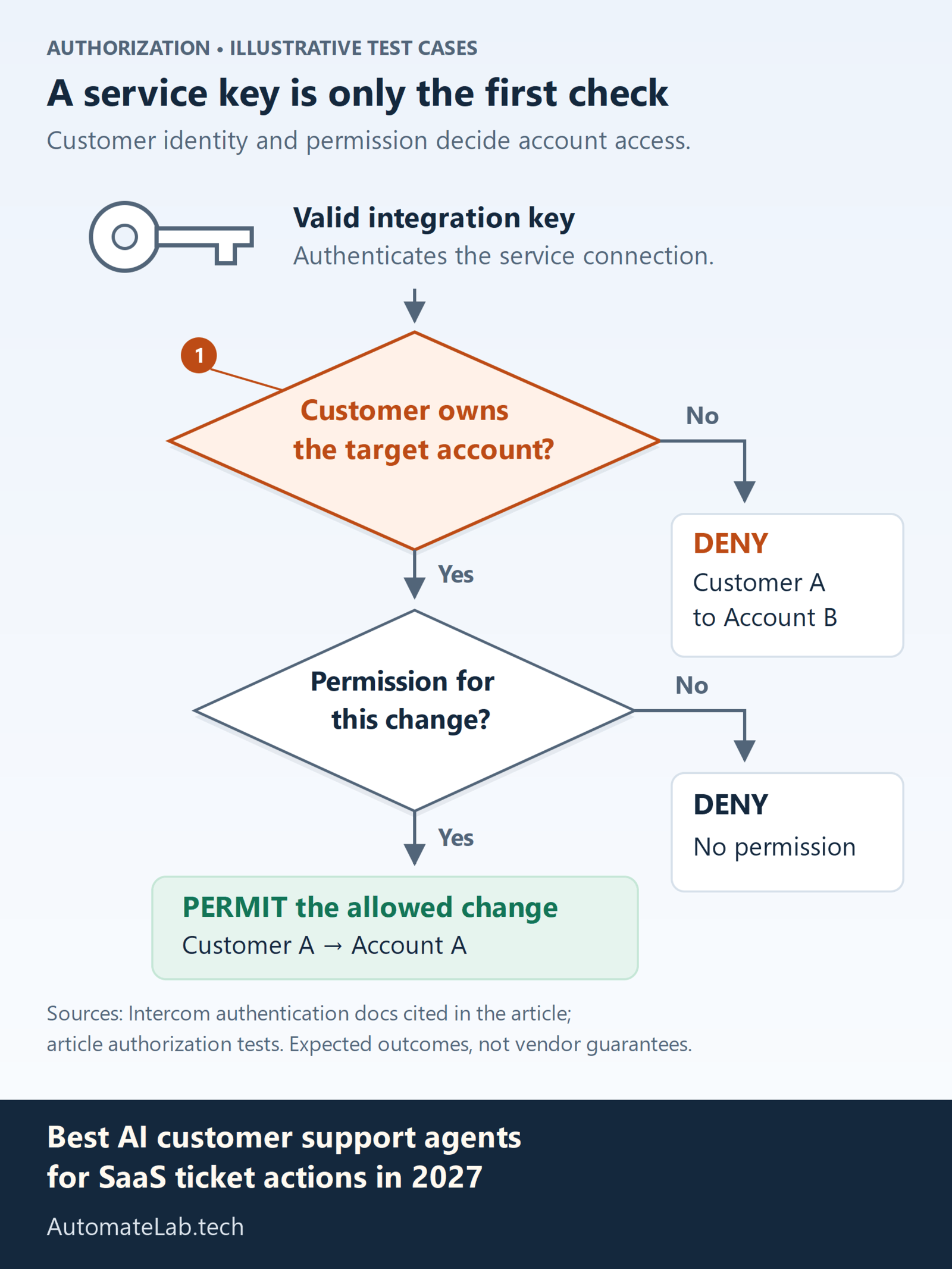
Intercom separately documents customer authentication for Data connectors. Verifying the person and authenticating the integration are separate jobs. A valid integration token does not establish that the person chatting owns the requested account.
Skip if: The team cannot define the backend operation, its permissions, and its escalation conditions. Choosing Fin does not build a suitable internal API or settle your account-access rules.
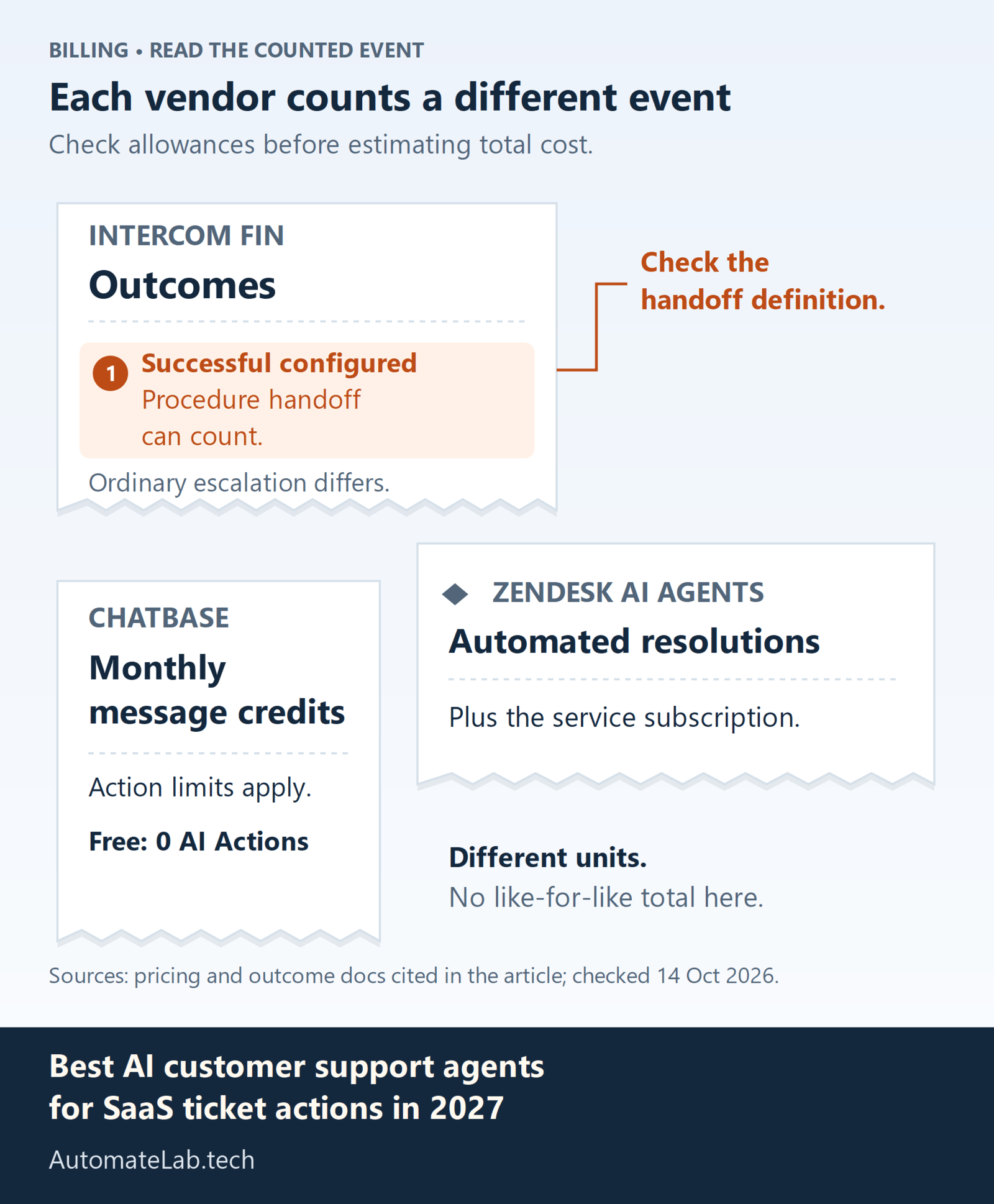
Price: Fin uses outcome billing. Its outcome definitions include a successful Procedure configured to hand off to a person or workflow. Ordinary escalation, including a customer asking for a person, has different billing treatment. Count these separately when estimating costs.
Fin can also run with an existing helpdesk. Intercom's external-helpdesk packaging has minimum commitments and no Intercom seat costs; confirm the chosen helpdesk, channel, and contract before deciding a migration is necessary.
When should a Zendesk team choose Zendesk AI agents?
Best for: Teams that want to evaluate action-capable automation within their Zendesk service setup. The current AI agents overview describes answers from trusted knowledge sources alongside authorized actions and API integrations.
Begin with the workflow already owned by the support team. Specify the required ticket fields, external system, permitted change, and destination for exceptions. Ask the vendor to demonstrate that exact route in your account configuration. A knowledge-source answer does not prove an integration has written the requested record.
Skip if: The proposed configuration cannot demonstrate the required operation and customer authorization on your support channel. The reviewed Zendesk pages do not establish an end-user identity guarantee for every action path. Verify the exact channel and operation before enabling it.
Price: Zendesk combines its service subscription with AI usage measured in automated resolutions. The current pricing page lists AI Agents and Action Builder in Suite Team. Confirm the resolution allowance, additional usage charges, and whether your existing account uses the current packaging.
When is Chatbase a useful separate support-agent layer?
Best for: Teams comparing an agent layer with its own data sources and configured connections to the tools they already use. The integration catalog documents data fetching and actions through integrations, REST, and webhooks.
Chatbase's Zendesk integration announcement describes ticket creation under configured escalation conditions and live human handoff through Zendesk Sunshine. Historical ticket import is a separate feature. Training on previous tickets can improve the source material available to an agent; it does not itself authorize a new ticket update.
Skip if: A necessary account action or identity check cannot be demonstrated through the selected integration. The reviewed Chatbase pages do not specify a complete customer-authorization mechanism for arbitrary sensitive custom actions. Verify it with the vendor and with whoever owns the backend endpoint.
Price: Chatbase uses subscription tiers with monthly message credits and action limits. The current plan table lists zero AI Actions on Free; Standard is the first listed tier with Helpdesk, API access, and advanced Zendesk integrations. Confirm connector entitlements and any separate Zendesk licensing.
How do you distinguish a real ticket action from a convincing answer?
Use a sandbox account and one concrete request, such as changing an allowed account setting. Define the expected record before running the demo. Inspect the backend after the conversation: the test passes when the permitted change exists, the correct customer owns it, and the transcript reports the actual result.
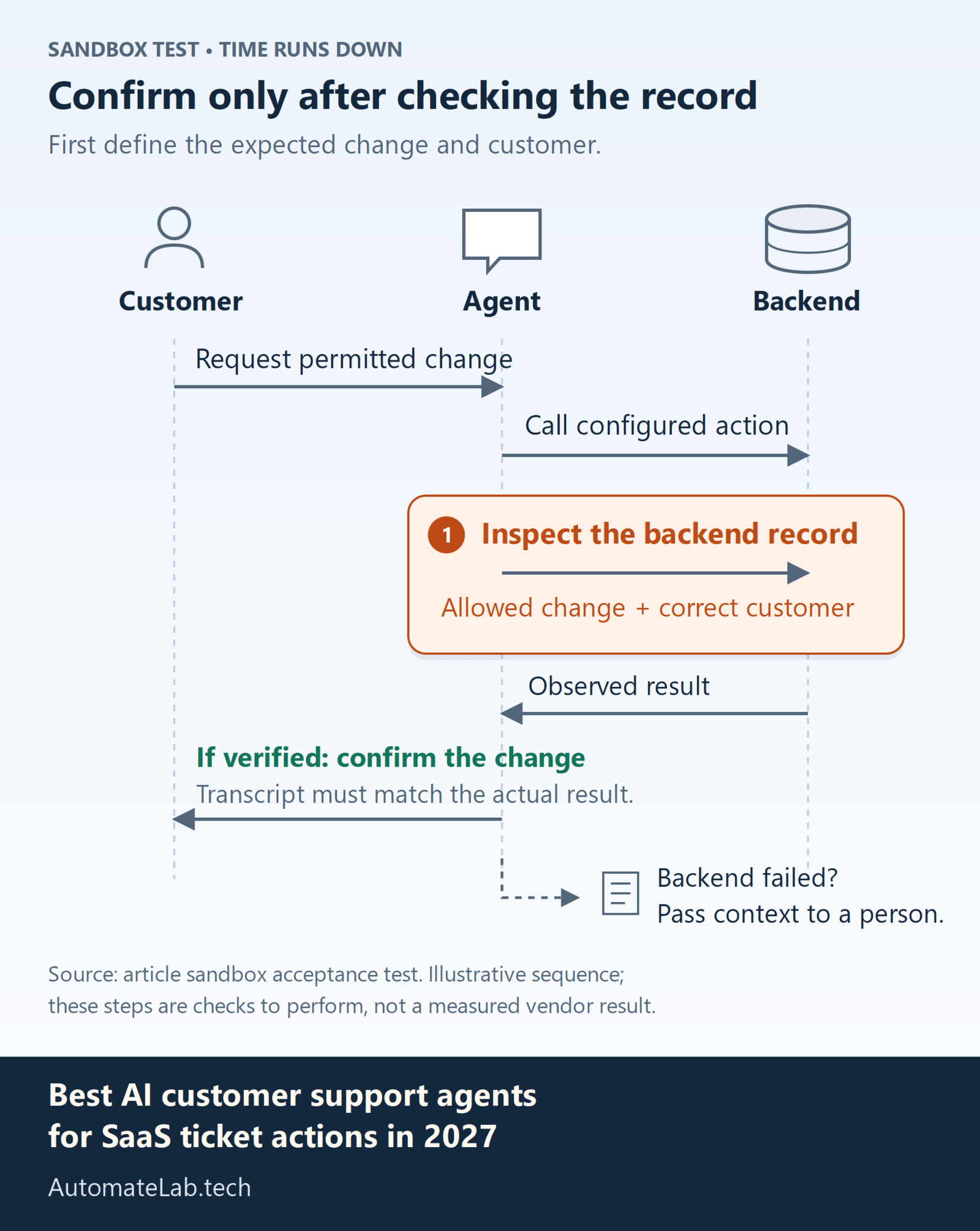
Then repeat the request with a different account identifier, insufficient permissions, and a backend failure. Those cases should reveal whether the agent checks authorization, preserves the failure, and hands over useful context. This follows the same tool-execution distinction used when building an AI sales agent.
A fixed approval workflow can still own the final write. Choosing between agentic workflows and RPA starts with the task: interpreting the conversation and executing a permitted change can have different owners.
How should you evaluate the three shortlisted platforms?
- Ask Intercom to demonstrate an authenticated Data connector, its write controls, and the billing treatment of a Procedure handoff.
- Ask Zendesk to demonstrate the required action in your account and confirm the automated-resolution allowance and additional usage terms.
- Ask Chatbase to demonstrate the paid-plan integration, customer authorization, ticket escalation, and the message-credit impact of the workflow.
FAQ
Can an AI support agent change a SaaS account?
Yes, when a configured action can call an authorized backend endpoint that permits the change. A knowledge-base answer alone cannot establish that the account was changed.
Is every Fin handoff billed as a resolution?
No. Fin distinguishes a billable Procedure handoff from ordinary escalation, including a customer requesting a person. Its outcome documentation defines those categories separately.
Does Chatbase Free include AI Actions?
The plan table checked on 14 October 2026 lists zero AI Actions on Free. Check the paid tier and integration entitlements needed for the ticket operation.
Do you have to replace your helpdesk to use Fin?
No. Intercom documents Fin deployment with existing helpdesks, with minimum commitments. Confirm support for your selected helpdesk and channel before purchase.