
Claude Code and Claude Desktop MCP config file: location and format (Windows/Mac/Linux)
Two tools, two config files. Claude Desktop reads claude_desktop_config.json; Claude Code reads ~/.claude.json -- not ~/.claude/settings.json, which many guides incorrectly recommend.
TL;DR: Claude Desktop reads claude_desktop_config.json at OS-specific paths (macOS: ~/Library/Application Support/Claude/, Windows: %APPDATA%\Claude\), while Claude Code reads ~/.claude.json for user scope or .mcp.json in the project root -- not ~/.claude/settings.json, which many guides cite incorrectly and which does not load MCP servers.
Most MCP setup guides conflate two different tools with two different config files. If you followed a tutorial that told you to edit ~/.claude/settings.json for Claude Code, that's why your servers aren't showing up. The Model Context Protocol spec and the Anthropic CLI use separate config paths, and getting them crossed is the single most common reason MCP servers fail to load silently.
Where is the Claude Desktop MCP config file?
Claude Desktop reads one file: claude_desktop_config.json. The path differs by OS:
- macOS:
~/Library/Application Support/Claude/claude_desktop_config.json - Windows:
%APPDATA%\Claude\claude_desktop_config.json(typicallyC:\Users\<you>\AppData\Roaming\Claude\) - Linux:
~/.config/Claude/claude_desktop_config.json
On macOS, the fastest way to open the file is: Claude Desktop menu bar (not the window's gear icon) → Settings → Developer → Edit Config. That button creates the file if it doesn't exist, then opens it in your default editor. On Windows and Linux you navigate there manually.
After saving any change to claude_desktop_config.json, fully quit and relaunch Claude Desktop. Closing the window without quitting the app does not reload the config. On macOS that means Cmd+Q or Claude → Quit Claude; on Windows, right-click the system tray icon and choose Exit.
What does the mcpServers JSON format look like?
The file holds a single top-level mcpServers object. Each key is a display name for the server; each value is a stdio transport spec:
{
  "mcpServers": {
    "filesystem": {
      "command": "npx",
      "args": [
        "-y",
        "@modelcontextprotocol/server-filesystem",
        "/Users/you/Desktop"
      ]
    },
    "github": {
      "command": "npx",
      "args": ["-y", "@modelcontextprotocol/server-github"],
      "env": {
        "GITHUB_PERSONAL_ACCESS_TOKEN": "ghp_..."
      }
    }
  }
}
All paths in args must be absolute -- relative paths silently fail. On Windows, use double backslashes inside JSON strings: "C:\\\\Users\\\\you\\\\Desktop". For remote servers that use SSE or HTTP instead of a local process, swap command and args for a url key:
{
  "mcpServers": {
    "remote-api": {
      "url": "https://mcp.example.com/sse",
      "headers": { "Authorization": "Bearer YOUR_TOKEN" }
    }
  }
}
Claude Desktop logs connection attempts to ~/Library/Logs/Claude/mcp*.log on macOS and %APPDATA%\Claude\logs\ on Windows. If the hammer icon doesn't appear in the chat input box after relaunch, check these logs first.
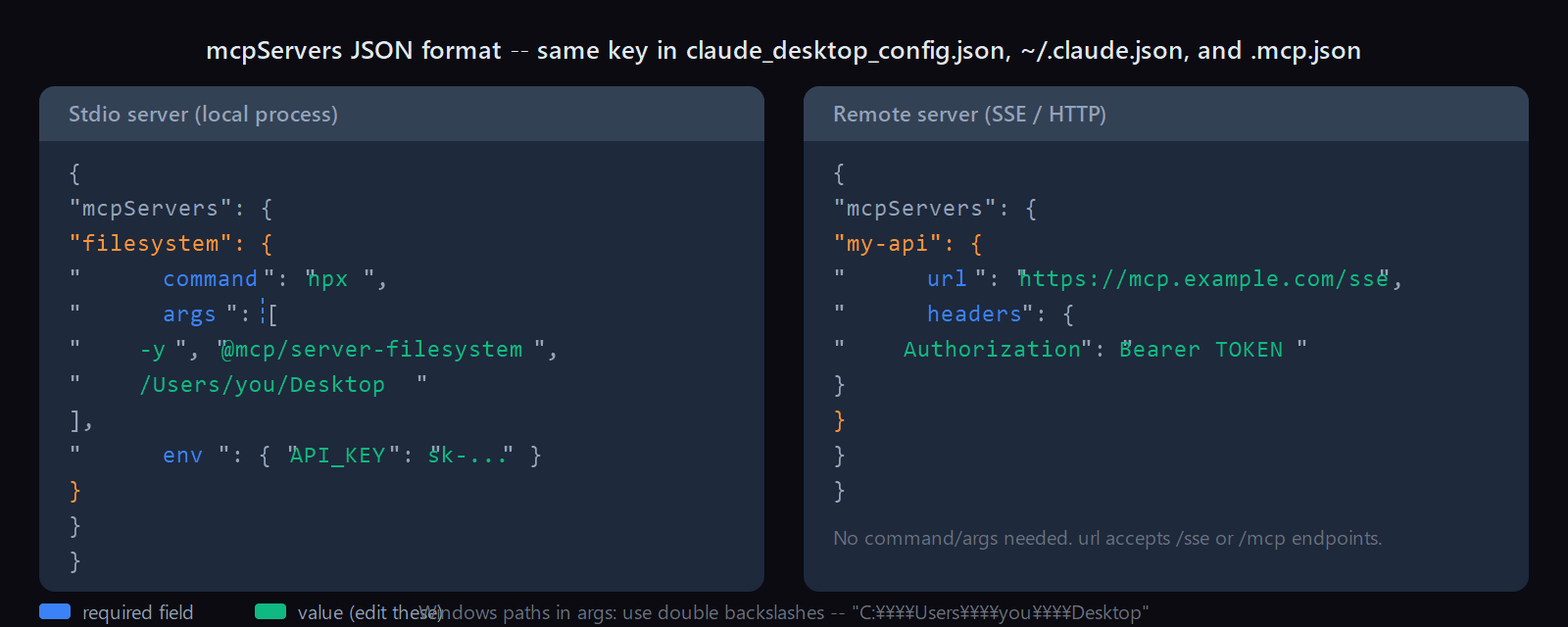
command + args; remote SSE/HTTP servers need url instead. The env and headers fields are optional. On Windows, backslashes in paths must be doubled inside JSON strings.Where is the Claude Code MCP config file?
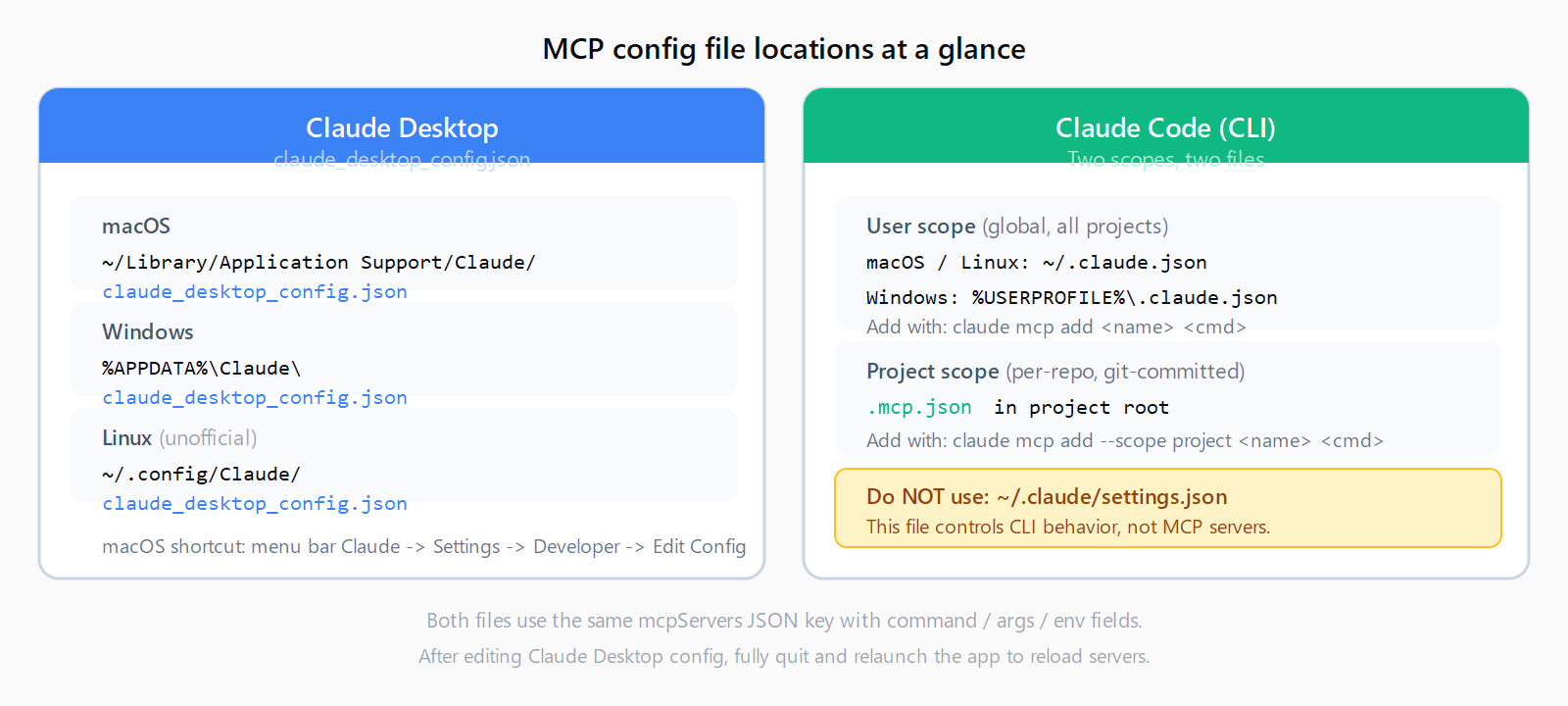
~/.claude/settings.json controls CLI behavior, not MCP servers.Claude Code (the CLI) uses two config files depending on the intended scope:
- User scope (global):
~/.claude.jsonon macOS and Linux;%USERPROFILE%\.claude.jsonon Windows. Applies to every project you open. - Project scope:
.mcp.jsonin the project root directory. Committed to git so your whole team picks up the same servers automatically.
The critical point: ~/.claude/settings.json is Claude Code's behavior settings file -- auto-compact, model preferences, allowed tools -- but it does NOT load MCP servers. Multiple reported cases on GitHub (including issue #4976) confirmed that placing MCP config in settings.json produces no error and no servers. If you set up Claude Code MCP servers on Windows following an older guide, check whether it pointed you to the wrong file.
The format inside ~/.claude.json mirrors the Claude Desktop shape exactly -- same mcpServers key, same command/args/env structure. Project-scoped .mcp.json uses the same schema.
How do you add MCP servers without editing JSON directly?
The claude mcp add command writes to ~/.claude.json (user scope) or .mcp.json (project scope) so you don't have to hand-edit JSON:
# Add a server to user scope (global, all projects)
claude mcp add filesystem npx -y @modelcontextprotocol/server-filesystem /path

# Add to project scope (.mcp.json in the current directory)
claude mcp add --scope project github npx -y @modelcontextprotocol/server-github

# List all configured servers and their scope
claude mcp list

# Remove a server by name
claude mcp remove filesystem
The --mcp-config flag at launch accepts a path to any JSON file in the claude_desktop_config.json format, letting you test a new server config without touching your global file:
claude --mcp-config ./test-servers.jsonIf claude mcp add returns an "unknown option" error, your Claude Code version predates the flag -- see the claude mcp add errors guide for the version check and workaround.
What Windows-specific issues cause MCP servers to fail?
Three Windows gotchas that don't appear in most guides:
- Environment variables in
envare not expanded. Writing"APPDATA": "%APPDATA%"inside theenvblock passes the literal string%APPDATA%, not the expanded path. Hardcode the value:"APPDATA": "C:\\\\Users\\\\you\\\\AppData\\\\Roaming\\\\". - npx requires npm to be installed globally. If
npxworks in your terminal but fails inside Claude Desktop, check whether%APPDATA%\npmexists. If not, runnpm install -g npmonce. - WSL paths are not interchangeable with Windows paths. A Claude Code install in WSL writes to the Linux home (
~/.claude.jsoninside WSL), separate from any Windows-native Claude Code install at%USERPROFILE%\.claude.json. The two installs do not share config.
FAQ
Where is the Claude Desktop config file on Windows?
At %APPDATA%\Claude\claude_desktop_config.json. In most installs that resolves to C:\Users\<username>\AppData\Roaming\Claude\claude_desktop_config.json. Paste %APPDATA%\Claude directly into the Windows Explorer address bar to navigate there without typing the full path.
Why are my Claude Code MCP servers not loading?
The most common cause is placing the config in ~/.claude/settings.json instead of ~/.claude.json. The settings file controls Claude Code behavior but does not load MCP servers. Move the mcpServers block to ~/.claude.json (a dot-file at the home root, not inside the .claude/ directory) and restart Claude Code.
What is the difference between user scope and project scope?
User-scoped servers in ~/.claude.json are available in every project you open with Claude Code. Project-scoped servers in .mcp.json (project root) are available only in that project and are committed to git, so teammates who clone the repo get the same server list. Project settings add to user settings -- they don't replace them.
Can I add MCP servers without editing JSON manually?
Yes. claude mcp add <name> <command> [args] writes to your user-scope config automatically. Add --scope project to write to .mcp.json instead. Run claude mcp list to verify the result. The --mcp-config <path> flag at launch accepts a one-off JSON config without modifying your global file.
Can I share MCP server configuration with my team?
Yes -- commit .mcp.json to your repository. Every team member who runs claude in that project directory picks up the project-scoped servers automatically. Exclude secrets from .mcp.json: put API keys in the env block of ~/.claude.json (user scope, gitignored by your global .gitignore) and reference them as environment variables in the command.
Does Claude Desktop work on Linux?
Claude Desktop does not have an official Linux release as of mid-2026. Some users run an unofficial build or Electron-wrapped version, which places the config at ~/.config/Claude/claude_desktop_config.json, but Anthropic's support for Linux Claude Desktop is absent. For Linux, Claude Code (the CLI) is the supported path for MCP server integration.