
MCP remote tool 60-second timeout: causes and fixes
MCP error -32001 hits exactly 60 seconds into any long tool call. The TypeScript SDK and Claude Desktop hardcode this limit and ignore configuration. Here is what actually fixes it.
TL;DR: The MCP 60-second timeout is hardcoded in the TypeScript SDK and Claude Desktop -- the universal fix is the async handleId pattern (return a job ID immediately, poll for results) rather than trying to extend the limit.
If you've built an Claude Code MCP server that runs any operation lasting more than a minute -- a database export, a document conversion, a web scrape, a code generation job -- you've seen this error: McpError: MCP error -32001: Request timed out. The tool call hits 60 seconds and dies, regardless of what you do on the server side. This post breaks down exactly where the limit lives and which fixes actually work.
Where does the 60-second timeout come from?
The MCP specification does not mandate a 60-second timeout. It recommends that implementations set timeouts to prevent hung connections and that they MAY reset the clock on progress notifications. The timeout you're hitting is an implementation choice, not a protocol rule -- and three different layers can enforce it independently:
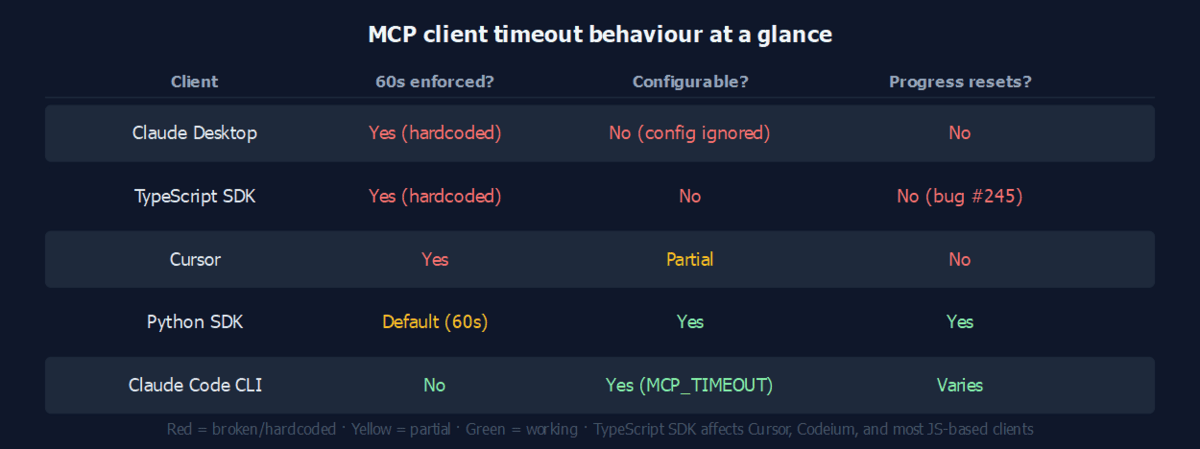
- TypeScript SDK (affects Cursor, Codeium, and any client built on it): hardcodes 60,000ms. The timeout cannot be configured and does NOT reset when your server sends progress notifications. This is a known bug tracked in typescript-sdk#245.
- Claude Desktop: a client-side timeout that silently ignores the
timeoutfield inclaude_desktop_config.json. No configuration option is respected; a feature request to fix this has been marked "not planned." - Claude Code CLI: configurable via
MCP_TIMEOUTenvironment variable or a per-servertimeoutfield in the config. This is the only major client that properly respects a timeout override. - Python SDK: defaults to 60 seconds but accepts a
ClientSession(timeout=300)constructor argument. Unlike the TypeScript SDK, it also properly resets the timer on progress notifications.
The table below summarises where each client stands:
| Client | 60s enforced? | Configurable? | Progress resets timer? |
|---|---|---|---|
| Claude Desktop | Yes | No (config silently ignored) | No |
| Claude Code CLI | No | Yes | Varies |
| TypeScript SDK | Yes (hardcoded) | No | No (bug) |
| Python SDK | Default | Yes | Yes |
| Cursor | Yes | Partial | No |
How do you fix the timeout in Claude Code?
If your target client is Claude Code CLI, the fix is a one-liner. Either set the environment variable before launching:
MCP_TIMEOUT=300000 claude # 5 minutes, in milliseconds
Or add a timeout field to the per-server entry in your Claude config:
{
  "mcpServers": {
    "my-server": {
      "command": "node",
      "args": ["server.js"],
      "timeout": 600000
    }
  }
}
This is the only client-side timeout option that actually works. For Claude Desktop or TypeScript-SDK-based clients, you need a server-side approach.
What is the async handleId pattern and why does it work universally?
Instead of blocking the tool call until the operation finishes, you return immediately with a job identifier. The client (or the LLM driving it) then polls a second tool to check the status. Because the initial call returns in milliseconds, the 60-second timer never triggers.
Python/FastMCP implementation:
import uuid, asyncio

JOBS: dict = {}

@mcp.tool()
async def start_export(query: str) -> str:
    job_id = str(uuid.uuid4())[:8]
    JOBS[job_id] = {"status": "processing", "result": None}
    asyncio.create_task(run_export(job_id, query))
    return f"Export started: {job_id}. Call check_job({job_id!r}) to poll."

async def run_export(job_id: str, query: str) -> None:
    # long-running work here
    result = await do_slow_thing(query)
    JOBS[job_id] = {"status": "done", "result": result}

@mcp.tool()
async def check_job(job_id: str) -> str:
    job = JOBS.get(job_id, {"status": "not_found"})
    if job["status"] == "done":
        return f"Done: {job['result']}"
    return f"Status: {job['status']}"
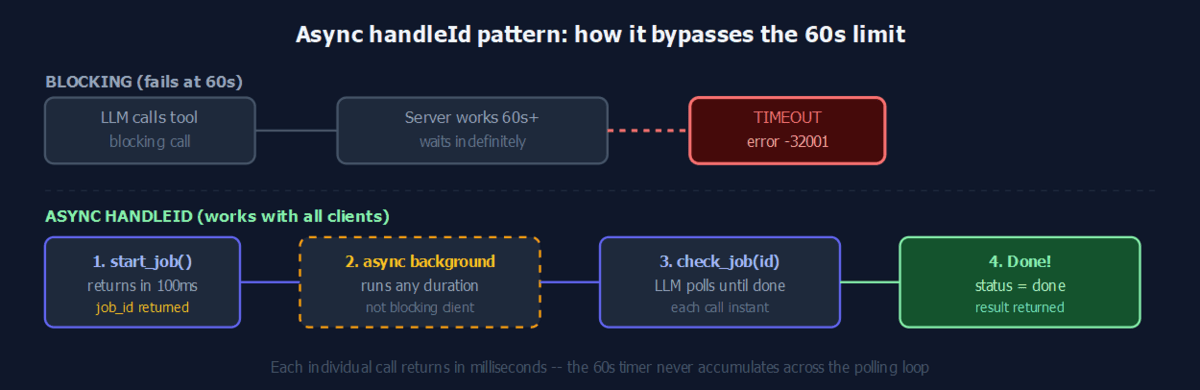
The pattern works with every client -- Claude Desktop, TypeScript SDK, Claude Code CLI -- because it doesn't depend on any timeout configuration. The LLM naturally drives the polling loop using stateful agent patterns: it calls start_export, reads the job ID from the response, then calls check_job on a loop until the result arrives.
Do progress notifications help?
Progress notifications let the server signal ongoing work during a blocking call. The MCP spec says clients MAY reset the timeout on each notification. In practice:
- Python SDK: resets the timer correctly. Sending a notification every 5-10 seconds keeps the connection alive past 60 seconds.
- TypeScript SDK: ignores progress notifications for timeout purposes. Sending them from a server used by a TypeScript client has no effect on the deadline.
- Claude Desktop: same as TypeScript -- notifications are received but the clock does not reset.
Progress notifications are useful for Python-based clients and as a debugging signal, but they are not a reliable universal fix. If your tooling must support Claude Desktop or Cursor, use the async handleId pattern instead.
What are the other common failure modes?
Transport degradation (7-10 second phantom timeout): When using streamable-HTTP transport with Uvicorn, some clients expect HTTP/2 bidirectional streaming. Uvicorn only supports HTTP/1.1, so the connection degrades and tools time out before the 60-second wall even matters. Fix: switch to stdio transport for local servers, or use an HTTP/2-capable server (Hypercorn, Granian) for remote ones.
Cold-start latency: If your MCP server spawns a subprocess, loads a model, or initialises a browser context on the first tool call, that startup cost eats into the 60-second budget. Pre-warm the resources at server startup rather than on the first request.
Claude Desktop silent drop: Unlike Claude Code CLI, Claude Desktop does not surface a timeout error message in the UI. The tool call simply returns no result. If a tool appears to silently succeed but produces no output, the 60-second timeout is the first thing to check.
For other MCP configuration errors (wrong flag order, unknown option warnings, connection failures), those are separate from the timeout issue and have their own fixes. A full index of MCP and automation error codes with verified fixes is available in the Automation Error Index.
FAQ
What is MCP error -32001?
It is the JSON-RPC error code for request timeout. The client sent a tool call, did not receive a response within its timeout window, and returned this error. Code -32001 maps to "Request timed out" in the MCP error registry. The timeout that fired could be the TypeScript SDK's hardcoded 60s, a Claude Desktop client limit, or a network-level gateway timeout if your server is hosted remotely.
Can I configure the MCP timeout in Claude Desktop?
No. The timeout field in claude_desktop_config.json is currently silently ignored. A feature request to make it configurable has been marked "not planned." The only workarounds are server-side: the async handleId pattern, or reducing the work a single tool call has to do so it completes in under 60 seconds.
Why don't progress notifications fix my timeout?
Progress notifications only reset the timeout clock when the client implements that behaviour. The Python SDK does; the TypeScript SDK does not. If your MCP client is built on the TypeScript SDK (Cursor, most JavaScript-based tools), progress notifications are delivered but have no effect on the deadline.
How often should I send progress notifications?
Every 5-10 seconds for Python SDK clients. Each notification must include a progressToken that matches the _meta.progressToken from the original tool call. Sending without a matching token is valid but provides no timeout benefit.
Does the async handleId pattern add complexity for the LLM?
Minimal. The LLM receives a job ID string, calls the status tool, and loops until it sees "done." Most capable models handle this naturally when the tool descriptions make the polling expectation explicit. Describe the status tool as "call this with the job ID returned by start_* tools to check if the result is ready."
Is there a version of the MCP spec that will fix this permanently?
SEP-1539 (a pending spec enhancement) proposes that servers declare their expected timeout per capability during initialization handshake, so clients can auto-adjust their timeout window for specific tools. Until that lands and clients implement it, the async handleId pattern remains the most reliable approach.