
How to fix Claude Code MCP "spawn npx ENOENT" (and "spawn uv ENOENT") on Windows
On Windows, Node's spawn can't find .cmd shims or user-PATH tools like uv. Two fixes: the cmd /c wrapper and the full binary path - plus the plugin-cache gotcha that wipes the patch on update.
TL;DR: On Windows, npx is a batch shim that bare spawn can't find - change command to cmd with args ["/c","npx"] to fix spawn npx ENOENT; for spawn uv ENOENT run winget install astral-sh.uv then use the full path
Both errors appear in the same place: claude mcp list shows a server with no checkmark, and the details reveal spawn npx ENOENT or spawn uv ENOENT. They look like PATH problems - and partly are - but the fix that works in a terminal won't automatically work when Claude Code spawns the process. The MCP config file location affects which settings take effect; if you're not sure where yours lives, see the post on MCP config file location and format in Claude Code. For a searchable catalog of MCP and Claude Code errors, see the Automation Error Index.
What causes "spawn npx ENOENT" in Claude Code on Windows?
On Windows, the Node.js CLI ships npx as a batch script (npx.cmd), not a native binary. When Claude Code calls child_process.spawn('npx', args) to launch an MCP server, Node looks for a file named exactly npx - no extension - in the directories on PATH. It finds nothing, because the file is npx.cmd. Without shell: true set on the spawn call, the system reports ENOENT (no such file or directory).
This is a confirmed bug in Claude Code's MCP spawn path, tracked in GitHub issue #58510. The equivalent bug was fixed for LSP servers in v2.1.132 (issue #17312), but the MCP server spawning code was not updated. As of v2.1.139, it affects every official plugin that ships "command": "npx": context7, chrome-devtools-mcp, azure, mongodb, desktop-commander, and playwright.
How do you fix "spawn npx ENOENT" in an MCP server config?
There are two approaches. The full-path method is more reliable across plugin updates; the cmd /c wrapper is shorter to type.
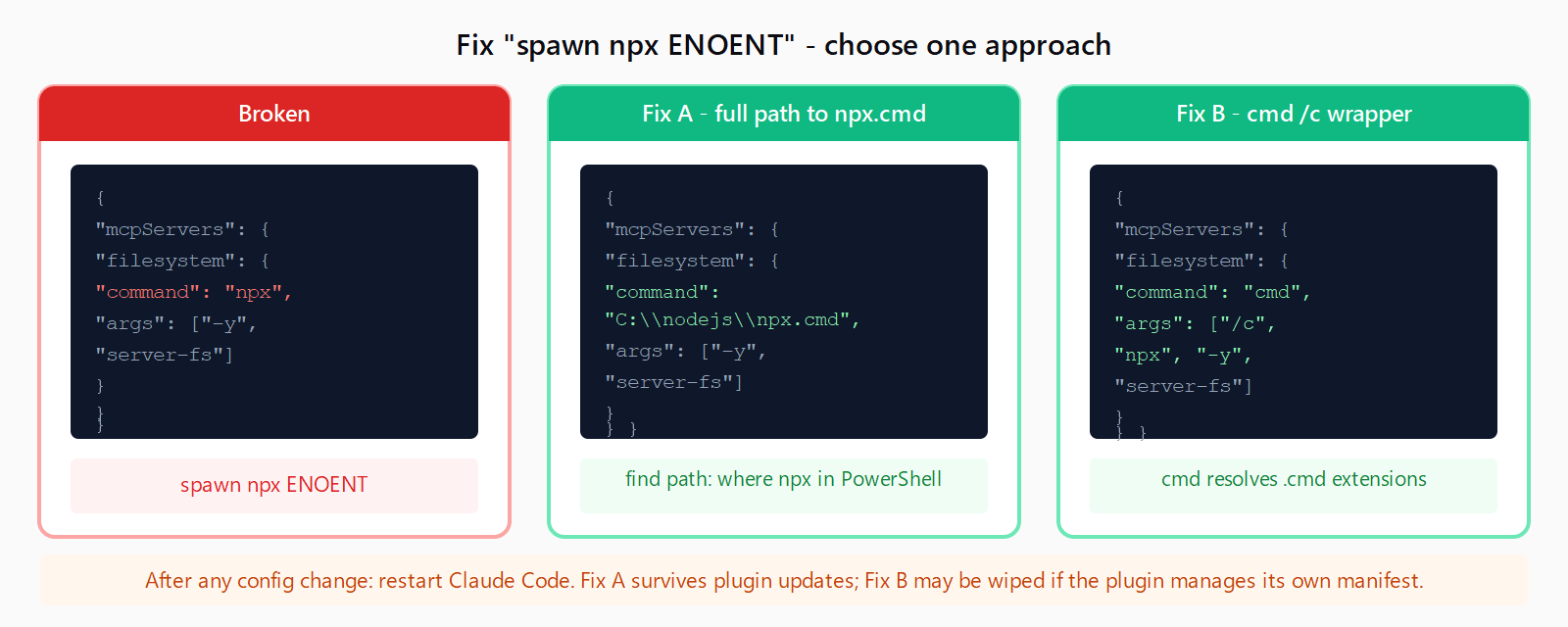
Option A: use the full path to npx.cmd. Run where npx in PowerShell or CMD to find the absolute path - typically C:\Program Files\nodejs\npx.cmd. Use that path as the command in the MCP config (double the backslashes in JSON):
{
  "mcpServers": {
    "filesystem": {
      "command": "C:\\Program Files\\nodejs\\npx.cmd",
      "args": ["-y", "@modelcontextprotocol/server-filesystem", "C:\\Users\\you\\projects"]
    }
  }
}
The same path works at the CLI if you're using MCP server setup in Claude Code on Windows:
claude mcp add filesystem -- "C:\Program Files\nodejs\npx.cmd" -y @modelcontextprotocol/server-filesystem C:\Users\you\projectsOption B: wrap with cmd /c. Replace the bare npx command with cmd /c npx. The Windows Command Prompt resolves .cmd extensions automatically, so it finds npx.cmd where a bare spawn cannot.
CLI form:
claude mcp add --transport stdio filesystem -- cmd /c npx -y @modelcontextprotocol/server-filesystem C:\Users\you\projectsConfig form (in %USERPROFILE%\.claude.json):
{
  "mcpServers": {
    "filesystem": {
      "command": "cmd",
      "args": ["/c", "npx", "-y", "@modelcontextprotocol/server-filesystem", "C:\\Users\\you\\projects"]
    }
  }
}
After editing the config, restart Claude Code for the change to take effect.
How do you fix "spawn uv ENOENT" in Claude Code?
spawn uv ENOENT means the uv Python package runner is either not installed or not visible to the process Claude Code spawns. The fix depends on which case applies.
If uv is not installed: install it globally via winget (the Windows package manager):
winget install astral-sh.uvAfter installation, open a new terminal and run where uv to confirm the path - typically C:\Users\<you>\.local\bin\uv.exe or C:\Users\<you>\AppData\Local\uv\uv.exe.
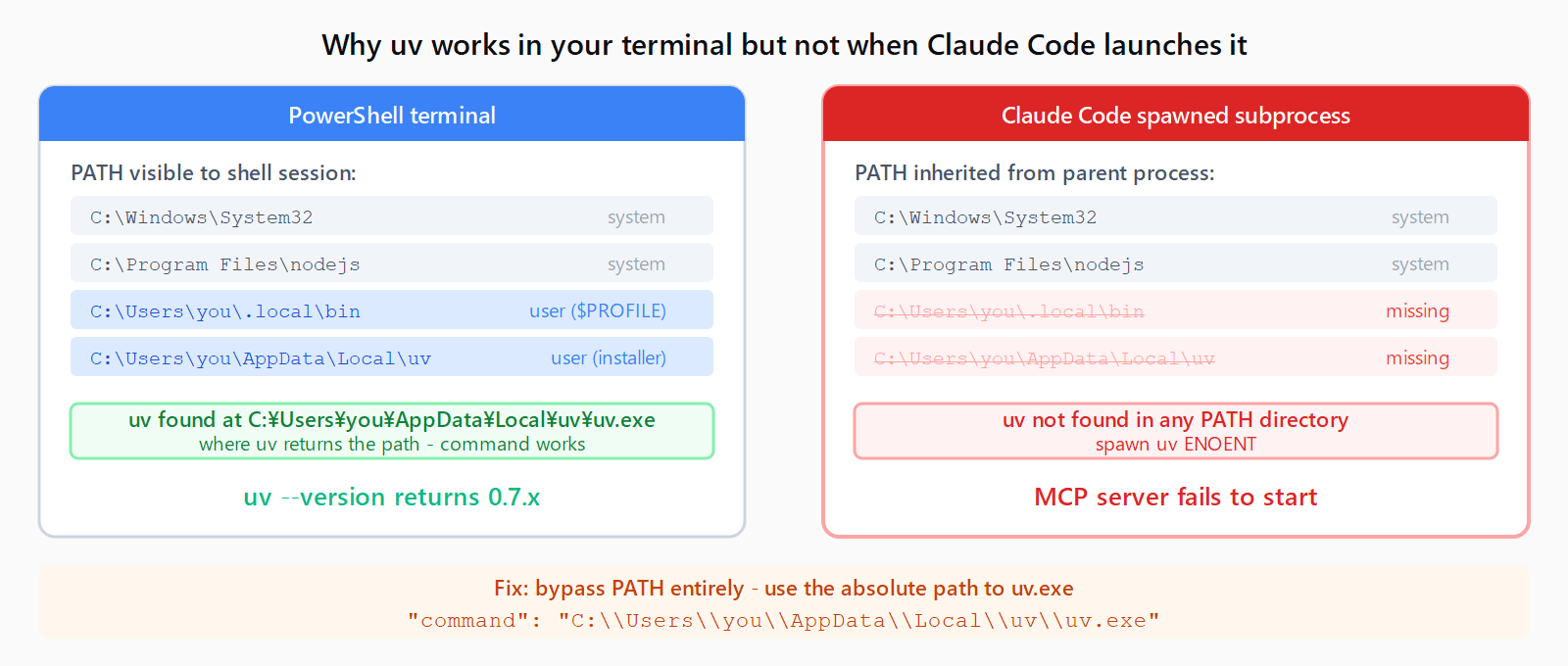
If uv is installed but Claude Code can't find it: skip the command name and pass the full path directly in the config:
{
  "mcpServers": {
    "sqlite": {
      "command": "C:\\Users\\you\\AppData\\Local\\uv\\uv.exe",
      "args": ["run", "--with", "mcp-server-sqlite", "--python", "3.12", "mcp-server-sqlite", "--db-path", "C:\\Users\\you\\data.db"]
    }
  }
}
Alternatively, wrap with cmd /c uvx - same shell-expansion trick that fixes the npx case:
{
  "mcpServers": {
    "sqlite": {
      "command": "cmd",
      "args": ["/c", "uvx", "mcp-server-sqlite", "--db-path", "C:\\Users\\you\\data.db"]
    }
  }
}
Why does uv work in my terminal but fail when Claude Code launches it?
Windows makes a distinction between the PATH visible to a terminal session and the PATH visible to a process launched by another application. When you open PowerShell or CMD, your shell startup scripts ($PROFILE, system variables set in Control Panel) expand and add directories like %USERPROFILE%\.local\bin to PATH. When Claude Code spawns a subprocess, it inherits its own environment - which may be built from the system PATH only, not the per-user shell additions.
This is the same reason that a Node version manager (nvm-windows, fnm) can make node and npm visible in a terminal but invisible to any tool that spawns them without first running the manager's shell hook. The workaround is always the same: use the absolute path to the binary, so PATH resolution is bypassed entirely.
Does the cmd /c fix survive a Claude Code plugin update?
Not always. For servers you add manually via claude mcp add, the fix is stored in %USERPROFILE%\.claude.json and persists indefinitely. For servers installed through the Claude Code plugin marketplace, the command field lives in the plugin's cached manifest at %USERPROFILE%\.claude\plugins\cache\<marketplace>\<plugin>\<version>\. Patching that file works, but a plugin update replaces the cache and wipes the patch.
Until Anthropic ships the fix on the MCP spawn path itself (applying shell: true on Windows the same way #17312 did for LSP servers), the only stable workaround for plugin-managed servers is to reinstall them as manual entries in ~/.claude.json with the cmd /c wrapper, then leave the plugin disabled to prevent its manifest from overwriting your config.
FAQ
What is the difference between "spawn npx ENOENT" and "spawn npx.cmd ENOENT"?
spawn npx ENOENT means the OS couldn't find a file named npx at all. spawn npx.cmd ENOENT would mean it tried the .cmd extension explicitly but still failed - usually a sign that Node.js itself isn't installed or its bin directory is missing from PATH entirely. The spawn npx ENOENT form is far more common and is fixed by the cmd /c wrapper or the full path workaround above.
How do I find the full path to npx on Windows?
Run where npx in PowerShell or CMD. It prints the full path including the .cmd extension, for example C:\Program Files\nodejs\npx.cmd. Use that verbatim as the "command" value in your MCP config (replace each backslash with \\ in JSON).
Does the cmd /c wrapper work for uvx as well as npx?
Yes. Replace "command": "uvx" with "command": "cmd", "args": ["/c", "uvx", ...] and the shell resolves uvx.exe the same way it resolves npx.cmd. If uv is not on the system PATH at all, install it first with winget install astral-sh.uv.
Should I use WSL instead of native Windows for Claude Code MCP?
WSL avoids the .cmd shim issue entirely because Linux processes spawn Linux binaries. If you're running Claude Code inside WSL2, npx and uvx resolve normally. The tradeoff is that MCP servers running inside WSL can't access Windows-native paths without a UNC path like \\wsl$\Ubuntu\home\..., and any server that needs to open the Windows desktop or interact with Windows apps won't work from inside the WSL boundary.
Is "spawn npx ENOENT" a bug in Claude Code or in Windows?
It's a bug in Claude Code's MCP spawn path - confirmed in GitHub issue #58510. The fix (passing shell: true when spawning on Windows) was already applied to the LSP path in v2.1.132. Until the same fix reaches the MCP spawn path, the cmd /c wrapper is the recommended workaround.