
How to throw a custom error in an n8n Code node inside a loop
Two patterns for collecting per-item errors in n8n loops without halting the workflow - including the silent colon-truncation bug in Continue mode.
TL;DR: Set the n8n Code node's "On Error" to "Continue (using error output)" to keep the loop running after failures - but colons in error messages are silently truncated (n8n issue #16120); return {success:false, error:"..."} as structured data instead.
When a Loop Over Items workflow calls a Code node for each record and something goes wrong - a missing field, a failed validation, a rejected API call - the default behavior stops the whole workflow dead. What most users actually want is for the loop to continue with the remaining items and collect all failures into a summary at the end. There are two ways to get there, and they behave differently in ways most n8n tutorials skip. For other common n8n runtime failures, see the Automation Error Index.
How does throw new Error() work in an n8n Code node?
Inside a Code node, throw new Error("something went wrong") causes the node to fail with that message. By default this halts the entire workflow execution. The error appears in the execution log and, if a linked error workflow is configured, triggers it.
That default is correct when you want a hard stop - a failed payment, a missing required config. It is the wrong behavior when you want the loop to process the rest of its items and report everything that failed at the end.
How do you continue the loop after a Code node error?
Open the Code node settings and change "On Error" from "Stop Workflow" to "Continue (using error output)". With this mode active, any thrown error is caught by n8n and the item is routed through the error output pin instead of the success pin. The node does not halt - the loop continues with the next item.
The error output item looks like this:
{
  "error": "something went wrong [line 4]"
}
At the end of the loop, add a Code node that filters items where item.json.error is present. Those are your failures. Items without that key are your successes.
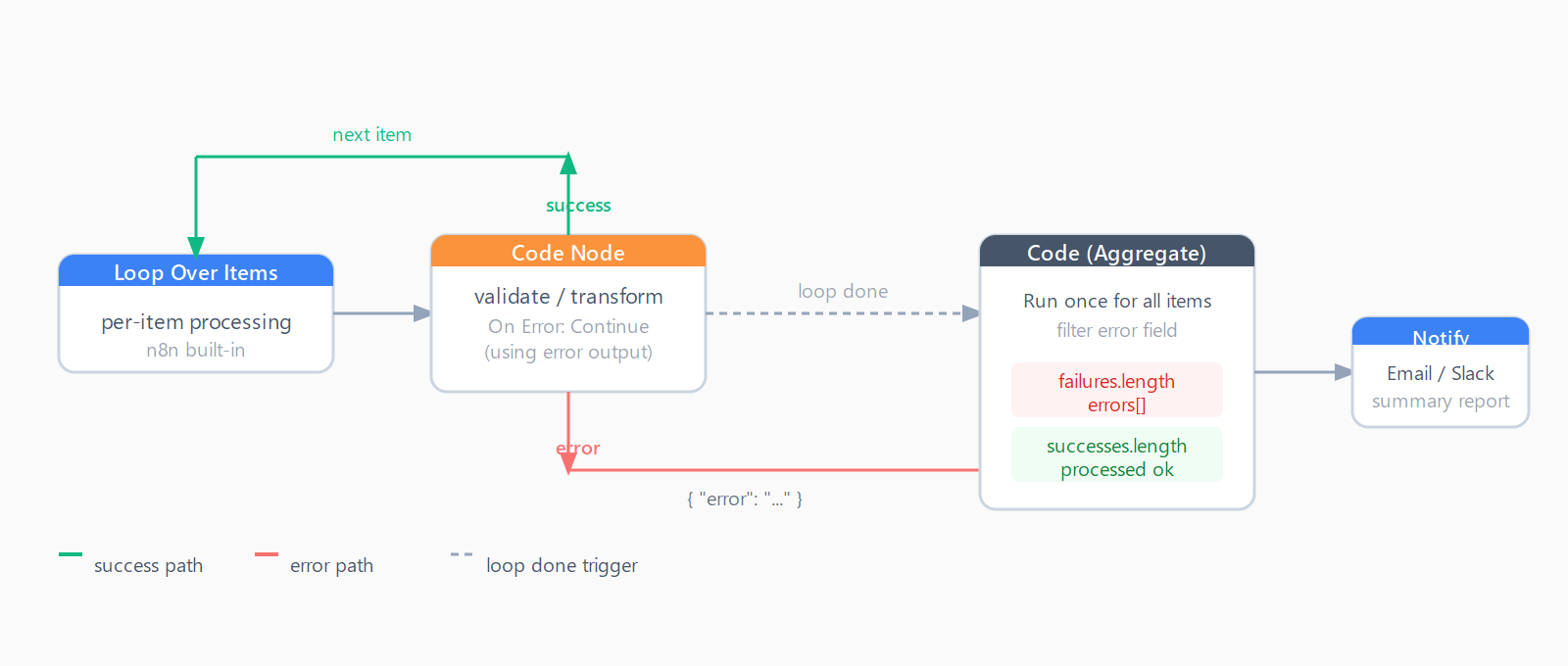
// End-of-loop aggregation - run in "Run Once for All Items" mode
const failures = $input.all().filter(item => item.json.error);
const successes = $input.all().filter(item => !item.json.error);
return [{json: {
  total: $input.all().length,
  failed: failures.length,
  succeeded: successes.length,
  errors: failures.map(f => f.json.error)
}}];
Why does the error message get cut off after the colon?
There is a confirmed bug in n8n's "Continue (using error output)" mode: error messages containing a colon are silently truncated. Only the text after the last colon appears in the error field. This affects n8n 1.95.2 and is tracked in GitHub issue #16120.
For example, throw new Error('Validation failed: record #42 has no email') produces:
{ "error": "record #42 has no email [line 8]" }The "Validation failed" prefix is gone. This is a problem any time your error message includes a URL, a key-value pair, or a colon-separated label. The workaround is to avoid colons in the thrown message: throw new Error('record #42 is missing an email address'). Or switch to the structured-output pattern below, which avoids throwing entirely.
![Side-by-side comparison: the thrown message 'Validation failed: record 42 has no email' versus the error output which only shows 'record 42 has no email [line 8]' - the prefix before the colon is stripped. A fix note says to avoid colons or use the structured-output pattern.](https://automatelab.tech/content/images/2026/06/n8n-code-node-throw-error-loop-2-truncation-bug.png)
What is the structured-output pattern for loop error handling?
Instead of throwing, return a JSON object from the Code node for every item - including failed ones. This keeps all items on the success pin and makes aggregation straightforward:
// In "Run Once for Each Item" mode
const record = $input.first().json;

if (!record.email) {
  return [{ json: { success: false, error: `record ${record.id}: missing email`, original: record } }];
}

// happy path
return [{ json: { success: true, id: record.id, processed: true } }];
At loop end, the aggregation node receives a flat list of all items. Filter on item.json.success === false to collect failures. The original field carries the raw input for debugging - no data is lost.
This approach sidesteps the colon-truncation bug completely and gives you the full error context in a structured field rather than a string with an appended line number. The n8n community thread for throwing errors from a Code node inside a loop landed on this same resolution: accumulate errors as data, not as exceptions.
If you have hit other loop-related edge cases, see the fix for when Loop node only processes the first item and the fix for n8n nested loops retaining completed state across outer iterations.
When should you use the Error Trigger workflow instead?
The Error Trigger is a different tool for a different job. It fires when an entire workflow fails - not when individual items inside a loop fail. If your Code node throws without "Continue (using error output)" and the workflow errors out, any linked error workflow receives:
execution.id- the specific run ID for debugging.workflow.name- which workflow failed.node.name- the node that threw the error.error.message- the thrown message.
Set an error workflow under Workflow Settings -> Error Workflow. A common setup is a SYS_Global_Error_Handler workflow that routes failures to Slack or email based on which workflow failed. n8n does not recursively trigger error workflows - if the error handler itself fails, that failure is logged but does not fire another handler.
Use the Error Trigger when you want a notification that a whole workflow has broken down. Use per-item error collection (the structured-output pattern above) when you want a summary of which records within a successful run had problems. For deeper diagnostics when a workflow is producing unexpected output, n8n execution debugging with per-node inspection covers the patterns that produce silent failures.
Can you get both the thrown error and the original item?
Not directly when using "Continue (using error output)". n8n's error output item only contains the error field - the original item data is not carried along. This is another reason to prefer the structured-output pattern: you control what goes into the return object and can include the original record, a unique ID, and any intermediate values you need for the summary.
If you are already using the throw pattern and cannot refactor the Code node, one workaround is to include a stable identifier in the error message itself: throw new Error(`record ${record.id} failed validation`). Parse it back out in the aggregation node to correlate failures with inputs.
FAQ
How do I stop a Code node error from halting the whole n8n workflow?
In the Code node's Settings panel, change "On Error" from "Stop Workflow" to "Continue (using error output)". The node will route the failed item through its error pin and execution continues with the next item.
Why does my n8n error message only show the text after the colon?
This is a documented bug (n8n GitHub issue #16120) in "Continue (using error output)" mode: error messages are truncated at the last colon character. Avoid colons in thrown messages, or switch to the structured-output pattern and return an object instead of throwing.
How do I collect all the failed items after an n8n loop finishes?
Add a Code node after the Loop node running in "Run Once for All Items" mode. Filter $input.all() on whichever field marks failure - either item.json.error (throw pattern) or item.json.success === false (structured-output pattern). The aggregated list is then ready for an email, Slack message, or spreadsheet log.
Can the Error Trigger workflow capture per-item errors from inside a loop?
No. The Error Trigger fires when the entire workflow fails with an uncaught exception. Per-item errors inside a loop that uses "Continue (using error output)" never surface to the Error Trigger - they are handled inside the execution. The Error Trigger is for whole-workflow failures, not per-record ones.
What is the difference between throwing in a Code node and using the Stop and Error node?
Both cause a workflow failure by default. The Stop and Error node supports an "Error Object" type that accepts a full JSON structure, making it easier to send rich context to an error workflow. The Code node's throw only accepts a string message and is subject to the colon-truncation bug in error-output mode. For per-item collection inside loops, neither is ideal - use the structured-output return pattern instead.