
Self-hosting n8n with Docker Compose in 2026: complete walkthrough
Run n8n on your own server with Docker Compose and Traefik: compose.yaml, .env, WEBHOOK_URL, and N8N_PROXY_HOPS=1 — the setting most guides skip.
TL;DR: Create an n8n-compose/ directory with a compose.yaml (n8n + Traefik), add four vars to .env, and run docker compose up -d - also set WEBHOOK_URL and N8N_PROXY_HOPS=1 or webhook triggers will display localhost URLs instead of your domain.
This walkthrough targets a Linux VPS with Docker Engine and Docker Compose v2 already installed. For the pre-Docker steps - provisioning the droplet, pointing a domain, opening firewall ports - see the post on self-hosting n8n on a VPS. The Automation Error Index at automatelab.tech/products/datasets/automation-error-index/ catalogs setup and runtime errors across the full n8n self-host surface.
What do you need before running n8n with Docker Compose?
Four prerequisites, all required before the first docker compose up:
- Docker Engine installed and running (
docker --versionshould return v24 or later). - Docker Compose v2 (
docker compose version- note: no hyphen; the v1docker-composebinary uses a different syntax). - A domain name with an A record pointing at your server's IP. Traefik uses this to request a Let's Encrypt certificate automatically.
- Ports 80 and 443 open in your firewall. Port 80 is needed for the ACME HTTP challenge during certificate issuance; port 443 carries all HTTPS traffic.
n8n defaults to SQLite for workflow and execution storage. SQLite handles personal use and small-team deployments without any additional setup. If you expect more than roughly 100,000 workflow executions per month or need concurrent access from multiple worker processes, the n8n docs provide a PostgreSQL variant of the compose file.
How do you write the compose.yaml for n8n?
Create a directory called n8n-compose/ and save this as compose.yaml inside it:
services:
  traefik:
    image: traefik:v3
    restart: unless-stopped
    command:
      - --providers.docker=true
      - --providers.docker.exposedByDefault=false
      - --entrypoints.web.address=:80
      - --entrypoints.websecure.address=:443
      - --certificatesresolvers.myresolver.acme.httpchallenge=true
      - --certificatesresolvers.myresolver.acme.httpchallenge.entrypoint=web
      - --certificatesresolvers.myresolver.acme.email=${SSL_EMAIL}
      - --certificatesresolvers.myresolver.acme.storage=/letsencrypt/acme.json
    ports:
      - "80:80"
      - "443:443"
    volumes:
      - traefik_data:/letsencrypt
      - /var/run/docker.sock:/var/run/docker.sock:ro

  n8n:
    image: docker.n8n.io/n8nio/n8n
    restart: unless-stopped
    environment:
      - N8N_HOST=${SUBDOMAIN}.${DOMAIN_NAME}
      - N8N_PORT=5678
      - N8N_PROTOCOL=https
      - WEBHOOK_URL=https://${SUBDOMAIN}.${DOMAIN_NAME}/
      - N8N_PROXY_HOPS=1
      - GENERIC_TIMEZONE=${GENERIC_TIMEZONE}
    volumes:
      - n8n_data:/home/node/.n8n
      - ./local-files:/files
    labels:
      - traefik.enable=true
      - "traefik.http.routers.n8n.rule=Host(`${SUBDOMAIN}.${DOMAIN_NAME}`)"
      - traefik.http.routers.n8n.tls=true
      - traefik.http.routers.n8n.tls.certresolver=myresolver
      - traefik.http.routers.n8n.entrypoints=websecure
      - traefik.http.services.n8n.loadbalancer.server.port=5678

volumes:
  traefik_data:
  n8n_data:
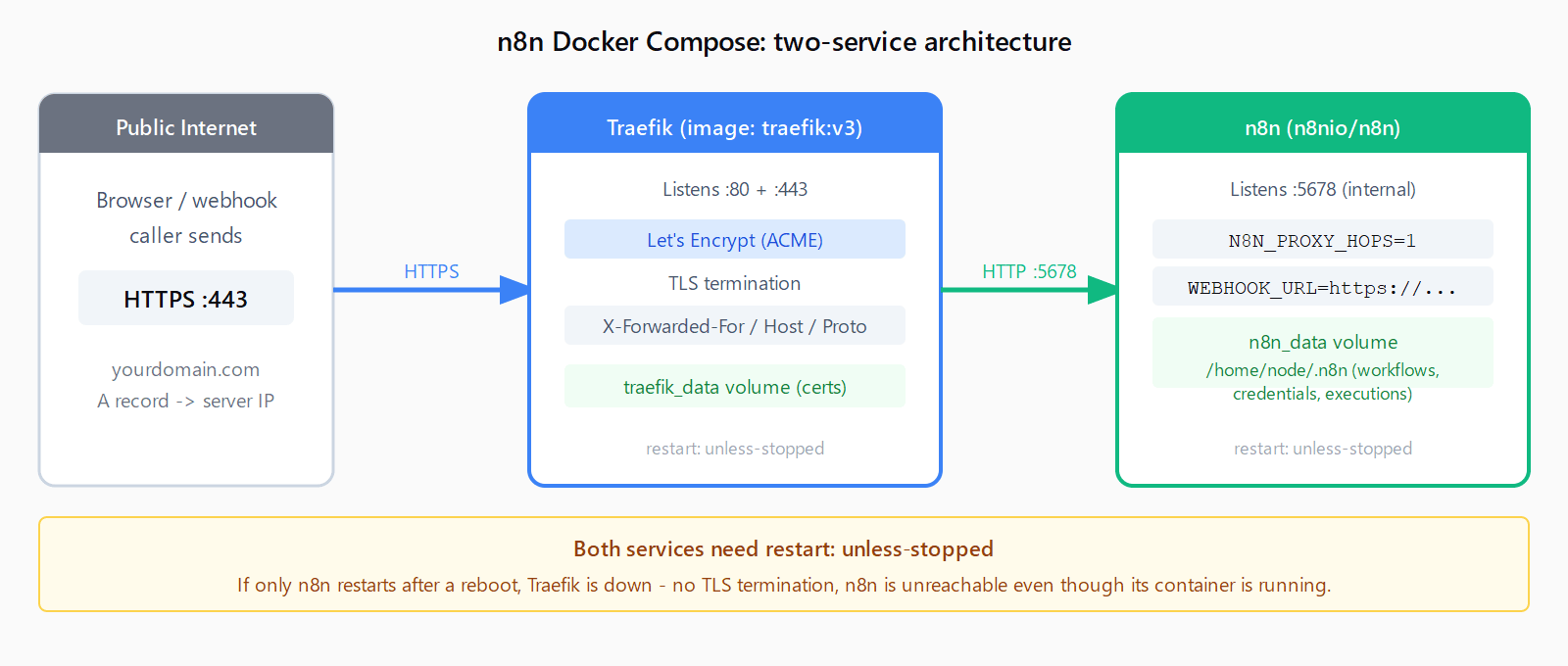
Two details worth noting before moving on. First, restart: unless-stopped appears on both the traefik and n8n services. Setting it only on n8n is a common mistake: Traefik manages TLS termination, so if it doesn't restart after a server reboot, n8n comes back up but is no longer reachable over HTTPS. Second, the n8n_data named volume persists all workflows, credentials, and execution history. Docker never removes named volumes during a pull or a container restart, so your data survives updates.
How do you configure the .env file for n8n Docker Compose?
In the same n8n-compose/ directory, create a .env file:
DOMAIN_NAME=yourdomain.com
SUBDOMAIN=n8n
GENERIC_TIMEZONE=Europe/London
SSL_EMAIL=you@yourdomain.com
DOMAIN_NAME is your registered domain without a protocol prefix. SUBDOMAIN sets the hostname prefix, so n8n gives you https://n8n.yourdomain.com. GENERIC_TIMEZONE takes any IANA timezone string and is used by n8n's scheduler. SSL_EMAIL must be a real address, because Let's Encrypt sends certificate expiry alerts there.
Also create the local-files/ directory that the compose file mounts:
mkdir -p n8n-compose/local-filesHow do you start n8n with Docker Compose?
From inside the n8n-compose/ directory, run:
docker compose up -dDocker pulls both images (about 400 MB total on a fresh host), Traefik requests the Let's Encrypt certificate for your subdomain, and n8n starts in the background. Tail the n8n logs to watch it come up:
docker compose logs -f n8nLook for the line: Editor is now accessible via: https://n8n.yourdomain.com/. That confirms n8n is ready. Open the URL in a browser and complete the initial owner account setup.
Why do n8n webhook triggers show localhost URLs instead of your domain?
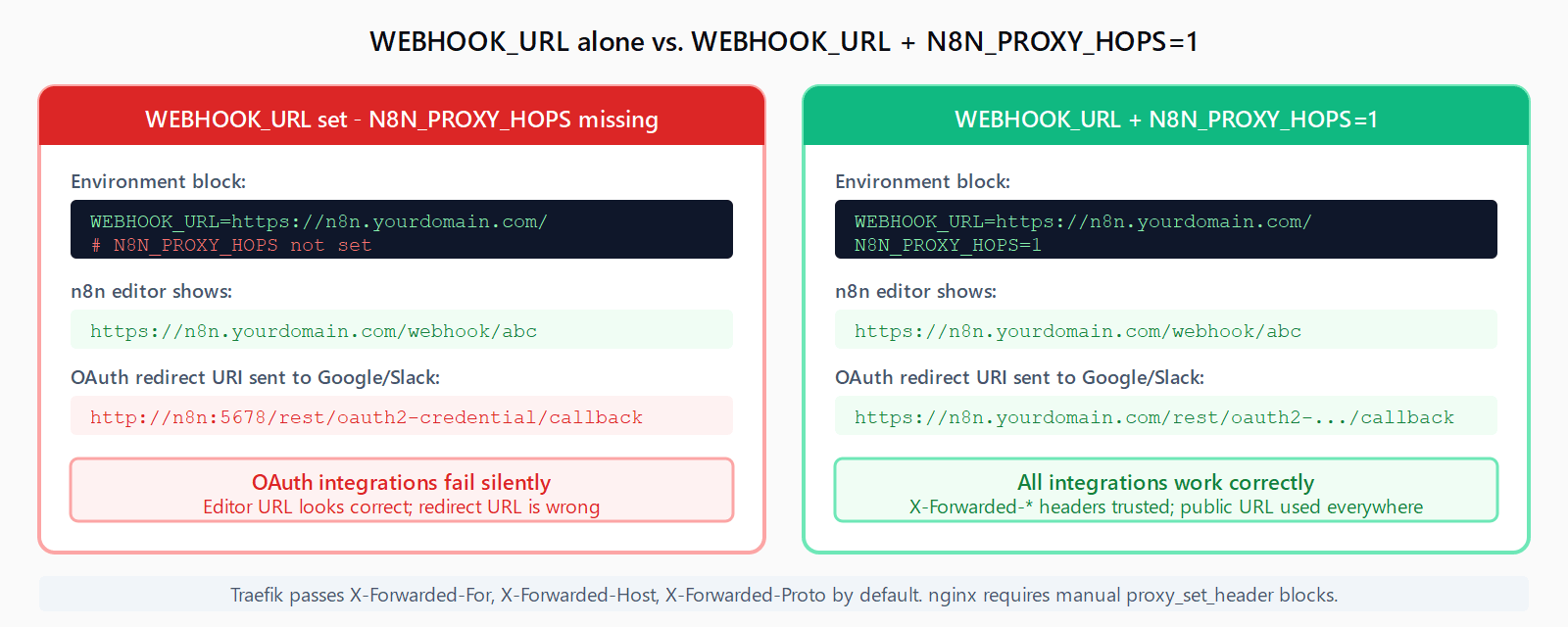
This is the most common post-setup problem and the one that almost no Docker Compose guide mentions. When n8n runs behind a reverse proxy like Traefik, it can't automatically determine its public-facing URL. Set only WEBHOOK_URL and n8n uses it for what it shows in the editor, but it still constructs OAuth redirect URIs and certain API callback paths using its internal network address. The environment block in the compose file above already includes both required settings:
WEBHOOK_URL=https://n8n.yourdomain.com/
N8N_PROXY_HOPS=1
N8N_PROXY_HOPS=1 tells n8n that one proxy sits in front of it and instructs it to trust the X-Forwarded-For, X-Forwarded-Host, and X-Forwarded-Proto headers that Traefik passes. Without it, OAuth-based integrations (Google Sheets, Gmail, Slack) often break at the redirect step even though simple HTTP Request webhooks appear to work. Traefik passes all three forwarded headers by default; if you switch to nginx, add a manual proxy_set_header block for each.
For a deeper look at container networking errors -- including the case where an HTTP Request node inside n8n can't reach another service running on the same host -- see the guide on ECONNREFUSED errors in n8n containers.
How do you update n8n when running with Docker Compose?
n8n releases updates frequently. Pull the latest image and restart the container:
cd n8n-compose
docker compose pull n8n
docker compose up -d n8n
This replaces the container without touching the n8n_data volume. Before any major version jump, back up that volume first:
docker run --rm \
  -v n8n_data:/data \
  -v $(pwd):/backup \
  alpine \
  tar czf /backup/n8n-backup-$(date +%Y%m%d).tar.gz -C / data
Run this from the n8n-compose/ directory. It writes a timestamped .tar.gz containing the full /home/node/.n8n data directory. To restore, reverse the tar command against a clean n8n_data volume before starting the containers.
FAQ
Does n8n Docker Compose require PostgreSQL, or does SQLite work?
SQLite works and is what n8n uses by default. It handles personal-scale and small-team workloads without additional setup. PostgreSQL is recommended when you run n8n in queue mode with multiple worker processes, or when you need more concurrent write throughput. The n8n docs include a separate PostgreSQL compose variant if you need it later; migrating from SQLite to PostgreSQL requires a database export and reimport step.
Can I use nginx instead of Traefik as the reverse proxy?
Yes. Replace the Traefik service with a standard nginx container (or host-installed nginx) and configure it to proxy requests to http://n8n:5678. Add proxy_set_header X-Forwarded-For $proxy_add_x_forwarded_for, proxy_set_header X-Forwarded-Host $host, and proxy_set_header X-Forwarded-Proto $scheme to the nginx location block. Use Certbot to manage Let's Encrypt certificates. The n8n service definition in compose.yaml stays the same.
How do I view n8n and Traefik logs in Docker Compose?
Run docker compose logs n8n from the n8n-compose/ directory. Add -f to follow in real time. Add --since 1h to limit output to the past hour. For Traefik logs including certificate issuance events: docker compose logs traefik. Traefik logs "Obtaining ACME certificate" when requesting a cert and "Renewing certificate" when refreshing it.
What happens to workflows and executions if the server reboots?
With restart: unless-stopped on both services, Docker restarts Traefik and n8n automatically after a reboot. The n8n_data named volume is not removed by a restart, so all workflows and credentials persist. Without the restart policy, both services stay down after a reboot until you run docker compose up -d manually.
How do I access the n8n editor if the container is running but the URL returns an error?
Check Traefik logs first: docker compose logs traefik. Common causes are an A record that hasn't propagated yet (Traefik can't complete the ACME challenge), port 80 blocked by a firewall (same issue), or SUBDOMAIN and DOMAIN_NAME mismatched in .env. Running curl -v http://n8n.yourdomain.com/.well-known/acme-challenge/ from an external machine shows whether Traefik is responding to the challenge at all.