
How to fix Claude Code 'No available IDEs detected' in WSL with Cursor
Claude Code's /ide command says 'No available IDEs detected' when Cursor runs on Windows and the CLI runs in WSL. Launch Cursor from inside WSL to fix it. Telling five similar failures apart.
TL;DR: When /ide in Claude Code reports "No available IDEs detected" while Cursor is open on the Windows host but Claude Code is installed inside WSL, relaunch Cursor from inside WSL with cursor . so the extension binds in the WSL namespace.
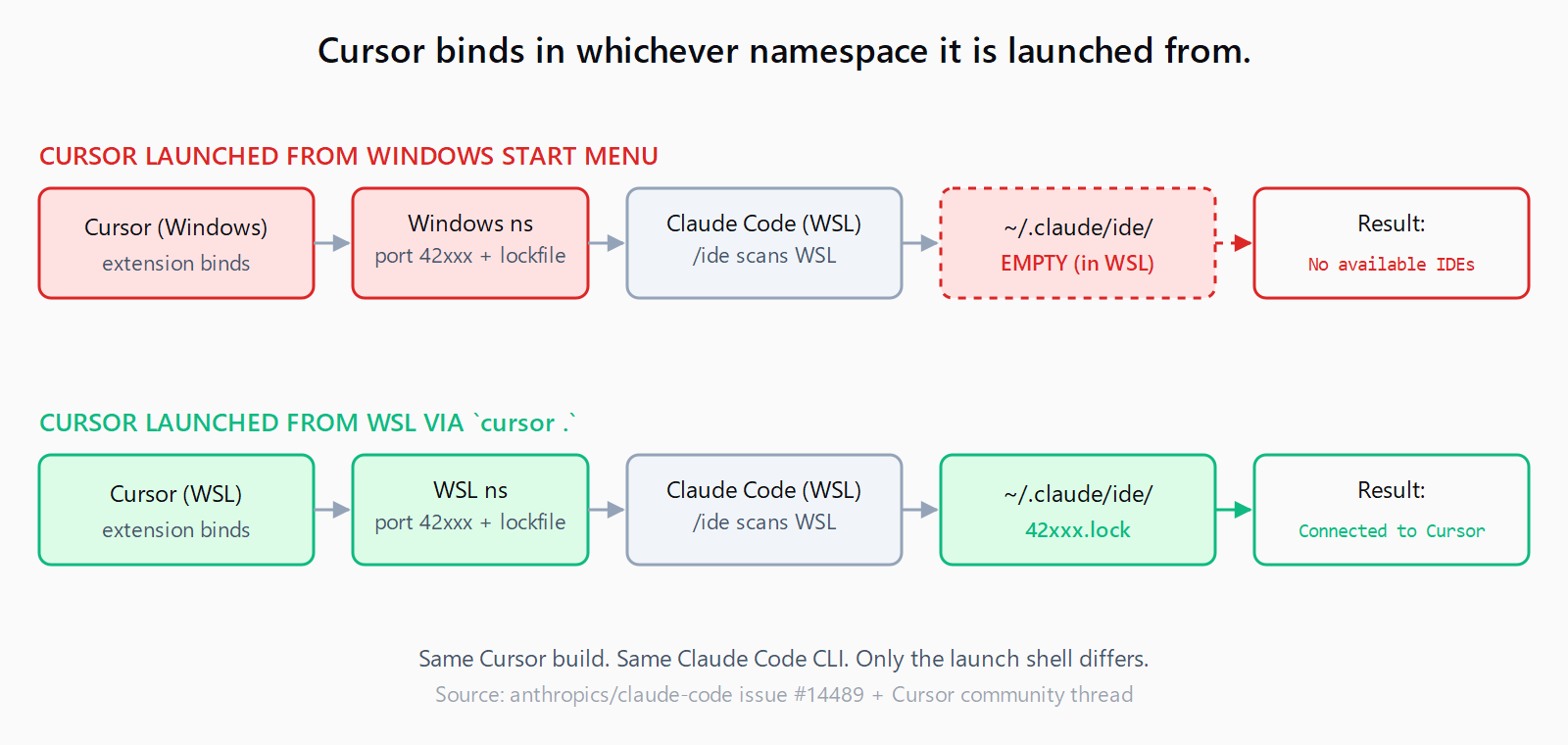
The Claude Code extension binds its discovery socket inside the WSL network namespace and writes the lock file to the WSL ~/.claude/, where the CLI is looking. Restart the /ide attempt and it connects.
# inside WSL, in your project directory
cursor .
That is the entire fix when the symptom is the bare "No available IDEs" line. Most posts stop there, but four other failures produce a near-identical prompt and need different fixes - identifying which one you have first saves an hour of the wrong workaround.
Why does "No available IDEs" happen with WSL + Cursor on Windows?
Claude Code's /ide command discovers the IDE by scanning ports 42000-44999 on localhost and looking for a JSON lock file under ~/.claude/ide/. The Cursor-side Claude Code extension binds the socket and writes the lock file when Cursor starts. Issue #14489 describes the exact problem: when Cursor runs on Windows and the CLI runs in WSL2 Ubuntu, the socket binds to the Windows network namespace and the lock file lands in the Windows user profile - neither of which is reachable from inside WSL. The CLI scans WSL's localhost, finds nothing, and reports "No available IDEs detected."
The fix is to make the extension run inside the WSL namespace, which it does when Cursor is launched from a WSL shell.
Which five symptoms look the same at the prompt?
Issues in the Claude Code repo that touch IDE detection on Windows or WSL all produce a near-identical message. Match yours before pasting commands.
| Exact symptom | Issue | Fix |
|---|---|---|
| "No available IDEs detected" - Cursor on Windows host, CLI in WSL | #14489 | Launch Cursor from WSL with cursor . (this post) |
Cursor option appears on first /ide then disappears on the second | #20826 | Reload the Cursor window (Ctrl+Shift+P -> "Developer: Reload Window") between attempts |
| JetBrains IDE on WSL not detected | #1232 | Different lock-file path; install the JetBrains plugin from inside WSL and restart the IDE |
| Connected, but Claude reports the wrong working directory | #1411 | WSL working-directory propagation bug; cd in the WSL shell again, then re-run the claude command |
"No available IDEs" - VS Code installed but the code command is missing from PATH | #1276 | From VS Code: Ctrl+Shift+P -> "Shell Command: Install 'code' command in PATH" |
If your prompt is exactly "No available IDEs detected" and Cursor is running on the Windows host, the first row is the right fix. If Cursor briefly appeared and vanished, you are in row 2 and the WSL relaunch will not help.
How do you verify the fix worked?
Three quick checks confirm the IDE is wired up:
- Lock file exists. Run
ls ~/.claude/ide/in WSL. After Cursor is launched from WSL you should see one or more JSON files named with a port number (e.g.42421.lock). If the directory is empty, the extension did not bind in the WSL namespace. - Port is listening. Run
ss -tlnp | grep -E '4[2-4][0-9]{3}'in WSL. You should see Cursor's helper process listening on a port between 42000 and 44999. Empty output means the same root cause. /ideshows Cursor. Inside Claude Code, run/ide. Cursor should appear in the picker. Selecting it should printConnected to Cursor.
If steps 1 and 2 show the artifacts but /ide still says "No available IDEs," the CLI is scanning a different localhost - check that you started claude in the same WSL distribution, not in a second WSL2 instance.
What if the fix did not work?
Three less obvious causes catch people:
- You have two WSL distros. If Cursor was launched from
Ubuntu-20.04but you are runningclaudeinUbuntu-22.04, they are isolated networks. Use the same distro for both. - Windows Firewall is blocking the WSL2 subnet. Default rules sometimes deny inbound TCP from the virtual switch. Add an allow rule for ports 42000-44999 from the WSL2 subnet (
172.16.0.0/12on most setups). - Cursor's Claude Code extension is the wrong version. Open the extensions tab in Cursor and confirm the extension is the official Anthropic build, not a community fork.
If you are also setting up Claude Code on Windows with WSL and registering MCP servers, the IDE-detection fix and the MCP server registration are independent - both can fail at the same time. Pair this fix with our notes on Cursor rules silently failing to load if your rules also are not picked up after the connection works.
FAQ
Why does the same setup work on macOS or Linux but not WSL?
On macOS and Linux there is one network namespace and one filesystem. On Windows + WSL2 there are two of each, and Cursor binds in whichever side it is launched from. Because the typical Cursor install is a Windows app launched from the Start menu, it binds to Windows by default. Linux-only setups never see this.
How do I check if the IDE lock file actually exists?
Run ls ~/.claude/ide/ inside WSL. After a successful launch from WSL you should see at least one .lock file with a port number in its name. If the directory is empty or missing, the extension never bound in the WSL namespace.
Does this affect VS Code in WSL or only Cursor?
VS Code's "Remote - WSL" feature runs the VS Code server inside WSL automatically, so the extension binds in the WSL namespace and the CLI sees it without any extra step. Cursor as of late 2025 does not have an equivalent first-class WSL mode, which is why the manual cursor . launch is needed.
Can I run Claude Code on Windows directly instead of in WSL?
Yes. Claude Code has a native Windows build that talks to Cursor on Windows without any namespace issue. The trade-off is that many tooling chains (Python venvs, Node toolchains, package builds) work better in WSL, which is why the WSL-CLI + Windows-Cursor split is so common.
Will running both in WSL slow down the project?
If your project files live on the Windows filesystem (under /mnt/c/), reads from WSL are slow regardless of where Cursor runs. The fast path is to put the project under the WSL filesystem (~/projects/) and open it from there. The IDE detection fix and the filesystem performance fix are independent; do both.
Hit a different error? Browse the Automation Error Index for a searchable catalog of Claude Code errors, each with a verified fix.