
How to add an llms.txt file to your site (and validate it correctly) in 2027
TL;DR: Create a UTF-8 Markdown file named llms.txt at your site root with a title, one-sentence summary, and bulleted links to core pages, then validate the file with a structured-content checker before publishing.
llms.txt was proposed by Jeremy Howard at Answer.AI in September 2024 as a way to give large language models a curated map of the pages worth reading on a site. It is not a W3C or IETF standard, and no major LLM provider has publicly committed to consuming it. That makes the real question less "will this work?" and more "does a well-formed file give me an edge when a bot decides what to read first?" This guide walks through creation, structure, and validation -- the part most how-to posts skip.
What is llms.txt?
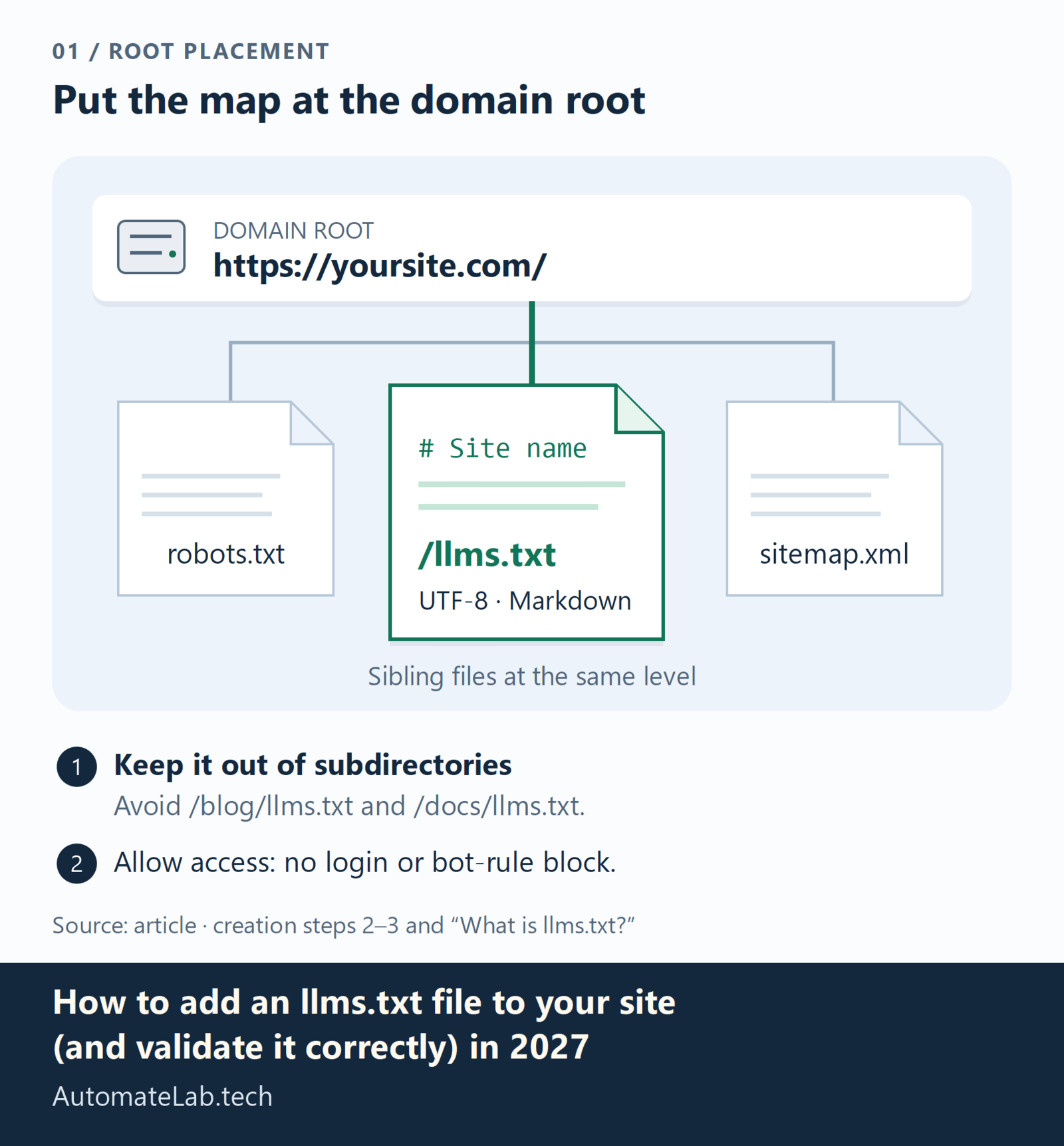
llms.txt is a Markdown file placed at the root of a web site (/llms.txt) that gives language models a curated map of the pages most worth reading. It sits at the same level as robots.txt and sitemap.xml, and follows the same convention: bots and crawlers check /llms.txt to discover what the site creator considers important.
The file format is intentionally simple. It uses Markdown headings, bullet lists, and links. An example from llmtxt.info looks like this:
# llmtxt.info

> The reference site on llms.txt: what it is, how it works, how to create one, with a free validator and generator.

## Core pages
- [What is llms.txt](https://llmtxt.info/what-is-llms-txt/)
- [How it works](https://llmtxt.info/how-it-works/)
- [How to create llms.txt](https://llmtxt.info/how-to-create/)
- [Comparison](https://llmtxt.info/comparison/)
The top-level heading is your site name. The blockquote (>) is a one-sentence summary. ## Core pages is a heading followed by a bulleted list of your best pages. That is the entire format.
Compare this to the AI citation checklist published here, which lists llms.txt as one of several technical signals for getting cited by ChatGPT, Perplexity, and Claude. A well-built llms.txt is the easiest of those signals to implement.
How to create llms.txt (step by step)
Step 1: Write the file in Markdown
Create a file named llms.txt (not llms.md, not llms.html -- the extension is .txt despite the content being Markdown). Use these elements in this order:
- Site name as h1.
# Your Site Namewith a link back to your homepage. This is what a bot sees first. - One-sentence summary. A blockquote starting with
>that describes what the site is about in 15-30 words. This is the snippet a language model extracts when it encounters your file. - Core pages section.
## Core pagesfollowed by a bulleted list of your 8-15 most important URLs. These should be the pages you want LLMs to read and potentially cite. - Optional additional sections.
## Additional pagesfor secondary content,## Resourcesfor reference material,## Terms of useif you have any.
Each list item uses standard Markdown link syntax: - [Link text](https://yoursite.com/page/). The link text should be a descriptive noun phrase, not "Click here."
Step 2: Save as UTF-8 plain text
Save the file as UTF-8 encoded plain text. The filename must be exactly llms.txt (all lowercase). It goes at the root of your domain, not in a subdirectory:
https://yoursite.com/llms.txt
Do not place it at /blog/llms.txt or /docs/llms.txt. The convention is the domain root. If your site lives at example.com/blog, the file goes at example.com/llms.txt, not example.com/blog/llms.txt.
Step 3: Make it accessible to bots
Your llms.txt must be reachable without authentication and not blocked by robots.txt. Check your robots.txt for any Disallow: /llms.txt or broad Disallow: / rules that might block it. This is where a lot of sites break -- they have an llms.txt but the same policy blocking AI crawlers also blocks the file itself.
If you use Cloudflare AI bot policies, make sure /llms.txt is not filtered out by any bot management rules. A file no bot can reach is the same as not having one.
How to validate your llms.txt file
Creating the file is the easy part. The step nobody writes about is validation -- making sure the file is well-formed, accessible, and actually useful before you ship it.
Validation checklist
Run through these checks before publishing:
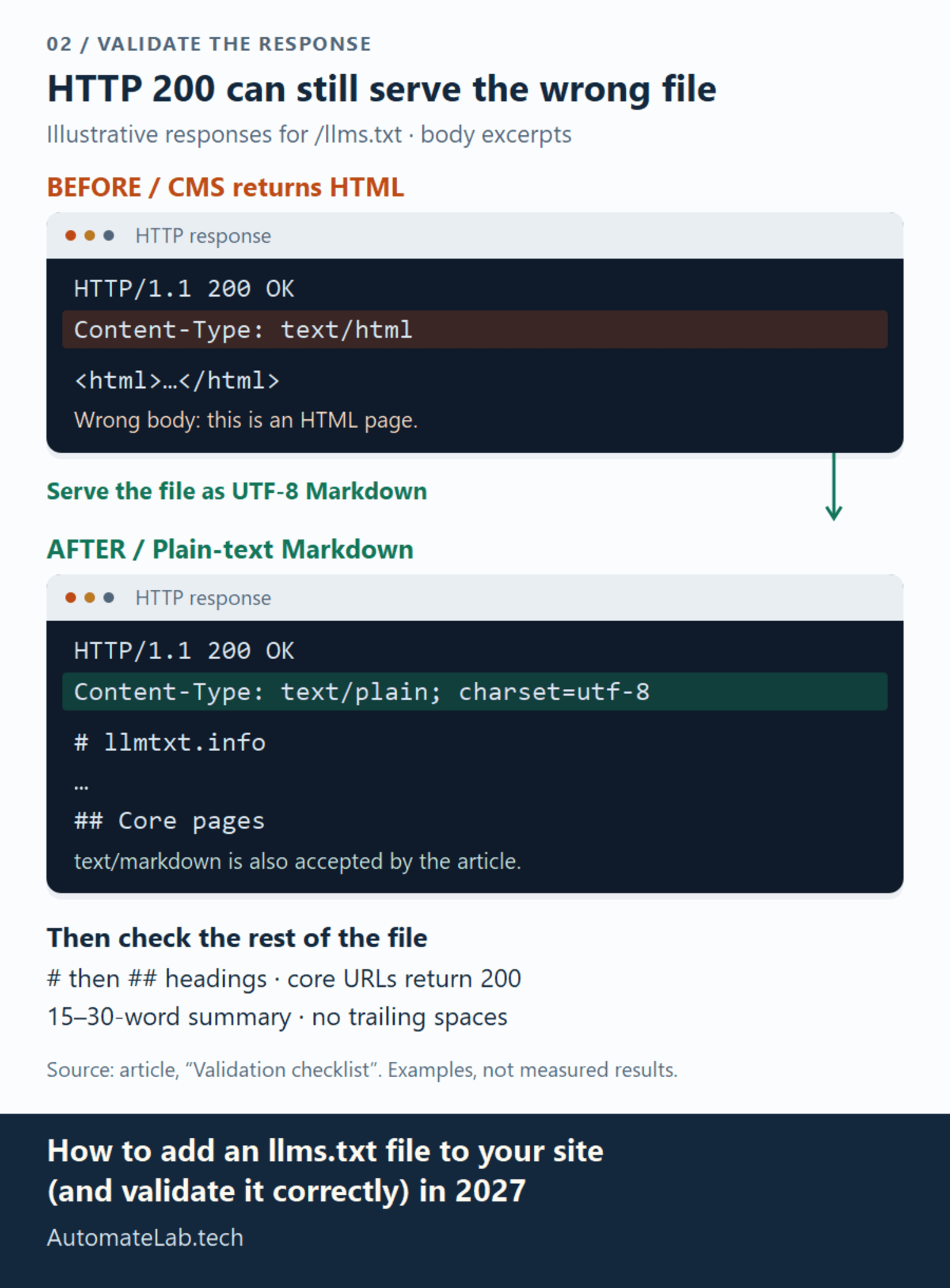
- HTTP 200. Curl the file. It must return
200 OK, not301to a redirect or404. Some CMS platforms will try to interpretllms.txtas a page template and return HTML instead of Markdown. Confirm the response content type istext/plainortext/markdown. - UTF-8 encoding. Open the file in a hex editor or use
file -i llms.txton Linux/macOS. If the encoding is anything other than UTF-8, LLMs may misparse the content. - Heading structure. The first heading must be
#(h1). The section headings must be##(h2). No skipping levels. No h3 under h1 without an h2 in between. - Link reachability. Every URL in the core pages list must return 200. Broken links in
llms.txtsignal neglect -- a bot that sees dead links may deprioritize the whole file. - Summary length. The blockquote summary should be 15-30 words. Too short and it lacks context. Too long and it gets truncated by extractors.
- No trailing whitespace. Lines with trailing spaces can cause diff noise and may confuse some parsers.
The fastest way to automate these checks is with AutomateLab's llms.txt Validator. It parses the file structure, validates UTF-8 encoding, checks heading hierarchy, and verifies that the summary meets length requirements. Enter your llms.txt URL and get a pass/fail report in seconds.
What the validator flags (and how to fix each)
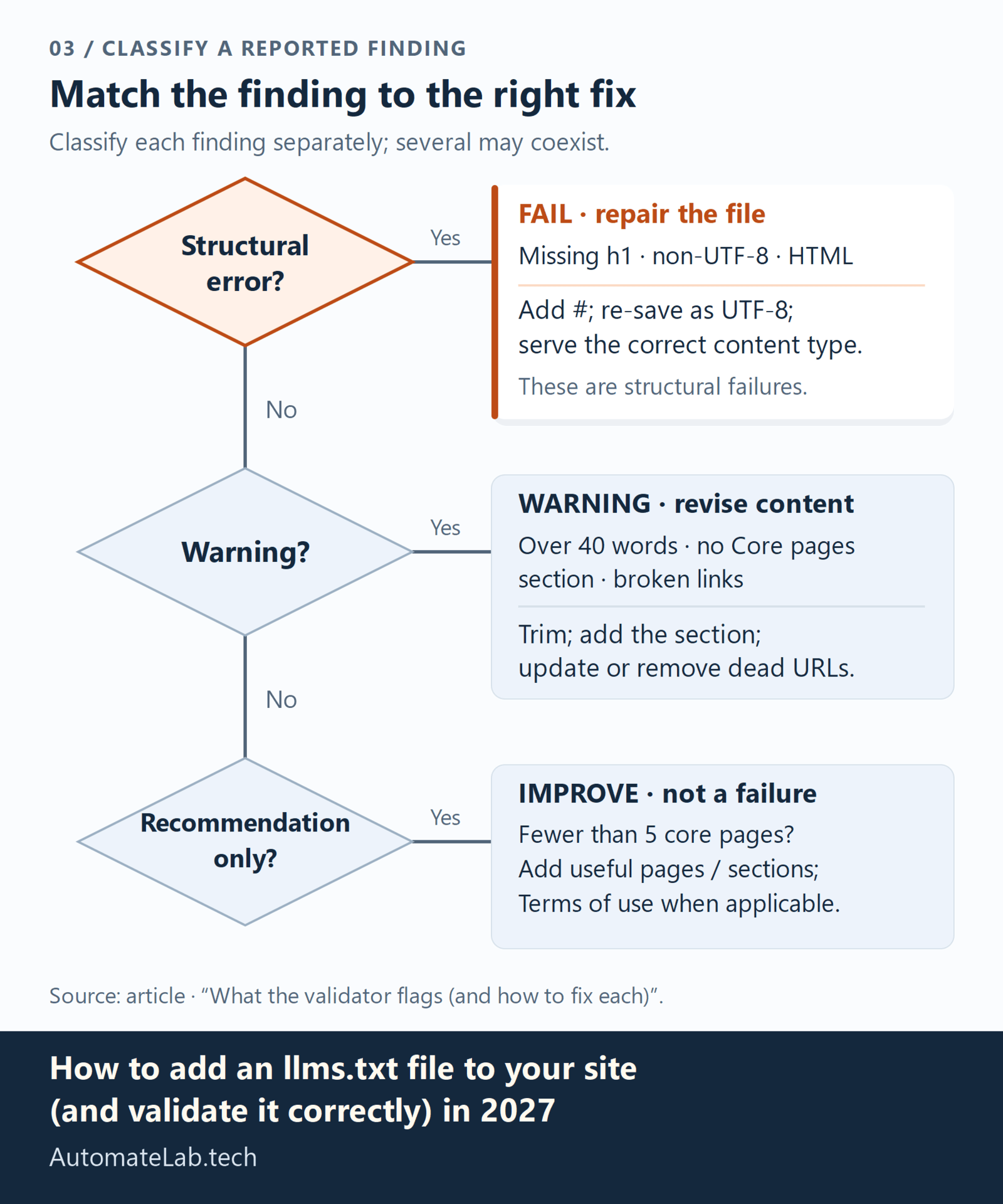
The validator catches issues in three categories:
Structural errors (fail): Missing h1 heading, non-UTF-8 encoding, llms.txt returning HTML instead of Markdown. Fix: re-save the file with the correct encoding and content type.
Warnings: Summary longer than 40 words, no ## Core pages section, broken links in the list. Fix: trim the summary, add a Core pages section, and remove or update dead URLs.
Recommendations: Fewer than 5 core pages listed, no optional sections, no ## Terms of use when the site has one. These are not failures but signals that the file could be more useful to bots that read it.
llms.txt vs robots.txt -- what's the difference?
Both files live at the domain root and both tell bots what to do. They serve different purposes:
- robots.txt is a restrictive protocol. It tells bots which pages to avoid. It uses
DisallowandUser-agentdirectives in a proprietary format. - llms.txt is an affirmative protocol. It tells LLMs which pages to read. It uses Markdown in a format designed for human editing.
A site can (and should) have both. robots.txt blocks the pages you don't want crawled. llms.txt promotes the pages you want LLMs to prioritize. They are complementary, not interchangeable.
For a deeper comparison, see the breakdown at llmtxt.info/comparison, which maps llms.txt against robots.txt, sitemap.xml, and the proposed llms-full.txt specification.
How to extend this after deployment
Once your llms.txt is live and validated, there are a few follow-on steps to maximize its impact:
Add it to your llms-full.txt if applicable. The llms-full.txt proposal extends llms.txt with per-page summaries.The Lighthouse agentic browsing auditcovers the v2 proposal and how to pass the upcoming Lighthouse llms.txt check.Monitor which pages bots actually read. If you check your server logs for ChatGPT-User or perplexity- user agents, you may see requests for pages listed in your llms.txt increasing.Refresh quarterly. Remove outdated pages, add new ones. Stale llms.txt files that link to 404s lose credibility with extractors.
FAQ
Does Google, ChatGPT, or Perplexity actually read llms.txt?
As of 2026, no major LLM provider has publicly confirmed systematic consumption of llms.txt. It is an advisory file, not a formal standard. However, sites that have llms.txt files report stronger results in AI citation tracking, and the file structure aligns with how AI extractors already discover and prioritize content. The signal is best-effort, not guaranteed.
Does llms.txt improve Google search rankings?
No. llms.txt is designed for language model consumption, not traditional search engine ranking. Google's indexing pipeline does not use llms.txt as a ranking signal. It is a GEO (Generative Engine Optimization) signal, not an SEO one.
Where do I place llms.txt on different platforms?
Always at the domain root: https://yoursite.com/llms.txt. On WordPress, use a plugin or add it via your theme's functions.php to serve as a static file. On Next.js, place it in the public/ directory. On static site generators (Hugo, Jekyll, Astro), add it to your static assets directory. The path is always /llms.txt regardless of platform.
Is llms.txt required for AI citation?
No. Many cited sites do not have llms.txt. It is an advantage, not a requirement. The strongest citation signal remains high-quality, well-structured content with clear authorship and entity signals. llms.txt helps bots find those pages faster.
How often should I update llms.txt?
Every 3-6 months is a reasonable cadence. Update when you publish significant new content, remove or merge old pages, or change your site structure. Stale links in llms.txt undermine the file's purpose.