
How to connect HubSpot to Zapier without code
Connect HubSpot to Zapier without code: triggers, actions, and the Static List limitation that catches most teams off guard.
TL;DR: Connect HubSpot to Zapier via Apps > +Add connection > HubSpot, authenticate with your HubSpot Super Admin account, and automate contact creation, deal updates, and list management - but note that Add Contact to List only works with Static Lists, not Active or Smart Lists.
HubSpot and Zapier cover the gap between your CRM and the rest of your stack without writing any code. The connection itself is quick; the complexity is in knowing which triggers and actions are available at each HubSpot plan tier, and one specific quirk about list membership that breaks workflows if you do not know about it.
What do you need before connecting HubSpot to Zapier?
- HubSpot Super Admin access. A standard user cannot connect third-party apps. The connecting account must hold Super Admin or an account with "App Marketplace Access" permission enabled.
- HubSpot plan consideration. Zapier triggers and actions that access paid HubSpot features (custom properties, sequences, workflows) require the corresponding HubSpot plan - Professional or Enterprise. Free or Starter HubSpot accounts work but expose fewer trigger options.
- Zapier plan. HubSpot is a premium app on Zapier. Free plans cannot build HubSpot Zaps; the Starter plan is the entry point.
How do you connect HubSpot to Zapier?
- In Zapier, navigate to Apps > +Add connection and search for HubSpot.
- Click Add connection. A popup opens redirecting you to HubSpot's OAuth consent screen.
- Log in with your HubSpot Super Admin credentials and select the portal to connect.
- Click Grant access. The popup closes and HubSpot appears in your Zapier Apps list.
Alternatively, connect from inside HubSpot: navigate to Settings > Integrations > Connected Apps, find Zapier, and follow the same OAuth flow. Either path creates the same connection.
What HubSpot triggers and actions are available in Zapier?
Key triggers:
- New Contact - fires when a new contact is created in HubSpot.
- New Deal - fires when a deal is created.
- Deal Entered Stage - fires when a deal moves into a specific pipeline stage. Useful for notifications and handoffs.
- Form Submission - fires when a HubSpot form is submitted (Instant trigger).
- Property Changed - fires when a specific contact or deal property changes. Monitors one property per Zap.
Key actions:
- Create/Update Contact - upserts a contact record by email address.
- Create Deal - creates a new deal and optionally associates it with a contact or company.
- Add Contact to Static List - adds a contact to a HubSpot list (Static Lists only - see below).
- Update Company - updates properties on a company record.
Why does Add Contact to List only work with Static Lists?
HubSpot has three list types: Static Lists (manually managed membership), Active Lists (auto-enrollment based on property criteria), and Smart Lists (similar to Active, AI-assisted). The Zapier action can only write to Static Lists because Active and Smart Lists manage their own membership - HubSpot rejects API requests that would override the enrollment logic.
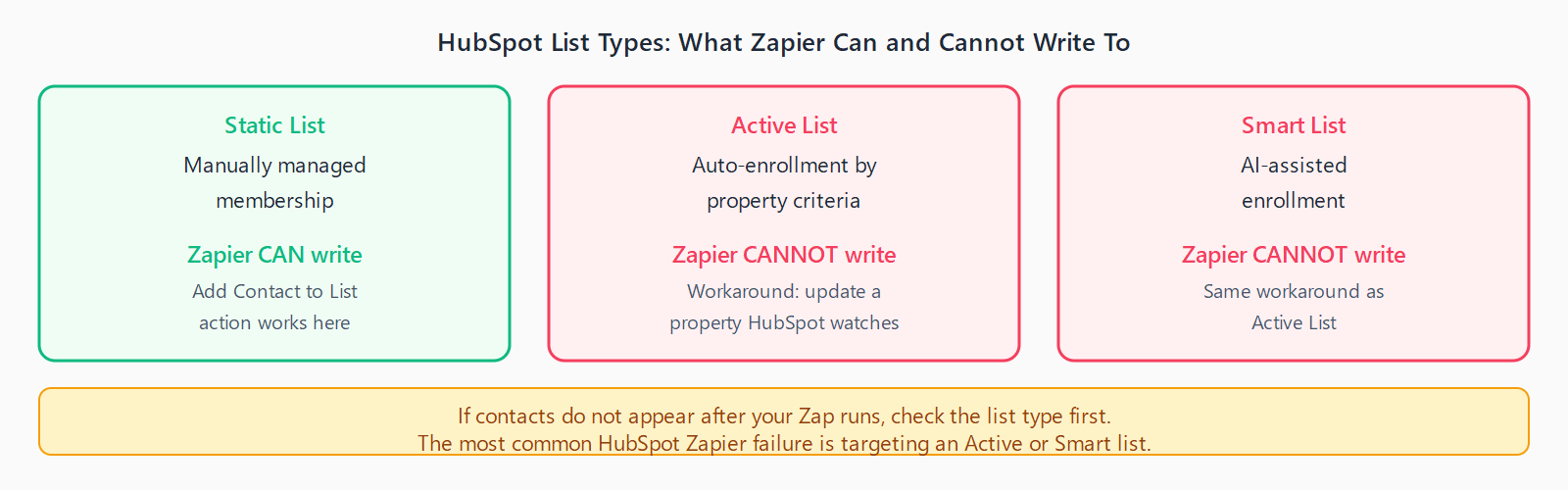
The common failure mode: a user creates a HubSpot Active List expecting Zapier to fill it, then the Zap runs but the contact does not appear. Check the list type first. If you need Zapier to add contacts to a dynamic-membership list, create a contact property change as the Zap action and let HubSpot's Active List criteria pick up the property update instead.
For deeper HubSpot automation - multi-step flows that involve deal stages and CRM syncs - the Make vs Zapier 2026 comparison covers which platform handles CRM workflows better at scale.
FAQ
Can I automate deal creation from a form submission in Zapier?
Yes, but it requires two Zap steps. Use Form Submission as the trigger, a Find or Create Contact step to resolve or create the submitter's contact record, and then Create Deal as the final action. On a Free Zapier plan, multi-step Zaps are not available - use the Starter plan or above.
Why does my HubSpot trigger not fire when I update a contact?
Contact update triggers fire only on property changes, not on every save. If the property you care about did not change value (e.g. a form re-submission with identical data), the trigger does not fire. Use the Property Changed trigger for one tracked property, or set up a HubSpot Workflow to set a "last modified" date property and trigger the Zap on that property changing.
Can I trigger a Zap when a HubSpot sequence step is completed?
Not directly. HubSpot Sequences do not expose a native Zapier trigger. The workaround is to have the final sequence step update a contact property, then trigger the Zap on that property change. Requires a HubSpot Sales Professional plan for Sequences access.
What is the HubSpot Zapier rate limit?
HubSpot's API allows up to 190 requests per 10 seconds per portal. Zapier batches requests, so most normal-volume Zaps stay well under this. High-volume bulk imports (thousands of contacts per hour) can hit the limit. Add a Zapier Delay step between action steps for bulk operations.
How do I associate a new deal with an existing contact in Zapier?
Use a Find Contact step before the Create Deal action to look up the contact by email. Then in the Create Deal action, pass the contact ID from the Find step into the Associate Contact field. Both steps are available on the Starter Zapier plan and above.