
AI SEO Magic Button: whole-site AI citation audit in one command
One command. Whole-site AEO/GEO audit. A ready-to-execute plan.json your AI agent can run. Meet the AI SEO Magic Button.
TL;DR: AI SEO Magic Button crawls your whole site, runs 39 AEO/GEO checks on every page, and outputs a prioritized plan.json your agent can execute - MIT, no API keys required.
Getting a site cited by ChatGPT, Perplexity, or Google AI Overviews requires around 39 signals to be right across every page: structured data, bot-crawler access, FAQ schema, answer density, canonical links, and more. Checking them one URL at a time is useful for a single page. Checking them across a 50-page site is hours of work and a spreadsheet of findings you still have to act on. The AI SEO Magic Button collapses that into one command.
What does AI SEO Magic Button do?
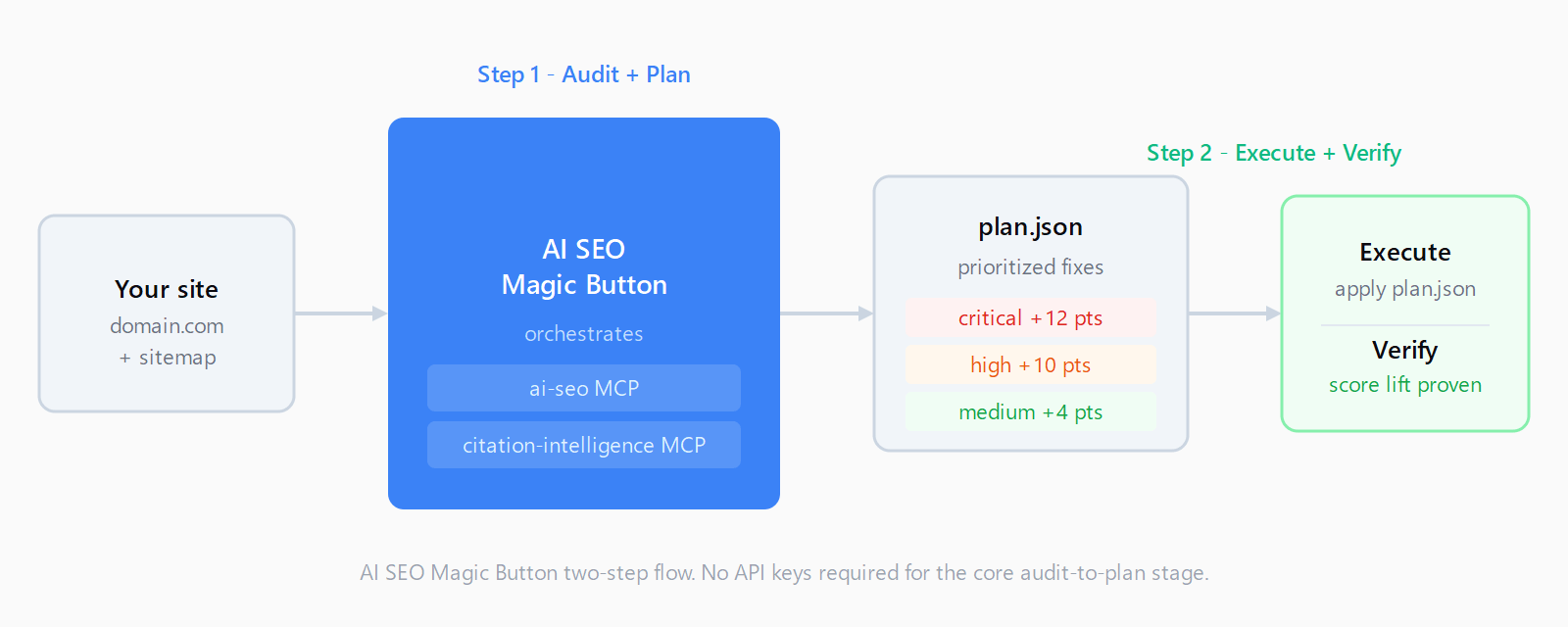
The tool follows a strict two-step flow: audit then plan, never silent edits.
In step one, it crawls your sitemap, samples up to N pages (configurable), and runs both the AI-SEO MCP (audit, score, rewrite) and the Citation Intelligence MCP (what AI engines actually cite, and where your site is missing) against each one. The two engines are spawned automatically as subprocesses - no separate configuration needed.
In step two, every finding lands in a portable plan.json and a companion plan.md checklist, sorted by estimated score lift. Each item is self-contained: it carries the page URL, the category (schema, structure, citation, content), a severity tier (critical, high, medium, low), an estimated expected_score_delta, a machine-readable action with the tool name and baked parameters, and an acceptance check so verification is unambiguous. An empty plan means a perfect score.
Here is what the CLI output looks like on a real page:
$ node dist/cli.js audit example.com --pages 2

https://example.com
  pages audited: 1 | avg score: 48 (D)
  fixes: 8 | est. lift: +78 points
   1. [critical] +12  No JSON-LD structured data found.
   2. [critical] +12  No FAQ structure (no FAQPage schema or H3 questions).
   3. [critical] +12  No sitemap at standard locations.
   4. [high]     +10  Rewrite for AEO: this page.
   5. [medium]   +4   Low authority signals - missing Organization schema.
   6. [medium]   +4   No canonical link element found.
Understanding the 13 signals AI assistants use explains why the top findings - missing JSON-LD, missing FAQ schema, and missing sitemap - consistently score as critical: AI retrieval pipelines extract directly from structured data, and a site with no sitemap is harder for AI crawlers to discover.
How do you install AI SEO Magic Button?
Three install paths, one shared core library.
As an MCP server (Cursor, Cline, Windsurf, Claude Desktop): add one block to your MCP config and it exposes a single tool, generate_seo_plan.
{
  "mcpServers": {
    "ai-seo-magic-button": {
      "command": "npx",
      "args": ["-y", "ai-seo-magic-button", "mcp"]
    }
  }
}
Call generate_seo_plan with { "domain": "yourdomain.com", "pages": 10 } and it returns the full plan.json plus the markdown checklist as structured content.
As a Claude Code plugin: one command installs the skill and plugin together.
/plugin install https://github.com/AutomateLab-tech/ai-seo-magic-buttonAs a Claude skill: copy the skill/ directory into .claude/skills/. The skill is the conversational interface - say "audit my site for AI SEO" and it drives the two-step flow.
What does the plan.json look like?
Each entry in the items array is a self-contained work ticket. A schema-category critical item looks like:
{
  "url": "https://example.com",
  "category": "schema",
  "severity": "critical",
  "expected_score_delta": 12,
  "title": "No JSON-LD structured data found on this page.",
  "action": {
    "type": "insert_schema",
    "instructions": "Add a FAQPage or Article JSON-LD block to the page head."
  },
  "acceptance": "Re-run audit.site; finding no longer appears in top_5_fixes.",
  "priority": 1
}
Action types determine how the plan is executed. insert_schema, generate_llms_txt, rewrite_aeo, and rewrite_geo items can all be handled programmatically by the apply helper. manual items (like editing robots.txt) emit plain instructions. Items that need an LLM rewrite are marked needs_agent and output a *.prompt.md the executing agent finishes in the current session.
The summary block at the top gives you the full picture before you look at individual items: pages audited, average score, grade, total items, estimated total delta, and a by_severity tally.
How do you execute and verify the plan?
Run the apply command to handle all tool-driven items in priority order:
node dist/cli.js apply plan.json --out magic-button-outOutputs go to magic-button-out/ rather than directly overwriting live files, so each change is reviewable before deploy.
After executing, re-audit and diff the score against the original baseline:
node dist/cli.js verify plan.jsonThe verify command re-runs the same audit tools against the same pages and prints a before-after delta per item and overall. Items that still fail stay on the plan; items that pass are cleared. This loop - execute, verify, repeat - is the intended workflow.
If you run agency-os, the sink command pushes every plan item into your Notion Tasks board as a Suggestion that flows through the standard Suggestion - To-Do - Done pipeline. Without a board configured it degrades to the local plan.md checklist.
FAQ
Does AI SEO Magic Button require API keys?
No. The core audit-to-plan flow uses the rule-based paths of the ai-seo and citation-intelligence MCPs, which need no external API keys. LLM-dependent rewrite items degrade gracefully to prompt templates the executing agent finishes in the current session.
How is it different from the single-URL AI SEO Checker?
The free AI SEO Checker at automatelab.tech/tools/ai-seo-checker/ audits one URL interactively in a browser with 39 checks and instant visual feedback. The Magic Button is a programmatic, whole-site tool: it walks every page in the sitemap, layers in citation-gap signal from the Citation Intelligence MCP, and outputs a machine-readable plan your agent can execute rather than a human-readable report.
Which AI assistants does it optimize for?
The audit targets citation by ChatGPT, Perplexity, Claude, Gemini, and Google AI Overviews. The citation-intelligence component checks which of those engines are currently citing your domain and for which queries, surfacing pages that rank but are not cited alongside pages with structural gaps.
How many pages can it audit at once?
The --pages flag (default: 10) caps the sample from the sitemap. For a small site, pass the actual page count. For large sites, start with 10-20 to get a representative plan, then run targeted audits on clusters once the critical fixes are applied.
Can it be used outside Claude Code?
Yes. The MCP server surface runs in any MCP-compatible host: Cursor, Cline, Windsurf, Claude Desktop. The CLI works standalone with node dist/cli.js audit. The only surface tied to Claude Code is the Claude skill and plugin.
Is the plan.json format stable?
The current schema is schema_version: "1.0". Fields documented in docs/plan-format.md in the repo are stable; the top-level summary, items[*].action, and items[*].acceptance shapes are the contract the apply and verify commands depend on.