
How we made automatelab.tech agent-ready with WebMCP
A real case study: registering WebMCP tools across our free tools and search, passing Lighthouse's new Agentic Browsing audit, and an honest take on the payoff.
TL;DR: We wired every tool and search box on automatelab.tech to AI agents with WebMCP - a shared navigator.modelContext helper that turns each page's existing action into a callable tool - and the result now registers in Google's Lighthouse Agentic Browsing audit.
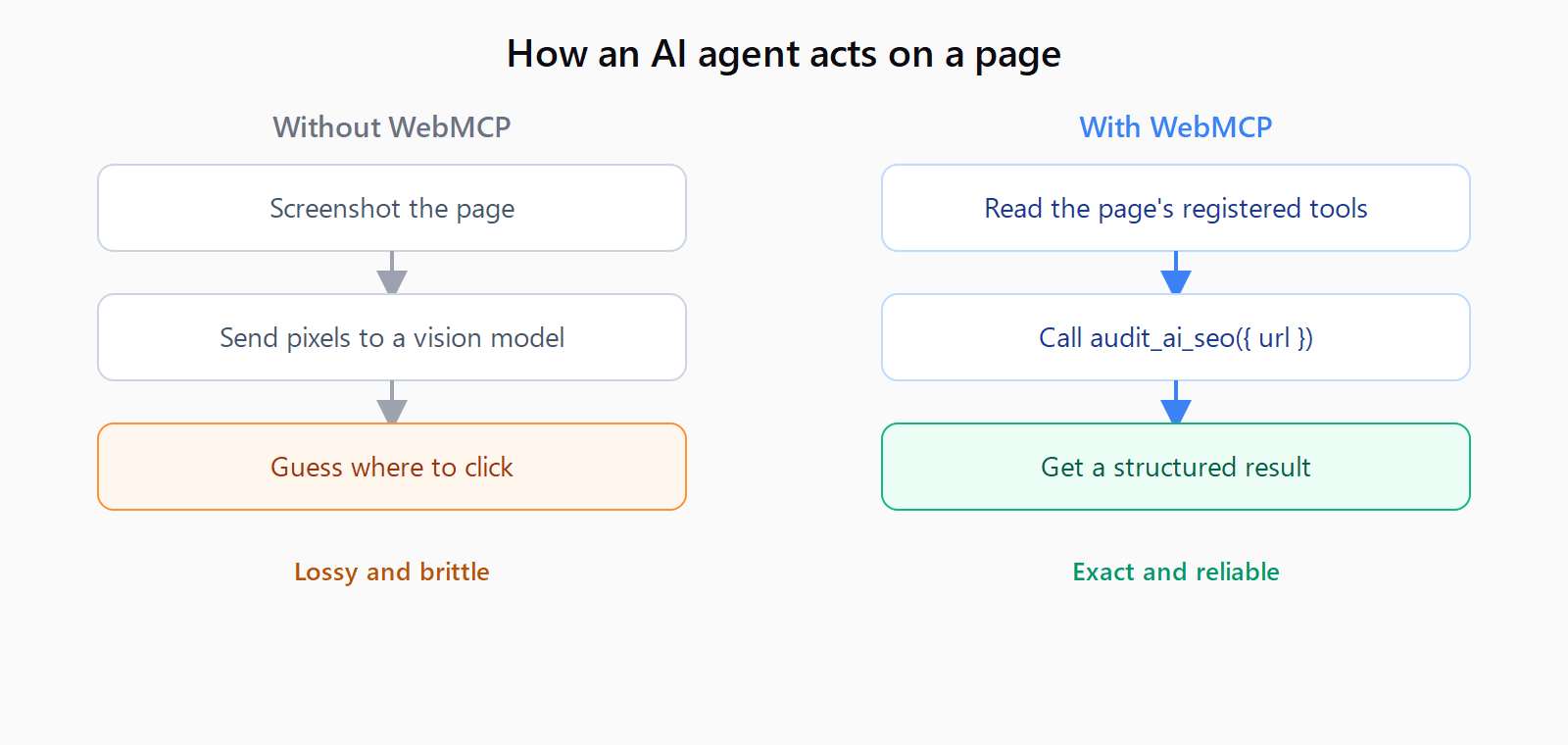
When an AI agent visits a normal website, it screenshots the page and guesses where to click. WebMCP lets the site hand the agent a typed list of actions instead. In June 2026 we registered ten of those actions across automatelab.tech - eight free tools plus the blog and dataset search - and here is exactly how, with an honest read on whether it is worth your time yet.
What is WebMCP, and is anyone using it yet?
WebMCP is a browser API, navigator.modelContext, that a page calls to register tools for an in-browser AI agent. Each tool carries a name, a natural-language description, a JSON schema for its inputs, and a handler that runs when the agent calls it. It is the browser-side cousin of the Model Context Protocol that server-side MCP integrations already speak. The spec is a W3C draft from the Web Machine Learning group, last updated in February 2026.
Now the honest part: WebMCP ships only in Chrome 146 behind a feature flag, real-world adoption is close to zero, and almost every production agent today still reads the raw DOM. This is a plant-the-flag move, not a traffic tap. Two things make it worth doing anyway. It is cheap if your pages already have working actions, and Google just started measuring it.
What does the Lighthouse Agentic Browsing audit check?
In May 2026, Lighthouse 13.3 added an Agentic Browsing category. There is no 0-to-100 score; each check returns pass, fail, or a ratio. Four things get measured: registered WebMCP tools, an llms.txt file, accessibility-tree integrity, and layout stability.
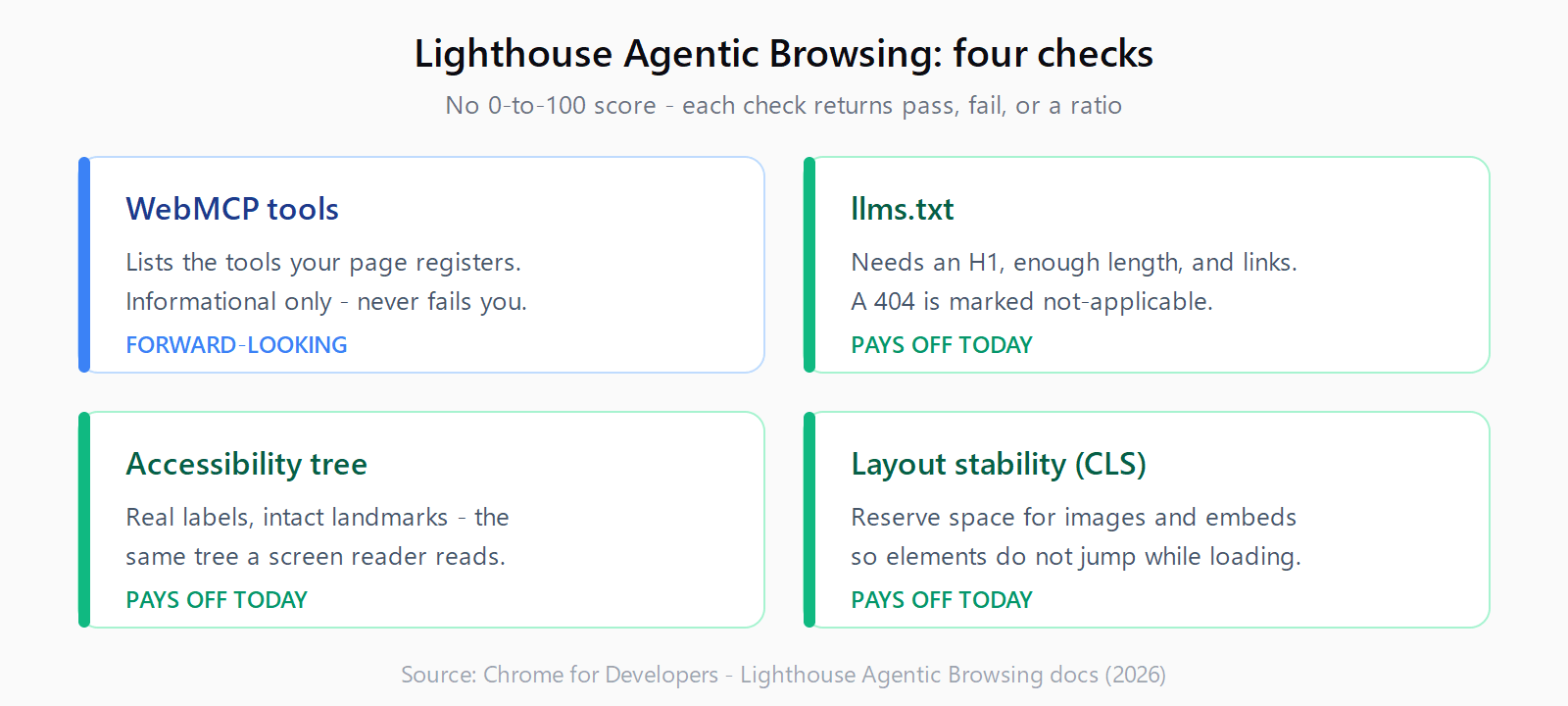
The catch most coverage skips is that the WebMCP check is informational only - it lists the tools your page registers and never fails you for having none. The other three pay off today regardless of WebMCP adoption. A clean accessibility tree helps screen readers and every retrieval crawler; a low layout-shift (CLS) score helps real users; and a valid llms.txt is the same file that the rest of the GEO and AEO checklist already asks for. The audit marks llms.txt as not-applicable on a 404, but flags it if the file exists and is missing an H1, too short, or has no links.
How do you register a WebMCP tool?
There are two paths. The declarative one adds toolname and tooldescription attributes to an existing <form>; the browser builds the input schema from the form fields, and your submit handler receives an agent-invoked event. The imperative one calls navigator.modelContext.registerTool() with a name, description, input schema, and an execute() handler that returns a content array.
We took the imperative path because every tool already had a compute function - the audit, the cost math, the workflow validator - so the handler just calls the code that was already there:
if (navigator.modelContext) {
  navigator.modelContext.registerTool({
    name: "audit_ai_seo",
    description: "Audit a URL for AEO/GEO readiness; return the score.",
    inputSchema: {
      type: "object",
      properties: { url: { type: "string", description: "Full URL incl. https://" } },
      required: ["url"]
    },
    execute: async ({ url }) => {
      const result = await runAudit(url);   // the function the page already had
      return { content: [{ type: "text", text: result.summary }] };
    }
  });
}
The non-obvious part is that you are not writing new tools, you are exposing the ones you already shipped. The whole integration is a roughly forty-line shared helper at /tools/webmcp.js that feature-detects navigator.modelContext and no-ops in every browser without it, so normal visitors are unaffected.
What did we expose on automatelab.tech?
Ten surfaces, each reusing the function behind its on-page button. Our free AI SEO Checker became audit_ai_seo; the calculators and validators became their own tools; and the two search boxes became query tools.
| Surface | WebMCP tool |
|---|---|
| AI SEO Checker | audit_ai_seo |
| AI Overview checker | score_ai_overview_eligibility |
| n8n cost calculator | estimate_n8n_cost |
| n8n workflow validator | validate_n8n_workflow |
| GPTBot / robots.txt helper | get_ai_crawler_robots_rules |
| Blog search | search_blog |
| Automation Error Index search | search_automation_errors |
Is making your site agent-ready worth it in 2026?
Do the agent-readiness groundwork for the wins you can bank now, and treat the WebMCP registration as a cheap option on a standard that might matter in a year. Shipping llms.txt, fixing the accessibility tree, and killing layout shift help screen readers, crawlers, and real users today - the WebMCP tools are the forward-looking layer on top. One caveat worth taking seriously: the WebMCP security model is still incomplete, so never expose a destructive or account-changing action without a user-confirmation step. Read-only audits, calculators, and search are safe first candidates; "delete my account" is not.
How do you make your own site agent-ready?
- Ship an
llms.txtat your domain root with an H1, a short summary, and links to your key pages. - Audit your accessibility tree so every control has a real label and no landmark is broken.
- Reserve space for images and embeds so your layout-shift score stays near zero.
- For each form or action, register a WebMCP tool that reuses the handler you already have.
- Feature-detect
navigator.modelContextso the code is a no-op in browsers without it. - Run Lighthouse's Agentic Browsing audit in Chrome to confirm the tools register.
FAQ
What is WebMCP in one sentence?
WebMCP is a browser API (navigator.modelContext) that lets a website register typed, callable tools for an AI agent instead of forcing the agent to read the page and guess.
Does WebMCP work in normal Chrome today?
Not yet. It ships in Chrome 146 behind a feature flag as a developer trial, so registration is a no-op in a standard browser. Feature-detect it and your code stays safe everywhere else.
Declarative or imperative - which should I use?
Use the declarative form attributes for a plain submit-to-results form. Use the imperative registerTool() call when the action already runs in JavaScript and you want to return a real result, which is what we did for every tool on the site.
Does any of this help my SEO or AI citations right now?
The WebMCP tools do not, yet. The surrounding work does: a valid llms.txt, a clean accessibility tree, and a stable layout are the same signals that retrieval crawlers and the Lighthouse audit already reward.
Is it safe to expose my site's actions to AI agents?
Read-only actions like search and audits are safe. The spec's security model is still incomplete, so gate anything destructive or account-changing behind an explicit user-confirmation step rather than exposing it directly.