
How to Connect Zapier to Notion (2026 Setup Guide)
Wire a Zap into a Notion database the right way: page-by-page access, the Create Data Source Item action, and the API change that silently breaks old Zaps.
TL;DR: Connect Zapier to Notion by adding Notion in the Zap, granting page-by-page access on its auth screen, and picking the "Create Data Source Item" action; reconnect any Zap older than Notion's 2025-09-03 data-source change.
This walk-through is for anyone wiring a Zap into a Notion database who hits the part most guides skip: Zapier only sees the pages you explicitly share, and Notion's recent API change quietly renamed every database action. Get either wrong and the Zap saves fine but never writes a row.
Prerequisites
- A Zapier account on any tier, including the Free plan, which allows 100 tasks per month and two-step Zaps.
- A Notion workspace where you are a member with edit access to the target database.
- The trigger app already picked, since a Zap needs an event before it can write to Notion.
Step 1: How do you add Notion and connect your account?
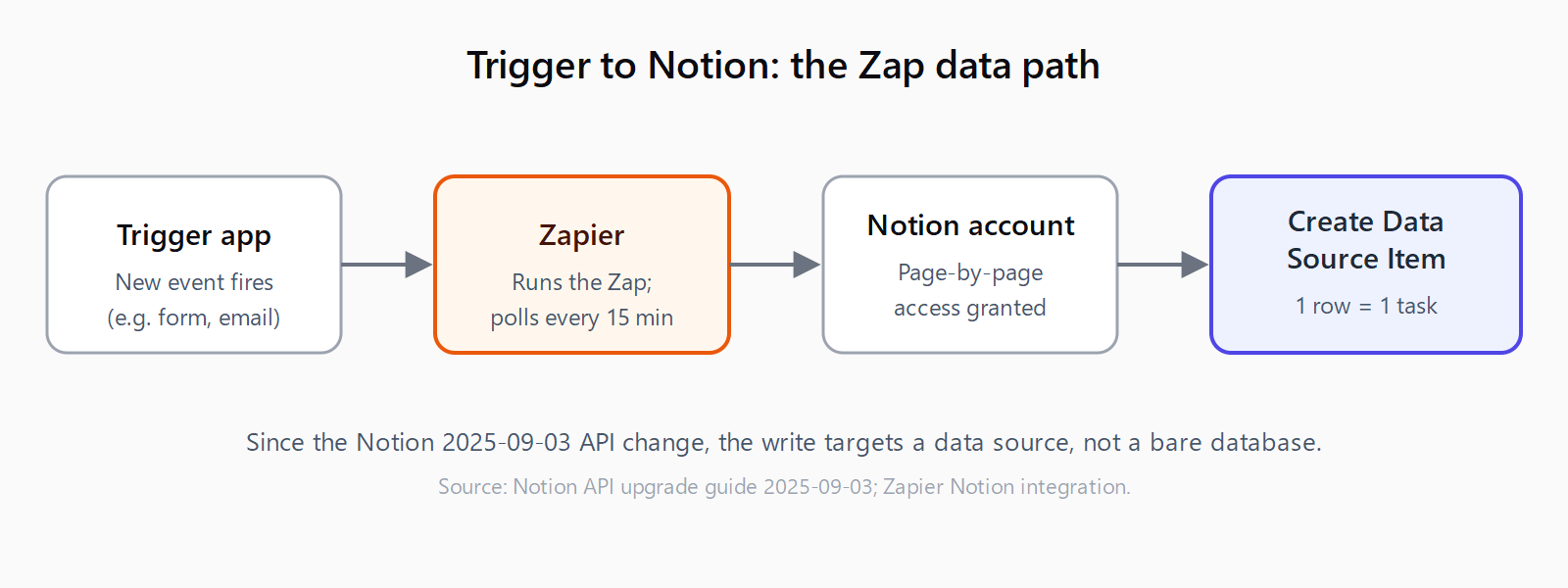
In the Zap editor, search for and select Notion as either the trigger app or an action app, choose the event, and click Continue. Under the account step, click + Connect a new account. Zapier opens Notion's authorization screen, where you click Select pages, tick the exact pages and databases you want Zapier to touch, and click Allow access. This page-by-page grant is the step that trips people up: Zapier can only see what you share here, so if a database is missing from the dropdown later, you skipped it in this dialog and need to edit the connection. Being a workspace admin is not strictly required, but you do need edit access to every page you grant.
Step 2: How do you set the Notion trigger or action?
For a trigger, Zapier offers New Data Source Item, New Comment, Updated Content in Data Source Item, Updated Properties in Data Source Item, and the page-level Updated Content in Page. For an action, the workhorse is Create Data Source Item - the action formerly labeled "Create Database Item" - alongside Update Data Source Item, Find Data Source Items, Add Block to Page, and an API Request (Beta) escape hatch for fields the standard action doesn't expose. Select your database from the dropdown; if it isn't listed, return to Step 1 and grant it.
Step 3: How do you map fields and create a Notion item?
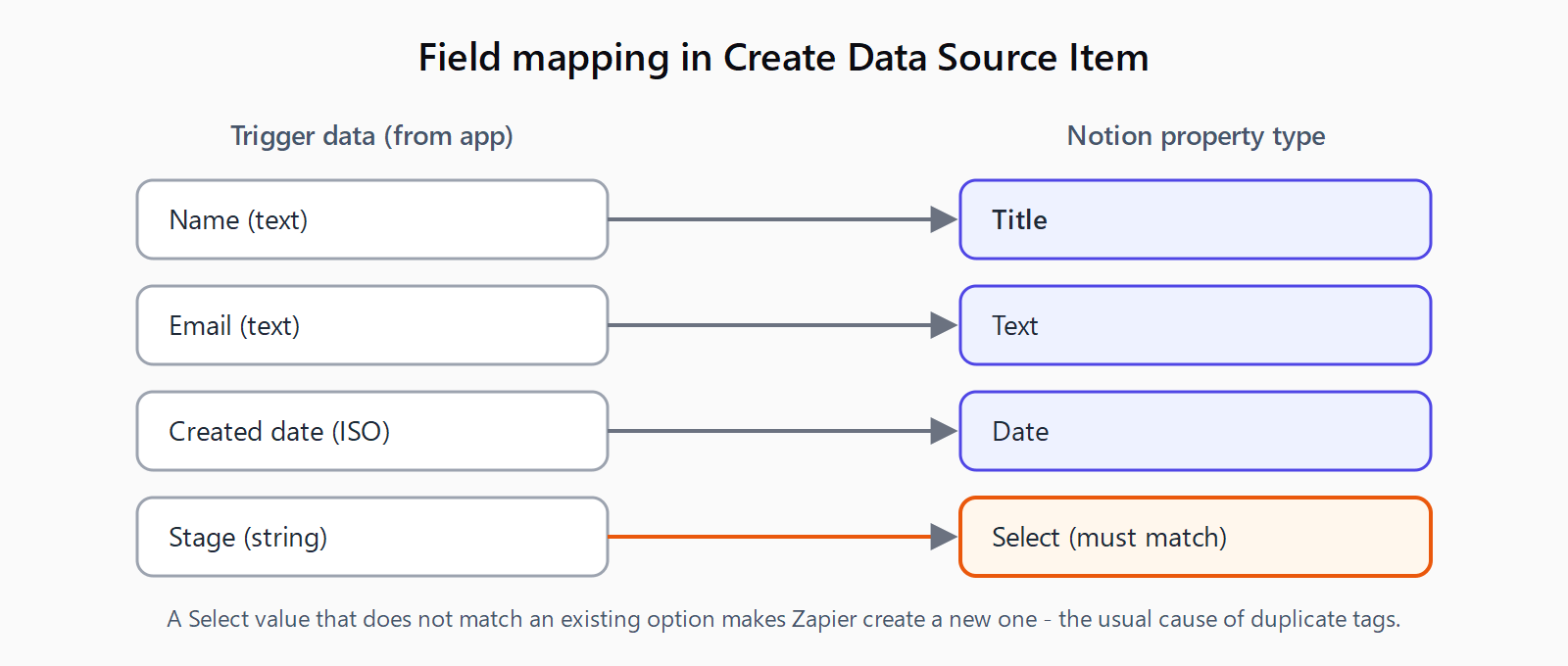
With Create Data Source Item selected, Zapier renders one input per Notion property. Map each one to data from the trigger: text into the Title field, an option that matches exactly into a Select property (Zapier will create a new option if the string doesn't match, which is the usual cause of duplicate tags), and ISO-style values into Date and Number fields. Leave a property blank to leave it empty in Notion. The mapping below is the heart of the integration.
Step 4: How do you test the connection?
Click Test action. Zapier creates one real row in your Notion database and returns the new page's ID. Open the database in Notion and confirm every property landed where you expect, then turn the Zap on. There is no separate sandbox - the test writes live data, so point it at a scratch database the first time. The same pattern of grant-pick-map-test applies when connecting Salesforce to Zapier, so the muscle memory transfers across apps.
Why does my Notion Zap stop working after it worked fine?
Notion's API version 2025-09-03 made a single database a container for one or more data sources, each with its own schema. Most operations that used database_id now require a data_source_id, and queries moved from PATCH /v1/databases/{id}/query to PATCH /v1/data_sources/{id}/query. The practical fallout in Zapier: if a Zap was built on an older integration version and someone later adds a second data source to that database, the create, read, write, and query actions fail per Notion's 2025-09-03 upgrade guide. The fix is to reconnect the Notion account on the current integration version and re-pick the data source. Older walkthroughs that still say "Create Database Item" and never mention reconnecting are the stale advice behind most broken Notion Zaps.
What does this connection cost and how fast does it run?
As of 2026, Zapier's Free plan gives you 100 tasks per month shared across all Zaps, two-step Zaps (one trigger, one action), and a single user. Each Notion item your Zap creates or updates counts as one task. Polling triggers - the "New Data Source Item" type - check Notion every 15 minutes on most plans rather than firing instantly, so a row added at 10:01 may not reach the Zap until 10:15. If you need near-instant runs you either move to a paid tier or drive the Zap from a faster trigger app. For sustained high volume, note that Notion's API allows an average of roughly three requests per second per integration, which Zapier manages for you but which still caps how fast a bulk backfill can run. If polling lag or task ceilings bite, it is worth comparing Make and Zapier on price-per-operation before scaling up.
FAQ
Do you need to be a Notion admin to connect Zapier?
No. You need edit access to the specific pages and databases you grant during the "Select pages" step. Admin rights only matter if you want to manage the connection at the workspace level. Zapier sees nothing you did not explicitly share.
Can you connect Zapier to Notion for free?
Yes. The Zapier Free plan covers 100 tasks per month, two-step Zaps, and one user, which is enough for a single trigger-to-Notion automation. You pay only when you exceed the task limit or need multi-step Zaps.
Why is my Notion database missing from the Zapier dropdown?
You did not grant it during the "Select pages" authorization dialog. Edit the Notion connection in Zapier, click into the account, re-run "Select pages," tick the missing database, and click "Allow access." The dropdown refreshes once access is granted.
Can you create a Notion item without giving Zapier API access directly?
Yes. The standard "Create Data Source Item" action handles ordinary properties without you touching the Notion API. The "API Request (Beta)" action is only for fields or endpoints the standard action does not expose, and it still uses the connection you authorized in Step 1.
How do you move data the other way, from Notion into another database?
Use a Notion trigger such as "New Data Source Item" as the first step, then an action app as the second. The same database-automation pattern works in Make when you push records into a Notion database from a CRM.