
Trigger a Make scenario instantly when a Google Drive file lands
Make has no instant Google Drive trigger. Bridge the gap with an Apps Script clock trigger that POSTs new files to a custom webhook.

TL;DR: A new Google Drive file can fire your Make scenario within about a minute: an Apps Script clock trigger POSTs file details to a Make custom webhook, so idle time costs zero operations.
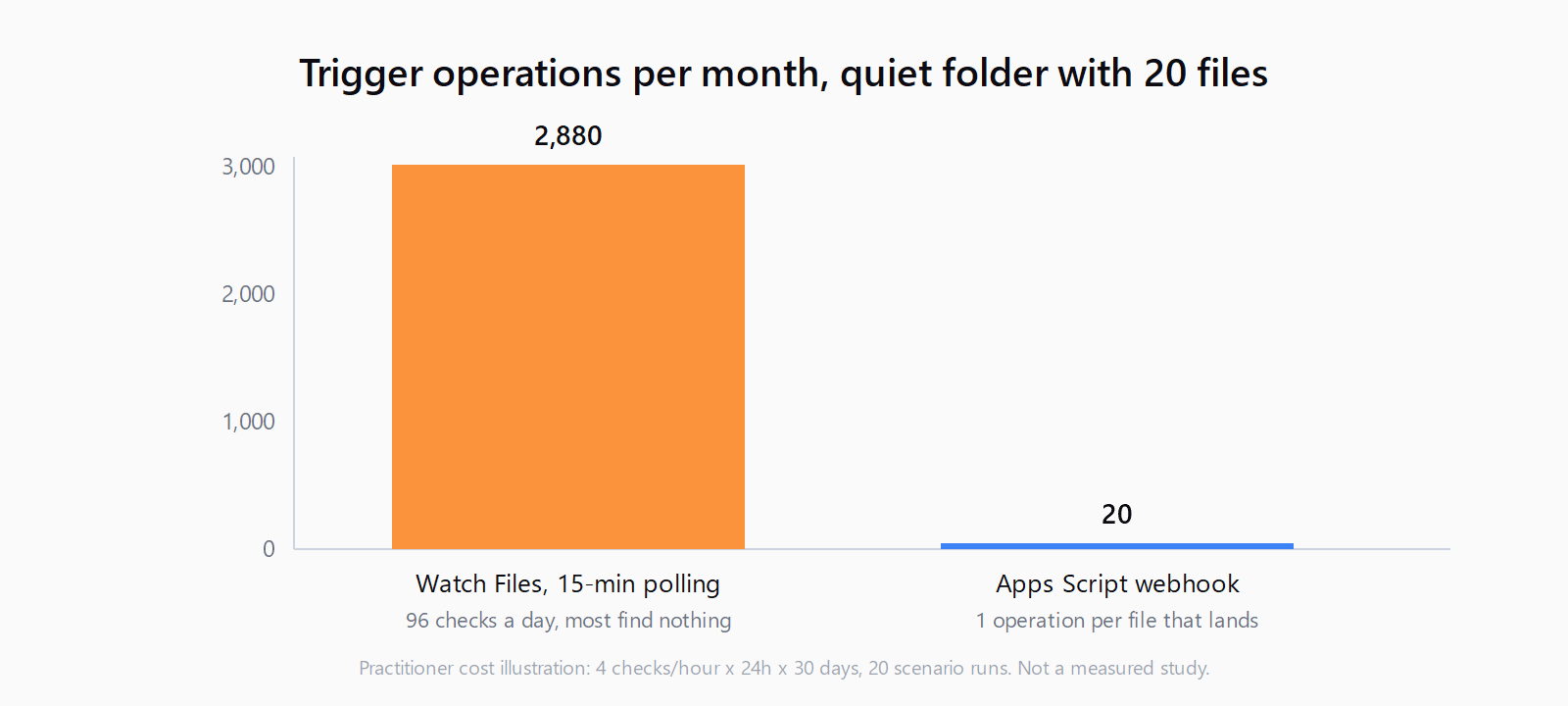
Make's Google Drive module has no instant trigger. The native "Watch Files in a Folder" module polls on a schedule, which means one operation every interval whether or not anything arrived. For a meeting-recordings folder that goes quiet for weeks, that is roughly 2,880 operations a month spent seeing "no new files" 96 times a day. The workaround confirmed by Make users is a small Google Apps Script that watches the folder and calls a custom webhook when a file actually lands.
What will this build do when a file lands?
The end state: a file lands in a Drive folder, Google's side notices it within 60 seconds, and your Make scenario starts with the file's name, ID, and link already in the payload. Between file arrivals, nothing runs on Make's side and no operations are consumed. The chain looks like this:
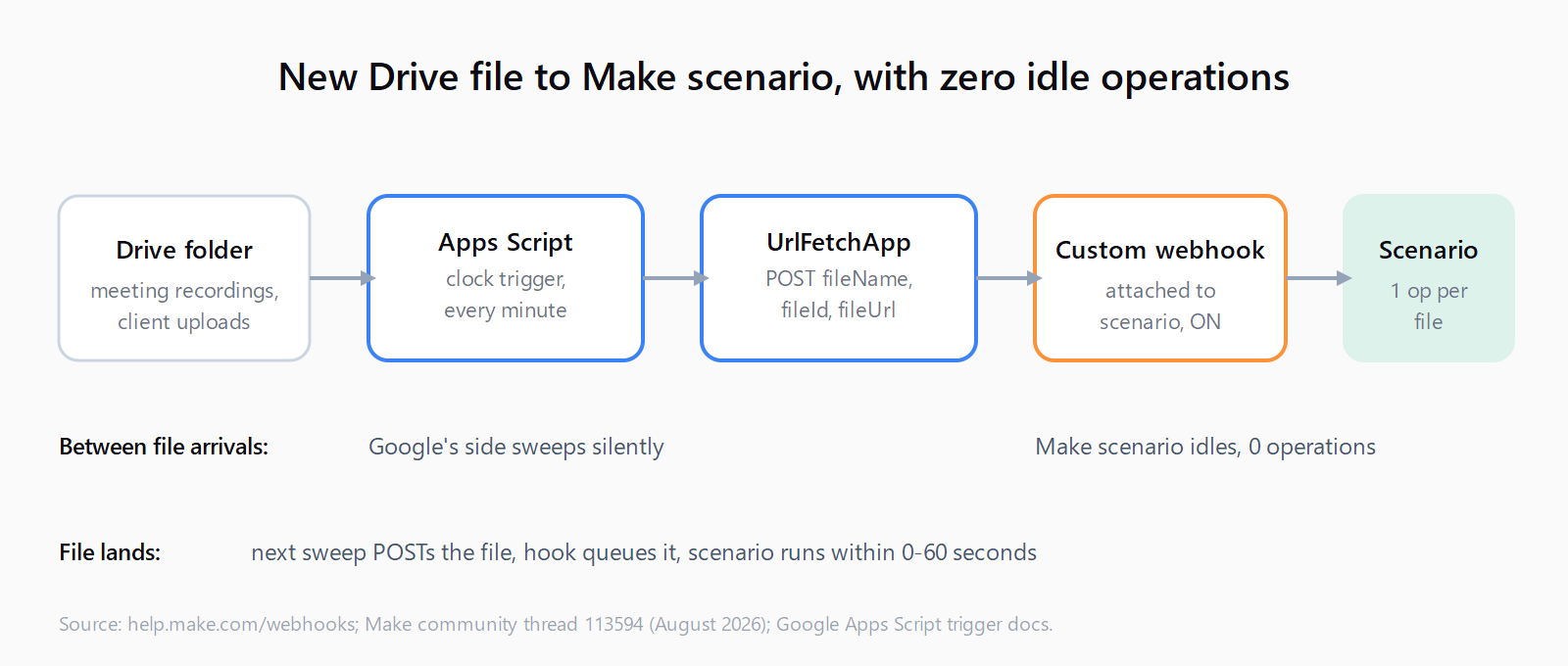
Why can't Make trigger instantly on new Google Drive files?
Because Google Drive doesn't offer Make a push event for uploads as of September 2026. Make's own documentation says that if an app does not provide webhooks, you can use polling triggers to periodically poll the service for new data, and that is exactly what the Drive module does. Native instant triggers exist for apps that push; Drive is not one of them inside Make. The pattern is common elsewhere - one index of 30 vendors lists 1,119 webhook events across team-ops tools - but Drive's Make integration doesn't follow it.
The second constraint is webhook hygiene. Make automatically deactivates webhooks that are not connected to any scenario for more than 5 days (120 hours), and a deactivated hook returns 410 Gone. The wording matters: the rule targets hooks that drift away from a scenario, not hooks that simply receive no traffic. A custom webhook that stays wired to the first module of an active scenario keeps working through months of silence, which is what makes the Apps Script bridge viable for slow folders.
How to create the custom webhook in Make?
- In Make, create a new scenario and add the Custom webhook module from the Webhooks app as the first module.
- Click Create a webhook, give it a name like "drive-folder-watcher", and copy the URL it generates.
- Add the rest of your scenario modules (move the file, notify Slack, log the transcript), then set the scenario to Scheduling: ON.
Leave the "Determine data structure" button alone for now. It works after the first real POST arrives, in the test step below.
How to write the Apps Script watcher?
Open script.google.com, create a new project, and paste this script. It lists the folder, filters by title if you set a keyword, and POSTs each new file to the hook. The UrlFetchApp.fetch call with a payload option follows the UrlFetchApp reference, and the file fields come straight from the DriveApp File class:
const FOLDER_ID = 'PASTE_FOLDER_ID';
const HOOK_URL = 'PASTE_MAKE_HOOK_URL';
const KEYWORD = ''; // optional: only POST files whose name contains this

function watchDriveFolder() {
  const props = PropertiesService.getScriptProperties();
  const posted = props.getProperty('postedIds')
    ? JSON.parse(props.getProperty('postedIds')) : [];
  const files = DriveApp.getFolderById(FOLDER_ID).getFiles();
  while (files.hasNext()) {
    const f = files.next();
    const id = f.getId();
    if (posted.indexOf(id) !== -1) continue;
    if (KEYWORD && f.getName().indexOf(KEYWORD) === -1) continue;
    const res = UrlFetchApp.fetch(HOOK_URL, {
      method: 'post',
      contentType: 'application/json',
      muteHttpExceptions: true,
      payload: JSON.stringify({
        fileName: f.getName(),
        fileId: id,
        fileUrl: f.getUrl(),
        created: f.getDateCreated().toISOString()
      })
    });
    if (res.getResponseCode() === 200) {
      posted.push(id);
      props.setProperty('postedIds', JSON.stringify(posted.slice(-200)));
    }
  }
}
Click Run once to authorize the Drive and external-request scopes, then add a trigger: Triggers > Add Trigger, function watchDriveFolder, event source Time-driven, type Minutes timer, every minute. Installable clock triggers can run as often as every minute, and that minute-level granularity is what keeps the lag under a minute.
How to keep the script from re-firing the same file?
The minute timer runs about 1,440 times a day, and most sweeps find nothing new - the script needs its own memory to know what it already sent. The code above stores posted file IDs in Script Properties and caps the list at the last 200 entries, so a file is POSTed exactly once. The 200 check before recording matters: if Make answered 400 Queue is full or 429, the file stays unposted and the next sweep retries it.
One first-run gotcha: when you activate the trigger, every file already sitting in the folder counts as new. If the folder holds months of recordings, seed the list first - run watchDriveFolder once with a temporary postedIds property prefilled with the existing file IDs, or point the script at an empty test folder until you have confirmed the flow.
How to test it end-to-end?
- Drop a test file into the folder and run
watchDriveFoldermanually once from the editor. - Check the execution log: the fetch should return
200with bodyAccepted, Make's default response when a hook is queued. - In Make, open the scenario's history - the run should be there with the JSON fields parsed. Click Determine data structure on the webhook module and map
fileName,fileId, andfileUrlinto your downstream modules. - Upload a second file and wait. Without touching anything, the scenario should start on its own within about a minute.
If the scenario history stays empty, work through the seven-step webhook diagnosis - the usual suspects are a scenario left OFF or a regenerated hook URL.
How much does this cost to run?
The Make side is where the money moves. A 15-minute Watch Files schedule burns about 2,880 operations a month on checks that find nothing - the exact complaint in the Make community thread behind this build ("burns 4 operations per hour even though the scenario sometimes doesn't run for months at a time"). The webhook setup runs the scenario only when a file arrives: 20 recordings a month is roughly 20 trigger operations plus your action modules. If you price scenarios across workloads, the 12-month cost model shows where polling overhead compounds.
The Google side is free. UrlFetchApp allows 20,000 calls a day on consumer accounts (100,000 on Workspace) and the script only calls it when a file is new. The one quota to watch is trigger runtime: 90 minutes a day on consumer accounts, 6 hours on Workspace, and a one-minute watcher that sweeps in about two seconds uses roughly half the consumer budget. If the folder is huge, lengthen the sweep or move to a Workspace account.
Can you set this up in 15 minutes?
- Create the custom webhook in Make and copy its URL.
- Paste the watcher script and fill in the folder ID, hook URL, and any title keyword.
- Run the script once manually and approve the Drive and external-request scopes.
- Add the time-driven trigger, every minute.
- Seed
postedIdsif the folder already contains files you don't want re-sent. - Upload a test file and confirm the scenario fires with parsed fields.
FAQ
Does Make have an instant trigger for Google Drive?
No. Drive's Make modules are polling triggers; Make falls back to polling whenever an app does not provide webhooks. Instant Drive uploads require a third party to push - which is the role the Apps Script plays here.
Why did my Make webhook return 410 Gone?
Make deactivated the hook because it was not connected to any scenario for more than 5 days (120 hours). Re-create the hook, re-attach it to the scenario's first module, and update the URL wherever you POST from.
How fast does the Apps Script trigger fire in practice?
Between 0 and 60 seconds after the file lands, depending on where the file lands relative to the minute boundary. Users running this pattern describe it as "near instant" compared with 15-minute polling.
Do I pay for Make operations while no files arrive?
Not with this setup. Webhook scenarios only execute when a POST arrives, so idle weeks cost zero operations. Polling schedules bill every interval regardless.
Can Apps Script fire an onChange event for Drive instead of a minute timer?
Apps Script's current event-object documentation lists Sheets, Docs, Slides, Forms, and Calendar; a Drive-scoped change trigger is not among them. The minute-level clock trigger is the documented and user-confirmed path.