
How to fix Make's Google Sheets "Add a Row" inserting above headers
Make's Google Sheets Add a Row inserts above the headers when the module's header lookup fails after a sheet-structure change. The fix: restore row 1, then re-select the worksheet.

TL;DR: Make's Google Sheets Add a Row module inserts data above the headers because it failed to detect the header row, usually after a structural edit to the sheet; restore row 1, then re-select the worksheet so Make re-detects the header range.
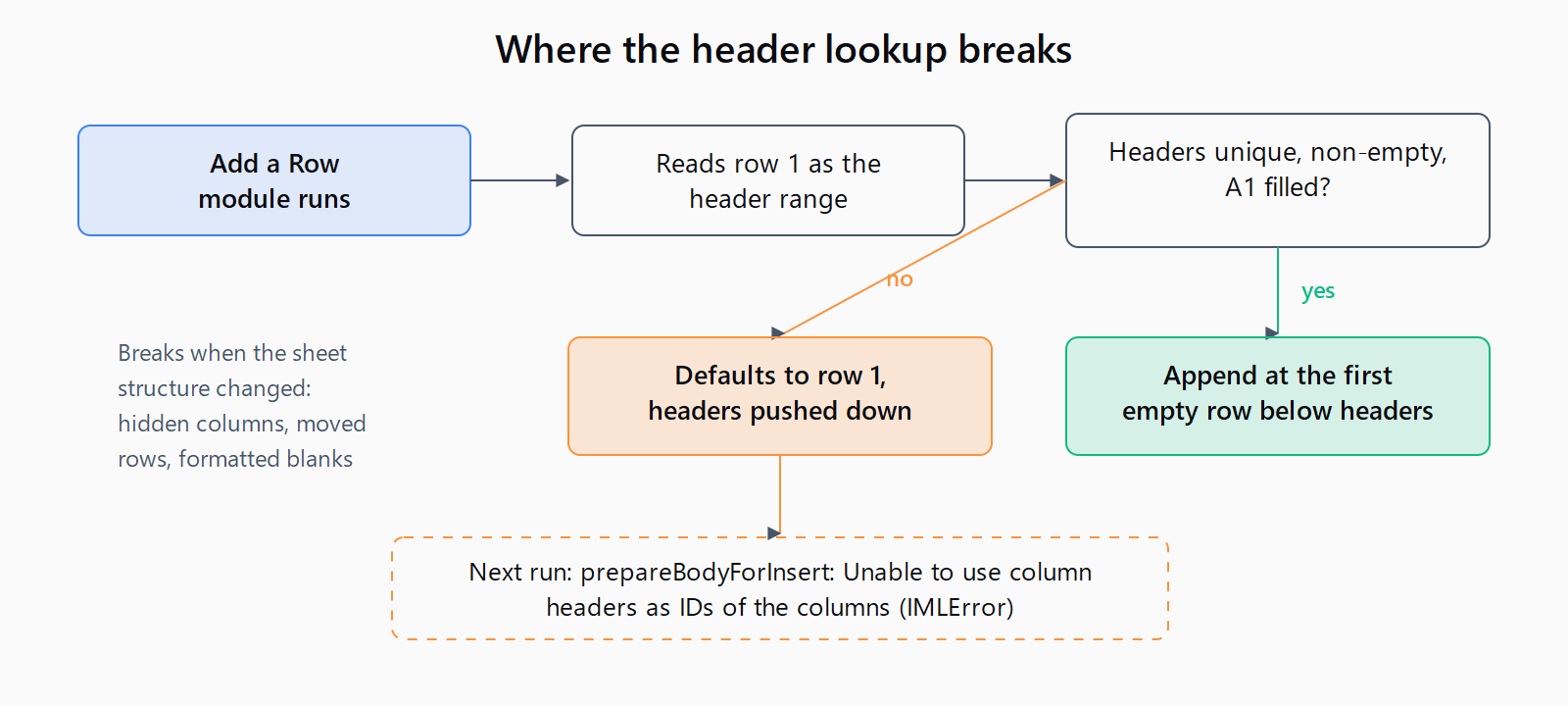
This failure has a signature: the scenario runs clean for days, then one morning a record lands in row 1 and shoves every header down to row 2. The next run fails outright with prepareBodyForInsert: Unable to use column headers as IDs of the columns. Please review your headers. Each column must have a unique, non-empty header before enabling Use column headers as IDs., an IMLError. Most write-ups treat this as a settings mistake. It is a stale header lookup, and this Make failure is one entry in the Automation Error Index that gets fixed by repairing the sheet structure rather than by re-arranging module dropdowns.
Why does Make's Google Sheets "Add a Row" insert above the headers?
Make's documentation describes Add a Row as a module that adds "a new row at the bottom of the table" (Google Sheets module docs). An insert at row 1 means the module never found the table in the first place.
The mechanism: with Table contains headers set to Yes and Use column headers as IDs set to Yes, the module re-reads row 1 on every run to map column names onto values. When that lookup returns nothing usable - hidden columns, moved or deleted rows, empty rows carrying formatting - the module cannot tell where the table starts. Make staff confirmed the exact default in an August 2026 community thread: "it failed to get the headers properly, so it didn't know where to add the new row and defaulted to 1." The run history in that thread shows the module recognizing A1:Z1 as the header range on day one and writing to A2:Z2. The next day, after the user hid a few columns she found annoying, the identical module targeted A1:Z1 as an insert row.
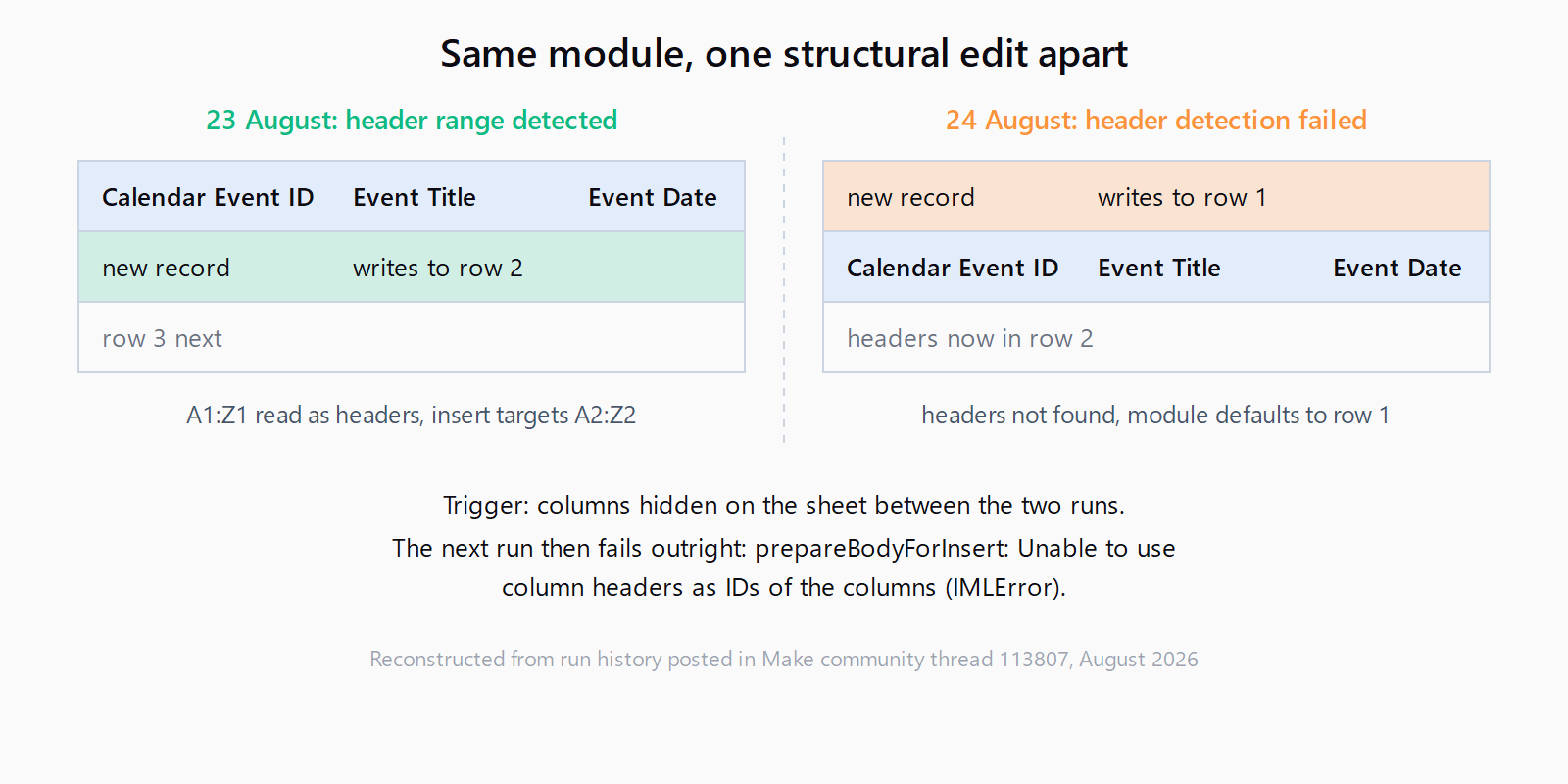
Cell A1 anchors the detection. If A1 ends up empty, or row 1 stops reading as a header row, Make treats the sheet as headerless and inserts at the top.
How do you fix the row placement?
- Restore row 1. Unhide any hidden columns, put the headers back in row 1, keep every header unique and non-empty, and leave nothing above them. Copying the header row from a version of the sheet that last worked is what actually resolved the forum thread.
- Re-select the worksheet in the module. Open the
Google Sheets > Add a Rowmodule, re-pick the Spreadsheet ID and Sheet Name, and leave the table range blank so Make auto-detects row 1 as the header row. Reselecting forces Make to refresh its cached column structure. - Test against a copy. Duplicate the sheet, point a test run at the copy, and read the row number in the module output before touching production data.
- Decide whether to disable the header lookup. Setting Use column headers as IDs to
Nostops Make from re-reading row 1, so this failure mode cannot recur. The tradeoff: mapping becomes positional, so reordering columns later silently sends values to the wrong fields. Make staff recommend it only when the sheet structure will not change.
How do you stop it from happening again?
Give the scenario a dedicated staging tab that nobody edits by hand. Keep row 1 frozen (View > Freeze > 1 row), keep headers unique and non-empty, avoid merged cells, and delete empty rows that carry formatting or borders, because Google Sheets can treat formatted blanks as populated rows and corrupt the table Make sees. After any structural change, re-select the worksheet and refresh the module fields before the next scheduled run.
How do you verify the fix worked?
Run the scenario once and open the module's output bubble. The output should place the new record in the first empty row below the headers: if the headers occupy row 1 and three records exist, the new row number is 5, not 1. Then check the sheet itself - headers still in row 1, new data below them.
What if the row still lands in the wrong place?
Check Insert data option next: Insert rows creates a new row, while Overwrite replaces cells in the range. Neither inserts above row 1, so a persistent row-1 insert still points at header detection. Watch the downstream failures too: runs that fail after a bad insert pair with the Retry error handler behavior, long recovery attempts can hit the allotted timeout error, and write-heavy scenarios run into Google Sheets quota errors on the n8n side. Each has its own fix, and none of them cause the row-1 insert itself.
How do you fix it in one pass?
- Unhide columns and restore unique, non-empty headers in row 1 with A1 filled.
- Re-select the Spreadsheet ID and Sheet Name in the module, leaving the table range blank.
- Test against a copy of the sheet and check the row number in the module output.
- If the sheet never changes structure, set Use column headers as IDs to No.
FAQ
Why does the next run fail with "Unable to use column headers as IDs of the columns"?
The bad insert moved the headers off row 1, so on the following run the header lookup failed and Make raised the IMLError. Restore the headers to row 1 and refresh the module; it is the same root cause surfacing one step later.
Should "Use column headers as IDs of the columns" be Yes or No?
Yes when the sheet is stable or collaborators may rename columns, because name-based mapping survives column moves. No when the sheet gets edited by hand, because the module then skips the header lookup entirely - at the cost of positional mapping that silently misroutes values if columns are reordered.
Why does my module show headers as letters (A, B, C) instead of column names?
The module retrieved row 1 as data because Table contains headers is set to No, or because the header lookup failed. Set it to Yes and re-select the worksheet.
Does hiding columns in Google Sheets break Make scenarios?
It can. In the August 2026 thread, hiding columns immediately preceded the row-1 insert, and restoring the original header row was what fixed it. Treat hidden columns as a structural change and re-test against a copy of the sheet.
How do I make Add a Row detect newly generated headers?
Re-select the worksheet and refresh the module fields; Make rebuilds the column list from row 1 at that point. If new columns appear while Use column headers as IDs is No, positional mapping ignores them until you re-map.