
Cloudflare AI bot policies can block ChatGPT and Perplexity citations
Cloudflare's Search and Agent presets catch OAI-SearchBot, PerplexityBot, and Perplexity-User. The fix, plus the September 15, 2026 defaults deadline, in one pass.
TL;DR: Cloudflare's Search and Agent presets can block OAI-SearchBot, PerplexityBot, and Perplexity-User; set Search and Agent to Allow under Configure AI bot policies, whitelist Perplexity in the WAF, and save before September 15, 2026.
Sites behind Cloudflare can vanish from ChatGPT search answers and Perplexity citations with no signal in Search Console, because Googlebot is not on the block list and rankings hold steady. The decision runs through one panel: Security Settings > Configure AI bot policies. Most guides describe the toggle, not the classification logic under it, so owners unblock the wrong preset or miss the deadline.
Why do Cloudflare's AI bot policies hide your site from ChatGPT and Perplexity?
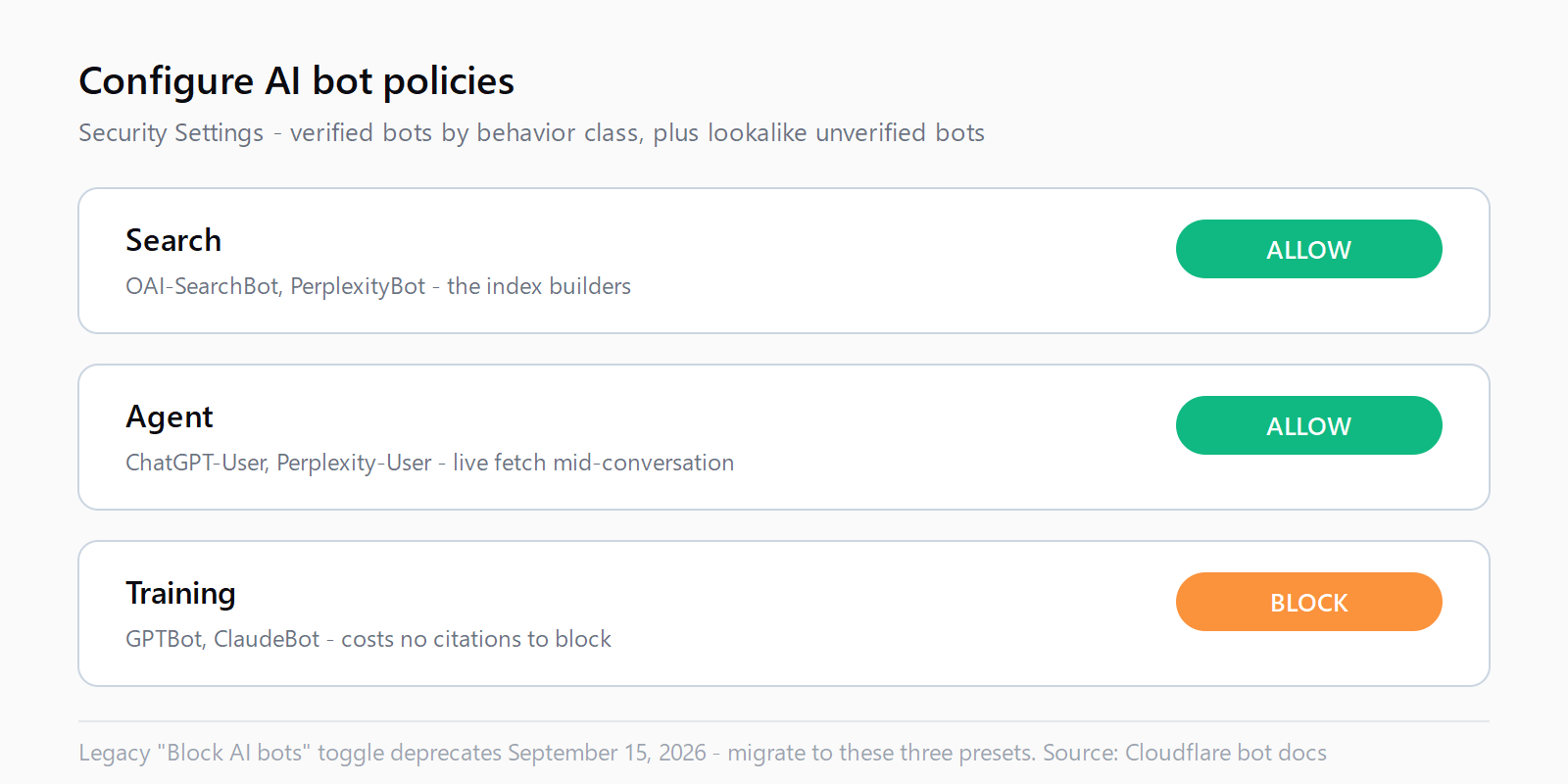
Cloudflare groups AI crawlers into three behavior presets in its AI bot policies documentation: Search ("crawlers that collect or index your content to answer questions about it later"), Agent (real-time work "on a person's behalf, such as chat fetch bots"), and Training (crawlers that train or fine-tune a model). Each preset blocks "Verified bots classified with that behavior, plus additional unverified bots that fall under these classifications."
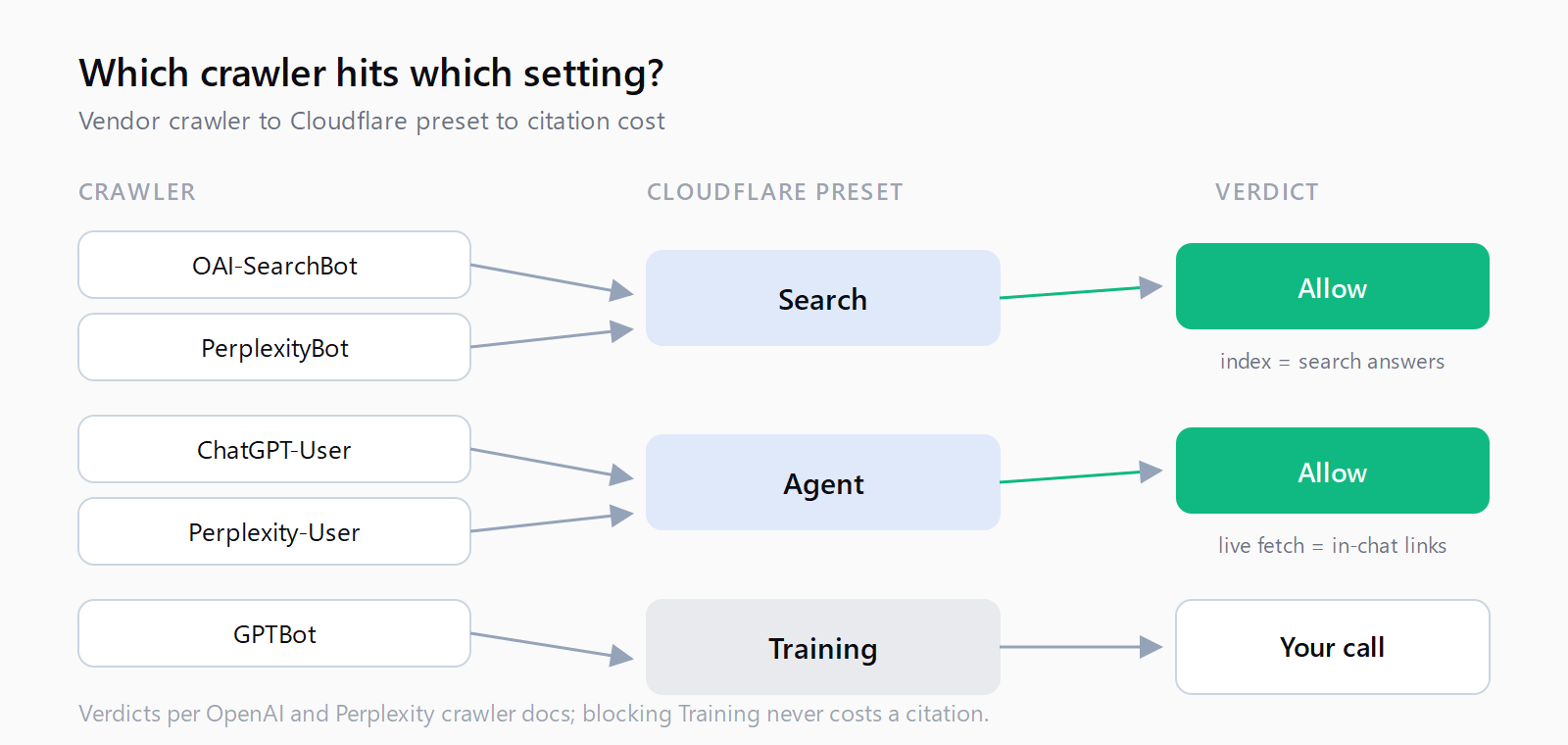
The Search preset decides citation eligibility. OAI-SearchBot builds the index behind ChatGPT search, and OpenAI states that sites opted out of it "will not be shown in ChatGPT search answers." PerplexityBot "surfaces and links websites in search results on Perplexity" and, per Perplexity's crawler documentation, trains no foundation models. A Search block removes a site from both engines while looking like a scraper defense.
| Cloudflare preset | Crawlers it classifies | What blocking it costs you |
|---|---|---|
| Search | OAI-SearchBot, PerplexityBot (index builders) | ChatGPT search answers and Perplexity results |
| Agent | ChatGPT-User, Perplexity-User (live fetch during a conversation) | In-chat quotes and links the moment a user asks |
| Training | GPTBot, ClaudeBot, and mixed-purpose crawlers | Nothing visible in AI answers |
The Agent preset matters just as much. When a user asks something that needs a live page, the assistant dispatches its fetcher to read it now, and Perplexity warns that "since a user requested the fetch, this fetcher generally ignores robots.txt rules." Block that category and the assistant cites whichever competitor it can reach - one of seven reasons a site stops getting cited, and the only one invisible to Google's tools.
How to set Search and Agent to Allow in the dashboard?
- Open the panel. Select the domain in the Cloudflare dashboard, then go to Security Settings > Configure AI bot policies.
- Set Search to Allow (do not block). Each preset offers Block (on all pages), Block on pages with ads (automated detection of ad-displaying pages), and Allow (do not block). The first two cut off OAI-SearchBot and PerplexityBot.
- Set Agent to Allow. Chat fetch bots turn an indexed page into an in-chat citation with a link.
- Set Training per your policy. Blocking Training costs nothing visible in AI answers; OpenAI decouples GPTBot crawling from search placement.
- Save. An explicit saved preference is what overrides the September 15 defaults.
robots.txt cannot do this job: Cloudflare enforces at the edge before robots.txt is consulted, which is why 13 signals AI assistants score before citing treats crawler reachability as signal zero.
How to whitelist PerplexityBot and Perplexity-User in a WAF rule?
Perplexity asks sites running a WAF to "explicitly whitelist Perplexity's bots," and its Cloudflare recipe pairs two conditions so a spoofed user-agent alone cannot pass:
- Create the rule. Go to Security > WAF > Custom rules and create a rule with the action Allow.
- Match the user-agents. Add a User Agent / contains condition for
PerplexityBot, then an OR branch forPerplexity-User. - Match the published IP ranges. AND a condition on IP Source Address / is in, pasting the ranges from perplexitybot.json and perplexity-user.json.
- Order it above blocking rules. The Allow must fire before any challenge or block rule, and Perplexity refreshes the ranges regularly.
The IP half is not optional: Cloudflare also catches unverified bots that behave like a classified group, so a claimed user-agent is not proof of identity. OpenAI publishes its own IP lists in OpenAI's crawler documentation.
How to opt out of the September 15, 2026 defaults?
On September 15, 2026, Cloudflare applies new defaults for new domains: bots classified as Training or as Agent will be blocked on pages that display ads, and Search will remain allowed. Two clauses matter here. Mixed-purpose crawlers that combine Search and Training "will also be blocked by all configurations to block AI training, including the legacy 'Block AI bots' option." And that legacy toggle is deprecating the same day, so zones still relying on it must move to the granular panel anyway. The opt-out is open to all customers before the deadline through the same Security Settings area, and zones that save an explicit preference keep it. Set the three presets deliberately and save; after September 15 the ambiguity is resolved by a default instead of by you.
How do you verify AI bots can reach the site again?
Check what reaches the origin, not what the settings screen claims. In Security > Events, filter by user-agent for OAI-SearchBot, PerplexityBot, Perplexity-User, and ChatGPT-User: 200 responses mean the crawlers are through; 403s or managed challenges mean a rule is still eating them. Then fetch one page with each crawler's user-agent and expect a 200, allowing a day for propagation, since both vendors adjust within about 24 hours. Access is signal zero; content-side work has its own checklist for how to get cited by ChatGPT, Perplexity, and Claude in 2026.
How do you keep citations through September 15 in ten minutes?
- Open Security Settings > Configure AI bot policies for each Cloudflare zone.
- Set the Search preset to Allow (do not block).
- Set the Agent preset to Allow.
- Set Training to Block only if that is the content policy; it costs no citations.
- Add a WAF rule allowing PerplexityBot and Perplexity-User by user-agent plus published IP ranges.
- Check Security Events for 200 responses from OAI-SearchBot, PerplexityBot, Perplexity-User, and ChatGPT-User.
- Save the explicit preference before September 15, 2026.
FAQ
Does the legacy "Block AI bots" toggle block ChatGPT search?
It blocks verified training bots plus similar unverified ones, and it excludes mixed-purpose crawlers. It is also deprecating on September 15, 2026, so set each preset in the granular panel instead.
What is the difference between GPTBot, OAI-SearchBot, and ChatGPT-User?
GPTBot collects content for model training. OAI-SearchBot builds the ChatGPT search index; ChatGPT-User fetches pages live during a conversation. Blocking GPTBot does not remove a site from ChatGPT search answers; blocking OAI-SearchBot does.
Does PerplexityBot respect robots.txt?
PerplexityBot does; allowing it in robots.txt plus the published IP ranges is Perplexity's recommendation. Perplexity-User generally ignores robots.txt because a user requested the fetch, so the WAF rule is the control that works.
Will Cloudflare's AI bot policies hurt Google rankings?
No. Googlebot is separate and outside these presets, which is why the block goes unnoticed: rankings hold steady while AI-answer traffic disappears, with no Search Console report tracking the loss.
Does fixing robots.txt restore citations after a Cloudflare block?
Not by itself. Cloudflare blocks at the edge before robots.txt is consulted, so the dashboard change is the one that restores fetching. For other errors of this shape, the Automation Error Index catalogs them per platform.