
Fix the n8n Google Ads node 400 "invalid argument" error
Google retired Ads API v21 and n8n's node kept calling it. The exact 400 payload, the v25 field gotcha, and both fix paths in one guide.
TL;DR: n8n's Google Ads node returns 400 "Request contains an invalid argument" because it still calls the retired Ads API v21; update n8n to 2.34.6 or later, or rebuild the call on an HTTP Request node against v25.
Self-hosted and cloud users with Google Ads reporting workflows started hitting this 400 in mid-August 2026, when Google began blocking requests to Ads API v21. The error text sounds like a malformed query, so the reflex is to edit report parameters. The cause is the API version the node calls, which means the fix is a version change, not a parameter change.
Why does the n8n Google Ads node return 400 "Request contains an invalid argument"?
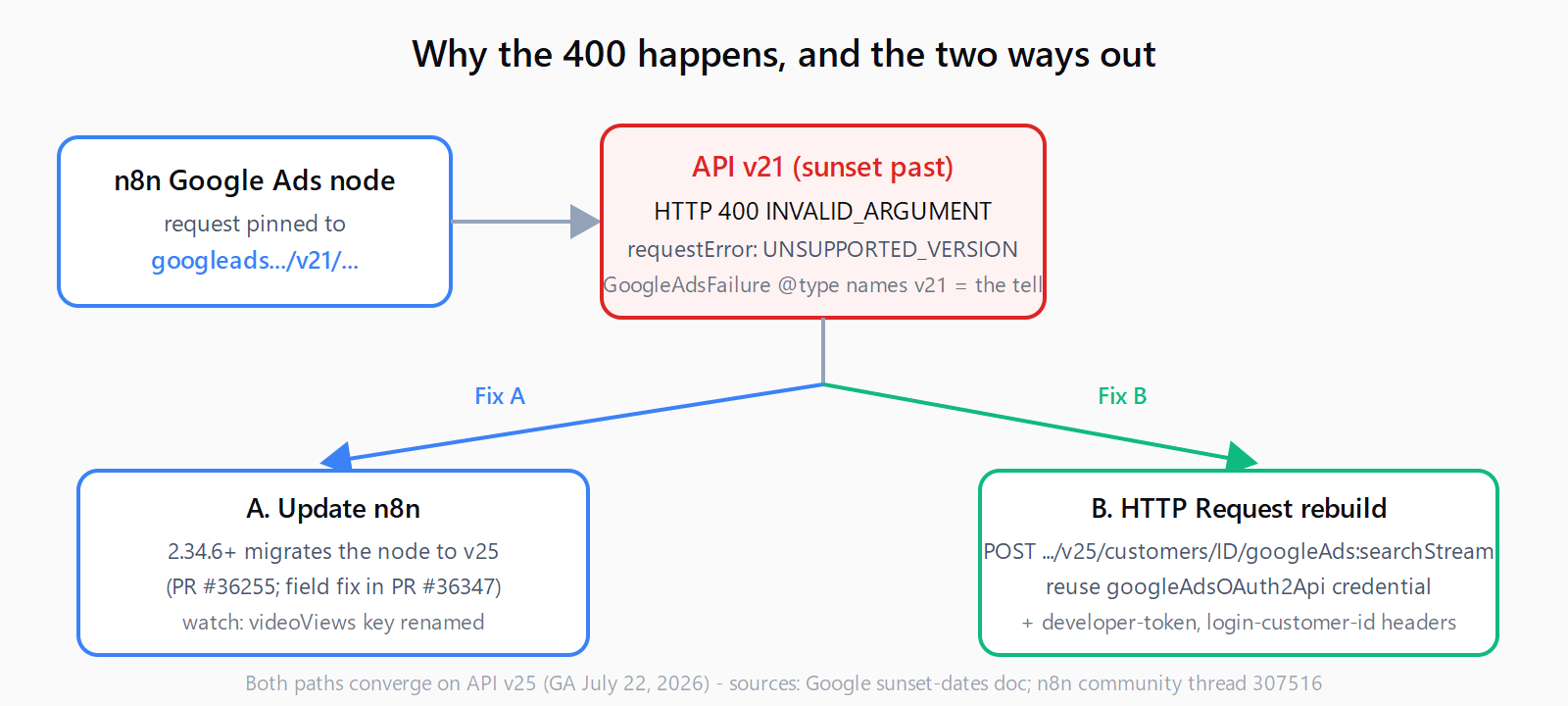
The node's built-in requests are pinned to the v21 path of googleads.googleapis.com. Google's Deprecation and sunset table lists v21 past its sunset date, so the API now answers those calls with a GoogleAdsFailure object that n8n surfaces as a 400. A report posted to the n8n community thread on August 13, 2026 shows the exact payload:
{
  "error": {
    "code": 400,
    "message": "Request contains an invalid argument.",
    "status": "INVALID_ARGUMENT",
    "details": [{
      "@type": "type.googleapis.com/google.ads.googleads.v21.errors.GoogleAdsFailure",
      "errors": [{
        "errorCode": { "requestError": "UNSUPPORTED_VERSION" },
        "message": "Version v21 is deprecated. Requests to this version will be blocked."
      }]
    }]
  }
}
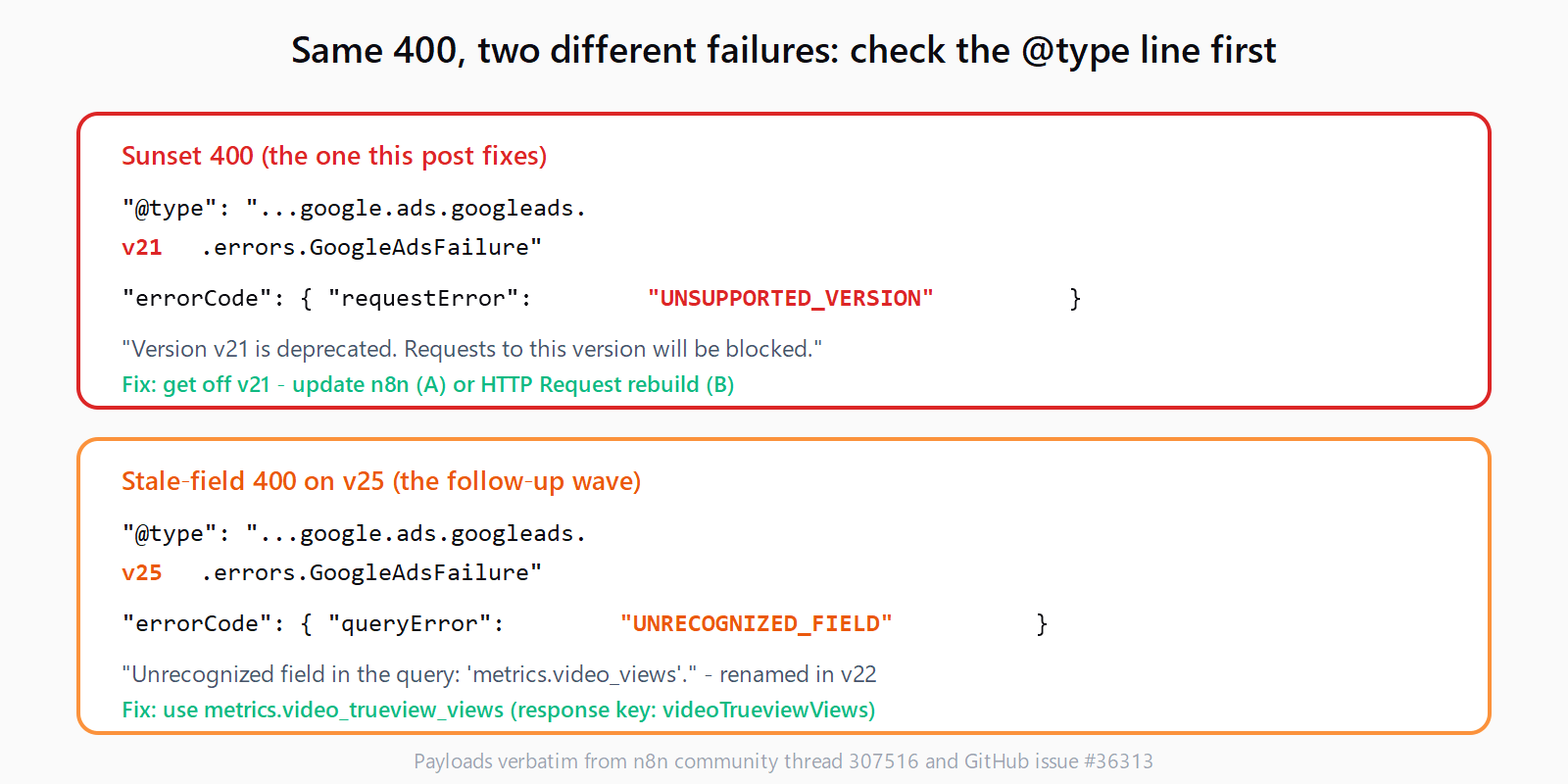
Two details in that payload identify the sunset as the cause. The @type field names the version the request reached - google.ads.googleads.v21.errors.GoogleAdsFailure - and the error code is requestError: UNSUPPORTED_VERSION, with the message "Version v21 is deprecated. Requests to this version will be blocked." A 400 whose @type names a different version is a different problem. The node has no version override setting, so there is no in-node switch to flip.
This is the same failure shape that broke n8n's Gemini nodes after Google's Gemini Interactions API migration: a vendor API move invalidates a native node, and no node-side setting repairs it.
How to fix the 400 by updating n8n?
n8n migrated the Google Ads node from v21 to v25 in release 2.34.6, under internal ticket NODE-5754, with the change contributed upstream as PR #36255. On 2.34.6 or later the UNSUPPORTED_VERSION error stops, because the node now targets v25, which Google released on July 22, 2026.
The migration initially shipped with one stale field. The node's campaign queries still selected metrics.video_views, which v22 had removed and renamed to metrics.video_trueview_views. That produced a second wave of the same 400 - this time with google.ads.googleads.v25 in the @type and queryError: UNRECOGNIZED_FIELD ("Unrecognized field in the query: metrics.video_views"), reported in GitHub issue #36313. The repair, PR #36347, was merged on August 14, 2026 and backported to the 2.34.x and 2.35.x release lines. Take the newest patch release rather than exactly 2.34.6, so both fixes arrive in one update.
One visible side effect of that fix: the response key videoViews becomes videoTrueviewViews. Any Set, Code, or mapping node downstream that reads videoViews needs the new key.
How to rebuild the call on an HTTP Request node?
Updating is not always an option: some teams pin self-hosted installs, some stage rollouts, and some want direct control over which API version their reports hit. The rebuild covers all three. It replaces the native node with an HTTP Request node that calls v25 explicitly and reuses your existing Google Ads OAuth2 credentials, so there is nothing to re-authorize. The predefined-credential pattern carries over, though credential reuse has other failure modes worth knowing about.
- Add the node. Insert an HTTP Request node where the Google Ads node was, and set Method to POST.
- Point it at v25. Set the URL to
https://googleads.googleapis.com/v25/customers/CUSTOMER_ID/googleAds:searchStream, replacingCUSTOMER_IDwith your Google Ads customer ID in digits-only form. - Reuse the credential. Set Authentication to Predefined Credential Type and pick Google Ads OAuth2 (
googleAdsOAuth2Api). Your existing credential works unchanged. - Add the two required headers. Set
developer-tokento your API token from the Google Ads UI, andlogin-customer-idto your manager account ID (digits only) if you reach the account through an MCC. - Send a GAQL query. Set the body to JSON with a
queryfield holding GAQL:
{
  "method": "POST",
  "url": "https://googleads.googleapis.com/v25/customers/CUSTOMER_ID/googleAds:searchStream",
  "authentication": "predefinedCredentialType",
  "nodeCredentialType": "googleAdsOAuth2Api",
  "sendHeaders": true,
  "headerParameters": {
    "parameters": [
      { "name": "developer-token", "value": "YOUR_DEVELOPER_TOKEN" },
      { "name": "login-customer-id", "value": "YOUR_MANAGER_ID_DIGITS_ONLY" }
    ]
  },
  "sendBody": true,
  "contentType": "json",
  "specifyBody": "json",
  "jsonBody": "{ \"query\": \"SELECT campaign.id, campaign.name, metrics.impressions, metrics.clicks, metrics.cost_micros FROM campaign WHERE segments.date DURING LAST_7_DAYS\" }"
}
How to verify the fix worked?
Run the workflow. A healthy call returns 200 with campaign rows; searchStream responses come back as newline-delimited JSON. If a 400 remains, read its @type line first: v21 means the request is still running the old node code, while v25 with UNRECOGNIZED_FIELD means a stale GAQL field name. The version named in the payload is always the fastest diagnostic.
What if the 400 error still appears after updating n8n?
- If the
@typestill saysv21, the running instance never picked up the update - on self-hosted, confirm the container image was pulled and the stack restarted; n8n cloud updates on its own schedule. - If it says
v25withUNRECOGNIZED_FIELD, a field name in your query is stale -video_viewstovideo_trueview_viewsis the known rename. - If you access a client account through a manager account, the API needs
login-customer-idset to the manager's ID, or it answersINVALID_ARGUMENTregardless of query correctness.
More n8n failure modes, including this one, live in the Automation Error Index.
Can you fix the error in under ten minutes?
- Open the failed execution and copy the
@typeline from the error payload. - If it names v21, update n8n to the newest patch release and re-run the workflow.
- If updating is not an option, add an HTTP Request node and point it at the v25
searchStreamendpoint. - Attach the existing Google Ads OAuth2 credential and add the
developer-tokenandlogin-customer-idheaders. - Re-run the workflow and confirm the request returns 200 with campaign rows.
FAQ
Which Google Ads API versions are sunsetting next?
v22 is next: Google's sunset table lists it for October 2026 (tentative), followed by v23 in February 2027, v24 in May 2027, and v25 in August 2027. A sunset can land any time in the listed month, and the dates can change.
Can I reuse my existing Google Ads OAuth2 credential on the HTTP Request node?
Yes. Set Authentication to Predefined Credential Type and select Google Ads OAuth2; the HTTP Request node then signs requests with the credential you already configured, so no new OAuth flow is needed.
Why do I have to add the developer-token and login-customer-id headers myself?
The native Google Ads node injected both automatically. On a raw HTTP Request node you set them explicitly: developer-token authenticates your developer account, and login-customer-id names the manager account making the call.
What is the current Google Ads API version?
v25, released July 22, 2026. The n8n node targets v25 as of release 2.34.6, and new client library installations default to it.
Does updating n8n fix the Google Ads node completely?
For campaign reporting, yes, once the install includes the August 14, 2026 field fix. The one visible change is the response key rename from videoViews to videoTrueviewViews, which downstream mappings must pick up.