
What Is Google-CloudVertexBot? The Vertex AI Crawler and robots.txt
Google Cloud's Vertex AI Search crawler, explained: what it fetches, why it hit your logs, and how to write the robots.txt rule.
TL;DR: Google-CloudVertexBot is Google Cloud's crawler for Vertex AI Search: it fetches your site only when you ground an AI agent on it, so allow it in robots.txt if you build agents on your content and block it otherwise.
The bot shows up in server logs with a mobile Chrome user-agent string, and it is easy to misread. Some log parsers lump it with Googlebot; some blocklists flag it as an unknown AI crawler. Neither framing is right: Google added it to the official list of Google's common crawlers in August 2024, and it obeys robots.txt like Googlebot does. What makes it different is who requests the crawl: your organization, not Google Search.
What is Google-CloudVertexBot and why is it hitting my site?
Google-CloudVertexBot is the user-agent token for crawls that Vertex AI Search performs when an organization creates a website data store. Vertex AI Search is being renamed Agent Search, and its grounding feature is what lets a custom AI agent answer questions using pages from a specific website. When you point a data store at your domain, Google's crawler fetches those pages, indexes them, and keeps them fresh for the agent to quote.
The Search Central changelog introduced it this way: "Added Google-CloudVertexBot to the list of Google crawlers, a new crawler that crawls sites on the site owners' request when building Vertex AI Agents," with the stated reason "to help site owners identify the new crawler traffic." The "site owners' request" part is the operative phrase. Google Search does not send this bot because your rankings changed or your content got popular. It arrives because someone with access to a Google Cloud project aimed Vertex AI Search at your domain. Usually that someone is you; sometimes it is a vendor or agency you hired.
That also explains the user-agent string it sends:
Mozilla/5.0 (Linux; Android 6.0.1; Nexus 5X Build/MMB29P) AppleWebKit/537.36 (KHTML, like Gecko) Chrome/144.0.7559.132 Mobile Safari/537.36 (compatible; Google-CloudVertexBot; +https://cloud.google.com/enterprise-search)The string looks like a mobile Chrome browser because Google's crawlers render JavaScript, and this one is no exception. The token after compatible; is the part to match in logs. Google's documentation notes that user-agent strings can be spoofed, so if a hit matters for a block decision or an abuse report, verify the source IP with reverse DNS against Google's published crawler ranges rather than trusting the string alone.
How should robots.txt treat Google-CloudVertexBot?
Treat it as a common crawler, because that is how Google classifies it. Common crawlers "always obey robots.txt rules when crawling automatically," so a disallow rule works, no WAF gymnastics required. The decision reduces to one question: do you plan to ground a Vertex AI agent on this site's content?
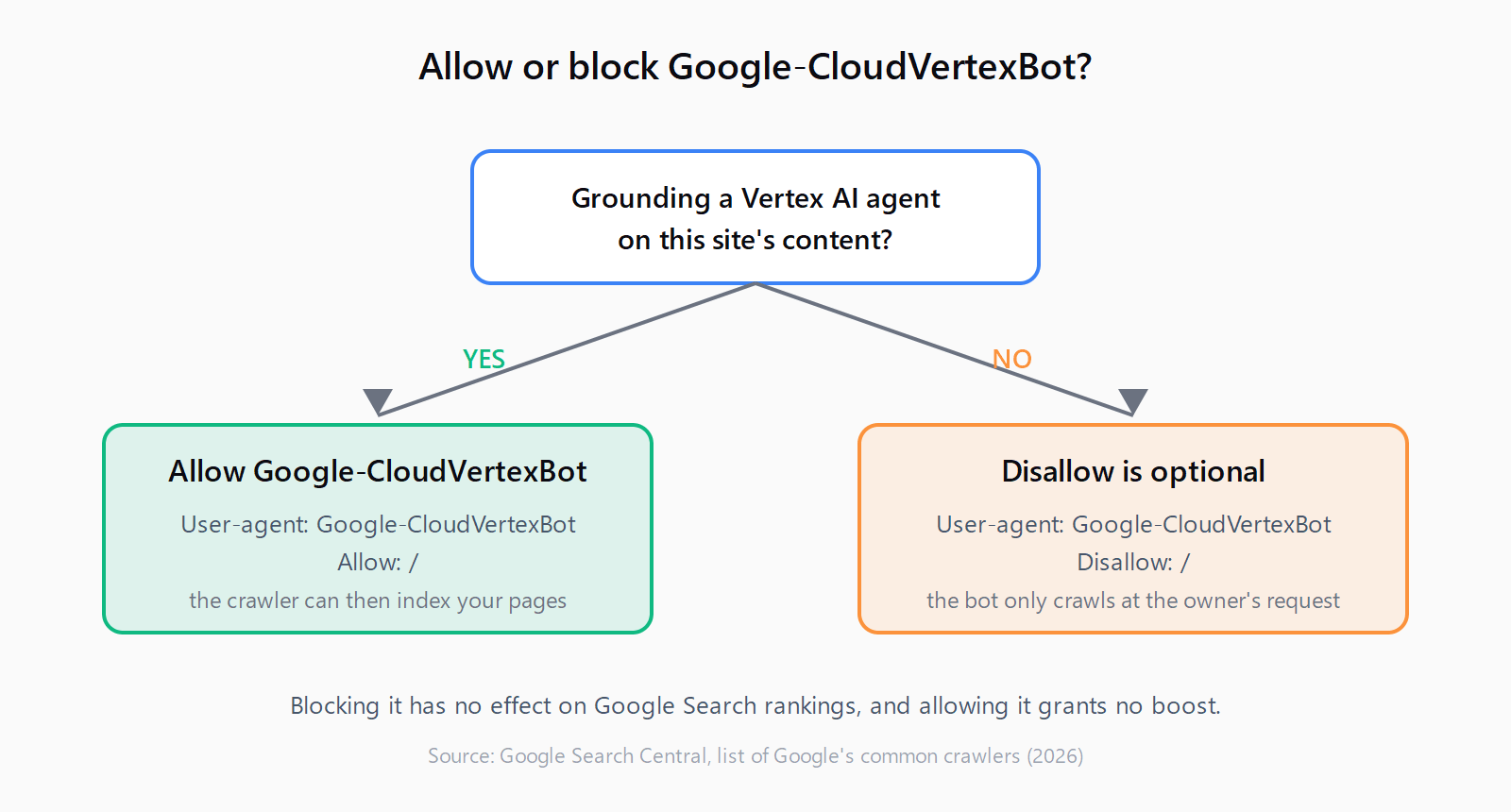
If yes, allow it explicitly:
User-agent: Google-CloudVertexBot
Allow: /

User-agent: Googlebot
Allow: /
If no, disallow it and move on:
User-agent: Google-CloudVertexBot
Disallow: /
One token subtlety: rules written for Googlebot also apply to Google-CloudVertexBot, because every common crawler matches its own token and the general Googlebot token. A blanket User-agent: Googlebot with Disallow: / blocks this crawler too, even with an explicit allow rule for Google-CloudVertexBot elsewhere in the file. If your robots.txt already restricts Googlebot, carve out the directories your agent needs to index before wiring up any data store.
Google states plainly what this crawler does not touch: crawling preferences for Google-CloudVertexBot "affect crawls requested by the site owners' for building Vertex AI Agents. It has no effect on Google Search or other products." Blocking it will not dent your rankings, and allowing it will not boost them.
What breaks agent grounding if you get this wrong?
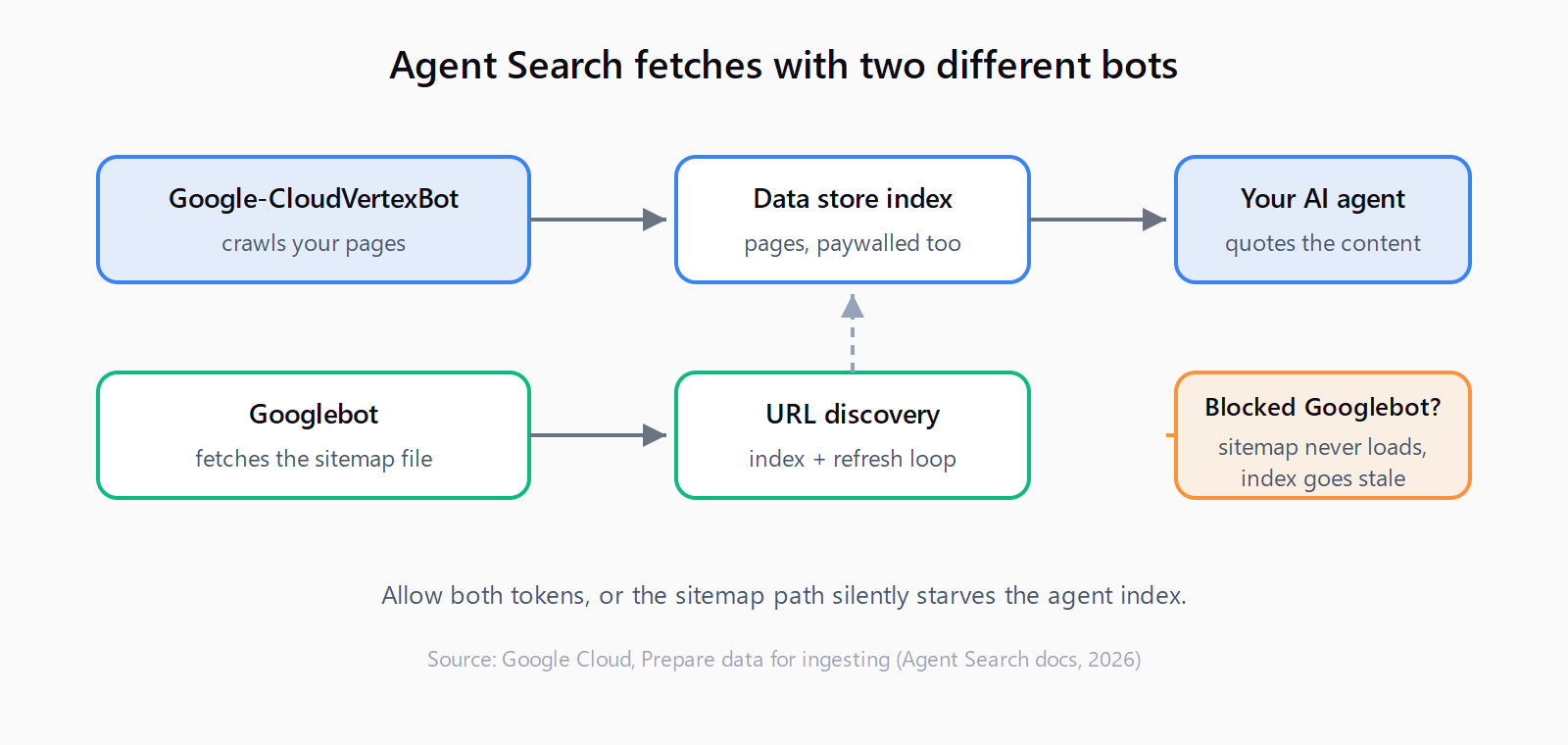
The Agent Search documentation lists the failure modes, and the sneaky one involves sitemaps. Agent Search crawls and indexes your pages with Google-CloudVertexBot, but it fetches the sitemap file itself using Googlebot. Permit Google-CloudVertexBot while blocking Googlebot and your pages still get crawled. The catch: the sitemap cannot be fetched, so its URLs never enter the index and never refresh through it.
Three other settings matter as much as robots.txt:
- CDN and firewall rules run in front of robots.txt. A WAF challenge or bot-fight mode that returns a 403 to unfamiliar user agents will starve the crawler even with a permissive robots.txt.
- The crawler needs access to paywalled or members-only content that the data store is supposed to index, so test those URLs specifically rather than assuming the public pages prove access.
- Advanced website indexing requires domain verification inside Google Cloud, which is a separate step from anything in robots.txt.
Getting access right is the same discipline that governs every other retrieval bot: the seven real blockers behind AI-search invisibility cluster into exactly these access and configuration failures. The difference here is intent: Google-CloudVertexBot serves your own agent project, not a third-party answer engine.
How does Google-CloudVertexBot differ from Google-Extended?
The two tokens get confused constantly because both sound like "Google's AI bot," and they control opposite things.
| Token | Controls | Effect when blocked |
|---|---|---|
Google-Extended | Whether crawled content may train future Gemini models and ground Gemini apps | No effect on Search rankings; removes future training use |
Google-CloudVertexBot | Vertex AI Search crawling your site for your own agent data store | Your agent loses its content source; Search unaffected |
Google-Extended is a control token rather than a crawler with its own user-agent string. It rides along on existing Google user agents and governs downstream use of already-crawled content. Google-CloudVertexBot is a real crawler that makes real requests from real IP ranges. Blocking Google-Extended tells Google "don't train on my content"; blocking Google-CloudVertexBot tells your own agent project "you can't read my site." Many site owners who block one actually wanted the other.
For the broader picture of which bots matter for AI answers, and why crawl access is only one of 13 signals AI assistants weigh when citing, token-level access control is necessary but nowhere near sufficient. A crawler that cannot fetch your URL ends the story before it starts, but a fetched page still has to earn the citation.
How do you verify Google-CloudVertexBot access works?
Check three things in order. First, grep last month's access logs for Google-CloudVertexBot. Its presence confirms a data store points at your domain; its absence means robots.txt decisions are theoretical for now. Second, resolve the source IP through reverse DNS and confirm the hostname matches Google's .googlebot.com crawl ranges, which filters out spoofed strings pretending to be the bot. Third, if you operate a data store, watch the indexed document counts in the Google Cloud console after a content refresh. A flat count under permissive robots.txt usually means a CDN or firewall rule is blocking the fetch.
That diagnostic sequence (logs, then IP verification, then edge rules) is the same one you would use to debug why a site never shows up in AI Overviews, where a Googlebot block or a nosnippet directive produces the same silent-absence symptom. Access failures rarely announce themselves; they just leave your content out of whatever index was supposed to read it.
FAQ
Does blocking Google-CloudVertexBot affect Google Search rankings?
No. Google's crawler documentation states that crawling preferences for this user agent have "no effect on Google Search or other products." It exists solely for owner-requested Vertex AI Search crawls.
Does Google-CloudVertexBot respect robots.txt?
Yes. It is classified as a common crawler, and Google's documentation says common crawlers always obey robots.txt rules when crawling automatically. A Disallow rule for the token is honored.
What is the difference between Google-CloudVertexBot and Google-Extended?
Google-Extended is an opt-out token governing whether your content trains future Gemini models. Google-CloudVertexBot is an actual crawler that fetches your site when your organization grounds a Vertex AI agent on it. They answer different questions: one about training, one about agent grounding.
Why is Google-CloudVertexBot crawling my site if I never set up Vertex AI?
The crawl happens at a site owner's request, so the request likely came from somewhere in your organization: a data team, an agency, or a SaaS vendor that builds on Vertex AI Search. Ask internally before blocking. If the string in your logs does not match Google's published IP ranges, treat it as a spoofed crawler instead.
What user-agent string does Google-CloudVertexBot send?
A mobile Chrome string ending in (compatible; Google-CloudVertexBot; +https://cloud.google.com/enterprise-search). Match on the token, and verify suspicious hits with reverse DNS because user-agent strings can be forged.