
UiPath vs Power Automate for small business: cost, features, and when to pick each
Power Automate starts at $15/user/month — or $0 on M365. UiPath unattended bots cost $420+/month. Here's when each one makes sense for a small business.
TL;DR: For most SMBs, Power Automate wins on cost - starting at $15/user/month versus UiPath's $420+/bot for unattended automation - and often costs $0 incremental if you already pay for Microsoft 365.
Both tools can automate most SMB workflows. The decision usually comes down to three things: whether you're in the Microsoft ecosystem, whether you need attended or unattended bots, and whether you have a developer who can work with UiPath's more complex environment. Here's where each wins and where each falls short.
How do UiPath and Power Automate compare for SMBs?
| Dimension | Power Automate | UiPath |
|---|---|---|
| Entry price (attended) | $15/user/month (cloud flows); $40/user/month (with desktop/RPA) | $25/month Basic (personal); attended robot ~$135/month |
| Unattended bots | $150/bot/month (Process plan); $215/bot/month hosted | ~$420/bot/month (enterprise); contact sales for scale |
| Free tier | Standard cloud flows included in most M365 plans | Community Edition (limited to development/testing, not production at scale) |
| Build environment | Browser-based drag-and-drop; no coding required | Desktop Studio (UiPath StudioX for no-code; Studio for developers) |
| Microsoft 365 integration | Native - Outlook, Teams, SharePoint trigger-ready out of the box | Requires connector setup; not native |
| Legacy/Citrix UI automation | Basic (desktop flows); not built for mainframes | Strong - purpose-built for Citrix, mainframe, and non-API legacy systems |
| AI features | AI Builder (pay-per-credit); Copilot in flows | Document Understanding, AI Center, built-in ML model deployment |
| Implementation cost estimate | $0-$15k (Microsoft partner) | $5k-$20k (SMB); $20k-$100k (enterprise) |
What does Power Automate cost for a small business?
Power Automate's pricing has three layers. If you already pay for Microsoft 365 Business Basic, E1, E3, or E5, cloud flows using only standard connectors (Outlook, SharePoint, Teams, OneDrive) are included at no extra cost. That covers a large portion of SMB automation needs - email triggers, SharePoint list updates, Teams notifications - without a separate invoice.
When you need premium connectors (Salesforce, Dynamics, SAP) or desktop RPA flows, the Power Automate Premium plan costs $15/user/month. For unattended bots - flows that run without a logged-in user, typically overnight batch jobs - the Process plan is $150/bot/month. The Hosted Process plan (Microsoft manages the VM) is $215/bot/month.
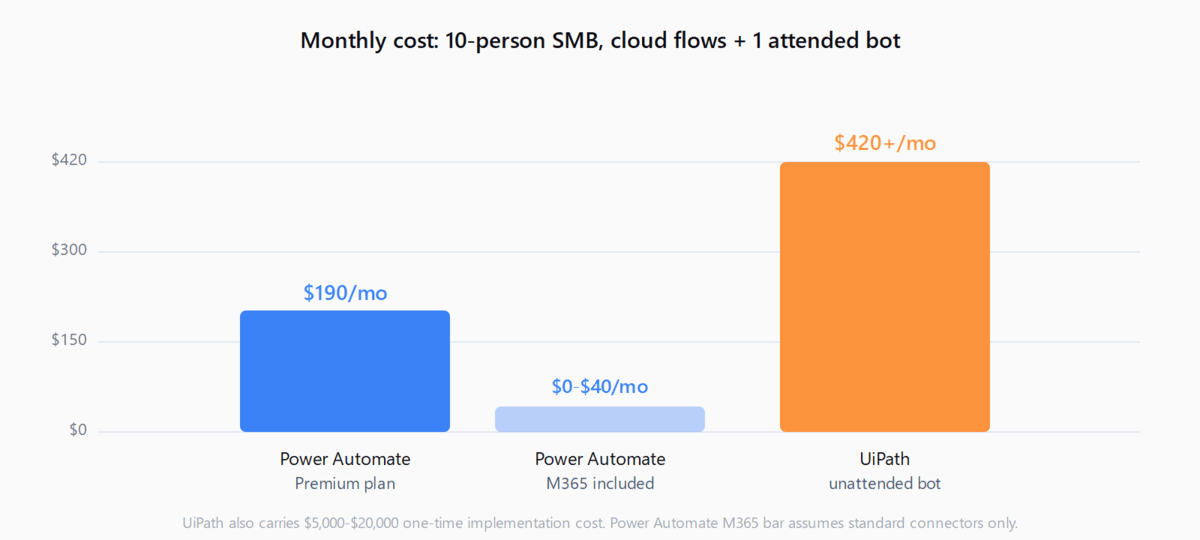
A 10-person SMB running cloud automations with one attended desktop bot would pay roughly: $150/month (10 users × $15) + $40/month (one attended RPA user) = $190/month. For context on how this compares to full agentic automation costs, the RPA cost breakdown covers the full TCO picture.
What does UiPath cost for a small business?
UiPath's published entry tier is the Basic plan at $25/month, which covers personal automations at limited scale. It's designed for proof-of-concept work, not production deployment. Moving to production means the Standard or Enterprise plan - both require contacting sales, and enterprise quotes typically land at $420+/bot/month for unattended automation.
The UiPath Community Edition is free and includes the full Studio development environment, making it a reasonable way to learn and prototype without cost. But Community Edition has bandwidth and runtime limits that make it unsuitable for running business-critical automations reliably. When you graduate to production, you're immediately in contact-sales territory.
Implementation adds cost. Integrating UiPath for an SMB realistically runs $5,000-$20,000 for a partner engagement, versus $0-$15,000 for Power Automate (and often $0 if your M365 admin handles it internally).
When should an SMB choose Power Automate?
- You're already in Microsoft 365. Flows connecting Outlook, SharePoint, Teams, and OneDrive are $0 incremental on most M365 plans. That's the clearest cost argument.
- You want citizen developers to build automations. Power Automate's browser-based builder is genuinely learnable by non-developers. UiPath StudioX is also low-code, but the UiPath environment (Orchestrator, Studio, robot service) adds complexity that requires more IT involvement to manage.
- You need to automate cloud SaaS apps. Zapier, Make, and Power Automate all operate in the connector model - if your apps have APIs and webhooks, Power Automate handles them well. For context on how Power Automate fits into this space, the Power Automate beginner's guide covers what it does well and where it falls short.
- You need compliance. Power Automate carries HIPAA, FedRAMP, ISO 27001, and SOC 2 certifications, which matter for healthcare and government SMBs.
When should an SMB choose UiPath?
- You automate legacy desktop applications. If your process lives inside a Citrix session, a mainframe terminal, or a desktop app with no API, UiPath's computer-vision-based automation is significantly more reliable than Power Automate's desktop flows.
- You plan to run 10+ unattended bots. At smaller bot counts, the per-bot cost difference is manageable. At scale, UiPath's Orchestrator adds queueing, scheduling, and monitoring that Power Automate's Process Advisor doesn't replicate.
- You have a dedicated RPA developer. UiPath's full Studio environment supports version control, exception handling, and reusable component libraries that a professional developer will use productively. For a team without a developer, the complexity is a liability.
Which is easier to learn?
Power Automate is faster to productive for a non-developer. The trigger-action builder in the browser requires no installation and produces working automations in an hour for simple flows. UiPath StudioX (their no-code variant) is comparable, but the surrounding infrastructure - installing Studio, connecting to Orchestrator, deploying a robot service - adds an initial overhead that takes a day or more to configure correctly.
For developers, UiPath Studio's .NET-based environment offers more control. It supports custom activities, exception handling frameworks, and advanced logging. Power Automate's expression language is functional but limited by comparison.
Bottom line
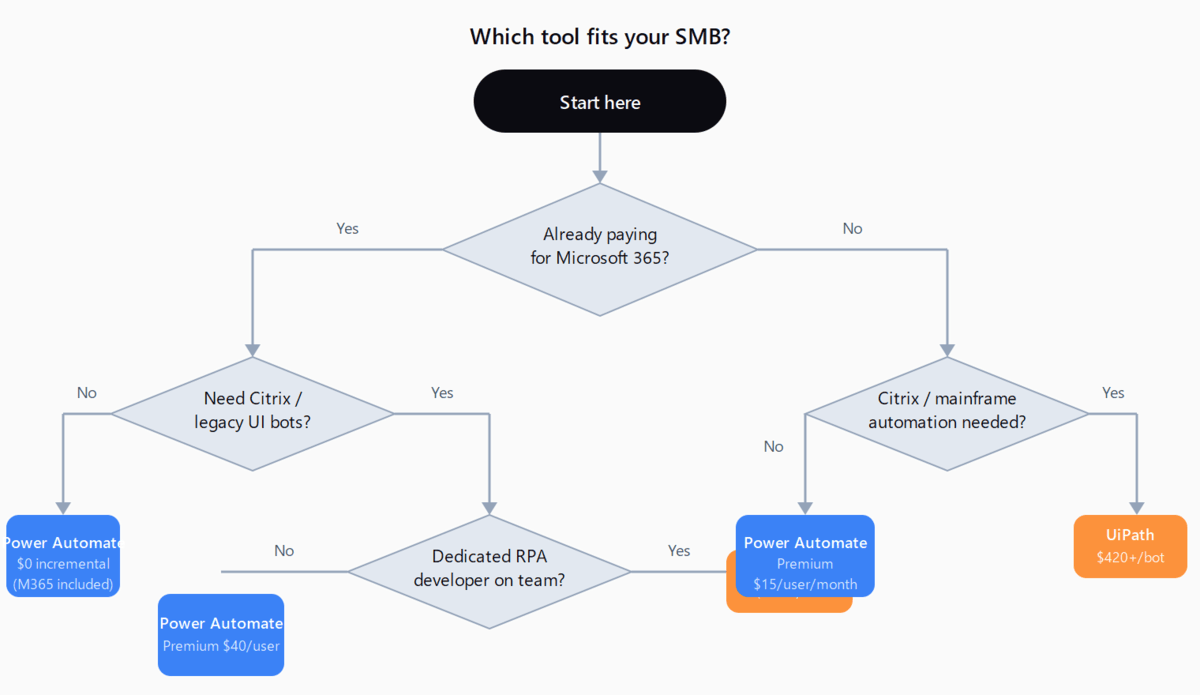
For an SMB on Microsoft 365 automating email, SharePoint, and Teams workflows: Power Automate at $0-$15/user/month. For an SMB running desktop bots against legacy systems or Citrix: UiPath, accepting the higher cost and implementation investment. The middle case - some cloud automation, one or two attended desktop bots - Power Automate Premium at $40/user/month is still the better value unless you have a dedicated RPA developer who already knows UiPath.
FAQ
Is UiPath free for small businesses?
UiPath's Community Edition is free and includes the full Studio development environment, making it genuinely useful for learning and prototyping. However, Community Edition has bandwidth and runtime limits that exclude it from reliable production use. Paid plans start at $25/month Basic (personal automations) or contact-sales Standard for business deployment.
Can Power Automate replace UiPath for RPA?
For most SMB desktop automation (automating Windows applications with APIs or UI controls), Power Automate desktop flows do the job at $40/user/month. For complex scenarios - Citrix virtual desktops, mainframe terminals, or high-volume unattended bots - UiPath's computer-vision engine and Orchestrator are more capable. Power Automate is a practical replacement for UiPath in most SMB contexts, not all enterprise ones.
Which is easier to learn - UiPath or Power Automate?
Power Automate requires no installation and produces working automations in an hour for simple triggers. UiPath StudioX is also low-code, but the surrounding infrastructure (Studio, Orchestrator, robot service) takes longer to configure. For non-developers, Power Automate's browser-based builder has a shallower initial curve.
Does Power Automate work without Microsoft 365?
Yes. Power Automate can be licensed standalone at $15/user/month (Premium) without an M365 subscription. The M365 bundle matters for cost - if you're already paying for M365, standard cloud flows are included - but it's not a technical requirement.
At what scale does UiPath become worth the premium for an SMB?
When you need 10+ unattended bots running continuously against legacy systems, UiPath's Orchestrator and monitoring tools justify the cost. Below that threshold, Power Automate's Process plan ($150/bot/month) handles unattended automation at a fraction of the enterprise UiPath price.