
How to fix the Cursor Provider Error that lasts for days
Most persistent Cursor Provider Errors aren't a network problem — they're caused by a conflicting MCP server. Here's the fix sequence that actually works.
TL;DR: Most persistent Cursor Provider Errors come from a conflicting MCP server, not your network — disable all MCPs, switch from Auto to a named model, and sign out and back in before doing anything more disruptive.
The error message — "We're having trouble connecting to the model provider. This might be temporary" — is accurate about being temporary in 90% of cases. When it isn't temporary, when it comes back every session or persists for days, you're dealing with one of four specific causes. Standard troubleshooting (restart, reinstall, VPN toggle) misses all of them.
What causes the Cursor Provider Error?
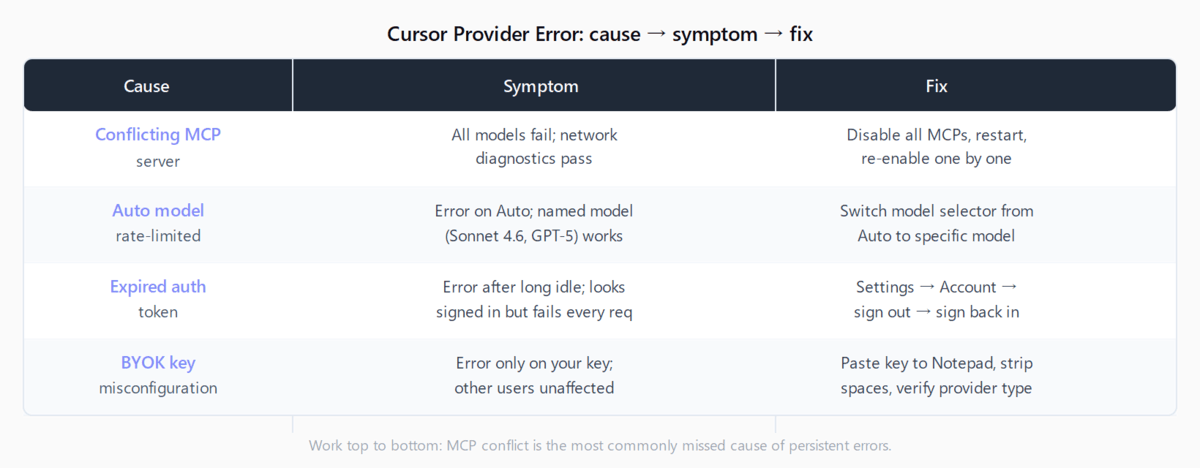
Four distinct root causes produce the same "provider error" message:
- A conflicting MCP server. The most commonly missed cause. MCP integrations run in the same process as Cursor's model requests; a misbehaving one (Perplexity MCP is the most reported culprit) breaks the provider connection across every model simultaneously. Network diagnostics pass, the Cursor status page shows no incident, and reinstalling does nothing — because the problem re-installs with your MCP config.
- Auto model hitting a rate-limited backend. When Cursor's Auto routing assigns your request to a model that's under load or throttled on the backend, you get "We're experiencing high demand" wrapped in a provider error. Switching to a specific model bypasses the Auto router and the error stops.
- Stale or expired auth token. Cursor's session tokens expire silently. You appear signed in, but every model request fails with an auth error that surfaces as "provider error" rather than a clear sign-in prompt. Signing out and back in forces a fresh token.
- BYOK API key misconfiguration. If you're using your own API key (Anthropic, OpenAI, or another provider), the key must match the provider type, contain no trailing spaces, and have a valid subscription. A key copied from a browser with a trailing newline will fail every request.
How do you fix the Cursor Provider Error?
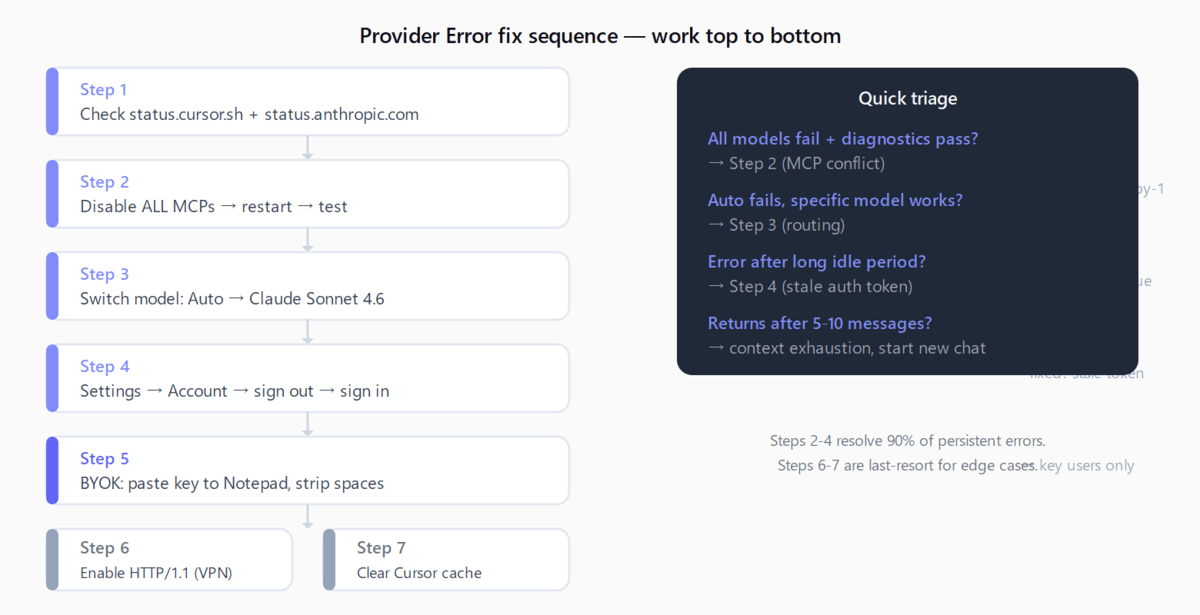
Step 1: Check status.cursor.sh first
Before any local troubleshooting, visit status.cursor.sh. If there's an active incident, wait — no local fix will help. Anthropic backend incidents also surface as provider errors; check status.anthropic.com if you use Claude models. Past incidents have lasted 2–6 hours.
Step 2: Disable all MCP servers
Open Cursor Settings > MCP and disable every MCP server. Restart Cursor and try a request. If the error stops, re-enable your MCPs one at a time to identify the culprit. The Perplexity MCP has been the most commonly reported cause in 2026 forum threads, but any MCP that makes outbound calls can interfere. This step resolves persistent provider errors that survive reinstalls.
Step 3: Switch from Auto to a named model
In the model selector (bottom of the chat panel), switch from Auto to a specific model: Claude Sonnet 4.6, GPT-5 Codex, or another named option. Auto routes requests dynamically and can land on a rate-limited backend; picking a model directly bypasses that routing. If the named model works when Auto doesn't, the issue is on Cursor's routing layer, not your local setup.
Step 4: Sign out and back in
Go to Cursor Settings > Account, sign out, and sign back in. This forces a fresh session token. The error often appears in accounts where a session token has been valid for months — Cursor doesn't prompt for re-authentication, so the expiry is silent. No settings are lost on sign-out.
Step 5: Check your API key (BYOK users only)
If you've configured your own API key in Settings > Models: open a plain text editor, paste the key, and verify there are no trailing spaces or newline characters. Confirm the provider type matches — an Anthropic key configured against an OpenAI endpoint returns a provider error, not a helpful mismatch message. If the key has been regenerated on the provider side (common with OpenAI's key rotation), update it in Cursor's settings.
Step 6: Switch to HTTP/1.1 mode
If you're on a corporate network or VPN, open Settings, search for http, and enable HTTP/1.1 mode. Restart Cursor. Corporate proxies frequently interrupt HTTP/2 streams — this is more often the cause of the connection error in Agent mode than the provider error, but it applies in some proxy configurations.
Step 7: Clear the cache
A corrupt local cache can produce provider-adjacent errors that clear on a fresh start. The full procedure for clearing the Cursor cache covers the right paths on Windows, macOS, and Linux without losing settings.
Why does the error come back after a few prompts?
If the provider error appears after 5-10 exchanges in a long conversation but not at the start, the cause is almost always context exhaustion. Long sessions accumulate token context; when the accumulated context hits the model's limit, the backend returns a resource_exhausted error that Cursor surfaces as a provider error. Starting a new chat resets the context and the error stops — until the session grows long again. This isn't a local fix; it's a limit of the model's context window.
For a broader map of Cursor errors by type, the Automation Error Index catalogs provider, connection, and auth errors across AI coding tools.
FAQ
Why does Cursor Provider Error appear on all models at once?
When the error affects every model simultaneously — Claude, GPT-5, Gemini all fail — the most likely cause is a conflicting MCP server. The MCP runs at the same layer as all model requests, so a broken one blocks everything. The second most likely cause is an active Cursor or upstream provider incident. Network diagnostics passing is not a reliable signal that the problem is local.
Does Provider Error mean my Cursor subscription ran out?
No. An expired or exhausted subscription shows a separate "out of requests" or "upgrade your plan" message, not a provider error. Provider errors are infrastructure or configuration issues. That said, if your usage limit expires mid-session, the next request may fail in a way that looks like a provider error until you check the account dashboard.
How do I know if it's a Cursor outage vs a local fix?
Check status.cursor.sh. If the status page shows degraded service, wait. If the status page shows all-green, the problem is local — run through Steps 2-5 above. The most reliable local signal: if switching from Auto to a named model fixes the error, the problem is in Cursor's routing layer. If switching models makes no difference, the problem is either your auth token or your MCP config.
Why does the Provider Error return after a few prompts in long sessions?
This is context exhaustion, not a network or auth issue. Each exchange in a chat accumulates token context. When the session reaches the model's context window limit, the backend returns a resource_exhausted error that Cursor reports as a provider error. Start a new chat session to reset. If your work requires long sessions, switching to a model with a larger context window (Claude Sonnet 4.6 has a 200k context) delays but doesn't eliminate the limit.
Can an MCP server cause the Cursor Provider Error?
Yes — this is the most underreported cause of persistent, multi-day provider errors. MCP servers run alongside Cursor's model requests in the same process. A misbehaving MCP (one making invalid outbound calls, throwing unhandled exceptions, or blocking the event loop) can break provider connectivity across all models while leaving network diagnostics clean. Disable all MCPs and test; if that fixes it, re-enable one at a time to find the offender.