
How to use Power Automate Flow Checker to find errors before they hit production
Power Automate Flow Checker catches missing inputs, bad expressions, broken connections, and deprecated actions at design time - but it cannot see any runtime failure. Use it well, then plan for what it cannot see.
Power Automate's Flow Checker is the stethoscope icon in the cloud-flow designer that runs continuously while you build, flagging missing inputs, broken connections, deprecated actions, and bad expressions before you ever hit Save. It's free, always on, and most makers either ignore it or assume a clean pass means the flow will run. It doesn't. Flow Checker validates the static shape of your flow only - it knows nothing about whether the API you're calling is reachable, whether your OAuth token will still be valid tomorrow, or whether you're about to hit a Dataverse throttle. This guide walks you through using it well and shows you exactly where its blind spots are.
TL;DR
- Where: stethoscope icon on the designer command bar, in both the new designer and the classic designer. Opens automatically when you save a flow that contains errors or warnings.
- What it catches: missing required inputs, misconfigured actions, broken/expired connections, expression syntax errors, deprecated actions.
- What it misses: every runtime failure - HTTP 400/401/403/404, throttling, schema drift, transient 5xx errors. A green Flow Checker is not a guarantee of a working flow.
Where do you find Flow Checker in Power Automate?
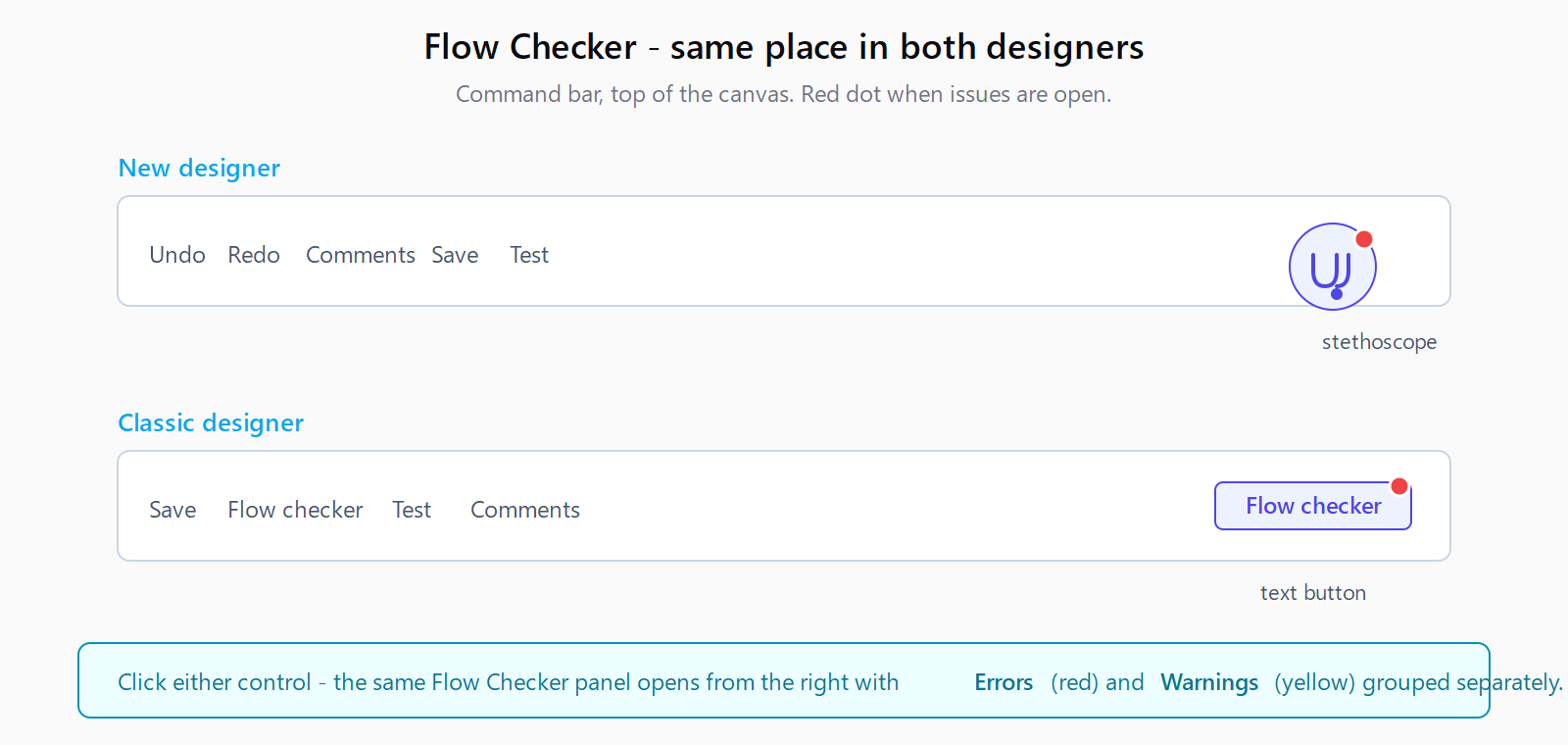
In the new designer, click the stethoscope icon on the command bar at the top of the canvas. The Flow Checker panel slides in from the right and lists every issue grouped under Errors (red) and Warnings (yellow). Click any item and the panel jumps you to the offending action card. The action's broken field is highlighted in red on the card itself, with the same red text inline - you can fix it from either the panel or the card.
In the classic designer, the button is labelled Flow checker on the command bar and shows a red dot when issues exist. The flow won't save until errors are cleared; warnings allow save but persist into the published flow.
What does Flow Checker actually catch?
Microsoft's Flow Checker guidance groups the tool's output into four buckets - error detection, warnings and suggestions, real-time feedback, and detailed explanations. In practice you'll see five concrete issue shapes:
| Issue | Severity | Why it's caught |
|---|---|---|
| Required input is empty (e.g., 'Message Id' is required) | Error | Static schema check on the action's required fields |
| Misconfigured action (wrong type, malformed reference) | Error | Action definition doesn't match the connector schema |
| Broken or expired connection | Error | The referenced connection ID no longer authenticates - the designer probes auth at design time |
| Expression syntax error (unbalanced parens, unknown function) | Error | Workflow Definition Language parser fails before the action can be saved |
| Deprecated action / connector | Warning | Catalogue flags actions that still work but are scheduled for removal |
Errors block save and publish. Warnings don't - you can publish a flow with open warnings, which is the right default for the deprecated-action case (you want time to migrate before the underlying action breaks). Don't ship a flow with unresolved warnings without writing down a follow-up - they tend to become the next quarter's broken-flow ticket.
What does Flow Checker not catch at runtime?
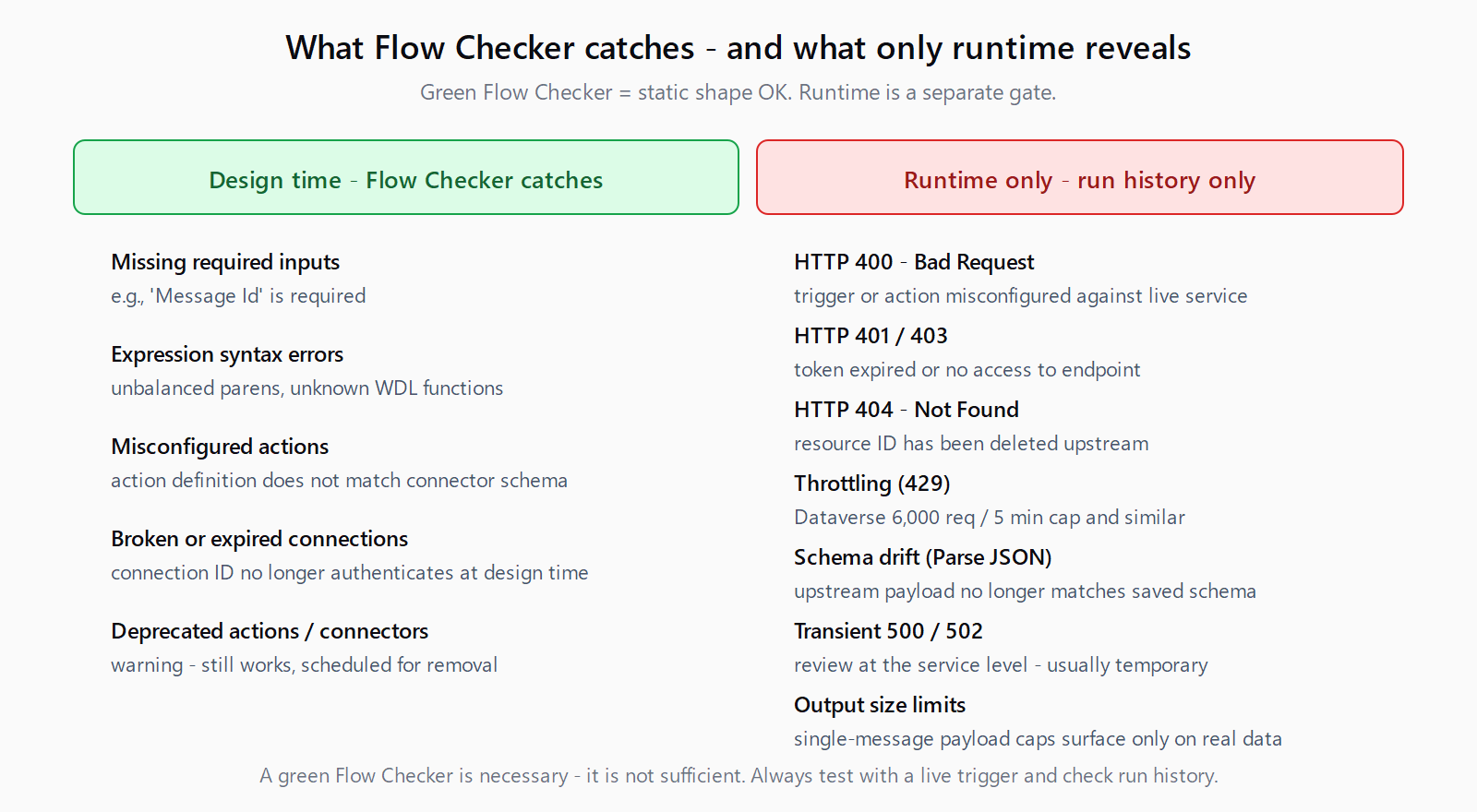
This is the part most guides skip. Flow Checker is a design-time tool. Anything that can only be observed when the flow runs against live data and live services is invisible to it. Microsoft's own troubleshooting guidance is explicit: "First, check the flow's run history to identify where the flow failed and review any error messages." Run history exists because Flow Checker can't see runtime.
The most painful Flow Checker blind spots in practice:
- HTTP 4xx at runtime. The HTTP action's URL parses cleanly at design time. Whether the endpoint exists, whether your token is still valid, and whether your tenant has access to that resource only get answered when the flow runs. Connection-auth errors show up as 401 / 403 Unauthorized errors in run history and look identical to broken-connection design-time errors - but Flow Checker can't pre-empt them once the connection record itself is healthy.
- Schema drift on Parse JSON. You generated the schema from a sample response three months ago. The upstream service has added a non-nullable field. Flow Checker is green, the flow runs, Parse JSON throws InvalidTemplate at runtime.
- Throttling. Dataverse caps a connection at 6,000 requests per 5 minutes per user. Trigger a flow with a 50,000-row loop and you'll hit a 429 - the checker has no view of execution volume.
- Transient 5xx errors. 500 Internal Server Error and 502 Bad Gateway are service-side and intermittent. Microsoft's guidance: "Error codes 500 and 502 are related to the service and can be temporary. These errors should be reviewed at the service level."
What's a repeatable pre-publish checklist?
- Run Flow Checker, fix every error, read every warning. A deprecated-action warning is a deadline - add a calendar reminder to migrate before it becomes an error.
- Re-authenticate every connection the flow uses, even ones you set up minutes ago. The designer's auth probe runs once at save - a token that expires in 24 hours will still look green now.
- Test the flow with a real payload. Flow Checker validates structure; only an actual run validates schema. Use the Test button with Manually selected to fire the trigger with current data.
- Inspect run history for the first three successful runs. Open each action, confirm outputs match what downstream actions expect. Schema drift hides here.
- Wire up error handling for the runtime classes Flow Checker can't see - configure Run after on a downstream action to catch has failed / has timed out, and route failures to a Teams or email notification. Microsoft's own guidance points at robust error handling and retry policies for exactly this gap.
FAQ
Does Flow Checker run automatically?
Yes - it's always active in the designer and opens automatically when you save a flow that contains errors or warnings. It also runs in real time as you edit, so the stethoscope grows a red dot the moment you introduce an issue.
What's the difference between an error and a warning?
Errors block save and publish; warnings don't. Errors are things Power Automate is certain will fail (missing required input, expression syntax, broken connection). Warnings are advisories - usually deprecated actions or best-practice violations - that work today but will likely fail later.
Why does my flow fail if Flow Checker shows no errors?
Because Flow Checker is a design-time tool. It validates static structure - inputs, expressions, action types, connections. Every runtime signal (HTTP 4xx and 5xx errors, throttling, schema drift, output size limits) only appears when the flow actually runs. Open run history, click the failed action, and read the error body there.
Where is Flow Checker in the new designer vs. classic designer?
In both designers it's on the command bar at the top of the canvas. The new designer uses a stethoscope icon; the classic designer uses a Flow checker text button. Behaviour is the same in both - red dot for open issues, panel on the right with errors and warnings grouped separately.
Can I publish a flow with warnings but no errors?
Yes. Warnings are non-blocking. That's correct default behaviour for the deprecated-action case - you want time to migrate the action before it actually breaks - but treat every published warning as a follow-up ticket. Unresolved warnings tend to age into runtime failures.