
How to Deploy an AI Agent to Production with FastAPI and Docker
A copy-paste recipe for wrapping a LangGraph, Pydantic AI, or LangChain agent in a FastAPI endpoint, a non-root multi-stage Dockerfile, and a timeout that stops one stalled model call from hanging your whole worker pool.
TL;DR: Wrap the agent in one async FastAPI endpoint, containerize it with a non-root multi-stage Dockerfile with a /healthz route, then wrap the LLM call in asyncio.wait_for with a retry so one stalled call cannot hang a whole Uvicorn worker.
Most write-ups on this topic stop at an architecture diagram: FastAPI box, Docker box, arrow to "cloud." The part they skip is the failure mode that actually pages someone at 2 a.m. - an agent loop with no per-call timeout, running under a worker pool that fills up one stalled request at a time. This walk-through uses a Python agent framework like LangGraph or Pydantic AI as the "agent" black box; the FastAPI and Docker layer around it is identical regardless of which one you picked.
What does a production-ready FastAPI agent deployment look like?
Four pieces, in order of how often they get skipped: an async endpoint that calls the agent and returns a typed response, a Dockerfile that builds a small non-root image with a health check, a timeout-and-retry wrapper around the actual model call, and a worker/process count that matches how the container is actually going to be run (bare Docker, Compose, or an orchestrator like Kubernetes or ECS). Observability and background job handling come after those four are solid, not before.
How to wrap an agent in a FastAPI endpoint?
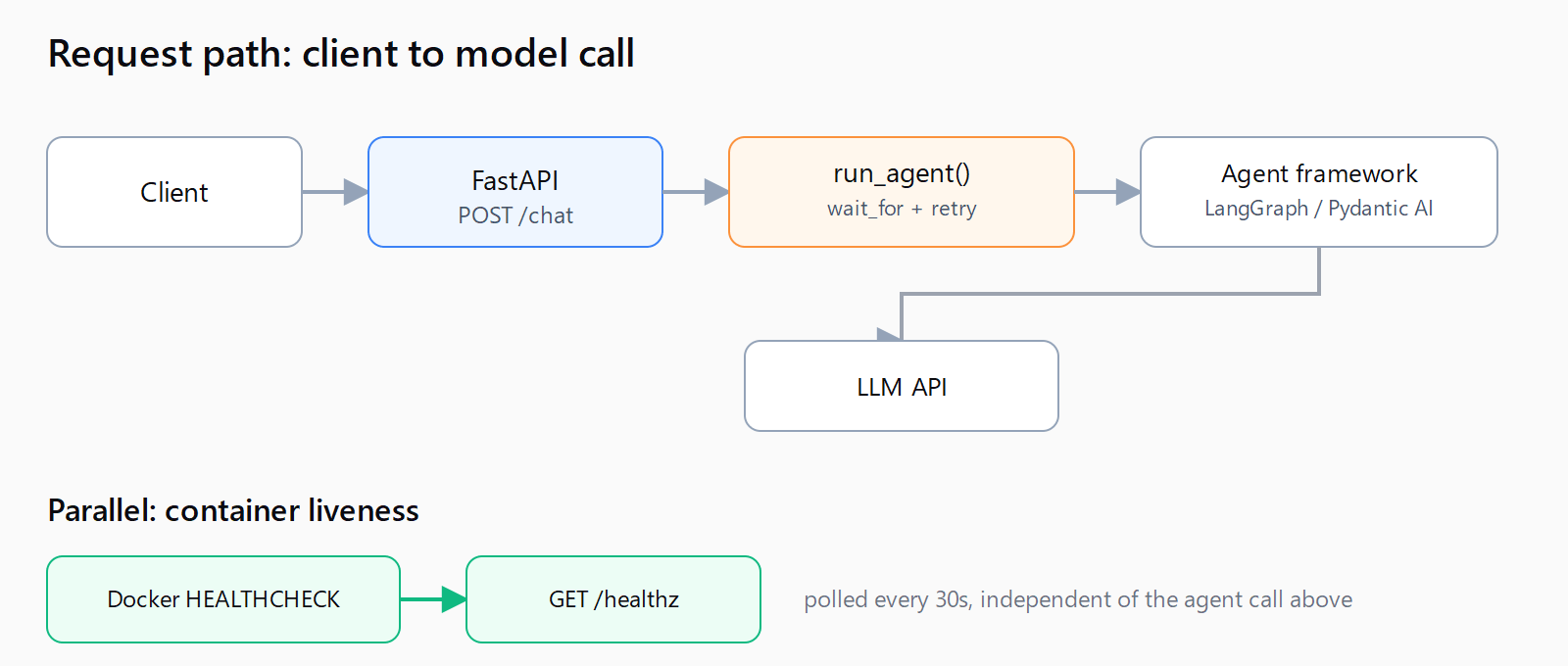
The endpoint's job is narrow: validate the request, call the agent, return a typed response, and never let an unhandled exception leak a stack trace to the caller. FastAPI's async guide is explicit that route functions calling out to I/O-bound work (an LLM API call is exactly that) should be declared async def so the event loop can serve other requests while one is waiting on the model.
from fastapi import FastAPI, HTTPException
from pydantic import BaseModel

app = FastAPI()

class ChatRequest(BaseModel):
    session_id: str
    message: str

class ChatResponse(BaseModel):
    reply: str

@app.post("/chat", response_model=ChatResponse)
async def chat(req: ChatRequest) -> ChatResponse:
    reply = await run_agent(req.session_id, req.message)
    return ChatResponse(reply=reply)

@app.get("/healthz")
async def healthz() -> dict:
    return {"status": "ok"}
run_agent is whatever your framework's invoke call is - graph.ainvoke() in LangGraph, agent.run() in Pydantic AI. The important part for now is that the endpoint has nothing else in it; the timeout and retry logic goes inside run_agent, not scattered across every route that calls it.
How to write a production Dockerfile for a Python agent?
The official FastAPI Docker guide copies requirements.txt before the application code so dependency layers cache between builds, and insists on the exec form of CMD - "always use the exec form... to ensure that FastAPI can shutdown gracefully and lifespan events are triggered." A multi-stage build on top of that keeps the compiler toolchain out of the final image, per Docker's multi-stage build docs, which show the pattern as a build stage feeding artifacts into a clean runtime stage via COPY --from=.
FROM python:3.12-slim AS build
WORKDIR /code
COPY requirements.txt .
RUN pip install --no-cache-dir --user -r requirements.txt

FROM python:3.12-slim
WORKDIR /code
RUN useradd --create-home --uid 1000 appuser
COPY --from=build /root/.local /home/appuser/.local
COPY ./app ./app
ENV PATH=/home/appuser/.local/bin:$PATH
USER appuser

HEALTHCHECK --interval=30s --timeout=3s --retries=3 \
  CMD curl -f http://localhost:8000/healthz || exit 1

CMD ["fastapi", "run", "app/main.py", "--port", "8000"]
The HEALTHCHECK instruction is what lets Docker (or the orchestrator reading the same signal) restart a container whose event loop is alive but whose agent logic is wedged - a plain "process is running" check won't catch that.
How to stop a stalled LLM call from hanging your whole API?
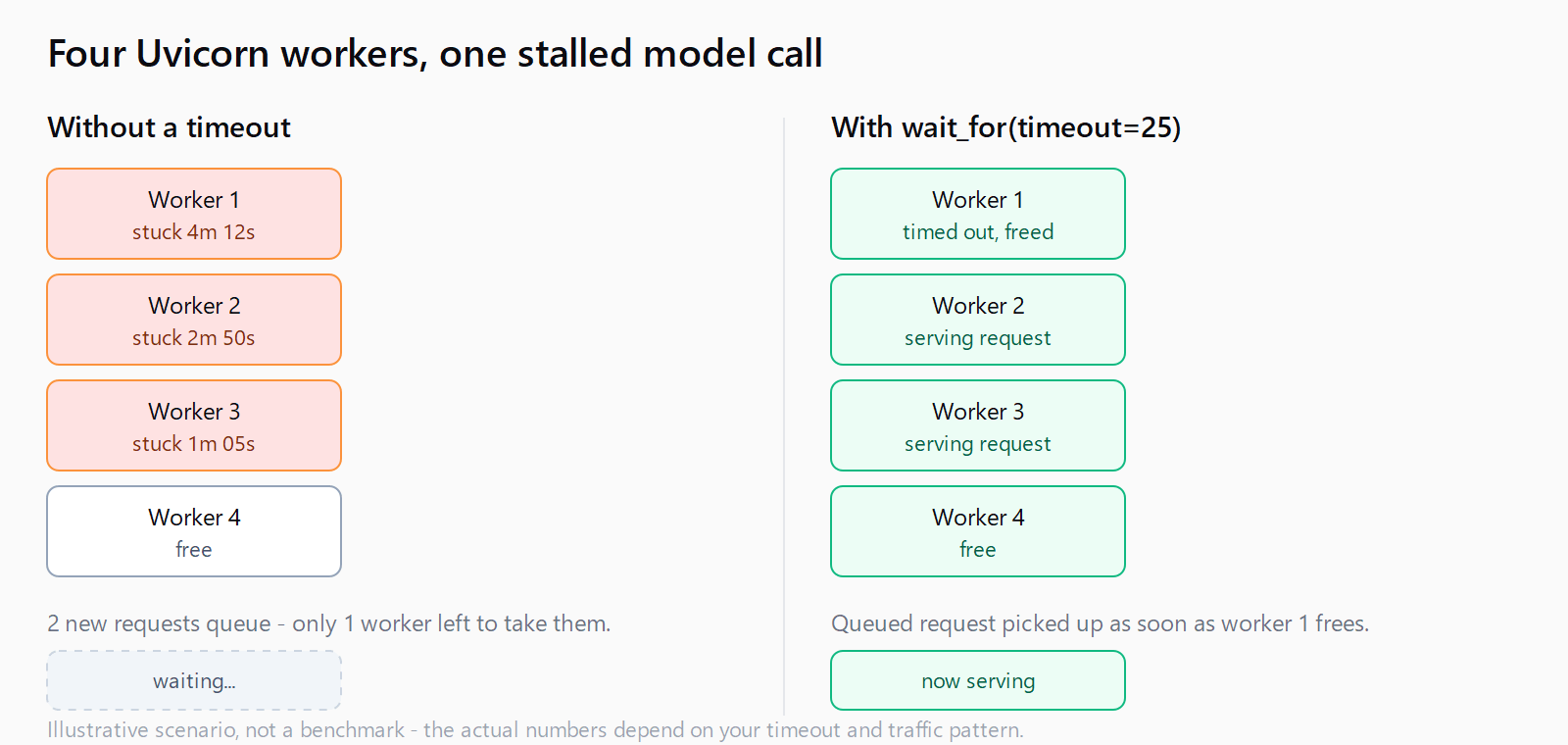
This is the gotcha the architecture-diagram posts skip. Uvicorn runs a fixed pool of workers; each worker services one request at a time per event loop iteration. If run_agent calls a model API with no timeout and that API stalls (rate limit backoff, a dropped connection, a tool call that never returns), the request that triggered it never finishes - and under concurrent traffic, one stalled call at a time eats a worker until the pool is exhausted and healthy requests start queuing behind dead ones.
The fix is a bounded wait plus a bounded retry around the actual model call, not around the whole endpoint:
import asyncio

async def run_agent(session_id: str, message: str, timeout: float = 25.0, retries: int = 2) -> str:
    last_exc: Exception | None = None
    for attempt in range(retries + 1):
        try:
            return await asyncio.wait_for(
                agent.ainvoke({"session_id": session_id, "message": message}),
                timeout=timeout,
            )
        except asyncio.TimeoutError as exc:
            last_exc = exc
    raise HTTPException(status_code=504, detail="agent timed out") from last_exc
Twenty-five seconds is a starting point, not a rule - set it to whatever your slowest legitimate tool call needs plus headroom, and log every timeout so you can tell a slow model from a hung connection.
How many Uvicorn workers does an agent API need?
FastAPI's own deployment doc draws a line most posts blur: if you're running under Kubernetes, Docker Swarm, or a similar cluster manager, run one Uvicorn process per container and let the orchestrator handle replication - stacking a process manager with multiple workers inside a container that's already being replicated is, in the doc's words, "unnecessary complexity." The --workers N flag is for the other case: a single server or a Docker Compose stack with no cluster layer above it.
For a Compose deployment, that means CMD ["fastapi", "run", "app/main.py", "--port", "8000", "--workers", "4"]. For anything running on Kubernetes or ECS, drop the flag and set the replica count instead - the same worker-count decision an n8n Docker queue-mode deployment makes with its worker replica count for a different kind of job.
How to monitor and scale the agent once it's live?
Wire OpenTelemetry's Python SDK around the same run_agent call so every span captures token usage, tool-call latency, and retry counts - the numbers that tell you whether the 25-second timeout above is too tight before a real user hits it.
If a request needs minutes rather than seconds (a long multi-tool research task, a batch job), don't stretch the HTTP timeout to match - hand the job to a Redis-backed worker queue and return a job ID immediately, then let the caller poll or receive a webhook. It's the same pattern an n8n queue-mode Docker stack uses for long-running workflow executions, just with Celery or RQ workers instead of n8n's worker containers.
How do you ship all four pieces in one pass?
- Write the FastAPI endpoint so it does nothing but validate, call the agent, and return a typed response.
- Build the Dockerfile as a multi-stage image with a non-root user and a
HEALTHCHECKagainst/healthz. - Wrap the model call in
asyncio.wait_forwith a bounded retry, not around the whole endpoint. - Set
--workers Nonly for Compose or single-server runs; use one process per container under Kubernetes or ECS. - Add OpenTelemetry tracing on the agent call before the first incident, not after.
FAQ
How do you deploy a LangChain or LangGraph agent specifically?
The FastAPI and Docker layers in this post are framework-agnostic; swap run_agent's body for graph.ainvoke() if you're on LangGraph, or the equivalent call for LangChain's AgentExecutor. See the LangChain vs LangGraph guide for which one to reach for first.
Is there a ready-made FastAPI AI agent template?
No single official one - the structure above (typed endpoint, multi-stage Dockerfile, timeout wrapper) is the minimum shape most production repos converge on regardless of framework.
Do I need Celery or Redis for a Python AI agent API?
Only if a request can legitimately take minutes rather than seconds. Short tool-calling turns belong in the synchronous /chat endpoint; long-running research or batch tasks belong in a queue.
Does the exec-form CMD requirement actually matter in practice?
Yes - the shell form of CMD runs your process as a child of /bin/sh, so SIGTERM goes to the shell instead of Uvicorn, and FastAPI's lifespan shutdown hooks never fire before the container is killed.
What Python version should the base image use?
3.12 or newer works with current FastAPI and Docker tooling; pin the exact minor version in requirements.txt and the Dockerfile's FROM line so a laptop build and a server build install the same thing.