
How to Deploy an AI Agent to Production with Express and Docker
A copy-paste recipe for wrapping a Node.js agent in a streaming Express route, a non-root multi-stage Dockerfile, and a BullMQ queue that stops one long-running agent turn from hanging your whole event loop.
TL;DR: Stream agent output with the AI SDK in an Express route, ship it in a multi-stage Node 24 Dockerfile using exec-form CMD, and offload long runs to a BullMQ and Redis queue.
Most Node.js agent tutorials stop at a terminal demo: import an SDK, print a completion, done. Wiring that same agent into an Express server that survives real traffic needs three more pieces the demo never touches: a streaming endpoint that flushes tokens as they arrive, a container that shuts down cleanly instead of dropping a response mid-token, and somewhere for runs that outlast an HTTP timeout to go. This walkthrough assumes you already picked a Node.js AI agent framework - Mastra, the Vercel AI SDK, or LangChain.js - and covers the four pieces that turn a working agent into a deployable service.
What does a production Express AI agent deployment need?
Four pieces, each fixing one specific failure mode: a streaming route built on the AI SDK's streamText so the browser gets tokens as the model produces them, not after; a multi-stage Dockerfile that ships a non-root, exec-form container; a BullMQ queue backed by Redis for any run that could exceed the reverse proxy's timeout; and structured logs that record per-run latency and token cost. Skip any one of these and the failure shows up in production, not in a demo. If the agent itself needs loops, retries, or multi-agent handoffs rather than a single completion, decide between LangChain vs LangGraph for the orchestration layer first - the Express wrapper below sits in front of either.
How to build a streaming Express endpoint for an AI agent?
The AI SDK's own Express example wires streamText to pipeUIMessageStreamToResponse, which writes stream chunks straight to the Node response object as they arrive:
import { pipeUIMessageStreamToResponse, streamText, toUIMessageStream } from 'ai';
import express from 'express';

const app = express();
app.use(express.json());

app.post('/api/agent', async (req, res) => {
  const controller = new AbortController();
  req.on('close', () => controller.abort());

  const result = streamText({
    model: 'anthropic/claude-sonnet-4-6',
    prompt: req.body.input,
    abortSignal: controller.signal,
  });

  pipeUIMessageStreamToResponse({
    response: res,
    stream: toUIMessageStream({ stream: result.stream }),
  });
});

app.listen(3000);
The req.on('close', () => controller.abort()) line is the part demos skip. Without it, a reader closing the tab mid-answer leaves the model call running - and billing - until it finishes on its own; streamText's abortSignal option is what actually cancels the upstream request.
How to write a production Dockerfile for a Node.js agent?
Build in one stage, run in another, so the runtime image never carries the TypeScript compiler or devDependencies. Node 24 is the current Active LTS release as of mid-2026 (Node 22 moved to Maintenance LTS), so it is the base image below unless a dependency still pins to 22:
# syntax=docker/dockerfile:1
FROM node:24-slim AS build
WORKDIR /app
COPY package.json package-lock.json ./
RUN npm ci
COPY . .
RUN npm run build

FROM node:24-slim
WORKDIR /app
RUN groupadd -r agent && useradd -r -g agent agent
COPY --from=build /app/dist ./dist
COPY --from=build /app/node_modules ./node_modules
COPY package.json ./
USER agent
EXPOSE 3000
HEALTHCHECK --interval=30s --timeout=3s CMD node -e "require('http').get('http://localhost:3000/health',r=>process.exit(r.statusCode===200?0:1)).on('error',()=>process.exit(1))"
CMD ["node", "dist/server.js"]
The container runs as the unprivileged agent user, not root - a compromised tool call (arbitrary shell execution is a real risk in agent tool-calling loops) shouldn't also mean root inside the container. The HEALTHCHECK uses a Node one-liner instead of curl -f because the Debian slim base image does not ship curl.
Why does docker stop hang on a Node AI agent container?
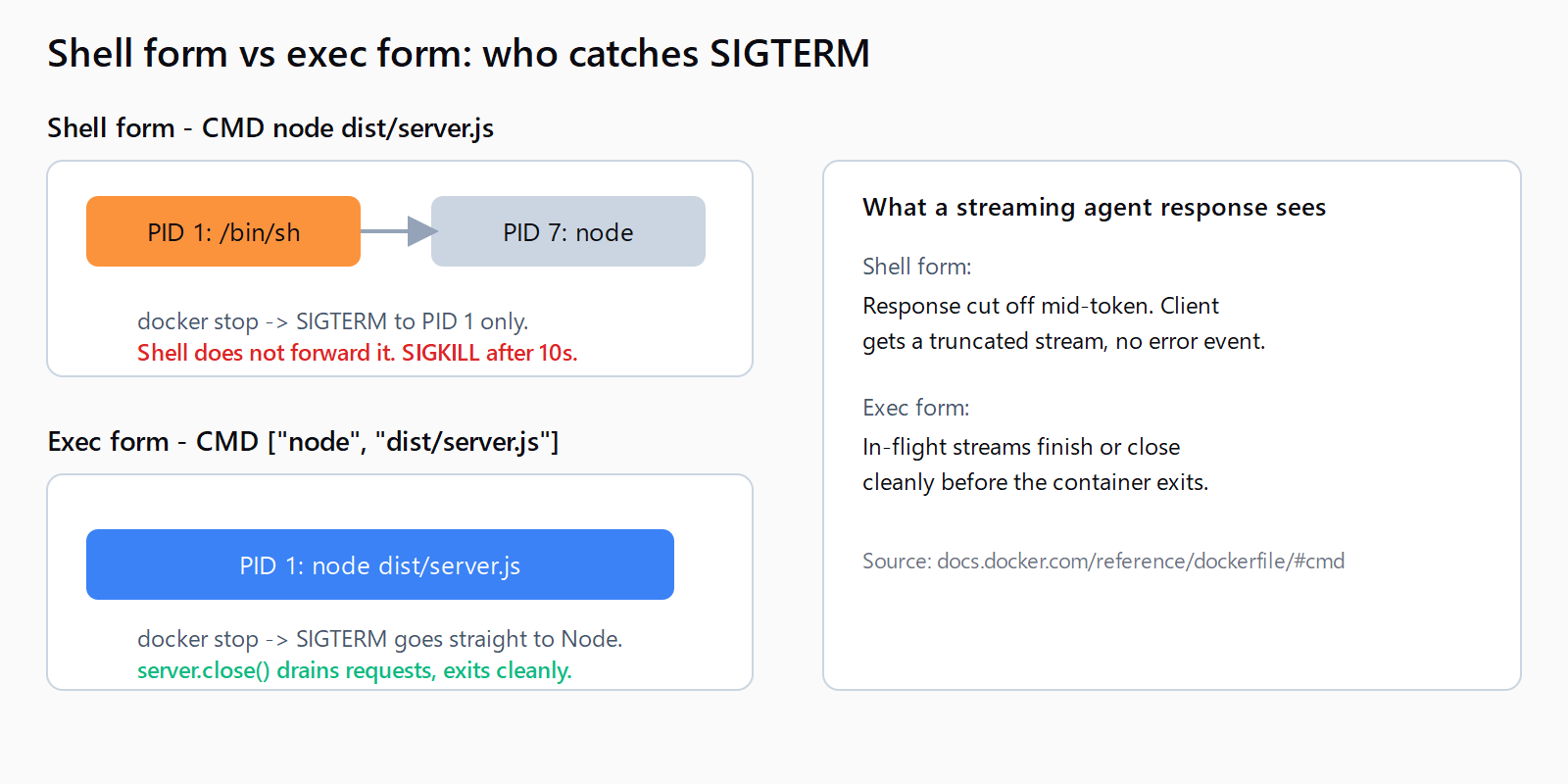
Because the CMD line copy-pasted from an older tutorial uses the shell form - CMD node dist/server.js without brackets, or an npm start entrypoint. Docker's own reference explains why that breaks shutdown: the shell form "starts your ENTRYPOINT as a subcommand of /bin/sh -c, which does not pass signals," so the executable never becomes the container's PID 1 and never receives a SIGTERM from docker stop. The shell absorbs the signal, Node never hears about it, and Docker SIGKILLs the whole container after the default 10-second grace period - killing every streamed response that was mid-token at that moment.
The exec-form CMD ["node", "dist/server.js"] used above avoids this entirely: Node runs as PID 1, receives SIGTERM directly, and can call server.close() to drain in-flight requests before exiting.
How to keep a long agent run from blocking Express?
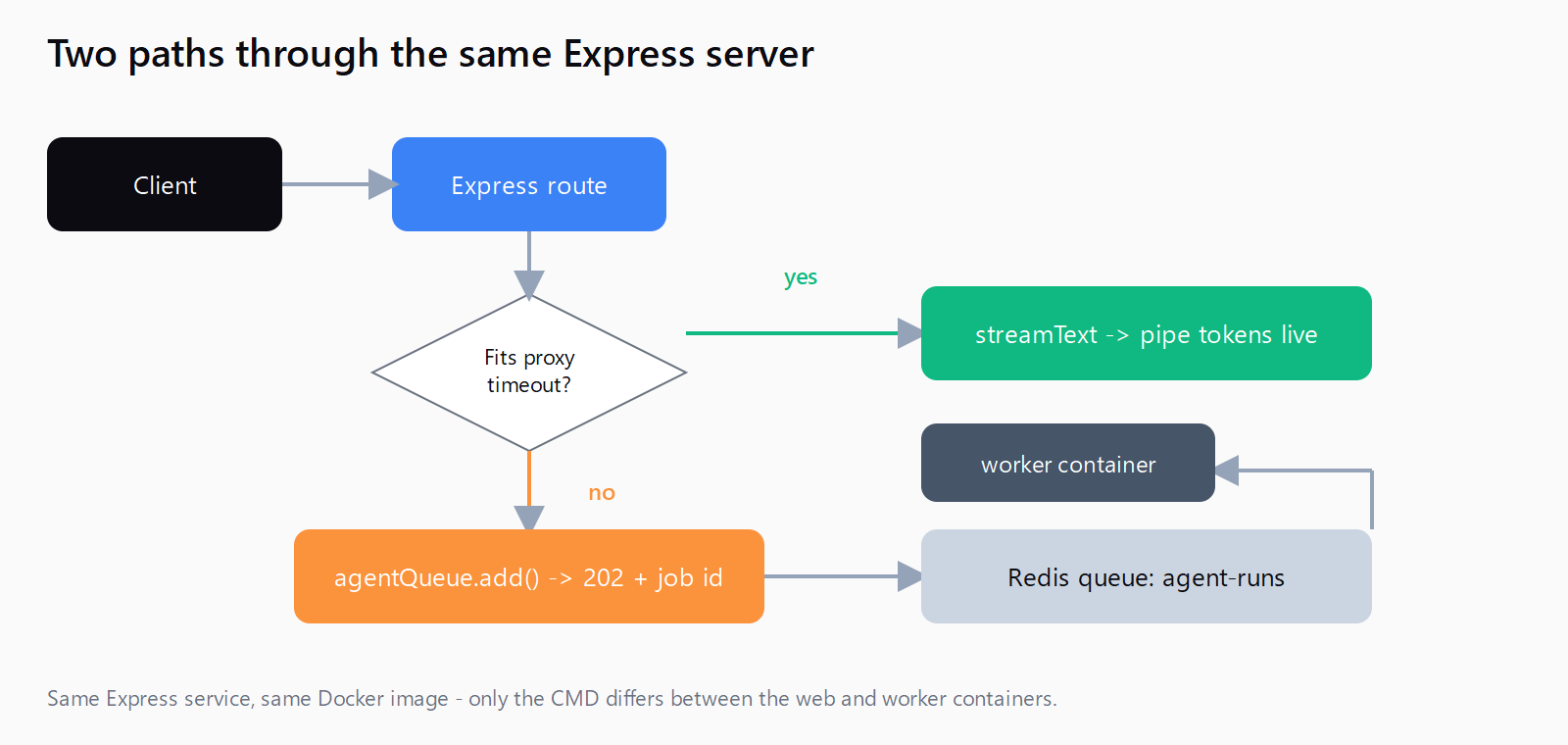
Anything that can run longer than the reverse proxy's timeout - a multi-step tool-calling loop, a long document analysis - should not hold an open HTTP connection. Enqueue it instead and poll or push the result back:
import { Queue, Worker } from 'bullmq';

const connection = { host: process.env.REDIS_HOST, port: 6379 };
const agentQueue = new Queue('agent-runs', { connection });

app.post('/api/agent/async', async (req, res) => {
  const job = await agentQueue.add('run', { input: req.body.input });
  res.status(202).json({ jobId: job.id });
});

new Worker('agent-runs', async (job) => {
  const { text } = await streamText({
    model: 'anthropic/claude-sonnet-4-6',
    prompt: job.data.input,
  });
  return text;
}, { connection });
This is the same split n8n uses at scale for its own long-running nodes: a lightweight process accepts the request and hands the actual work to a worker pulling from Redis, covered in more detail in the queue mode with Redis and worker containers setup. The Express version needs one extra container in the compose file - a worker service running the same image with a different CMD - and no code changes to the sync endpoint above.
How to monitor a Node.js AI agent in production?
Two signals matter more than general request logs: per-run latency (the model call, not just the HTTP round trip) and token cost per run. Structured logging with pino and a span around the streamText call covers both without adding a separate APM product:
import pino from 'pino';
const logger = pino();

const start = Date.now();
const result = await streamText({ model, prompt });
logger.info({
  durationMs: Date.now() - start,
  inputTokens: result.usage.inputTokens,
  outputTokens: result.usage.outputTokens,
}, 'agent_run_complete');
Feed the same span into OpenTelemetry JS if the run also calls external tools - the trace shows whether a slow response came from the model or from a tool waiting on a third-party API, which a flat log line cannot answer.
How do you ship all five pieces in one pass?
- Wire the agent to an Express route with
streamTextandpipeUIMessageStreamToResponse, and abort onreq.on('close'). - Write a multi-stage Dockerfile on
node:24-slimthat drops devDependencies from the runtime stage and runs as a non-root user. - Use exec-form
CMD ["node", "dist/server.js"], never a shell form ornpm startentrypoint. - Add a BullMQ queue backed by Redis for any run that can exceed the proxy's timeout, with a separate worker container pulling from it.
- Log per-run latency and token counts with
pino, and add an OpenTelemetry span if the agent calls external tools.
FAQ
How do I deploy a LangChain.js agent to production with this same setup?
Swap the streamText call for LangChain.js's own streaming methods and keep the Express route, Dockerfile, and queue pattern unchanged - the deployment shape does not depend on which agent framework produced the tokens.
Why does my Node AI agent container hang on docker stop?
The CMD line is almost certainly using shell form or npm start, which puts a shell at PID 1 and blocks SIGTERM from reaching Node. Switch to exec-form CMD ["node", "file.js"].
Do I need Redis for a Node.js AI agent?
Only if some runs can exceed your reverse proxy's request timeout. A single-turn chat endpoint that always finishes in a few seconds can skip the queue entirely.
How many Express workers does a production AI agent need?
Node's single-threaded event loop handles concurrent streaming connections fine since most of the wait is on the model API, not local CPU; scale by running multiple container replicas behind a load balancer rather than by adding Node cluster workers.
What's the difference between this and the FastAPI version of this deployment?
The failure modes differ by runtime: the Python/FastAPI path centers on Uvicorn worker counts and a stalled-call timeout, while the Node/Express path centers on Docker's PID 1 signal handling and the AI SDK's streaming API - the underlying goal of a non-blocking, cleanly-shutting-down agent server is the same.